Desertcart purchases this item on your behalf and handles shipping, customs, and support to Uruguay.
🚀 Ship Smarter, Print Faster, Stay Ahead!
The OFFNOVA USB Shipping Label Printer is a high-speed, direct thermal printer designed for professional shipping needs. Supporting multiple label sizes up to 4x6 inches, it connects via USB to Windows, Mac, Chromebook, and Linux systems. With automatic label calibration and compatibility with major shipping platforms like UPS, FedEx, and eBay, it delivers up to 80 labels per minute and operates continuously for over 12 hours, making it an essential tool for efficient, reliable package processing.




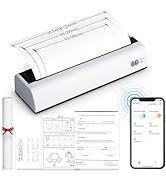
| ASIN | B0BC6DKPYK |
| Additional Printer Functions | Print Only |
| B&W Pages per Minute | 72 pages_per_minute |
| Best Sellers Rank | #106,056 in Office Products ( See Top 100 in Office Products ) #208 in Desktop Label Printers |
| Brand | OFFNOVA |
| Built-In Media | Machine & Adapter |
| Color | White |
| Color Depth | 1 bpp |
| Color Pages per Minute | 72 pages_per_minute |
| Compatible Devices | PC |
| Connectivity Technology | USB |
| Control Method | App |
| Controller Type | Windows |
| Customer Reviews | 4.1 out of 5 stars 1,480 Reviews |
| Display Type | LCD |
| Duplex | Manual |
| Hardware Interface | USB |
| Ink Color | White |
| Item Dimensions D x W x H | 6.3"D x 7.68"W x 4.13"H |
| Item Type Name | 4B-2054N |
| Item Weight | 0.79 kg |
| Manufacturer | OFFNOVA |
| Maximum Copy Resolution Black and White | 203 |
| Maximum Copy Speed Black and White | 80 pages_per_minute |
| Maximum Media Size | 4 x 6inch |
| Maximum Print Resolution Black and White | 203 |
| Maximum Sheet Capacity | 80 |
| Maximum print Resolution Color | 203 |
| Model Name | 4B-2054N |
| Model Number | 4B-2054N |
| Model Series | 2054 |
| Number of Drivers | 1 |
| Other Special Features of the Product | Auto Label Size Identification |
| Paper Size | 4" x 6" , 2" x 4", 3" x 4", 2.25", 2" inches |
| Print media | Labels |
| Printer Connectivity Type | USB |
| Printer Output Type | Monochrome |
| Printer Type | Thermal |
| Printing Technology | Thermal |
| Processor Count | 1 |
| Resolution | 203 x 203 DPI |
| Series Number | 2054 |
| Special Feature | Auto Label Size Identification |
| Specific Uses For Product | Shipping, Office |
| Total USB 2.0 Ports | 1 |
| Total Usb Ports | 1 |
| Unit Count | 1 Count |
| Warranty Description | lifetime technical support |
| Warranty Type | Limited & Lifetime Technical Support |
N**E
Good, reliable printer
R**R
Some issues. Good customer service.
Final review: The vendor sent me a new printer, free of charge after my review below. The new printer has been used well over 200 times since then and has worked flawlessly. Therefore, I have updated this as my final product review. When it actually prints a label, it comes out great. But it consistently wastes 2-3 labels, only printing a small portion of the label and then stopping. 1st attempt printing success is about 50%. Update: The printer has completely stopped printing a full label (see photo). Seller contacted me and offered a replacement. Update 2: A new printer was sent to me and the first few labels have printed great. The customer service was very good. If the new one continues to print well, I will upgrade my review accordingly.
A**R
Love this machine!
The first unit sent to me did not work, but they were quick & got another sent to me. I got it set-up & it works. It prints fast. This is a handy machine to have if you do alot of shipping!
J**N
Very disappointing
The device holds a lot of promise, and fails to deliver on most of them. The printer does recognize label perforations, but that's about it. It does not differentiate to the driver any distinction between label sizes, so you're going to have to work out in mm the size of the page and the offsets. As for the drivers themselves, I tried using this with a Mac and Chromebook. With the Chromebook, the printer would only sometimes respond to a new page command, other times it would not react at all. While there's an option to get logs, the logs were 4 bytes long and effectively useless. Complicating matters is that since the printer doesn't clearly communicate it's sizes, getting Google Docs to recognize it is also a challenge. (Not that it matters, since the printer fails to print.) On the mac, after several installation attempts, i was able to sort of get it to print something, but it only worked once and then I was back to being unable to print. I'll also note that the printer loves to spit out empty labels. Also, the manual is a bit odd. The thermal element is on the top part of the printer, so the label medium needs to be facing up. I'm sure if I spent a few days fiddling with things I could probably get this to do a passable job, but I'm horrified by what sort of instruction tome I'd need to offer family members who want to use it.
S**V
Needs a little massaging to get it up and running under Linux. Works well once configured.
Got it up and running on a linux server with little trouble. Got the Debian package linux driver from Offnova, filename Linux-driver-2054n_v4.deb. Would not initially install on a Debian 13.4 Trixie system because the deb requires libcupsimage2, and in Trixie that package has been renamed libcupsimage2t64. Decompressed the deb file, decompressed the control.tar.xz, edited control to read Depends: cups (>= 1.2), libcupsimage2t64 (>=2.0.0), recompressed control, repackaged the deb, and it installed fine. I have CUPS set to expose the printer to my network via airprint and IPP everywhere and it works fine from every mac, iphone, windows and chromeos device I've tried, without any drivers or installation required. Not sure about longevity or durability. I've been using it for five months with no major issues. Print quality has been excellent (for labels). A couple of failure to feed errors, where I've had to reprint, but it's rare enough that I'm fine with it. At the price it's hard to complain.
R**S
Best thermal printer!
Love my thermal printer! I ship once a week and it is very reliable.
T**W
Update: No longer the "Worse printer I've ever purchased."
I didn't originally love this printer until I realized the issue. I don't recommend using the printed instructions that come with the Printer. Go to the Offnova web site and use the instructions. Connect printer to PC, power on, download and install drivers, install paper, test print. make sure paper size is set to 4x6.
I**L
Funcional
Práctica. Me gusta la calidad!.
A**I
Great printer at great price. And great service !
I received a printer that didn't work (the labels were not moving). I wrote to the OffNova support and after providing a picture and video of the problem, they sent me a new one right away. The new one was received a couple of day after my initial order ! :) Since then, a very good product, does everything i want, and easy to configure.
R**G
Huge time saver
This printer does exactly what it's supposed to do. It only took me a few minutes to download the driver and set it up. The biggest advantage that not many people have mentioned is how fast it prints! A laser printer takes around 10 seconds to print a standard sheet, and that doesn't include the time it takes to set it up. But this printer can print a label in under 2 seconds directly from the shipping website. It is now super quick and easy to print shipping labels for my small business, and I save so much time!
S**K
Can’t get it to install
I was told this product was great. It worked wonderfully for a friend. I ordered one thinking it would help my small business. I can’t even get the software to download on my Windows. I have reached out to the company. And they have not gotten back to me at all for any help. I would not recommend to anyone.
A**.
Review for the OFFNOVA Shipping Label Printer
I’ve been using this printer for my clothing business, and it’s been a solid addition. It’s fast, efficient, and works well once you get past the initial setup. Here’s what stood out to me: Pros - Prints labels in under two seconds, saving a ton of time. - Labels are sharp and clear, with barcodes that scan perfectly. - Works with major platforms like ShipStation, UPS, FedEx, and eBay. - Compact size fits nicely in a small workspace. - Customer support is responsive and helpful, quickly addressing any issues. Cons - Setup can be frustrating, especially downloading the right drivers. - Feeding 4x6 folded labels can be tricky, and rollers sometimes misalign, causing jams. - Mac users may face security warnings when installing drivers. - The roller mechanism showed issues after a while, though customer support replaced it promptly. Once it’s set up, this printer is a game changer for small businesses. The speed and reliability outweigh the setup frustrations, and customer support is excellent if anything goes wrong. Definitely a solid choice for shipping labels.
J**H
Using it on MAC, as easy as it gets
I used this product on my mackbook just now to print the label directly from the pdf file. It prints the PDF with any content does not matter if it is label or anything else. I've also printed the images in black and white for the stickers. The best part is the higher DPI that gives a nicer print compared to my previous thermal printer. The other feature I liked more was the automatic paper size detection to not worry about the different sizes for either UPS or Canada Post or Fedex. Many times we have issues with finding drivers but it was quite easy to follow the guide, download the driver and have it installed. All in all a nicely thought out package of drivers, device and high quality output labels.
Trustpilot
2 days ago
3 weeks ago