Buy anything from 5,000+ international stores. One checkout price. No surprise fees. Join 2M+ shoppers on Desertcart.
Desertcart purchases this item on your behalf and handles shipping, customs, and support to Uruguay.
🖱️ Elevate your workspace comfort with precision and power — because your wrist deserves the best!
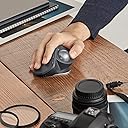
The Logitech MX Ergo is a premium ergonomic trackball mouse featuring a customizable 0°–20° tilt angle to reduce wrist strain, 2048 DPI precision for accurate cursor control, and an impressive 4-month battery life. Designed for professionals, it supports multi-device connectivity via Bluetooth and Logitech’s Unifying receiver, includes 8 programmable buttons, and offers a stable, premium feel with its weighted magnetic base. Ideal for millennial managers seeking comfort, efficiency, and seamless workflow integration.


| ASIN | B074W227RK |
| Antenna Location | Office |
| Are Batteries Included? | Yes |
| Are Batteries Required | Yes |
| Battery Average Life | 4 months |
| Best Sellers Rank | 48,981 in Computers & Accessories ( See Top 100 in Computers & Accessories ) 987 in Mice |
| Box Contents | Wrist rest pad, mouse pad, Unifying receiver, micro-USB cable for charging |
| Brand Name | Logitech |
| Button Quantity | 8 |
| Colour | Black |
| Compatible Devices | Mac, Personal Computer, iPad with iPadOS 13.1 or later (Pointing, clicking and scrolling will be supported by enabling the “AssistiveTouch” accessibility feature.) |
| Country of Origin | France |
| Customer Reviews | 4.5 4.5 out of 5 stars (6,002) |
| EU Spare Part Availability Duration | 4 Months |
| Enclosure Material | Plastic |
| Global Trade Identification Number | 05099206073081 |
| Hand Orientation | Right |
| Hardware Platform | PC |
| Item Dimensions L x W | 5.7L x 3.7W centimetres |
| Item Type Name | Logitech MX ERGO |
| Item Weight | 5.78 Ounces |
| Manufacturer | Logitech |
| Manufacturer Part Number | 222B231 |
| Model Name | MX Ergo |
| Model Number | 910-005179 |
| Mouse Maximum Sensitivity | 2048 Dots per Inch |
| Movement Detection | Trackball |
| Network Connectivity Technology | Bluetooth |
| Number of Batteries | 1 Lithium Polymer batteries required. (included) |
| Operating System | Windows 7 |
| Pattern | Single |
| Power Source | Batteriebetrieben |
| Product Features | Wireless |
| Product Finish Type | Smooth Plastic |
| Product Warranty | 2-year Limited hardware warranty |
| Range | 10 meters |
| Style Name | MX Ergo |
| Theme | Office Ergonomics |
| Unit Count | 1.0 count |
R**E
Trackball with a difference! Amazing results but,....costly!!
Given the price it's rather steep. Too expensive is slightly overlooked by the design and capabilities this different mouse can do! Love the short cut functions and new rested angles your hand sits on; more degrees of satisfaction. Main purchase was to solve the RSI I have been getting after using my logitech mouse on a mac. Now upgrading to this beast is exciting. Getting used to the trackball with the thumb is new and at the moment I'm adapting to it. Key Functions in apps are tailored so setting up this is little fiddly but straight forward. I also do prefer the rotating scroll which tilts left or right. None of the other trackballs do this. ie. M570, which is old now. Needed something new and refreshing! One things for sure, don't be leaving this at work after paying so so much! At the moment after using for 2 weeks it's comfortable and usefull. It's working well and I'll update this review. Update!! It's been 6 months now and now I'm charging for the first time!!! It's crazy. I've actually become accustomed to the Logitech MX Ergo device and beleive me...I haven; had any issues with RSI. It has taken some time to adjust but working within small confined spaces, this thing is an ingenious work of art! I am swaying to this style or flow of working and it's spot on for what I want. I use the full slant and haven't had issues at all. Only wished I bought an new but opened cheaper version as any small inferior marks wouldn't harm or be noticed at all with this beast of a wireless mouse! Buy it!
M**W
Very easy to use, with your arm/wrist hanging off an office chair arm
I'd bought a couple of Aptico trackballs, one for the office and one for the laptop in another room that I use with Blackstar software for managing my Blackstar ID:30 amp. But the one for the office was because I have an anti-static mat on my desk because I am an electronic engineer and my office is also my lab. A conventional mouse is quite 'grippy' on this surface so is difficult for accuracy with electronic/technical drawings. So I thought, 'make the mouse stationary, work the cursor with the thumb and increase the resolution as and when necessary. Hence the Aptico but, every other day, I have to have the ball out for cleaning and lubricating including its cavity. I found Mr. Sheen to be quite good in this respect but why does the ball stick so quickly? I have a logitech k750 wireless keyboard. And I now have a logitech MX 50 trackball, not cheap at eighty quid, but read on. I am working from home using a client laptop securely linked to my remote desktop PC at the client's office. The MX 50 offers the facility to share the USB dongle with my own wireless keyboard. Thus the MX 50's own dongle can be attached to my client's PC. There is a switch just in front of the scroll wheel that enables me to switch between doing stuff on my own PC or doing stuff on the client PC (enormous monitor attached to the client laptop so the laptop screen is virtually redundant). Wow! But it gets better. If I'm drawing, in Visio, say, for the customer or Altium at home, when greater cursor accuracy is required there is a thumb-operated switch just behind the scroll ball that increases resolution or, in other words, slows the cursor down thus allowing greater accuracy. So, you've zoomed what you are trying to do by whatever means in your application and then made the position of the desired object more precise with this button on the 'mouse'. There's more; you're an engineer, say, and you're in a website where you've selected a datasheet or something which isn't what you were hoping for and you have to wander the cursor back up to top left reverse arrow to go back to the previous page? Not so with the MX 50. It has two buttons left of the scroll wheel, easily accessible, and the nearest of these is a 'go back' button which is the one we want! Forward of this is a 'go forward' button which I must confess I've hardly used but nice to have anyway. The scroll wheel has left-right click too for those apps that support horizontal scrolling. But here is the best bit: scroll wheel stickiness. I've been using this for a month and I haven't had to have the ball out yet for a clean and lubrication. Really! But the Aptico ball was out pretty much every other day for a clean and a lube (including its cavity). I'm right-handed and the right arm of my office chair hangs over the surface of my desk so my fingers fall upon the mouse or trackball in the manner of a pianist. But not quite. The MX 50 has a (magnetically locked) 20 degree tilt facility which I do use; I just put the trackball at the ideal drop hand position on my desktop and pretty much all I have to move is my thumb. Like scrolling through your phone contacts, the cursor will move fast if you move the wheel fast. Charge via the micro-USB port. Allegedly, a 4-minute charge will give you a day and a full-charge lasts a month. Looks like I should put mine on an overnight! OVERALL VERDICT: Typical Logitech quality. Absolutely fit for purpose, clearly designed by a human and not a computer. The tactility of the left/right switches is just right, the click of of the scroll wheel is just right, the weight of the 'ball' is spot on and it hasn't stuck yet, the tiltability (magnetically 'locked) is spot on. This has been designed by people who might have to use it. It has been bought by me who does use it for >12 hours per day and it is simply superb - my wrist stays more-or-less stationary, my thumb does the walking and my fingers the switching. Bliss.
M**.
A solild mouse for those who work at their computer all day.
Great product. This was my first Ergo ball mouse so while I don't have a significant frame of reference, having used this product for more than a year now I like it and it is still going strong. Charge is good and the mouse is very configurable. My only complaint is the mouse does need cleaned quite often but that happens with any ball mouse. Dirt and oil build up causing it to become scratchy and not track as well but can be easily resolved in less than two minutes of maintenance. Not for gamers or artists but heavy IT users.
F**S
After several months of usage, I love it. I use it on MacOs. It is precise and well built. I have occasional use, not intensive.
L**.
Muy a gusto con la compra
�**O
Primero decir que yo uso el trackball a diario, no para juegos (aunque en ocasiones también, pero no tipo shotemup) así que esta reseña no aplica al gaming ni al diseño gráfico 3D (para eso hay otas marcas como 3Dconnexion con su spacemouse), sino más bien a la ofimática. Tampoco me voy a basar en tecnicismos tipo dpi ya que no voy a hacer una tesis y al final lo importante es que el trackball vaya siempre fluido, incluso con doble pantalla y altas resoluciones, te permita la máxima personalización posible y se adapte a tu uso, a tu fisionomía y proporcione la ergonomía (agarre, posición...), precisión y tacto adecuados. La bolita de la foto no es la de serie, se la he cambiado (se compran aparte). Un punto que voy a recalcar: hay que limiarlo de vez en cuando. Es decir, se saca la bolita (es fácil introduciendo un boli por el agujero y empujando la bolita, teniendo cuidado de agarrarla con la otra mano para que no caiga al suelo) y se limpian los rodamientos que hay por dentro (esas pequeñas protuberancias que cogen polvo y suciedad). Si alguien se queja porque no va fino sin limpiarlo... Bueno, pues nada, que no eche aceite al coche o a la cadena de la bici que verá qué fino va igualmente. Yo lo que hago es que uso un poco de crema de manos de vez en cuando para "encerar" la bolita. Con esto y la limpieza no va suave, lo siguiente. Ahí os dejo el briconsejo y espero que no me cancelen la opinión por esto. En fin, que los colecciono y he probado los mejores de las marcas más especializadas. La calidad hay que pagarla, y éste es el tope de gama de Logi en cuanto a trackballs. No os confundáis, me gustan también los demás, también los uso por ir cambiando, pero éste más (y tengo 2). Lo que no me gusta en general en todos (el Kensington Slimblade es el único que me gusta en esto) es el scroll. Es imposible dejarlo ajustado a la perfección y para todoterreno, aunque éste no es malo porque tiene su goma que hace que no se resbale. El Kensington Pro Fit Ergo en eso peor, tiene una rueda de scroll sin gomita (aunque si no quieres gastar tanto, está en general bien, míratelo). Pero yo para eso uso el Microsoft Surface Dial (con la mano izquierda), porque para scroll de libros, webs, etc. suave y ajustado a diferentes ritmos dinámicamente es lo mejor que he encontrado (para Windows). La combinación de los dos en mi caso es perfecta (también combinado con el slimblade si eres ambidextro para esto), aunque como digo eso ya es para flipados sibaritas que en vez de hacer vídeos en youtube y monetizarlos les da por escribir opiniones gratuitas en Amazon dando briconsejos a los demás porque "coleccionan trackballs" y los enceran con cremita :D
D**S
Użytkowanie ok ale lekki upadek na pdloge spowodował jej trwałe mechaniczne uszkodzenie. Co przy innych myszkach się nie zdarzało
D**E
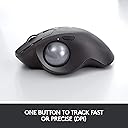
J’utilise des trackballs Logitech depuis 25 ans, et ce modèle est sans conteste le meilleur que j’ai jamais utilisé, et de très loin! J’avais été déçu par le modèle précédent (M570), qui était de qualité inférieure à ce que la marque proposait habituellement (il faisait vraiment « cheap »), notamment par rapport à l’excellent « TrackMan Marble ». Oui, le MX Ergo n’est pas donné, mais il n’y a pas de mystère : pour avoir le meilleur, il faut y mettre le prix. Vous trouverez bien sûr de nombreuses marques et plein de modèles de trackballs beaucoup moins chers, fabriqués par des entreprises spécialisées dans le low-cost mais vous risquez certainement d’être déçus à cours ou moyen terme. Le MX Ergo lui respire la qualité : les matériaux utilisés sont somptueux, il est lourd (pas un problème pour un trackball, bien au contraire puisqu’il ne bouge pas). Contrairement aux modèles précédents sans fils, ici pas de piles mais un accumulateur rechargeable (génial). Le dessous du trackball est recouvert sur toute sa surface d’une couche de caoutchouc antidérapant, bien plus résistant que les 3 petits patins que l’on trouvait sur les anciens modèles qui finissaient inévitablement par se décoller. J’ai adoré la touche qui permet de passer du mode « déplacement rapide » du pointeur au mode « précision » (déplacement très lent et très précis). Un autre bouton vous permet de passer d’un ordinateur à un autre sans à avoir à changer de « dong » (récepteur Bluetooth), le MX Ergo peut être appareillé avec deux ordinateurs différents pour peu que l’on dispose d’un second dong. La molette est très confortable et précise, les boutons clic gauche et clic droit ainsi deux boutons programmables sont eux aussi solides et de grande qualité. Enfin, vous pouvez télécharger gratuitement un programme permettant la gestion de votre MX Ergo. C’est donc pour moi très largement ce qui se fait de mieux en matière de trackball, vous serez conquis. Et merci à Logitech pour avoir fait à nouveau le choix de la qualité.
Trustpilot
2 months ago
3 weeks ago