Desertcart purchases this item on your behalf and handles shipping, customs, and support to Uruguay.
🚀 Elevate your workflow with the mouse that works as hard as you do!
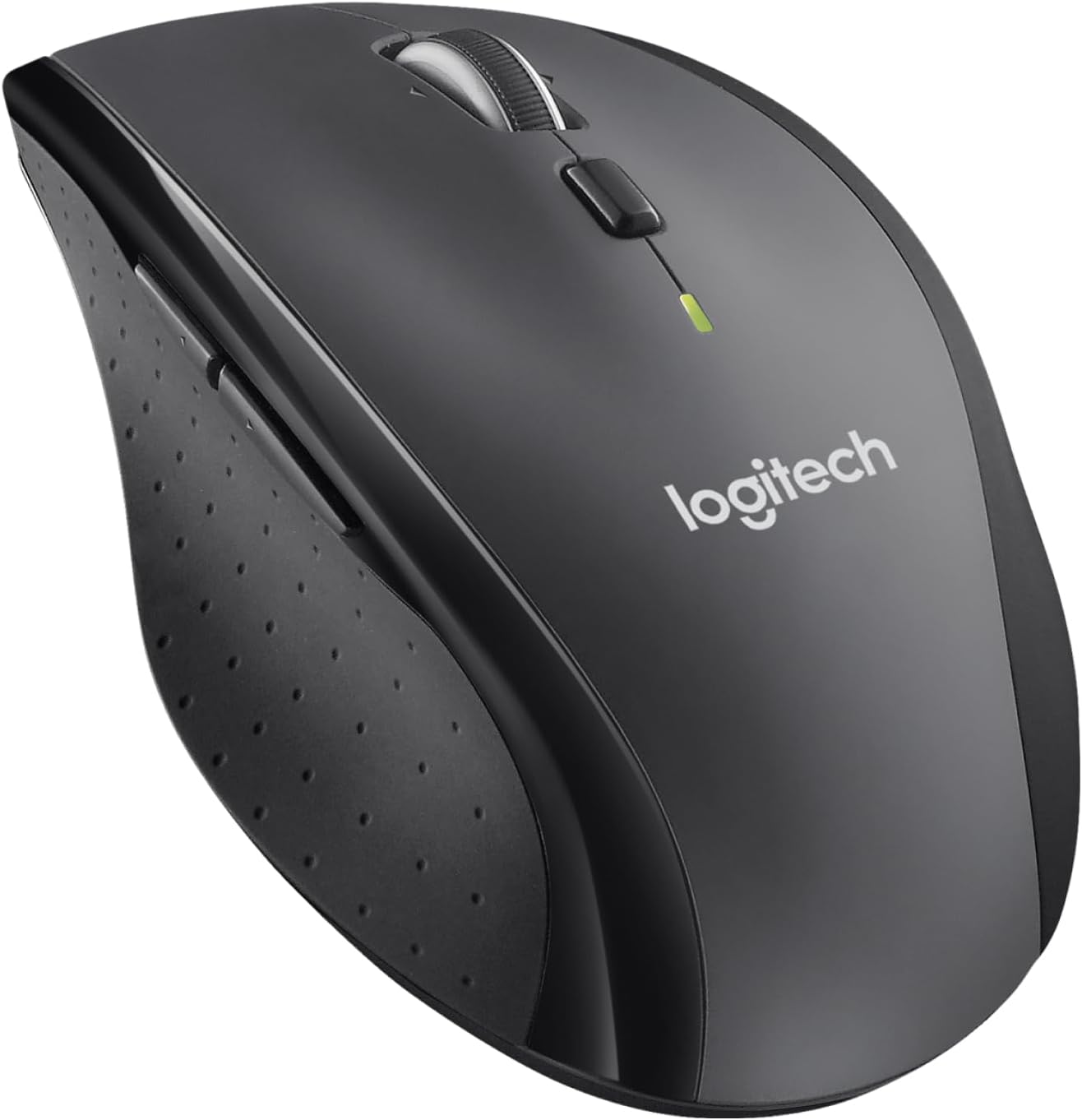
The Logitech M705 Marathon Wireless Mouse delivers exceptional endurance with a 3-year battery life, ergonomic comfort tailored for right-handed users, and advanced laser precision at 1000 DPI. Featuring dual-mode scrolling and 5 customizable buttons, it enhances productivity across macOS, Windows, and Chromebook platforms. Its unifying USB receiver supports up to 6 devices within a 10-meter range, creating a clutter-free, efficient workspace for professionals who demand reliability and performance.


| ASIN | B003STDR1E |
| Antenna Location | Office |
| Are Batteries Included? | No |
| Are Batteries Required | Yes |
| Battery Average Life | 3 years |
| Best Sellers Rank | 180 in PC & Video Games ( See Top 100 in PC & Video Games ) 16 in PlayStation Legacy Systems 45 in Mice |
| Brand | Logitech |
| Brand Name | Logitech |
| Button Quantity | 7 |
| Colour | Graphite |
| Compatible Devices | Mac, Personal Computer |
| Connectivity technology | USB |
| Country of Origin | China |
| Customer Reviews | 4.4 out of 5 stars 16,928 Reviews |
| EU Spare Part Availability Duration | 3 Years |
| Embellishment Feature | Logo |
| Enclosure Material | Rubber |
| Global Trade Identification Number | 05099206023901 |
| Hand Orientation | Right |
| Hand orientation | Right |
| Hardware Platform | PC |
| Included Components | other |
| Item Dimensions L x W | 10.9L x 7.1W centimetres |
| Item Part Number | 910001949 |
| Item Type Name | Logitech M705 Wireless Optical Mouse |
| Item Weight | 4.8 Ounces |
| Manufacturer | Logitech |
| Manufacturer Part Number | MAIN-40191 |
| Minimum Required Operating System Version | Windows 7 |
| Model Name | Marathon Mouse M705 910-001949 |
| Model Number | 910-001949 |
| Mouse Maximum Sensitivity | 1000 Dots per Inch |
| Movement Detection | Laser |
| Movement detection technology | Laser |
| Network Connectivity Technology | USB |
| Number of Batteries | 2 AAA batteries required. |
| Number of buttons | 7 |
| Operating System | Windows 10, Windows 11 or later, macOS 10.5 or later |
| Pattern | M705 |
| Power Source | Battery Powered |
| Product Warranty | 2-year Limited hardware warranty |
| Range | 10 meters |
| Style Name | Retail Box |
| Theme | Video Game |
| Unit Count | 1.0 count |
D**B
Happily buy another one!
I spend most of my day sitting in front of a computer for work, and the comfort of a mouse has never really meant much to me. after using the M705, I find it impossible to use other peoples computers, as the shape and style of their mouse just does not seem to fit into my hand. This mouse appears to be perfectly designed to fit the shape of your hand, and works with great ease....as long as you are right handed. The 'SetPoint Settings' software was a great surprise also. the 8 different buttons on the mouse can all be programmed to do whatever you wish. This can also be changed to have different operations, depending on which programme you are running at the time! Where two buttons may be forward and backward on the web browser, can then become, copy and paste on a word document. this in itself has increased my productivity at at work, as it has saved me using pesky keyboard shortcuts on various other programs. The 8 functional buttons are not overly sized, or too busy and clumsy either. The scroll wheel has its standard click down button, along with a left and right click. all three are useful, and I personally have them set for different things depending on the program in use. However, i do feel that sometimes, the left and right click of the wheel can sometimes be pressed accidental, while trying to use the centre click down button. this in itself is no great issue, but does sometimes mean I end up Zooming on pages when simply trying to select something. All in all....great piece of kit! The three buttons on the thumb side are quite smoothly in place. the fairly standard 'page forward and page backward' buttons are there. with ease of use, there is no complaints with these. the third button is below your thumb. To start with i didnt even notice it was there. it is designed into the shape of the mouse, and is easily miss-able. had it not been for the the small grey mark near the bottom. this is no way a complaint, as it just just shows how well another function can be hidden into the mouse. All in all....great piece of kit!!
M**A
Excellent mouse; does everything I need it to (as well as things I didn't realise I needed, until now)
I bought this mouse to use with my laptop (which I primarily use at home and don't tend to take out and about with me). It's the first battery-powered mouse I've ever purchased, having only had rechargeable mice in the past, but I found that I wasn't getting much more than 5-6 days on a charge. After reading the reviews (and Q&As on Amazon), I decided to take a chance on the fact that this mouse has a three-year battery (it came with 2xAA Duracell batteries). Although I've only had this mouse for a week, I'll update this review when the batteries need replacing so others can judge how realistic this claim is, but I'm optimistic. It appears that a few other reviewers don't like the scroll options, yet I specifically bought this as it has the option of toggling between "click scroll" and "frictionless scroll"; perfect for navigating through longer PDFs, websites or spreadsheets with a small movement of my hand. I also love that I can use the scroll button to navigate left or right through a spreadsheet (or move the cursor back/forward a few characters as I'm typing), as it not only clicks and scrolls vertically; it can be nudged left or right, as well. This is a feature I didn't realise it had when I purchased it, and it's been a massive help, seeing as I spend so much time working on spreadsheets. The back and forward buttons on the left side (just above the thumb rest) are another reason I chose this particular mouse, as it assists greatly when I'm navigating through websites at speed. The buttons are ideally located, and do not get in the way (i.e. they're placed in such a way that it's hard to click them accidentally, unlike other mice I've had in the past). I plugged in the receiver and it worked straight out of the box without any need to tweak settings. I'm rather particular about my mouse set-up, so I did make a few small adjustments, but they're certainly not necessary for the average user. Overall, this is a great mouse, and I'm delighted with my purchase. It was just under £33 and it was, I feel, money well spent.
M**T
An excellent Mouse for daily use
I have been using this mouse daily for 18 months and so far it has been the been the best mouse that I've used. Pros: * Very responsive (others that have tried this mouse think it's too sensitive, so might see this as a con rather than a pro) * Excellent battery life (I have just replaced the batteries after 18 months of continuous use) * Comfortable to use (it fits my big clumsy mitts well) * Well built - it's showing no real signs of wear after 18 months * Plug and play works fine (on Windows and Linux), and is recognised and starts working pretty much instantly * Tiny receiver works well. Cons: * The middle click on the scroll wheel does not work very well (I have to press quite hard and there's not really any tactile feedback when it clicks) * Others that have used it find the pointer too sensitive * Price - this is quite expensive for what it is I work in IT, so this has been used exclusively for desktop applications (as opposed to gaming). I also travel a lot, and this mouse has been thrown into a rucksack numerous times with no signs of damage. I used to use Microsoft mice for many years, but with this mouse I am now a Logitech convert (this has outlasted and outperformed my last 2 Microsoft mice in every respect, although it did cost nearly twice as much).
G**O
Quality and comfort
Comfortable mouse with plenty of features, at a great price.
M**N
Durable, comfortable and reliable
I would absolutely recommend this mouse to anyone, I bought one from elsewhere a while ago and while it did die out eventually, it should be telling that I intentionally sought to buy the same mouse again. Some have complained that it's small, but I don't have such problems, maybe I have small hands. In any case the signal doesn't cut off annoyingly like you get with some (such as my previous Microsoft wireless keyboard/mouse) and has good range. The lack of it being wired is also helpful for its flexibility with regard to gaming, as you don't get any wires tugging from an inconveniently short cable. Speaking of which, some may admittedly find the DPI of this mouse to leave something to be desired for some gamers. However, having never used a true gaming mouse myself I can say this one exceeds my expectations. The side buttons can also immediately be assigned without driver hassle, at least in certain games such as Counter-Strike: Source. In general use, the M705 also shines, but admittedly less on scrolling. Although click scrolling can feel slow at first, changing the scroll settings on your OS is an easy solution. Unfortunately the free wheel mode has been frustratingly inaccurate, at least for me, as you'll try to scroll to a particular point on a page and it'll move back a moment later. Even fast movements can cause the scroll wheel to move when click mode is off. The same sensitivity issues also seem to effect the left and right mouse buttons themselves, but besides this I would again recommend this for anyone on a mid-range budget.
R**F
Awesome mouse
I have bought 4 of these, not because they wear out, but because they are so good. I literally cant remember the last time I changed batteries. Its durable in my bag for work, and infinity scroll is the reason I come back to logitech. The only thing I now need is one with usb c dongle.
G**O
Excellent mouse. (updated)
This is a good mouse, there's no mistake about that, but now that that has been said, I do have a few issues with it. First the pros: This is a comfortable mouse. The position of the hand is bang on. But those who have big hands do try it first if possible. The weight is just right for me allowing me complete control over it. The feet glide effortlessly on my hard surface mouse pad and the laser tracks brilliantly. The buttons are in the right position and they have a nice feel. Battery life seems to be durable, it lasted the 3 years that they state. The cons: When it arrived the feet seemed like the had glided over an abrasive surface cause they seemed already a bit worn. Odd... The wheel wobbles around 1mm in "free spin mode" which is odd and in "stepped mode" if you lift the mouse and move sideways (and this does not have to be very fast, just normal speed) you can hear the wheel moving sideways. No biggie but really odd. The right side rest for the farthest fingers is nothing but a grip. You wont "rest" your fingers there... Although the buttons seem nice, the left and right click buttons are "loud". I moved from a Microsoft 5000 Desktop BlueTrack Mouse that was already a bit loud. This one takes the crown. For as of this moment is is the loudest mouse I've ever had. So, final thoughts. Do I recommend it? Absolutely! It's a nice mouse and it will get the job done. The batteries have been lasting for over 3 years with daily use.
C**.
Great product,but not for gaming
mouse looks good feels very good,quality materials,top product,but when it comes to moving a pointer on a screen its bad,feels like its on ice,sliding,lag input,its like changing dpi when moved on surface its accelerating and then slowing down,scroll haze its own mind sometimes,not for gaming,i think battery its good
A**R
When I am at work, I am sad that I am not using this mouse - my favorite mouse on the market!
This is the perfect mouse, and over the years I have bought one for both of my parents and quite a few friends. It has a pleasant heft to it, it is excessively comfortable to hold, there is little to no latency, it tracks smoothly, you can easily customize how the scroll wheel feels, and you can switch between devices easily. I also find the battery last ages - I have to change the battery maybe once a year. Additionally, if you misplace the bluetooth recevier, it can be replaced with the logitech universal receiver, reducing e-waste and allowing you to continue using the perfect mouse without issue.
V**Ğ
Gayet kullanışlı
Scroll tuşunu çok kullanan kişiler için ideal
J**O
"Marathon", c'est pas pour rien...
[Voir directement le 2ème paragraphe pour l'appréciation du produit] J'ai acheté ma première M705 en 2012, à l'époque où la forme était exactement la même mais l'ancien logo était encore inscrit à la place du nouveau. Je l'avais trouvée parfaite, mais depuis 6 mois elle souffrait du syndrome du double clic (elle double cliquait là où on cliquait, et les cliquer-déplacer devenaient quasiment impossibles tant elle lâchait en plein milieu... Très très frustrant, même si ça survenait pas périodes et le reste du temps elle se comportait normalement... Cela dit, je vois d'autres commentaires qui disent qu'ils avaient aussi acheté la même en 2012 et qui fonctionne toujours très bien, donc peut-être que c'est la mienne qui a été moins endurante...) Bref,elle était visiblement en fin de vie. En remplacement j'avais eu envie de tester la MX Master, qui était en promo à 40€, mais je l'ai renvoyée 15 minutes après le déballage tant la déception était immense... J'ai donc repris cette fameuse M705 qui, hormis le problème du double clic (qui est survenu après plus de 5 ans d'utilisation quasi quotidienne tout de même...), ne m'a jamais déçu. J'aime : - la durée de vie phénoménale des piles, je crois qu'en 5 ans d'utilisation j'ai dû les changer 3 fois ! - la taille idéale, ni trop grande comme la MX Master, ni trop petite, elle est (dans mon cas) parfaitement adaptée à ma main, la forme est adaptée et agréable, elle est légère - La possibilité de ranger le tout petit récepteur à l'intérieur de la souris pour les déplacements - La molette qui se décrante grâce au bouton en-dessous de celle-ci et qui permet de scroller très rapidement - Les boutons sur le flanc gauche, paramétrables selon les applications dans le logiciel SetPoint de Logitech, ils font gagner un temps énorme et sont bien mieux placés que sur la MX Master - Le bouton planqué sous la partie où repose le pouce, qui se comporte comme un afficheur des applications ouvertes, même si je ne l'utilise jamais c'est sympa (et je viens de découvrir qu'en fait lui aussi est paramétrable et on peut changer l'action par défaut) J'aime moins : - Désolé pour les gauchers ! - Ne fonctionne pas sur toutes les surfaces, ou moins bien : inutilisable sur du verre (contrairement à la MX Master, mais pas dans la même ligue...) mais aucun problème sur sur mon tapis de souris Je finirai par vous conseiller de vérifier les offres reconditionnées ! Remontez tout en haut de cette page et vous avez marqué "[tant] d'occasion à partir de [tant]€". Cherchez le vendeur Amazon Warehouse. Perso j'ai pris la dernière qu'il restait en état "comme neuf" pour 25€ soit 15€ moins cher juste pour avoir un emballage ouvert, sinon la souris en elle-même est effectivement comme neuve. Ça vaut le coup de jeter un coup d’œil !
M**S
Good and cheap!
Good and cheap!
A**A
Good product and amazing price
Works well
Trustpilot
2 months ago
2 weeks ago