Buy anything from 5,000+ international stores. One checkout price. No surprise fees. Join 2M+ shoppers on Desertcart.
Desertcart purchases this item on your behalf and handles shipping, customs, and support to Uruguay.
🖨️ Restore your printhead, reclaim your productivity!
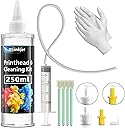
The Osinkjet 250ml Printhead Cleaning Kit is a powerful, eco-friendly solution designed to clear inkjet printer nozzle blockages across major brands like Epson, HP, Canon, and Brother. Equipped with a high-efficiency cleaning formula and essential tools, it ensures thorough maintenance, extends printer life, and delivers sharp, vibrant prints—saving you from expensive replacements and downtime.


| ASIN | B09Y91SWM6 |
| Additional Printer Functions | Print Only |
| Best Sellers Rank | #20,990 in Office Products ( See Top 100 in Office Products ) #839 in Inkjet Printer Ink Cartridges |
| Brand | Osinkjet |
| Built-In Media | Printhead cleaning solution 250ml, 20ml syringe, 4 fat-tip swabs, 3 combo connectors, 1 pair of disposable gloves |
| Color | 250ml Printer Cleaning Kit |
| Compatibility Options | OEM |
| Compatible Devices | Printer |
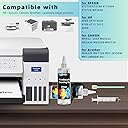
| Compatible Printer Models | Epson, HP, Canon, Brother |
| Customer Reviews | 4.2 out of 5 stars 789 Reviews |
| Ink Base | Water |
| Ink Color | Black, Tricolor |
| Ink Colour | Black, Tricolor |
| Manufacturer | Osinkjet |
| Mfr Part Number | 250ml Printhead Cleaning Kit |
| Model Name | 250ml Printhead Cleaning Kit |
| Model Number | PCK 250ml |
| Model Series | Osinkjet Printhead Cleaning Kit Series |
| Number of Items | 1 |
| Other Special Features of the Product | Eco-Friendly Cleaning Cleaner |
| Page Yield | 190 |
| Printer Model Compatibility | Canon PIXMA G3260, Canon PIXMA G7020, Canon PIXMA MX922, Epson ET(EcoTank) ET-2760, Epson WorkForce WF-3640 |
| Printer Type | Inkjet |
| Special Feature | Eco-Friendly Cleaning Cleaner |
| Specific Uses For Product | Printer maintenance and cleaning |
| UPC | 771077981867 |
| Unit Count | 1 Count |
| Warranty Description | 1 year |
J**S
Tricky to get hooked up ... BUT WORKS AND SAVED ME $$$$$ !!!!!!
Brother MFC-J475DW that had completely stopped printing BLACK... thought the print head was ruined like so many others and hated the idea of buying another $199 printer. Okay...the instructions were a bit cryptic, some of the parts were clear making them hard to see/use if you dropped them...and the instructions didn't address Brother products. Attaching the cleaning plugs to the printer was a bit difficult since the inkjet ports were so deep in the printer, and I kept a folded paper towel beneath the print head to catch cleaning fluid I was pushing through once I got it attached to the black cartridge input port. 1. Started the print head cleaning function and pulled the power on the printer to stop the head while moving accross the rail. 2. Attached the rubber nozzel to the cartridge input port. The cleaning fluid pushed through tightly at first.... got a ton of black ink out. Got easier and I was replacing the paper towels after almost every 5ml push so that it wouldn't overflow and drip into my printer's circuit boards.. 2. First 20ml went fairly slow as I was being careful. then I ran a second 20ml through the system until what was coming out on the constantly replaced (folded) paper towels was getting clearer and clearer STILL changing paper towels about every 5 ml...then no black ink coming through. 3. Let the printer sit for about 5 minutes to dry, put the cartridges back in.... printed a test page... STARTED to see black ink, printed another test page... MORE BLACK INK..... third print looked almost brand new.... Just printed a page from a website, about an hour after the cleaning and it looks like a brand new printer!!!!! THIS KIT SAVED ME over $250 by not having to buy new printer/cartridges.....a little funky to get it to work but WORKS IT DOES!!!! Saved a key resource for my ebay business!!!!! Thanks and have a Merry Christmas!!!!!!!!
T**Y
Go to Youtube to find out how to use this stuff the right way.
works just like it said it would. Go on you tube to find out the right way to use this stuff. My printer (2800) sat for over 8 months and wouldn't print at all. I cleaned the heads twice and now it works like new.
S**D
It's quite easy to clean the heads, but be patient getting heads charged again
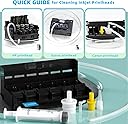
The cleaner worked well on my Epson WF-3640. The yellow was completely blocked. Just one cleaning was enough to make it work great again. I cleaned the remaining heads just because I had to remove all the ink tanks and cleaning was fast and easy. The instructions are lacking on details and options. My printer just required the flexible tube, but attaching the tube to the syringe was unclear. The instructions made it look like the tube attached directly to the syringe, but it requires the smallest adapter. Also the instructions have you remove the print head head assembly which is much more work than needed. There are many YouTube videos that show how to clean the heads without removing them which worked well for me. I changed the paper towel pad after each head cleaning to ensure nothing dripped into the printer. Put the paper towel pad under the heads as shown in the video. When cleaning each head do not use much pressure on the syringe. I used the push-pull method. With about 5 ml of cleaner in the syringe, push a very small amount into the head. Then pull it out and you should see some color in the extracted cleaner. Repeat by pushing a little more then extract it. You should see ink on the paper towel pad. Move the heads to a clean area of the pad so as not to soak the pad and make it drip. With each push-pull cycle, the ink on the pad should get lighter and less pressure is needed on the syringe. When the syringe is empty, that head should be clean. Change the pad and repeat for each head. When done, use a small rolled piece of rolled paper towel or cotton swab to soak up the cleaner in the tank area. Replace the tanks in the position shown in the printer and you're done. It only took about half an hour to clean all 4 heads. It took much longer to get the heads primed and working again. Make sure you have full tanks and/or extra tanks. I first did the printer's head cleaning function, Then printed a color_test page that I made. Nothing printed which was a bit scary. I did a couple more head cleans and allowed a few minutes between each clean to allow the heads to cool down. I printed the test pattern again and a little color was printed. I kept repeating the head clean, wait for the heads to cool, then print the test pattern. It took a few cycles but each cycle looked better, but then my black tank was empty. I replaced it and after the printer completed the lengthy charging process for the new tank, printed the test pattern and to my surprise, the 3 color were back and looked good, but no black. I did a couple more head cleans on the Black Only option as the colors were working. Finally all 4 print heads were working and I am happy with the results. My printer is working again! I hope this helps. The cleaning in the printer was fast, but charging the heads takes a while. Don't panic, be patient, and the printer will recover.
R**N
The black in my HP plotter head was completely clogged, but this did the trick.
The black on my HP inkjet plotter head completely clogged plugged up (from only printing in color and not using pure black in a long time) and the print head is a $300 replacement part. I was pleasantly surprised how well this cleaner worked. The head was 100% plugged and would not pass any black ink, but after a soak in this solution and then using the syringe to pull a vacuum on that color, eventually enough solution got into the print head to begin unclogging. Once it was a little unclogged, then it was easier to get fresh solution into that color and working it back and forth until it was entirely unclogged. By the time i was out of solution, the black channel had completely opened up and the stream across the print head was uniform, straight and perfect. Now I know better than to let the black go without printing for a few months, but if it clogs up in the future I would definitely get this again
E**N
This includes everything you need to clean your print heads!
A neighbor of mine recently gave me two Epson Ecotank printers. An ET-3850 and an ET-2750. They had barely used either of the two printers, there were less than 60 prints made from them. This led to the print heads drying up as they set around. After running the standard 'Head Cleaning' and the 'Power Cleaning' feature built into the printers, it was not able to fully alleviate the issue, so after some research, I ordered this print cleaning kit. This job is not that hard to do, and for most people, if you can follow instructions on Youtube, and have steady hands, it's not that hard to do. The kit came with all of the things necessary to cover a multitude of different printers. The job was a bit messy, but by using the gloves that came with the kit, and a few carefully placed and folded paper towels, the mess was kept contained from the very start. Using one of the contained swabs to dab up a little leaked black ink / cleaning solution inside the printer was all it took to finish the job, reassemble it, and get it all going again! Once the blocked heads were fully flushed with cleaning solution, I had to run a number of 'black only' print jobs to get the print head to fill back up with ink. After that, my prints on both printers are coming out beautiful so that my art can be fully expressed! So, this little $14 kit brought life back to almost $800 worth of printers that my neighbors were just going to discard because they no longer appeared to work properly.
B**J
Didn't work for me - but read the review
But it did make a big mess! ===================== Update - Maybe I was having a bad day when I posted 1 star and a snarky review. My printer had been sitting for 6+ months and the printer nozzle deep cleaning process didn't work. I knew when I bought the Osinkjet kit I was rolling the dice. After writing the first review the company reached out and asked how they could make it right. Therefore I'm changing my rating to a neutral 3 star rating - it didn't work for me but it might work for you. Mine was a terminal case. Newspaper or puppy pads would have contained the mess. The customer service is great in a world of buy it and get lost companies!
P**R
Unclogged my Canon G6020
Unclogged and cleaned the print heads on my Canon G6020 that had been sitting unused for over a year. Easy to use. Just make sure you have some old rags, bucket and small drop cloth to mitigate the mess. Very happy with purchase and would buy again (hopefully won't have to).
R**Z
Be more accurate on your product details
Product did not fit exactly as instructed. Ended up spitting the yellow elbow fitting. And brother printer was not printed on the instructions. So you ended up sold me a falsely advertise product that is for Epson, Canon, and HP printer but not Brother printers that was advertised on your Amazon detail. But I am keeping the product. There are other ways I can clean the print head.
N**Z
Recomendable para limpiar cabezales Epson 3110
Líquido necesario para destapar cabezales. Es caro, pero es lo que necesitas para poder destapar tus cabezales después de tiempo de no usarlos.
Trustpilot
2 months ago
2 weeks ago