We remain fully operational. Our teams are working around the clock to ensure your deliveries continue safely.

DOWNLOAD THE APP


Copyright © 2025 Desertcart Holdings Limited
DOWNLOAD THE APP
Buy anything from 5,000+ international stores. One checkout price. No surprise fees. Join 2M+ shoppers on Desertcart.
Desertcart purchases this item on your behalf and handles shipping, customs, and support to Uruguay.
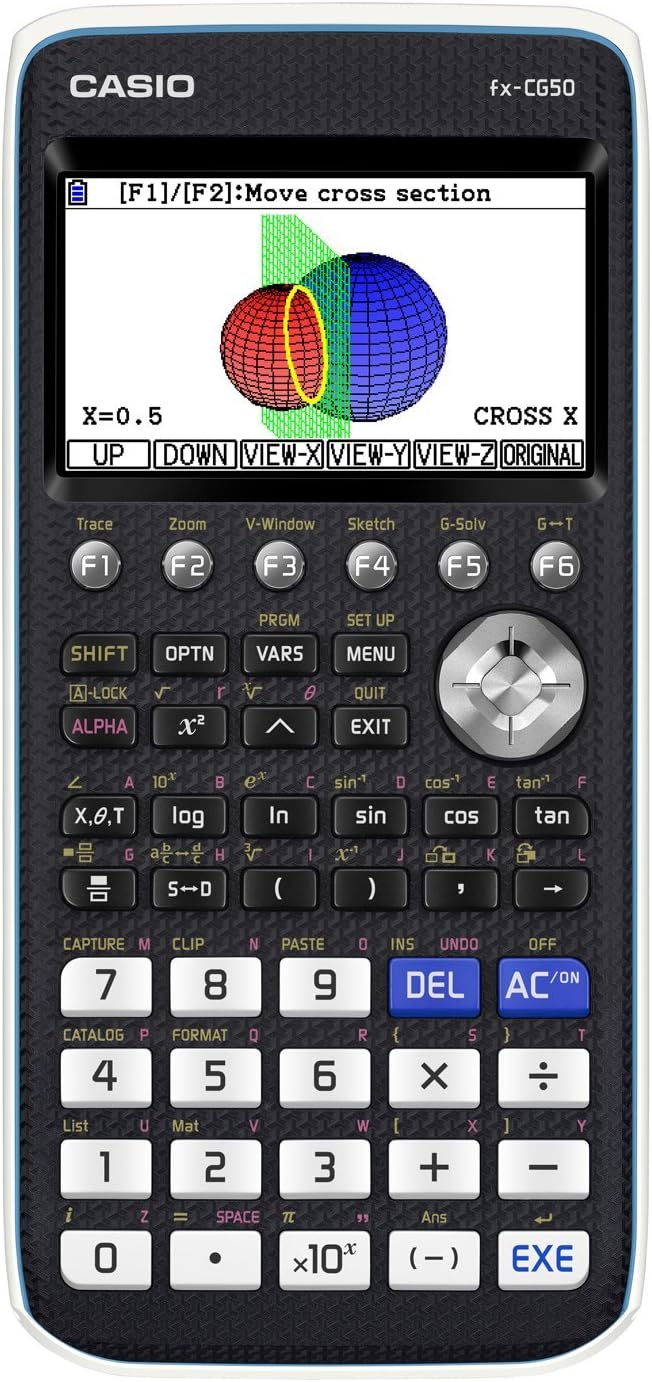
📈 Elevate your math game with Casio’s vibrant, exam-approved powerhouse!
The Casio Fx-CG50 is the UK’s best-selling color graphic calculator, tailored for GCSE to A-Level and IB students. Featuring a sharp 3.7-inch high-resolution color LCD, it offers over 3,000 advanced functions including 3D graphing, equation solvers, and spreadsheets. Designed for durability with a protective cover and powered by 4 AAA batteries lasting up to 14 months, it combines intuitive navigation with exam board approval to be the ultimate study companion.


| ASIN | B071S1HRM7 |
| Best Sellers Rank | 1,018 in Stationery & Office Supplies ( See Top 100 in Stationery & Office Supplies ) 1 in Graphing Calculators |
| Box Contents | CASIO FX-CG50 Graphic Calculator |
| Brand Name | Casio |
| Calculator Type | Graphing |
| Colour | Black |
| Country of Origin | China |
| Customer Reviews | 4.7 4.7 out of 5 stars (1,683) |
| Display Type | LCD |
| Enclosure Material | Plastic |
| Global Trade Identification Number | 04549526600814 |
| Item Dimensions L x W | 18.9L x 9.5W centimetres |
| Item Type Name | CASIO FX-CG50 GRAPHIC CALCULATOR |
| Item Weight | 0.25 Kilograms |
| Manufacturer | CASIO |
| Manufacturer Part Number | FX-CG50 |
| Model Name | FX-CG50 |
| Model Number | FX-CG50 |
| Number of Batteries | 4 AAA batteries required. (included) |
| Power Source | Battery Powered |
| Product Warranty | 3 year gurantee |
| Screen Size | 3.7 Inches |
C**M
Great calculator!
This calculator is extremely good at its performed functions. It's an excellent choice for students studying at higher level education, and is well preferred over the other calculator choices. The calculator itself comes with many different options, and is still one of the most advanced calculators for its time. Its a very good quality and it's quite easy to use for simple calculations, however for more complex ones you will need to find out how to use it. Its quite a chunky calculator compared to most, and the weight of it is pretty heavy, but this means that it does the job quite fast and has a much longer battery life. For me, the battery life is around 14 months with moderate use, however if you use it more frequently then it may need to be changed much sooner.
M**R
Amazing Calculator. Well worth the expense!
My daughter has started A-Level maths and said this was the best calculator there was. Imagine my surprise and shock (I could have fainted) when she told me said calculator was £120....yes yes one hundred and twenty pounds. After a lot of umming and erring we decided to get it for her, wanting the best for her education. I am told it does basically everything but make you a cup of tea. It is large for a calculator but thats not surprising considering how much it does. It covers you for the whole of A-Level content and will help her through university as well. It has a colour screen and while I couldn't use it she was getting on wonderfully with it once she had got to grips with it. She has said you can upload python programs to it, draw graphs, do trigonometric functions and a whole host of other wonderful things (I couldn't quite believe it as I grew up with a calculator that had four functions....+, ×, ÷ and -)! This is beyond amazing for a calculator and is a real investment to your or your child's education. I am really pleased we bought it for her. I also read a review that said to get the protective case, incase you drop it and to keep dirt and dust out. This was an excellent idea and I ordered it with the calculator. I would advise anyone to do the same.
F**R
Excellent calculator...
I bought this mainly because it offers financial functions as well as many others (sometimes hard to find). It has proved very useful already. I like the way I can save solver equations for later use (only one equation can be loaded at a time) and connect the calculator to my computer for backup purposes. This calculator is very powerful but be prepared to consult the manual for best results.
Q**S
GCSE Calculator
Before I bought this for my son I did research about this to see if it is allowed for GCSE plus for calculator it's high end price costing £118 but it is more expensive outside Amazon I found. It's has approval from exam boards which can be seen on Casio website. My son used the fx-CG50 said it's amazing it could understand maths better plus it has periodic table showing each element in detail. I asked my son will it help you better for GCSE maths, his reply was yes I think I will get much better grade with this calculator. Price I will say it is expensive 🫰 but if it helps to improve education by a bit it's cheap ☺️ Quality is amazing on this it's colourful display. It has it own charging port to charge when battery life is low. Quantity of ways of doing maths is amazing showing graphs etc ... Weight is good too and efficiency of the product looks amazing 🤩 Overall I would say it was an excellent buy to invest in my son future. 😃
O**N
As it says
Suitable for A level further Maths. Good size screen. However some functions needed for the exam aren’t available. My child had to carry another calculator along with this one to do his mock exam. I was expecting it has everything they needed. Also it’s not solar powered, and uses 3AA batteries, I am a bit disappointed. But overall it’s a good quality calculator.
A**S
Fantastic! But flaws need correcting
This is my favourite calculator that is highly recommended for above GCSE, (or for super keen GCSE students) and all professionals like engineers and scientists. But I have a lot of recommendations for Casio for the next CG50: Show the derivative in X or Y solver, not just in trace in the graph mode. Provide dy/dx solver in graphing app so that x/y value can be found for a given gradient... and also for a given second derivative. Provide a gsolve option to identify points of inflections in the graph. And even identify concave and convex areas in different colour. Allow parametric equation solve features just like normal cartesian graph gsolve features as none of the g solve soft keys work at the moment when it comes to parametrically defined curves. Allow us to do everything including finding areas. Please move the radian degrees item to first on the list of settings as we have to frequently switch between degrees or radians and it requires too many key strokes. We can find the tangent/normal to a graph using sketch option but the equation of the tangent/normal cannot be pasted into the graphing app as a curve. If we could than it would be easier to find where the normal/tangent intersects other key points. Please allow us to adjust the font size. The bottom keys of the CG50 have been shaven off at an angle compared to the Classwiz 991EX. The height of the area we press is less. This makes key presses less comfortable than classwiz 991EX. Please could you restore full size. Allow recurring decimals option where we can enter and convert between recurring decimals and other formats. Allow us to find prime factors of a number, as other less advanced Casio's do. Allow calculations of volumes of revolution, and 3D depiction of volumes of revolutions. Conics app is isolated from graph app and is really not that useful... we need to be able to plot tangents or other curves with the circles to find intersections with the circle etc. Importantly, please could you allow us to define a cartesian graphs IMPLICITLY... the grapher becomes useless when an equation is implicitly defines. Other calculators are able to show implicit graphs. This allow circles to be plotted easily without a separate conics app. The new distribution app is almost useless in an exam conditions or computations setting. This is because it lacks all the features for calculating but visually shows the distribution (useful), which means you need to be in the stats app for calculations. So to make the ability to see the distribution accessible, I would like the option to visually see my distributions where I am doing my calculations (stats ap) and not have an isolated distribution app to go to. Please integrate the distribution ap features in the stats app. Infact, the z distribution shows in the stats ap. Please integrate the distributions app this way. When we get an answer for a probability in the stats ap, please allow us to copy / store in a variable like x/ANS so we can move to main and use that value for the probability in a calculation... often we have to remember a string of digits to copy. Transformation of 3D images in geometry app will be very useful. Please allow us to copy the ANSWERS from intermediate calculations in main rather then just the calculations line... this is a really annoying omission from the calculator. Also sometimes calculations line that used ANS in the calculation does not contain the answer from the part before if further calculations were executed...a software method to detect this would be nice where it takes the answer from the line before. Enable Spearman’s rank correlation coefficient calculations in the stats ap. Allow access to all Statistical Table of values (eg. Critical values) for all types of distribution such as for critical values for Hypothesis testing for zero correlation of bivariate data - PMCC values vs significance level and sample size. Allow us to access stats data as we still have to use a book to access these stats data, it should be in CG50, if it has a periodic table it should have this. Allow the stats app to perform Hypothesis testing for different distributions by taking all the required parameters (like numworks calculator does). Allow Negative binomial distribution function in the statistics aps. Recursion web graph does not start at the table start, please fix this. List commands have to be executed in main rather that in the stats app making it difficult for use. Again, please bring the ANS key to CG50 like the classwiz. Square root should also ideally be a direct key and not a shift operation. When we select a function operation using soft keys in main and it appears on the screen, knowing the syntax is often a problem, find a way to quickly view the syntax of the operation. Some of the vector operations and vector input are in different locations, bring them in a coherent place. Provide decametres and decimetres for length conversion. A dark mode option.
D**O
Tout allait bien. Pas de problèmes ou de défauts.
A**R
Calculator product delivered as expected. Feedback for sender - need better packing. The box arrived a bit damaged. For a calculator of this price it’s at risk of being damaged in transit.
B**E
Excelente
A**D
nice product. rcvd as expected.
C**O
The calculator arrived with lot of scratches on the screen its like it was been used before.
Trustpilot
2 weeks ago
4 days ago