Buy anything from 5,000+ international stores. One checkout price. No surprise fees. Join 2M+ shoppers on Desertcart.
Desertcart purchases this item on your behalf and handles shipping, customs, and support to Uruguay.
🚀 Elevate your office game with speed, security, and seamless connectivity!
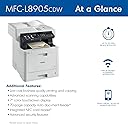
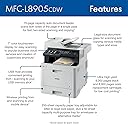
The Brother MFC-L8905CDW is a high-performance color laser all-in-one printer designed for busy workgroups. It delivers fast 33ppm printing, advanced triple-layer security, and high-speed duplex scanning at 58ipm. With a large 7-inch touchscreen, wireless and Ethernet connectivity, and ultra high-yield toner cartridges supporting up to 9,000 black and 8,000 color pages, it combines professional quality with cost efficiency and flexible integration for modern business environments.


| ASIN | B0BKTXZP8B |
| Additional Printer Functions | All In One |
| B&W Pages per Minute | 33 ppm |
| Best Sellers Rank | #3,505 in Office Products ( See Top 100 in Office Products ) #62 in Computer Printers |
| Brand | Brother |
| Built-In Media | Toner Cartridges |
| Color | White |
| Color Depth | 24 bpp |
| Color Pages per Minute | 33 ppm |
| Compatible Cartridge | [Brother toner cartridge model numbers] |
| Compatible Devices | Smartphones |
| Connectivity Technology | Wi-Fi, wired |
| Control Method | Touch |
| Controller Type | Android |
| Customer Reviews | 4.1 out of 5 stars 253 Reviews |
| Display Type | LED |
| Dual-sided printing | Yes |
| Duplex | Automatic |
| Hardware Interface | Ethernet |
| Ink Color | Multicolored |
| Item Dimensions D x W x H | 20.7"D x 19.5"W x 21.6"H |
| Item Type Name | Color Laser Printer |
| Item Weight | 65.4 Pounds |
| Manufacturer | Brother |
| Maximum Copy Resolution Black and White | 300 dpi |
| Maximum Copy Resolution Color | 300 dpi |
| Maximum Copy Speed Black and White | 33 ppm |
| Maximum Media Size | 8.5X14 |
| Maximum Print Resolution Black and White | 300 dpi |
| Maximum Sheet Capacity | 250 |
| Maximum print Resolution Color | 300 x 300 |
| Model Name | MFCL8905CDW |
| Model Number | MFCL8905CDW |
| Model Series | 8905CDW |
| Number of Ethernet Ports | 1 |
| Number of Trays | 1 |
| Other Special Features of the Product | Auto Document Feeder, Auto-Duplex, Display Screen, Scan To E-Mail |
| Output sheet capacity | 250 |
| Paper Size | 8.5X14 Inches |
| Print media | Paper (plain) |
| Printer Connectivity Type | Wi-Fi, wired |
| Printer Output Type | Color |
| Printer Type | Laser |
| Printing Technology | Laser |
| Processor Count | 2 |
| Resolution | 300 x 300 |
| Scanner Type | Sheetfed |
| Special Feature | Auto Document Feeder , Auto-Duplex , Display Screen, Scan To E-Mail |
| Specific Uses For Product | Duplex Print and Scan for Business |
| Total Usb Ports | 1 |
| UPC | 012502664314 |
| Unit Count | 1.0 Count |
| Warranty Description | 1 year manufacturer |
| Warranty Type | limited warranty |
P**R
Best Printer We’ve Ever Had
Wonderful printer. Makes copies in b&w as well as color. Converts paper into PDFs. Works wirelessly. A bargain at the current price!
N**N
Great at home printer
Amazing at home printer. Ink last a very long time! This is the best one I have found.
T**R
My printer apparently is defective – definitely not recommended.
This is an OK multifunction machine. Color printing is good but on the slow side. So if you need a high speed color printer for production purposes, you should buy something else. The thing that triggered my two stars is the difficulty of replacing the four cartridges. I am in a small law firm. We needed this printer to print certain color exhibits that we needed in court today. We purchased a new set of Brother four color cartridges from Amazon. The printer said the cartridges needed to be replaced. I replaced them this morning. The printer is displaying error symbols for two of the cartridges. I have tried to reseat them several times to no avail. The bottom line is I am heading to court this morning without the color exhibits that I need because this printer will not print them -- everything comes out yellow. At the moment, I am really regretting our purchase of this Brother multifunction color printer. I ordered a replacement set of cartridges, thinking that perhaps the cartridges were defective. However, when I installed the new cartridges I had the same problem. So apparently the printer is defective. Accordingly, I’m downgrading my review to one star. The last straw is that even though the printer says that the black cartridge is in and correctly installed it will no longer will print at all -- even in black. This means that I cannot use even the copier function. I DEFINITELY DO NOT RECOMMEND THIS DEVICE!!
T**X
Perfect
This printer is fast, smooth. Does everything. I have been a fan of brother printers for years, and this one doesn't disappoint. My wife is a teacher and it gets used weekly for black and white, color and thicker paper. Everything is so high quality and professional. The app makes it really easy to do scans as well.
A**R
Exactly what you need
Does everything I wanted except very thick card stock. Printing envelopes with addresses was a little awkward as the duplex assemble has to be disabled. But for day to day it’s great. I purchased an extra tray and keep letter paper there as well as legal size in the built in tray. The external tray holds more and most of my printing in on letter size paper. Easy to change toner cartridges. Works well with Windows 11, Mac OS, and iPhone/iPad OS. Don’t use the copy or scan much but happy when I do. I think it does some medium thickness cardstock but I have used the heavy stuff for Christmas and birthday cards for years/decades. I still have my old card printer but it doesn’t do air print.
Q**Y
Exactly what I needed
I love this printer!
A**S
Already love it. I will follow up if that changes.
Printer arrived 2 days after order. It's huge. First I unpacked and then, carried it down the stairs, tossed out the old thing I had (also huge and heavy) - back up the stairs. Opened up the Brother, and removed all the more or less easy to find orange packaging plastic bits and tape. Plugged it in, and entered wifi password. And then the really weird thing happened, windows 11 _already_ set up the driver as it saw the printer somehow. Test page printed, looks great. this whole shuffle unpack and install took about 15 minutes. I was using a recent epson inkjet, and xerox colorqube before - and neither was successful in printing the QR correctly for fedex shipping. (inkjet the detail is too fuzzy, even with correct paper, - and colorcube decided to have some striping problem) One thing about this printer, is it takes about 1/2 ream of paper only which is annoying. You can however solve this by adding a $220 accessory oem tray, so that will happen on next round of optimizing things. Also there are a lot of reviews here on amazon about this or that printer being bad and never again, etc. I' m completely not convinced they are not 99.99% one of user error, or something other than the printer being the problem. As a side note, I worked at xerox on the the colorcube design, so I can say there is really a lot to paper handling design - especially with all the different paper quality out there, and ageing effects on rollers and plastics. Printers are not at all simple things. And if the question is why did I pick brother and not hp, or a canon or a xerox ? xerox - too pricey for me, and they keep changing the ink shapes. paper handling is good in the office versions, but so-so in the low cost versions. canon - 3 inkjets over as many years that stopped working. Additionally the one good canon I had that lasted a while, the driver disabled "sharing" of a usb connected printer by design. hp - any company that almost forces you into subscription model on ink/toner, or does not have a bypass method for the oem supplies. just say NO.
A**R
SLOW (and Inconsistent Wireless Connectivity)
I bought this printer to replace my Xerox WorkCentre 6515. The Xerox served me well for more than half-a-decade but I ultimately broke it by using off-brand toner cartridges. I got the Xerox new for around $450 back in 2018. I hoped this Brother printer would provide the same functionality with more user-friendly software since it is more of a consumer brand than Xerox. The Brother printer is not terrible--unless you print frequently or print long documents. I have run into two issues that I think should be known. First, the wireless printing functionality is extremely inconsistent. About 66% of the time I try to print, it says the printer is "Offline" or cannot be found. The other 33% of the time, it inexplicably works seamlessly. Ultimately, I bought a cable and just started printing everything through a hard connection like it's the mid-2000s. Second, the quoted printing speed is just an outright lie. After many print jobs, I have never seen it print anywhere close to 33ppm. Even on simple black & white, text-only print jobs, I have been averaging a little under 10ppm. These problems are not significant enough to merit a return, but they do leave me excited for the day that I get to upgrade from this printer to something with performance more in line with my old Xerox. EDIT: It's been about a month since I wrote the review above and 10ppm was WAY to generous. I've printed tons of documents since then and I am begging for a printer that could do 10ppm. In addition to being slow overall, this printer will print a few pages of a document and then take a brake so long that you will think it is done printing. After its had a chance to catch its breath, it will resume printing the document at its uniquely lethargic pace. I've used many ink jet printers that are significantly faster than this laser printer.
Trustpilot
1 month ago
3 days ago