Buy anything from 5,000+ international stores. One checkout price. No surprise fees. Join 2M+ shoppers on Desertcart.
Desertcart purchases this item on your behalf and handles shipping, customs, and support to Uruguay.
🎬 Elevate your media game—because your TV deserves to be smarter.
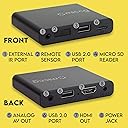
The Micca G3 Speck is a compact, affordable digital media player that upgrades any TV with 2K Quad-HD video playback and 4K HDMI output. It supports massive USB and microSD storage, plays a wide range of video, audio, and photo formats, and features auto-play, resume, and looping for seamless media enjoyment or digital signage. Ideal for millennials seeking a simple, versatile media solution without streaming subscriptions or network dependency.
| ASIN | B0B1P4NLLT |
| Best Sellers Rank | #2,683 in Electronics ( See Top 100 in Electronics ) #23 in Streaming Media Players |
| Brand | Micca |
| Built-In Media | Media Player, Remote Control, Power Adapter, AV Cable, Manual |
| Color | Black |
| Compatible Devices | Television |
| Connectivity Technology | HDMI, USB |
| Connector Type | HDMI, Analog AV |
| Controller Type | Remote Control |
| Customer Reviews | 4.2 out of 5 stars 8,055 Reviews |
| Form Factor | TV Box |
| Item Weight | 62 Grams |
| Manufacturer | Micca |
| Mfr Part Number | Speck G3 |
| Model Name | Speck |
| Model Number | Speck G3 |
| Other Special Features of the Product | Compact |
| Resolution | 4k |
| Smart Home Compatibility | Not Smart Home Compatible |
| Special Feature | Compact |
| UPC | 843528100162 |
| Unit Count | 1.0 Count |
| Video Codec | H.265/HEVC, H.264/AVC |
| Video Output Resolution | 3840 x 2160 Pixels |
| Warranty Description | 1 Year Manufacturer |
F**H
External Hard Drives work, but they have to be set up correctly
25 August 2018 - I had some trouble with this media player and another similar one with the same chipset, but I found the solution from the manufacturer. You need to use these with drives that are set up for master boot record (MBR) versus the newer GPT (GUI partition Table). This is why it will only read drives up to 2 TB. MBR does not support over 2 TB. I thought it was the drive brand. Toshibas worked, but not Western Digital. Then I went into disk manager and discovered that how they are configured depends on the manufacturer, but they all work when converted. I have used FAT32, NTFS and exFat formats. Not a problem. GPT is a problem. I hope this helps folks that have been tearing their hair out trying to figure out why their hard drives don’t work. Now, on with my original review.... I’ll hit the high points to keep it short. The Micca Spec G2 plays a bunch of different formats. The ones I tested: .mkv; a standard definition (480P) DVD.iso file, .mp4 video, .mp3, all from a flash drive. They worked flawlessly. Then I took the files that would be on a DVD - not an .iso file, but the actual folder that one would find on the media itself. I told the unit (so to speak...) to play the folder, and it did...just like it were a DVD or .iso file, menus and all. Then, I saw in the menu, “Optical Drive” listed, so I took my Samsung USB Blu-ray reader/writer and plugged it in. The Micca Speck played standard definition DVDs with no problem. However, when I attempted to play a Blu-ray Disc, I received a “file read error”. I tried a couple of Blu-ray Discs just to make sure it wasn’t the disc. Apparently this box doesn’t have the horsepower to decode Blu-ray Discs, but I can play HD videos ripped from Blu-rays with no problem. It could be compatibility with the Samsung reader/burner, too. I didn’t try my other brand of external Blu-ray player/burner with it. Subtitles and Audio tracks: I read another review that the individual could only read one audio track. That was not the case for me. I could read two language audio tracks. I only had two tracks on the .mkv I used so I can’t say if it would play more than that. The second track was dubbed in German and the volume was lower than the primary English track, but that could just be the way the original disc was recorded. Accessing subtitles was problematic for me. I couldn’t make it work, but it just may that I haven’t found the right sequence of buttons. This unit is fairly intuitive though. Bottom line: it’s small, economical and just works. I liked it so much I just purchased two more. These will make great stocking stuffers.
J**H
Micca Speck Portable Digital Media Player
First off, I actually bought two of these little units and gave one as a gift as I feel they work so well! We live in a rural area and as such we don't have access to high enough speed Internet to stream movies (that you'd think EVERYBODY has!). We used to have Hughes Net but didn't like the slow speed (really couldn't stream there!) or the low daily cap. We now have Wi-Max Wi-Fi, but it still isn't quite there yet, maybe some day though! But I was searching for a way to watch the movies I have that I had converted to MP4 without having to load everything into iTunes for our Apple TV's or to have to set up an older computer as a media center just to watch them through it. I actually had already done both of those ways and wanted to get just a simple 'plug and play solution'. While searching one afternoon this device came up in the search with several others but this unit had the overall best reviews so I immediately bought one to find out if it could do what I wanted. It is like an unmentioned category of devices, I guess because EVERYBODY is supposed to be streaming everything, devices that are for people that like me, that just can't stream it all but have large video collections. It works PERFECTLY for us! It is very small, has inputs for USB and SD Card and it is as simple as plug it into your TV, it comes with a composite cable but you do have to supply the HDMI cable and two batteries for the included remote. Some reviewers griped that they don't include the HDMI cable but I had already bought several of the $2.00 HDMI cables (that work perfectly fine by the way) from Amazon and so I had several already on hand. I just plug in a portable Hard Drive, I've used both the powered by the device type and the larger plug into the wall type, they both work fine, plug in the power plug from the device to the outlet and it comes on. The on screen interface of the TV when the unit is on, is totally easy to understand and the remote works fine. As I bought this entirely for it's ability to play my various Hard Drives and THUMB DRIVES TOO! I did not test all the available features, music playback etc., other than the ability to also play photos straight from an SD card which was fine too. The video playback is overall very good, as good as the source file, the video sound quality fine also, and while I did have to adjust the video playback on our 42 inch Sharp TV, the 50 inch Samsung played video back with no adjustments needed. So yes, I highly recommend this device. It is so small it can easily be taken if you travel a lot, just take a small hard drive or like a 64GB flash drive with some shows or movies you like, just plug the unit into the TV at the motel/hotel and go! Or take up no room at all with the media center in you home. Get the benefits of a media center computer without the computer if you don't need to get into the Internet through a device too. This is a PLAYER ONLY but a really good one! Just what I was looking for and I expect others are also! UPDATE 12/21/2012 Still works fine but one thing I forgot to mention is that the little metal device slides around very easily so I purchased some small rubber stick on feet from a local Radio Shack and put 4 on it. Now it stays where it should on the shelf by the TV.
D**D
Works fine, quality good, could stand a little improvment though.
This works as described. Plays everything I have in all different formats. I used this to replace a BluRay player I used to play movies from an external hard drive. I'm using NTFS for the external 1 TB drive. The only thing I don't like about it is that when the unit is turned off the drive does not turn off also, instead the drive activity light slowly flashes about one a second, I think this is some sort of 'standby mode' the units puts the drive in. The units needs an automatic shut off for the drive when the unit is turned off. If you disconnect the drive in this state, then plug it into a Windows 10/11 computer it comes up telling the drive has a problem and gives the option to fix it then something with the drive got 'corrupted'. If you let windows fix it then look at the drive you will find a 'LOST.DIR' folder. The 'LOST.DIR' is a directory created by the file system to store files that have been lost or corrupted but the 'LOST.DIR' is empty . So there is a 'corruption' of, in this case a NTFS, drive if the unit is powered down and the drive removed and this also happens if the power is removed from the unit before removing the drive. This means the unit is continually accessing the drive even when its powered off, even in that 1 second activity light flash time in a standby mode. Its safe to delete this 'LOST.DIR', its not a serious actual corruption problem but the fact that the folder is empty indicates something was not recognized as normal for the NTFS file system and that's probably because, it seems, the unit is using an Android based operating system as this is a folder that Android will create and hide on android devices. Other than this issue ... it works fine and does whats advertised, and I like it. But on the drive issue above it could stand a little improvement.
R**L
A Great Introductory Player for the Media Enthusiast
The Micca Speck is the newest in Micca's line of low end, inexpensive media players designed for local use without a network. It is a very good player, but like most of micca's products, a few features needed to really satisfy me are missing. They are rarely mentioned in reviews, and are probably not important to the general public, but they are important to me when deciding to buy a player, so I will mention them below. To start off, the Micca Speck is an excellent introductory media player with a small footprint and excellent features, and will probably play anything you throw at it that has been encoded using any of the recent standards. Encode in xvid, divx, or h264 with aac or ac3 audio and you should never have any problems, so long as the encoding standards are reasonable. Subtitle support is decent and will work in all cases where the file and the subtitle are separate. Its usb port is sufficient even for USB 3.0 Drives and it has excellent error recovery. After a freeze, it will generally reboot to the main menu after 10-20 seconds. It features a random playback feature that was missing from other players I have tested, and the main reason I bought this player. In short, if the bulk of your content hails from the last few years, and you want a media player with good features, a reasonably convenient remote, then get this player. It is inexpensive and worth the price. I paid about $5 less than the current listing as of this date, but what you get is much better than anything that was available last year, for a little more cost. This is all you need to know from this review. For those who are a bit more particular about their needs, I will elaborate on the strengths and weaknesses of this player below. As well as the result of some of my tests on actual media, which you may find useful. As stated, my main reason for buying this player was the addition of the random playback function. This feature may or may not be available on the other micca players, depending on whether the feature has been added to the latest firmware release. Since most of my content is old, the random playback is great for revisiting old content when you are not on a viewing schedule, or you want to entertain young kids and they're not sure what they want to see. The downside, (I am disappointed) is that the feature can only be applied to files in the same subdirectory. You can't start playing at the root and have it bounce all over the place. This might be great for those who keep secret videos, but I have everything organized by genre. The file system is great, in that it shows the entire file name, and scrolls if the filename is too long. I had a few files that did not work. One set of files (avi) gave "cannot play file" errors, I am not sure of their codec. Media encoded with ogg generally had problems switching audio streams, with loud clicks and snaps at worst, or a freeze at best. Sometimes it worked great, sometimes it didn't. I had one file the player recognized as being encoded at 0 khz but it worked fine. My guess is variable bitrate ogg audio will not work well in a movie. Ogg is an old format that was around before matroska/mkv became the popular container. It was generally used in ogm files, which was great because it allowed multiple streams (pre mkv). I have not bothered to reencode these files and probably will not do so, but if you have old files with ogg or divx 3.1 or anything like that, by now some of these files may have trouble even playing on your pc properly. If your collection is old, and you are not a netflix junkie, then you may want to go with another player, which will likely still give some problems on some of those files. Even vlc does not support some of these older codecs anymore. But I digress. Only one of the files I tested was overwhelming to the player, but considering only my higher end desktop can play it without slowdown, this is not a strike against the player. I tested a few files, even with quad audio (rare), and as long as the audio was ac3 or aac, there were zero problems with syncing, switching, or anything. It does jump back to the previous keyframe when you switch, so you might end up rewatching the last few seconds of a scene. Neither a plus or minus, it might be interesting to compare what's said in each stream. I always encode all available streams even if I don't know the language. The player automatically adjusts to hdmi by default if you have it connected, and you can switch between av and hdmi via the remote easily. Older models required you to make the switch half blind. It wasn't difficult, but for the non techie, it could have posed a challenge. You can enable autoplay for movies, photos, or music. I don't personally use this feature as you may have problems if there is a lot of content to scan or if some of your files are corrupted, as even the higher end player sometimes freezes because of it. Still, if your media is in good condition, you can enable this feature. The manual states that it plays objects in the root directory. I have not tested this, but you should be able to setup a picture slideshow, music, or movie playback to start automatically upon powering on. Combining it with the random feature adds some flexibility. This player features support for mkv, rmvb, rm, and although it does not mention it, flv as well, which means you can watch those youtube videos you've downloaded via your browser. It improves on the micca mplay, which does not support all these formats, and has problems playing them back on some occasions even when it does (such as rmvb). This player is nearly on par with the mid end MPLAY-HD, which I would recommend over this player, but it may be missing the random function, and has its quirks as well, as do most media players. The speck will not list OGM files at all. Unless you have been encoding for a while, and have not converted or reencoded your media, this is very unlikely to affect the vast majority of users. If you use handbrake or a similar tool, it will likely convert to m4v or mkv and use either dts, ac3, or aac audio, none of which ever gave any problems with the files tested. Subtitles: In some cases, subtitles did not show, probably related to the encoding process. Both sets of files with this error had ogg audio. Quite possibly, the subtitle embedding method may be related to the issue. Curiously, I had some old avis with an experimental method of embedding subtitles and they worked, no problem. Speed/Seeking: One thing that may worry the new customer. It can take up to 15 seconds to start up. It does not feature a quick splash screen while you wait. The first thing you will see is the main menu after a wait. Not a big deal, but it did cause me to doubt whether it was working or whether something was not properly connected. It plays at 1x speed with audio only which is not surprising. It is probably better to forward at 2x than 1.5x since the keyframes do not seem to update when you seek at the latter. To resume playback, there is a little button for pausing/playing. Though hard to find, it is an improvement over the older system which required you to quickly scroll your way back to 1x speed. The goto function works well enough. Only had one file where it didn't work, again due to encoding standards. One feature which is lacking, is that there is no faster way to scroll through content other than the down or up button. Other players let you page through the content with the next and previous buttons, but this feature is not included in the speck. Still, not too bad. The remote control is pretty good. Not as good as the higher end models, but definitely an improvement. You can switch display types, switch streams, change repeat method, and perform other actions without ever needing to go to the setup screen or access the OSD. Pressing ok while playing gives codec and encoding info (sometimes wrong), and the exit button allows you to cancel or go to the previous screen. I have bought several micca players over the last year, and have been satisfied with all of them. The higher end models aren't powerful enough to justify the added expense and the lower end ones are too simple. I would recommend this as an introductory player for someone who doesn't need any bells or whistles, and who has access to a significant amount of local content. This will play what your netbook may not. It will not however, rival an htpc or even the playback functions available through free players on your pc such as VLC, GOM Player, or The KMPlayer. The most important features for me are: 1) File compatibility. I keep alot of media in alot of different formats. Compatibility for this player is very good, but compatibility for the MPlay HD is even better. 2) Playback with audio at 1.5 or 2.x. Unless I have guests, I do all personal viewing at above 2.x if possible, even on youtube. I use a combination of free and paid software. This does not play at anything other than 1x with sound. The Mplay HD does play most content at 1.5 or 2.x with sound (has trouble with 2+ variable bitrate streams on occasion). So it gets the vote for this feature. 3) Random function. Kind of important. I rarely watch offline media anymore, but when I do, I don't want to be kept busy managing my content. It's easiest on a pc, but a mediaplayer with a random function is almost as good as a randomized playlist. This player does its job well enough. This was not available in the Mplay HD. There is a newer firmware for the device, but no file detailing changes. This could just be something they threw in, and not a sign of things to come. 4) A good OSD. I don't care about artwork, or any of that, but a quick preview of what you are about to watch is nice. The speck features a functional file list, so no complaints. That is all I need. However, when I have guests, a quick preview is great. The MPLAY-HD has a pretty good one. So far I have not been able to find anything as good as vlc running a random playlist. Until the day when media players have 3-4x playback with audio, playlist, and random playback, plus accellerated streaming/playback of online content, these players will remain a nice diversion from PC playback. Even so, they are leaps and bounds over what was available until recent years. The chipset of the Speck is not advertised, but it is likely pre 1055. All micca players use the realtek chipset. Also chipsets of the same generation generally perform very similar. Get this product, if it looks like it will need your basic needs. Otherwise I would recommend the MPlay HD . Their other players with the 1185 chipset, are basically like 1055s with online capability and extra memory. The 1186 chipset mainly adds 3d support. Playback compatibility (#1) will feature minimum improvements at best, due to the increased memory, but almost everything will work exactly the same as older products. At the original time of purchase, online functions were too buggy to satisfy, so I recommend either this product or the Mplay HD as the best bang for your buck. Then again, if you use netflix or hulu, you might want to reconsider. I personally would just buy a different player for each purpose, say the Roku. I am not fond of the Sigma chipset since it omits some important file formats, but the average user is unlikely to be affected. Consider trying out the WDTV or similar products if that meets your needs. I however, will continue to hover around realtek based products until something better comes along. Hope this helps someone make an educated purchase decision. Specifics are generally lacking from these reviews, which makes it harder to know what you're getting.
J**D
Great player for looping content
If you need a reliable, high bitrate 4K media player that will handle both HEVC and H.264 encoded content, this is the unit. A key feature of this unit is that it will seamlessly loop video files. Meaning it will replay a single video or series of videos without a titles or playback controls popping up when content cycles. It's a small but important detail. User interface is clear and utilitarian. Autoplay function works reliably at power on/startup.
E**N
Superior Player with a Few Faults To Be Aware Of
This is an addendum to the review below. I have discontinued using SDHC and switched to 100% USB. Here are additional comments sent to Micca: I think the Micca Speck is great!! I have been using it for several years now to display many graphics, ambient, and other videos (USB, 1080p, 2-3 GB, edited by me). It is displayed on my now decremented 32" LCD/LED monitor. It is a great ambient device. It plays most of the day. Two suggestions for improvement in the next generation: 1) Configure the NTFS system to permit use of shortcuts. This would allow me to create folders that are filled with shortcuts to videos on the same USB stick. This would permit me to create complex programmed video lists and play them. 2) Continue to test for quality the maximum bitrate of the 1080p so that the display does not stall and does not tear during playback. I reported this problem to you about two months ago. I have reduced the bitrate (using TMPGenc Video Mastering Works) down to 10 MBPS variable bitrate average. This removes about 99 percent of the video stalling and tearing -- still not 100%. You may need a larger buffer or simply faster components. Thanks =================================================================================== There are several issues that need attention by the vendor. Nothing serious enough to keep this little player from getting ±±±±±. PROs: 1) excellent picture quality at full HD 2) very good remote -- keys are distinct and located to prevent fat fingering the off switch 3) remote functions include viewing type: cycle current file, cycle all files, and others 4) tiny and well made -- I use the Speck to paint various screen savers on my older LCD monitor, embedded in my stereo console. Adds nice effects, such as an instant aquarium, Hubble telescope, star travel, fractals: anything that can be captured and processed in HDMI formats 5) very inexpensive for what it does CONS: 1) Be careful when reading the specifications: The maximum capacity for a SDHC flash-drive is 32GB. SDHX (not included in the Speck) goes up to 128GB. Still, buying four 32GB is probably less costly than a single 128GB. The player will play up to about 32 GB depending upon file size even with the 128GB. 2) The error handling needs work. That is, there is only one default message to the effect, "Cannot Play this File" regardless of whether the file is corrupted, the file system is misconfigured, or if the player is washed away in a tsunami. :) 3) I could find no contact number for Micca support, except for the direct vendor at Amazon. This was OK because I did get a very quick response through Amazon links. SOLUTIONS: 1) Keep file size as small as possible by carefully limiting duration and bitrate. Keep track of the file mapping locations. 2) Quick Format the SDHC between uses: Based on my tests, a single file mapped to, say, 30GB to 60GB in the NTFS file system is recognized by the Speck file system (anything up to 2TB) but is NOT playable. Erasing files at the 0 to 32GB location does not "relocate" extended file locations and does not help. I realize that NTFS should overwrite to the lower address but reformatting seems to always work.
X**G
Works well, with a few caveats
Pros: - Loads movies and images quickly with almost no lag. - Can seek in large files easily. - Good compatibility with many file formats, even mkv and webp. - User interface is basic, but fully functional for nearly all normal use cases.. - Lets you browse through the file system without any preparation for directories, filenames, etc. so you can just slap in a SD card with no regard to the file structure and immediately use it. Cons: - It didn't work on one of my HDMI monitors (Asus) at all and I had to switch to another one. There's no error messages or any way to diagnose this. - Always shows a red LED when powered off and a green LED when on. I put tape over mine. - A/V output is very dim and the colors are extremely desaturated. If you crank up the settings on your TV you can compensate for this but then the brightness/white levels are all out of whack. I think nobody really tested the video output on a real CRT TV and just cut and pasted some existing circuit for A/V output that was known to the industry. That said, the picture clarity is extremely good. Consider this device to be HDMI-only. - A/V and HDMI outputs won't work at the same time; so you can't get analog audio out of the A/V port while using HDMI playback.
A**D
Remarkable little device!
A remarkably good player especially for the price. A few minor inconveniences cause me to give it less than 5 stars. I initially bought the Micca Speck G2 to play video files in HDMI on my large screen TV. I have a large collection of video files after ripping most of my DVD and Blu Ray library to hard disk but I often find it inconvenient to stream files from my laptop for a number of reasons (usually because it's in use elsewhere in the house). Most of these files are on a ("My Passport" by WD) 2TB external HDD and I used the video players on the computer to stream files from the HDMI port. The Micca Speck G2 changed all this. I now plug the external HDD directly into the G2 USB port and watch on my TV through an HDMI cable. Using the infrared remote that comes with the player, I select "Movies." I can then navigate the directories on my HDD and choose the movies I want to watch! And unlike the players I use on my computer, the Speck G2 supports all of the video formats that I usually enjoy... MKV, MP4, MOV, and AVI. The player is very small and lightweight so I take it with me on trips along with an HDMI cable (to connect to the hotel TV) and either my external HDD (with hundreds of movies) or a 32GB USB stick (with a dozens of movies). The device supports playback (it will resume playing from where you last stopped watching, if you want) and when i contacted technical support (regarding subtitles - see below) I received a prompt, profession, accurate response. But I don't just use it for movies. The Speck G2 also allows me to view pictures on my HDMI display. When casting options aren't available, I can still easily share photos with friends and family on the TV that I've either downloaded to a stick or taken directly from my SLR camera on my SD/SDHC card which the Speck G2 also supports. This is also very convenient to have on vacation since I can share with my family, the pictures and videos I took during the day using my SLR camera without the need for a computer. There are a few things that could be improved on the player. The device is powered from a universal voltage wall adapter with a 3 to 4 foot cord and there is no provision to power it from a USB port. This is rather inconvenient when we travel since we rarely find an available outlet near the HD TV, even though there are three or four USB power ports right there on the set. I at first thought that there was some concern about the power available on USB ports but the adapter is 5V at 200mA which is actually a lower power rating than many USB ports I've seen. So why not a USB power option??? Another thing I found inconvenient is the support of PGS subtitles. If you rip a Blu Ray disk to MKV, the native subtitle tracks are PGS. And no ripper available today can convert these while ripping the disk. I like to have the English subtitles optionally available on my movies in case the volume on the TV has to be lowered or if i am having trouble understanding accents... anyway, there is a way to do this conversion later with a couple freeware applications but its a real hassle. Hey Micca! Please add a PGS codec. Video files should be 4GB or less which is typically not a problem unless you are playing ripped Blu Ray. In high def, some of these can be close to 4GB. I have used "Handbrake" freeware to compress the video on my ripped files if they exceed the 4GB limit. Oh, and I remember that I needed to change the default partition on my "My Passport" HDD for it to be compatible with the Micca. (Needs two 1TB partitions). I did not initially know how to do this but found some good instructions somewhere online and it was pretty easy. The device will also support music, which I rarely play on my HD media and support playback from an optical drive (CD ROM) which both seem to work for me but I have not used either of these features very much. The Micca Speck G2 was a really good find, especially for the cost. I'm very pleased with it so far. I'D give it 4.5 stars if I were allowed.
G**R
Worth every penny
This little gadget has been a game changer for me!
C**G
Underbar liten pryl!
Köpte denna för att använda till signage. Enkel att konfigurera för stående format. Bytte ut strömadaptern och tar istället strömmen (5V) via USB-A på TV'n. Det bästa med mediaspelaren är att den går att konfigurera så att den startar automatiskt och går i en loop så snart TV'n startas upp. Mycket prisvärd!
B**.
Desperate product
Desperate product. Never worked.
D**E
Works well with my Full HD 1080p TV and 1TB Portable Solid State Drive
An excellent device to make my old Full HD 1080p TV smarter. I connected a Silicon Power PC60 portable 1TB SSD, as my media storage device, to the Micca G3 and the two work together seamlessly. Brilliant. I have successfully played the following file types on the Micca G3 with no issues: vob (1GB), avi, wmv, ts, jpg, png, gif, webp, mp3, flac. The Micca G3 was able to play most, but not all, of the MP4 video files from my Windows PC (mainly downloaded from Youtube). For the MP4s that the Micca G3 initially could not play, I used the FILE CONVERSION function in the VLC media player application (free open source) on my PC, with the output profile "Video for MPEG4 1080p TV/device", to convert my MP4 files into a more standard version of MP4. Then they were fine on the Micca G3. The User Manual also contains other options for dealing with unsupported MP4 codecs. Display Resolution: the player can output video in a wide range of resolutions. For best results, configure the player’s Settings > Display Resolution to match the highest quality setting supported by the TV. “Auto” (the default) is recommended when the player is connected using an HDMI cable. Available settings: AUTO, 2160P, 1080P, 720P, 576P, 480P The player handles all my file types and sizes, quick menu response, no buffering. The G3 is a definite improvement on the previous G2 model. NOTE: the Micca G3 comes with a power supply (input 100-240V AC) suitable for use in Australia (output 5.0V DC 2A), but it has a TWO PRONG US style plug, so you will need to order a PLUG ADAPTER (US to Australian) such as the LEESAD travel adaptor for about $9. You will also need batteries for the remote (2 x AAA), and an HDMI cable. Firmware updates for the Micca G3 android operating system and PDF User Manuals are available for download at: https://www.miccatron.com/micca-speck-g3-4k-digital-media-player/ I find that the Micca remote control is very directional – you have to point it directly at the player, or it doesn't register. If you point the remote directly at or below the player, it works fine. But if the remote points slightly to the left, right, or above the player, there is no response. Overall, a very useful, versatile, solid product, and reasonably priced.
A**R
Prima speler.
Doet wat het moet doen, prima speler.
Trustpilot
2 months ago
1 month ago