
๐ Elevate your remote monitoring game โ stay connected, stay ahead!
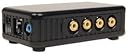
The IP Video 9100A Plus is a compact network video server featuring an embedded web server and 10/100Mbps Ethernet connectivity. It supports up to 4 simultaneous video inputs and audio, enabling remote monitoring of up to 9 locations via standard web browsers without needing a PC. Designed for seamless plug-and-play operation, itโs ideal for professionals seeking reliable multi-source video streaming and instant access to remote sites.
| ASIN | B000HBVTCA |
| Brand | Unknown |
| Customer Reviews | 3.7 out of 5 stars 37 Reviews |
| Manufacturer | Generic |
| Mfr Part Number | IP Video 9100 Plus |
| UPC | 683728010782 |
J**R
Fantastic, with a little help.
When I just couldn't get a wide enough outdoor IP camera I turned to the much, much cheaper CCD security camera market and found the perfect model. I then started trying to figure out how I would round up these CCD's with the rest of the IP cameras I have around my home. I found the IP Video 9100A being sold by Computer Geeks. Just looking at the generic product box made me wary but I figured I would give it a shot anyway. After all, I just needed a JPEG stream to pipe into my security software (Blue Iris). The product arrived on time and packaged well. Once I hooked it up to my network I found the device in my DHCP list on the router and I was up and running. The interface was horrible and it only really worked with Internet Explorer (No Firefox). I used Google to see if anyone was doing what I was and I found out that there were so many people using this gem because of a little third party firmware someone created and released for free! I had noticed that another reviewer here also recommended the same so I gave it a shot. The firmware is called Yoics [...]). Follow the directions! If you do not properly install the firmware and let it finish you can render your unit inoperable. Now that the new firmware is installed the interface is a dream to use and works absolutely perfect in Firefox. It also now gives me some images to clamp my security software to (which is xxx.xxx.xxx.xxx/usr/yoics0.jpg through yoics3.jpg for anyone wondering). This unit is so wonderful that I have just purchased another one for the other side of the house. I just wish the manufacturer would install Yoics as the default firmware!
P**F
Works 2 days at a time
I have two cameras connected over coax cable. ethernet connected and the FTP service running to backup to my FTP server The device works great for 2 days, then it goes dead and I have to do a power cycle to get it running again. As I'm writing this review it's currently down. I can ping the device fine, but if I try to connect through my browser it doesn't prompt for a login, it just hangs there. If I power cycle it works again. I've tested the router to make sure it isn't a problem at that point and the router is fine. I suspected it could be the constant FTP uploading, because I have it set on motion detect and to upload images to an offsite location, but even with that disabled it makes no difference, within 2 days it's down again. Also to note.. the "motion detection" system is EXTREMELY sensitive even on the lowest sensitivity. It'll pick up leaves, cobwebs, bugs, changes in light.. anything and everything is considered motion. The device also has a cheap feel to it. It's not a concern for me, but I know some people rate build quality by the feel of the device. The only thing I would say to be careful of, is when you're plugging in your RCAs, it feels like it could break the jack. It's overall not a bad device to cover somewhere that isn't too important.. but I wouldn't recommend it for anywhere critical, you're better off getting a proper DVR.
T**Y
Effective and Easy to Use
Got this item and had it set up and working within about 15 minutes. It does require you to do a bit of work on your router, but nothing hard. I was able to use it to watch my house over the holidays while I was over my mother's. Fun to see my cats walking around and playing. Worked on remote PC and on my LG non-smart phone! HOWEVER, I gave it a ding because I could not find a way, after hours of digging, to record what I was seeing remotely. I could record while at home just fine, but not from another computer. The image and video files would appear in the list when I had clicked save or save as, but then when I would go look for the file, nothing. I am stumped and will post here if I sort it out. It would be really great to figure this out. It does have the capability to upload motion detected images or constant recording to an ftp site, but I have not used this feature yet. Also, bear in mind there are several models; this one has NO video out, so you cannot record to a stand-alone dvr or vcr, but rather only to your computer. Instead, it has one audio in jack, which can be useful. I got this because I had a crazy drunk neighbor who would yell stuff outside my house at night. Made a point of telling him I had an audio-video recording system in place and the problem stopped instantly. He could see the cameras so he knew I was serious. The software/firmware works quite well. You can remotely adjust the image, view all or just one camera, etc. I do recommend this highly if you just want a system you can use to check on your house remotely. Addendum: Died a permanent death on August 23rd, 2013. Served its purpose but time to get a standalone dvr, as the prices have come down. I did like that this unit was easily hidden.
M**S
Poor manufacturing quality. Get the GXV3504 IP Video Encoder instead.
It stopped working for me even with the better Yoics firmware installed. The network connection would always drop after a little while. I spent hours messing around with my router settings and device settings but nothing fixed it. I looked on the forums for this device online and saw that some people were having some luck after re-soldering certain ICs. I had a hardware technician at the tech company I work for take a look at the device, and he saw that many legs on the ICs did not look like they were properly soldered. Event after he reworked them, it still had the same issue. Save yourself the headache and get the GXV3504 IP Video Encoder. It has worked flawlessly for me so far and has much better features (note that it has BNC inputs instead of RCA).
L**I
Pretty Cool Device---Really Needs Firmware Update
The device works great at digitizing four analog camera inputs and makes it available over the web. You must use Internet Explorer to get the best value out of the device because it requires Active-X. In Firefox (on Linux) the interface is rudimentary at best. I have resorted to using wget to grab images from the device. I planned to hook this up with ZoneMinder, but I need to update the firmware with the Yoics version which was mentioned by other reviewers. Unfortunaely, the first unit came in DOA, and had to be replaced (no problems, just took time), and then when I went to download the Yoics firmware, they have changed the site and I can't get to the firmware. Many requests for help have fallen on deaf ears. Yoics won't even provide an Email address!! I would give it five stars if they had the Yoics firmware already installed! Don't buy this unless you want to use windows and Internet Exploder. Rick
T**B
Not great, but good enough
JPG/STREAM URLS AT THE BOTTOM (but you must update firmware first) Does one thing, and does it well enough. Not great, but good enough. I'm giving this 4 stars because I can't seem to find anything else anywhere near this price range that still does. Works great for my old analog CCTV system with a BNC-RCA adapter. Enabled me to get those old video feeds into iSpy. Pros: Converts four RCA video streams into streams and images you can use in your own applications. Much cheaper than the alternatives. Cons: Doesn't seem to provide a stream or static image URL without updating to the YOICS firmware (keep reading), has a terrible GUI, and both the web server and the manual only work right in MSIE. You'll need to Google "YOICS firmware" and download that. Literally everything on the bundled CD is useless except the tools/IPEdit application (to find the camera's IP). Browse to that IP (only in MSIE), allow the plugin to run or the Configuration option won't enable. Select Configuration > System > Firmware Update and update to the YOICS firmware you found a moment ago. Install that and then browse back to the IP from MSIE again in about 30 seconds. Once you update the firmware, you can browse to IP/yoics[0-3].jpg for static images or IP/GetData.cgi?CH=0&Codec=jpeg&Size=320x240 for a live stream. If you're lucky, you'll never have to look at that godawful web UI again.
H**N
Amazing device to convert RCA camera into IP camera
I installed a different version of the firmware from a third party in order to get the features I wanted, but this device provides IP access to CCTV cameras (up to 4 of them) and at a fantastic price. Using this IP Video 9100A device in addition to a separate Wifi repeater with Ethernet ports on it, I was able to position cameras in remote areas, make them IP accessible, and wireless (except for power for the cameras, the IP Video 9100A and the Wifi repeater). No video cables were needed and I could access my cameras from anywhere. Fantastic!!!
P**R
Good Device, but beware jack order
There is one caveat about using the IP Video 9100 and that is that the video jacks are numbered 4-3-2-1 rather than 1-2-3-4. When I thought I had plugged into the number 1 (leftmost) jack I was actually plugging into number 4 and the results were disappointing. When I plugged into the rightmost jack, everything worked perfectly. I'm only using this device for a single channel of video, but now I am quite happy with the results. Google this device and you will find a link to a technical review that describes how this is a little Linux computer in a box... pretty impressive!
Trustpilot
1 month ago
1 day ago