We remain fully operational. Our teams are working around the clock to ensure your deliveries continue safely.

DOWNLOAD THE APP


Customer Services
Copyright © 2025 Desertcart Holdings Limited
DOWNLOAD THE APP


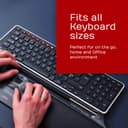
🖱️ Work smarter, not harder — the mouse that moves with you, not against you.
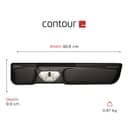
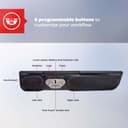
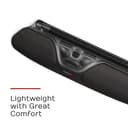
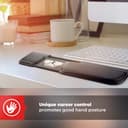
The Contour RollerMouse Pro3 is a wired USB ergonomic mouse designed to reduce shoulder, wrist, and arm strain by positioning the cursor control directly in front of your keyboard. Featuring a smooth rollerbar for finger-controlled cursor movement, customizable shortcut buttons, and adjustable cursor speeds up to 2400 dpi, it’s ideal for professionals seeking relief from RSI, carpal tunnel, and repetitive strain injuries while boosting productivity.


| ASIN | B01MTEH6WZ |
| Antenna Location | Office |
| Are Batteries Included? | No |
| Are Batteries Required | No |
| Battery Average Life | 2 months |
| Best Sellers Rank | 24,203 in Computers & Accessories ( See Top 100 in Computers & Accessories ) 562 in Mice |
| Box Contents | 1 x Contour RollerMouse Pro3, Keyboard risers, USB-C to USB-A adapter, User guide |
| Brand Name | Contour |
| Button Quantity | 7 |
| Colour | Black |
| Compatible Devices | Personal Computer |
| Customer Reviews | 4.5 4.5 out of 5 stars (330) |
| EU Spare Part Availability Duration | 2 Years |
| Embellishment Feature | pewter |
| Enclosure Material | Plastic |
| Global Trade Identification Number | 00743870004142 |
| Hand Orientation | Ambidextrous |
| Hardware Platform | PC |
| Item Dimensions L x W | 48.8L x 2.6W centimetres |
| Item Weight | 0.75 Kilograms |
| Manufacturer | Contour Design |
| Model Name | Contour Rollermouse Pro3 |
| Model Number | RM-PRO3 |
| Mouse Maximum Sensitivity | 2400 Dots per Inch |
| Movement Detection | Trackball |
| Network Connectivity Technology | USB |
| Number of Batteries | 1 Lithium Polymer batteries required. |
| Operating System | OSX, Windows |
| Power Source | Corded Electric |
| Product Features | Ergonomic Design |
| Product Finish Type | Matte |
| Product Warranty | 2 year manufacturer |
| Range | 33 feet |
| Style Name | Pro 3 |
| Theme | Space |
| UPC | 743870004142 |
| Unit Count | 1.0 count |
R**H
An important piece of kit if you have certain problems.
It's not a case of whether I like this product or not. The simple fact is that this has become a must accessory for me that I cannot live without. As a professional software developer of over 25 years using a keyboard and mouse constantly is key to making a living. Over the years I have developed various aches and pains in my hands that can be debilitating at times. The simple act of taking your fingers off the keys and rotating your hand to the mouse is an unnatural movement and one that was causing me a lot of discomfort. I have found it worse when I'm using a full size keyboard with a full numerical keypad etc and the mouse is further offset to my right. I have tried various ergonomic mice over the years, the best on the market, and none have quite worked for me as well as the rollermouse. The rollermouse sits underneath my keyboard and provides a comfortable palm rest. To move the cursor most of the time I simply stretch my right thumb down to the rollermouse and that's usually enough to most of the time to manoeuvre the cursor to where I want to go. A mouse click can also be simulated by pressing down on the rolling bar also. If needed there are dedicated buttons for clicking/selecting also. There is a trade off in the sense that the control is less accurate that a conventional mouse, however over time you do become used to it more and more. Also the pointer reaches the edge of the screen and the bar has been moved all the way to the end. At this point if you keep trying to move the roller it will eventually re-adjust and let you keep moving the pointer in that direction and this is initially a little jarring. I don't know how robust this product will be. It is collecting debris etc from my dirty hands over time etc as I eat lunch at my desk etc and probably don't have the best hygiene :). I have read however that it is possible to take it apart to clean it. Perhaps occasionally I should use a wet wipe and wipe down the 70% of the bar that is exposed. I will conclude by saying that it's a considerable investment, however I won't be buying another mouse and regardless of how long this lasts I will be buying another because this has become a natural, pain free way to interact with my machine 8 hours a day 5 days a week. My mice are now tucked away in my desk and I have no intention of bringing them back into action anytime soon. Well worth the money! I'm interested in trailing the mobile version at some point when funds allow!
A**R
Love this mouse!
I had used almost this exact roller mouse model at my last job. So when my wrist started hurting at my new job, using a regular mouse, I knew what I needed. I ordered it and it arrived quickly. I love how I can use either hand to operate the mouse with ease, sharing the days workload over two hands. The copy and paste buttons are great and the mouse keeps my back straight. Love that it doubles as a wrist rest when typing too. Best mouse ever!
N**C
RollerMouse
Brilliant!
B**L
Worth the cost...
May be a little expensive but worth the cost for ease of use. It plugs in and goes. I bought this as a 2nd one to travel with but be aware, it is narrower than the contour red plus but slightly longer. Saying that, I did not check the length difference. I do like the contour red better as it has a wider rollbar with little bumps on it and with nerve damage it helps more. Saying that, this one is a great alternative and a little cheaper, I love the copy & paste buttons which some cheaper ones do not have as standard along with the little scroll wheel. I have used this brand for a few years now and never looked back. At first it seems strange and alien and you feel slowed down, persevere and get used to it as in the long run you will be quicker and much more comfortable. As this was a 2nd travel item for me I tried a different brand that was cheaper, it was horrendously plastic, not comfortable and more suited to the bin. Do not go for any other brand, I truly would not be without a contour rollbar.
N**2
Life saver for shoulder issues
This mouse is a godsend for my poor shoulder. I have an issue with my rotator cuff and I’ve tried several mouses, all of which leave me in pain after a few hours but this one is fantastic! Love the fact that you can control the speed of the mouse and the short cut buttons are great. Works well with my Mac and my laptop. I have two reasons for not giving it 5 stars: - it doesn’t work well with ergonomic keyboards so I’ve had to compromise there - it’s really expensive and you’d expect it to be wireless for that price.
P**L
A career saver!
I've been a computer programmer for many years. Around 20 years ago I started getting terrible pains in my wrists and up my arms. Also in my right shoulder. I tried a whole host of alternative mice, trackballs, pointers - you name it - I tried it! None helped - often just causing pain in different places. For the last 15 or 16 years I have been using the Contour RollerMouse - and its saved my career! Pains gone! It took a little while to get used to it but now I'd never use anything else. They do wear out - I have had 3 Rollermouse Pros in the 15 or 16 years - just bought the Rollermouse Pro3. So I guess they last around 5 - 7 years. They have improved over the years and the RollerMouse Pro3 is a definite improvement over version 2. When my version 2 became temperamental my initial reaction was "Oh great - I have to buy another of these things". Its a necessary not an exciting purchase! What's improved is the tracking speed can now be adjusted via a button on the top - rather than turning it over and turning a dial. Secondly the scroll button is so much smoother to use - its buttery smooth! If my old Rollermouse had not broken would I have bought the upgraded version? NO! But it makes me feel a bit better about having to replace the old one!
S**L
Wish I had bought this years ago.
This product is amazing. I was apprehensive due to the pricetag and having already tried various other ergonomic mice which did not improve my RSI But should not have hesitated at all. Very sleek appearance and very easy to set up; took no time at all to get used to using, the copy and paste and double click buttons are an excellent addition. No more having to hold down the mouse to drag items and easy to use with both hands.
E**N
Ich bin Fan, diese ist bereits meine 2. Rollermaus. Arm und/oder Schulterschmerzen kommen dank dieser nicht mehr vor. Diese ergonomische Maus sollte es auf Krankenschein geben.
O**E
Tout d'abord, je précise que le modèle que j'ai acheté était en occasion, à un prix très très très bas par rapport au modèle neuf. C'est pour cela que je laisse les 5 étoiles, bien qu'il n'ait pas été précisé que les rehausseurs de clavier n'étaient pas fournis. J'ai été un peu déçue au départ que le dispositif soit incomplet, mais cette roller-mouse est tellement pratique et a si bien réussi à faire disparaître les douleurs et tensions que j'avais au bras droit en raison d'une mauvaise posture que ce que j'imaginais pouvoir être un inconvénient a bien vite été oublié. Cela fonctionne très bien comme ça et si besoin, je trouverai bien un système pour rehausser le clavier par mes propres moyens ! La prise en main est très facile et rapide, le confort est incomparable, bref je recommande sans réserve cette souris !
J**U
UPDATE 12/2025 The roller mouse is still working wonderfully and the pain I mentioned in my original review has not returned. I am Extremely happy with this purchase - I highly recommend it and if this one ever stops working, I will buy another. Original Review: My shoulder wrist and forearm pain are gone! I regularly use two large monitors plus my laptop screen, moving the cursor across all of them is easy, once you hit the end of scroll bar if you haven’t made it to the desired area, there is a spring type of thing. Just push into the spring and the cursor resets and continues moving as needed. I was hesitant about getting the roller mouse because 1) I wasn’t sure how easy multiple monitors would be, it’s a snap and nothing to worry about. 2) I had used an ergonomic split keyboard for 15+ years, so I was concerned about not being able to use the older mouse with that style of keyboard. I decided to give it a try and now use a regular keyboard with no wrist pain as of yet. I’ve been using the roller mouse for a couple of months now. 3) The price had me think long and hard about it; but I decided to give it a try through Amazon because it’s easy to return if it didn’t work out, and because if it did work it’s much cheaper than doctor visits, physical therapy or surgery. I’m extremely happy to say I have not needed to go to the doctor for the pains I had and I no longer need to eat ibuprofen like candy. The only regret is that I didn’t find the roller mouse a couple of years ago. I use the number pad on the keyboard extensively, so I chose the Pro3, it’s perfect.
K**R
En favorit - jag har blivit av med mina besvär efter att jag började använda denna.
N**O
me gusta amazon.en
Trustpilot
5 days ago
2 weeks ago