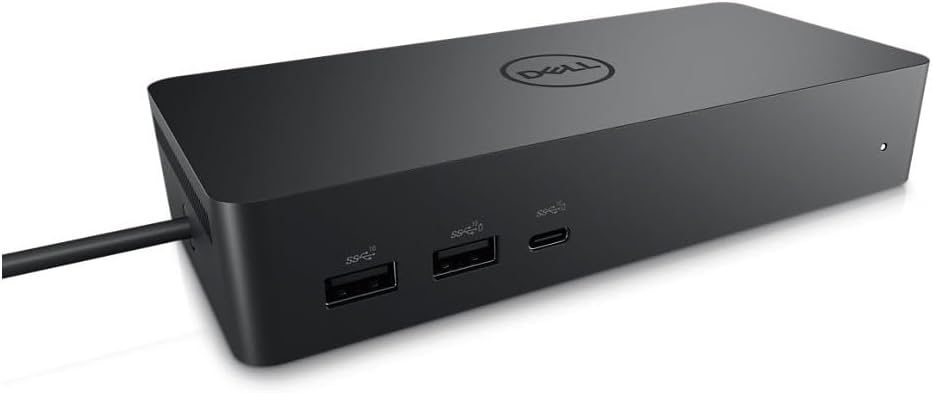





Dell Universal Dock UD22
Product ID: 524247536
Details
- BrandDell
- ColourBlack
- Compatible DevicesMonitors
- Hardware InterfaceHDMI USB 3.0 A
- Item Weight14.7 Ounces
- Number of Ports10
⚡130W power delivery
💻Dual 4K display support
🔌10 versatile ports
Buy anything from 5,000+ international stores. One checkout price. No surprise fees. Join 2M+ shoppers on Desertcart.
Desertcart purchases this item on your behalf and handles shipping, customs, and support to Uruguay.
⚡ Power your productivity, anywhere, anytime.
The Dell Universal Dock UD22 is a compact, high-performance docking station featuring 10 ports including HDMI and DisplayPort, supporting dual 4K displays and delivering up to 130W power. Compatible with both Mac M1 Pro and Windows laptops, it streamlines your workspace with universal connectivity and single-cable charging, making it an essential tool for modern professionals seeking flexibility and efficiency.
| ASIN | B0B5YC6TS4 |
| Best Sellers Rank | #79,679 in Electronics ( See Top 100 in Electronics ) #32 in Docking Stations |
| Box Contents | Item |
| Brand | Dell |
| Brand Name | Dell |
| Colour | Black |
| Compatible Devices | Monitors |
| Customer Reviews | 4.4 out of 5 stars 552 Reviews |
| Hardware Interface | HDMI , USB 3.0 Type A |
| Item Dimensions L x W x H | 16.6L x 3.2W x 7.6H Centimeters |
| Item Weight Unit of Measure | 14.7 Ounces |
| Manufacturer | Dell Computers |
| Manufacturer Part Number | 210-BEXR |
| Model Number | Dell-UD22 |
| Number of Ports | 10 |
| Product Dimensions | 16.6L x 3.2W x 7.6H Centimeters |
| Smart Home Compatibility | Not Smart Home Compatible |
| Total HDMI Port | 1 |
| Total USB Ports | 6 |
| UPC | 884116431442 |
| Unit Count | 1.0 Count |
| Wattage | 130 |
K**L
Finally- Mac + Windows compatible
Based upon last 3 months user experience Pros: 1. Compatible with both Mac M1 Pro and Windows laptop 2. Compact and light weight 3. USB -C type input - sufficient wire length 4. Max 3 output: 1 HDMI and 2 Display Port 5. Multiple USB ports for easy connectivity 6. No need of external power source for laptops, this single USB C input will charge it 7. Latest software updates are available on dell website Cons: 1. At least 2 HDMI port should be provided, I had to purchased a new cable to connect second screen. 2. All USB ports should be 3.0 3. To shift from Mac to windows, manually unplug the USB C 4. Avoid using any Display Port to HDMI converter. I faced resolution challenges when system goes to sleep mode.
D**N
Appears to be refurbished or minor reject sets given the price, but functions well as intended
Had multiple scuffs on the exterior, but functions well as intended so far. It seems likely a refurbished set or rejected set due to minor defects (exterior scuffs) rather than brand new in perfect condition, though not unexpected given the price.
S**R
This Dock is just what I needed!
Needed HDMI and USB-C ports plus a RJ-45 gigabit. These new superthin laptops have very few ports so a dock like this is really necessary. I've looked at other smaller docks but they need you to buy a 90-100Watt power brick. This Dell dock comes with the power brick that can provide up to 96Watt power delivery via the USB-C port. This fits the bill nicely. Genuine brand new DELL OEM packaging with Dell Service Tag S/N. Looks like the date of manufacture is: 06/05/2024. Lots of connectivity -- tested USB-A, USB-C, HDMI and RJ-45 ports. All working fine. Will be attaching external SSDs via USB-C later. Setup was a breeze and the dell ports and connectors are heavy quality and seem to be durable. Very similar to the WD19tbs I used at work.
U**K
Fantastic - Supports connection using BOTH DisplayPortAltMode *and* DisplayLink.
This is fantastic - high resolution, supports up to four monitors simultaneously, but take care to note that the way you connect to the dock dictates how many, and which of, the four monitor ports will work. In driverless mode (Display Port Alt Mode - found on most laptops that have a display icon next to the USB-C port or that advertise "USB-C with data and display" for the connecting USB-C port) only the HDMI port - and - EITHER DisplayPort #1 OR the USB-C Port will work. If you want to use more ports than this (up to and including all four ports simultaneously) you'll need to install the DisplayLink driver. I got this dock because my employer won't let me install software on the work laptop, so I can't install the DisplayLink driver, therefore I'm stuck with two screens maximum. If I change jobs and the new job lets me install the DisplayLink driver, then I'll be able to move to a three or four monitor setup. This has been a major step up from my previous Dock (which only supported 1080p resolution) and, as advertised, works driver-free with my work Dell laptop and my personal Asus laptop, as well as working with DisplayLink drivers with my Mac laptop. This is the only dock I've found that lets you connect BOTH DisplayPortAltMode and DisplayLink computers to the same dock. The cable length is good (80cm) which was enough to mount the dock in a cable tray hidden under the desk while still allowing enough length to comfortably reach up to the top of the desk to plug into the laptop. So after getting over the confusion of which ports work in which mode - it's a great bit of kit.
J**N
Excelente
Quedo genial para la laptop, tengo una dell, por lo que solo conectarla la leyo, ahora ahi tengo conectado mause, teclado y monitores, ademas carga la bateria de la lap
P**D
Bon fonctionnement
Content du produit
Trustpilot
3 days ago
4 days ago