


๐ Elevate your MacBook game with the ultimate all-in-one hub!
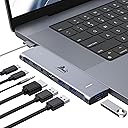
The LIONWEI USB C Hub is a premium 7-in-2 multiport adapter designed for MacBook Pro and Air models (2016-2022). It features a 4K HDMI port, Thunderbolt 3-enabled USB-C port supporting 100W power delivery and 40Gbps data transfer, plus multiple USB 3.0 ports and a 3.5mm audio jack. Crafted from aluminum, it offers fast charging, dual-display support (non-M1/M2), and seamless connectivity without blocking the magnetic charging port, making it an essential accessory for professionals seeking enhanced productivity and sleek design.


| ASIN | B0BSFD1DBG |
| Additional Features | Fast Charging, Fast Data Transfer, Plug and Play, Portable, Video Transmission |
| Best Sellers Rank | #511 in Computers & Accessories ( See Top 100 in Computers & Accessories ) #12 in Laptop Docking Stations |
| Brand | LIONWEI |
| Color | USB C Hub Adapter (MacBook) |
| Compatible Devices | Laptops |
| Customer Reviews | 4.3 out of 5 stars 13,399 Reviews |
| Data Transfer Rate | 40 gigabits_per_second |
| Enclosure Material | Aluminum |
| Hardware Interface | USB 3.0 Type C |
| Item Highlight | 7-in-2 with 4K HDMI, Thunderbolt USB C, USB3.0, Audio, 100W PD Port, for MacBook |
| Item Type Name | macbook pro adapter macbook accessories |
| Manufacturer | LIONWEI |
| Mfr Part Number | MUC2201 |
| Minimum Required Operating System Version | Mac OS X 10.0 Cheetah |
| Model Number | LIMUC2201 |
| Number of Items | 1 |
| Number of Ports | 7 |
| Operating System | Mac OS |
| Special Feature | Fast Charging, Fast Data Transfer, Plug and Play, Portable, Video Transmission |
| Total USB Ports | 4 |
| Total Usb Ports | 4 |
| UPC | 768587480461 |
| Unit Count | 1 Count |
| Warranty Description | 2 year |
B**M
amazing hub, great value, everything I wanted.
I try not to give 5 stars in my reviews because I know sometimes it seems too good to be true, but some products deserve it. If I can't come up with something wrong to deduct a start, then I have to give it its due. This is definitely a 5๏ซstar product, and I will outline my reasons for it. 1. When I was looking for a hub most of the time you end up in one of two brackets either it's on the cheaper side but you cannot charge your laptop with it, and it doesn't have a whole lot of ports, or it falls on the expensive side like more than $100. On top of that almost all the other hubs have a bunch of things that I don't need, like an SCID port. This one is surprisingly affordable, especially for what it offers. 2. For this hub, it's almost like the manufacturer had contacted me and asked me what I wanted in the hub. Then after I told them, they manufactured exactly that. Because it has two HDMI (which is surprisingly not common) and then on top of that, a DP port. I actually have the capacity to connect three monitors if I wanted just by using converters. Currently my extra monitors are HDMI because that's the tech that I have (in addition to my MS Surface). One of the HDMIs could also use a DP cable anyways. But if I added an extra monitor, I could have 3. With my laptop, I would practically look like โthe Sourceโ in the Matrix movie with all those monitors connected. So my point just being that if you need versatility, this offers that. You can hook up 3 total monitors and be great to go. 3. On top of that it has tons of USB-A ports. I have a lot of products that use that, including my headphones, my external hard drive, and my camera. But that is not all: it has those two USB C ports in the back. Therefore, this hub is going to work for me for a long time because there's just so much I can do with it. 4. When I first got it, I could not get it to charge. I'm putting this in here because I saw some reviews where they mentioned that they were having an issue getting it to charge. I will say that it's very important that you have the correct cable. That was what I learned when I got this product. So if you're having that issue, the way to troubleshoot it is to plug your laptop in with your USB C cord with your brick into the wall and make sure that your machine charges without the hub at all. That will help you determine what the problem is, and that's what helped me determine what the problem was. It wasn't that i had a cheap USB-C cord, but I was using that USB-C cord for a piece of tech that apparently wouldn't charge my laptop. It would power my backup battery when I needed to charge that. Make sure the cord you are using truly is 100 Watt PD charging. Or of course, I'm sure you can use a 240 Watt if that's what you happen to have. I went the extra step of getting a confirmed USB-IF Certified cable. It's not that much more to do it, and a good cable is worth it. Ever since then I've been golden. I will say, naturally, if I have my machine powering my drive + other stuff, the 100W may increase the charge of my device, but it maintains it. Like 28% might stay there. I think thatโs common sense, but just in case someone is having that issue. If Iโm just using the monitors though, it charges my laptop to 100%. 5. The other feature that I absolutely adore is there is a button on top where I can switch displays instead of having to go through the menu. I definitely use this more frequently than the average user because sometimes all I need are a couple of screens up, or maybe just one, and I donโt like to have monitors running for no reason. It can just lead to screen burn, etc. I may not necessarily need to have all of my screens running. So i can push on that button (I put a picture of what pops up), and it gives me the display options just on that first one touch. I'm still learning but there is a difference between a brief touch and holding it in, and there is a difference to be had. So what I'm talking about is the brief touch you have your menu options and then you can choose from there. It's so convenient and a wonderful time saver for somebody like me who sometimes I only want my big secondary screen, and sometimes I want to light it up with all the monitors I have because I need them for the project you're working on. Good reviews help us all make good purchasing decisions, so I hope this helps anyone else in knowing what they are getting.
C**S
Great port expansion for my home office setup
I recently picked up this LIONWEI 13-in-1 Docking Station to help consolidate my desk setup, and it has been a solid addition. Iโve been using it with my [Insert your laptop, e.g., MacBook Pro / Dell XPS] to connect multiple peripherals and monitors, and overall, it works exactly as advertised. Port Variety: The selection of ports is excellent. Having 2 HDMI and a DisplayPort made it very easy to connect my external monitors, and the additional USB-C and USB-A ports mean I donโt have to constantly swap cables for my mouse, keyboard, and external drives. Performance: Iโve found the Ethernet connection to be stable and fast, which is a big upgrade over relying solely on Wi-Fi. The power delivery feature keeps my laptop charged while I work, which is one less cable I have to worry about plugging in directly. Compatibility Note: Itโs worth noting that this is a great solution for expanding ports, but if youโre a Mac user, keep in mind that [Mac OS typically only supports extending one monitor / specific display configurations]. Itโs been perfect for my needs, but it's something to double-check before you buy if you plan on running a triple-monitor setup on a Mac. Build & Heat: It feels well-made and doesnโt get excessively hot even after a full day of use. Bottom Line: This dock is a great, cost-effective way to clean up a cluttered desk. Itโs highly functional, easy to set up (plug and play), and offers more than enough ports for a standard home office. Highly recommended if you're looking to turn your laptop into a full workstation.
R**Y
Yes! Works from a USB Lithium Power Bank Passing Power To The Host Computer!
12 March 2025 (Just got it today) Review for ASIN B0BNTHWWMY Described as: USB C Hub USB C Docking Station Dual Monitor 13 in 1 Triple Display Multiport Adapter with 2 HDMI+DP+8 USB C/A Ports+Ethernet+Audio, USB C Dongle for MacBook/Dell/HP/Lenovo ThinkPad/Surface It does that which I truly needed. It will pass power from a USB Lithium Power Bank through itself to the host computer. That means it will work in a power outage or it will work when I have to go to an office or to court where no AC outlet is available. Not all of these USB-C Docking Stations will do that. I have a recently purchased Orico that will not do that so I have to return the Orico now that I have this Lionwei. This one is a Lionwei brand: Not known to me but I'll be keeping my eye on the brand from this point onward. It's a solid feeling item made of metal. I guess aluminum? I don't know. I'm not going to be using multiple monitors. Today, my first day of ownership, I only had time to test the things I need most: (1) USB Lithium Power Bank providing power to the host through this docking station. That works great. My little HP notebook requires 45W ( 3 amps at 15 V). My RoMoss 65W power bank does that for sure and obviously there's an additional 20W overhead to also power the Lionwei docking station. Works great. My old trusty HP Elite X2 1012 G1 Notebook is charged while using it when connected to the power bank through this Lionwei dock. (2) RJ45 Gigabit LAN - worked fine. (3) Several USB drives. 1-USB3 Sandisk flash; 1-USB 10Gbps M.2 enclosure; 1 WD MyPassport 2TB Hard Drive and all worked as expected and all at the same time. (4) Just for a test, I connected a HDMI 1080p TV. It worked fine. And all of the above were attached and running while the HP notebook was being powered and charged by the RoMoss 40,000mah 65W power bank through this Lionwei USB dock. That should give me about 60 minutes from the power bank before the notebook battery begins to drain and then I should have another 60 minutes from the internal battery. Excellent for my needs. I try to avoid giving 5 stars because people tend to consider that a 5 star rating is the beginning of an untruthful review that was bought and paid for. So, 4 stars is as good as it gets most of the time from me and this is 4 stars for sure. And...yes, I bought it with my own money. I just wanted to put up a review immediately because I have spent well over 12 hours over many days trying to find a docking station that advertises it will work from a lithium power bank. None of them seem to want to advertise that they will work from a lithiuim power bank. Why? I don't know. But, this Lionwei does it and does it well. Now, when the tornado rips my house to shreds, I can still hotspot my phone to my notebook and power them from a lithium backup...if....I can find those devices in the rubble. Or, I can take them to a remote location away from AC mains and still get work done as long as I have a cell signal. I've also got a 30,000mah RoMoss power bank to power my phone. The RJ45 LAN is mostly for connection to my Synology NAS. The NAS is connected to a Cyberpower UPS that will power the NAS for about 18 hours. So, if the power is out, I can still get needed files from my home NAS. Good luck to all. If anything goes wrong, I'll come back to update. 01 April 2025 Update Nothing new to report. Still works as expected. Nice product.
A**R
Great Expansion Device for Macbook
Excellent addition to any modern MacBook pro. Adds another HDMI port on the other side of the device. Good fit and finish. Feels like part of the computer and not an extension device. Highly recommended!
J**Z
Excellent for running all the parts for a classroom.
Amazing and perfect fit Mr me as a teacher. Our tech department is looking at getting them for the district! I have 2 displays plus a cast to a TV. I have my iPad, presentation clicker, my flat charger, and my external hard drive all connected while still having room for more! The compact size is perfect for saving space on the desk. The connectivity is quick and the unit overall is easy to use. So far, it hasnโt gotten hot, but we will see when itโs used during the year.
R**F
HDMIs Stopped Working After ~6 months
Edited Review: I think Amazon makes it really hard to contact your merchant to discuss troubleshooting issues. Fortunately, the merchant/seller was able to offer me a full refund or send a new one. I opted for a new one because I really did like it when I initially had it. Hopefully, it won't have the same issue again 6 months later. I will update if that's the case. The merchant also showed me some steps, but it still didn't work on the old one. However, on the newer one it did work. Thanks! --Previous Review-- Product Bought: 13 in 1 USB C Docking Station - Dual Monitor, Triple Display, 8 USB C/A Ports, Ethernet, Audio for Windows I had bought this back in September 2023. It was working GREAT and worked with my KVM switch so it made it easy for me to switch between my work laptop and my personal desktop. I used the docking station for my work laptop since I require more USB ports. It stopped working all of a suddenly today. I know: It's not my KVM switch because the dual monitors work fine when I switch to my personal desktop. It's not the HDMI cables because when I plug each one individually into my work laptop, they still appear as an extended monitor. It's not my work laptop because it turns on and can recognize the other USB devices in the dock station. For some reason, it's ONLY the HDMI ports. Everything else like the USBs work just fine and my work laptop can recognize those. However, the HDMI ports are broken. So beware! I tried finding tech support, but it's no longer available since I am past the return window. That's what I get for being cheap. I guess I should find the original OEM dock stations for my work laptop now. I really liked the quality of the material if it did work. It's not some flimsy plastic although it could be a mix of metal and plastic. It keeps cool.
Z**R
Decent station, LAN issues
Overall this is a solid , cost efficient docking station, with tons of ports. The only issue we ran into was not being able to keep up with the LAN speeds - when going through the docking station as opposed to a direct cable, we lost about 100Mbps of upload speed.
M**E
Great Dock for a Work-From-Home Setup,
I work from home full-time and purchased this docking station to simplify my desk setup. I currently have two external monitors, an Ethernet connection, a USB microphone, a wireless mouse/keyboard receiver, a mouse jiggler, and my laptop charger all connected through this dock. Setup was completely straightforward. I plugged everything in, connected it to my laptop, and it worked immediately without any headaches. Having a single connection to my laptop instead of multiple cables has made my workspace much cleaner and more convenient. All of my devices, monitors, and network connection have been recognized consistently, and overall the dock has performed exactly as I hoped. The only reason Iโm not giving it a perfect score is that it gets noticeably warm during operation, especially when Iโm using multiple peripherals and passing power through it to charge my laptop. It hasnโt caused any failures or disconnects, but it does run hotter than I expected. Iโve also occasionally noticed slight mouse lag or stuttering when my mouse receiver is connected through the dock. Interestingly, the issue disappears when I plug the receiver directly into my laptop. That said, the lag isnโt constant and doesnโt happen often enough for me to say with certainty that the dock is the cause. Overall, Iโm very happy with this purchase. For the price, it has handled a fairly demanding work-from-home setup with ease and has significantly reduced cable clutter on my desk.
T**M
Great integrated and low profile Macbook Pro 16 USB C hub with necessary functions and good quality
TL;DR Great USB C hub for Macbook Pro 16. It has all the necessary adaptors and it has a good low profile shape which can be integrated smoothly with the MBP 16. (See uploaded video) I will highly recommend this hub. Pros: 1. I purchased this usb c hub to convert the my MBP16 usb c to USB-A and sd card reader. And it works great, every usb converting function is working as expected. In the meantime, the hub won't get extremely hot (my previous adaptor does). It will keep in a warm temperature which is acceptable. 2. I occasionally use its HDMI adaptor to connect my MBP to a 1080P monitor, and the monitor can work smoothly in 60HZ. 3. I really like its low profile design and it can be connected/integrated with my MBP smoothly. The hub is tightly connected with my mac and they are almost in the same level, I can put my mac on the desk and do not need to worry if the hub has bump or create uneven point. Cons: 1. The hub's power light won't turn off, even I shutoff my laptop. It maybe because I have my mac's power cable always connected, but I think it makes more sensor to shutdown the hub if the laptop is in sleep mode or shutdown. 2. It lacks DP adaptor. I think this "Con" belongs to Apple. I cannot find a usb c to hdmi adaptor that support 4k 60Hz output. So to use mac with 4K 60Hz monitor, it needs to be "usbc to usbc" or "usbc to dp". In general, I think a DP adaptor is more preferable than a HDMI for a Mac.
V**E
Doesn't fit if you have a protective case on your Macbook
So far this product has been really good for all the uses I needed out of it. The build quality is really great, all the ports work really well and are sturdy. There is no part of the product that is creaking or a loose piece of plastic. It fits really well if there is no protective case on your Macbook, which I didn't mind removing but some people might. The best feature about this product is the Hdmi port. The resolution on that port which the monitor receives is really good in quality. This is definitely a good buy. The only thing that is left to be spoken for is the life of this product. So far it has been really good.
I**A
Funciona perfectamente
Funciona a la perfeccion
M**F
Covers the head phone jack
When updated from my 2014 MacBook, I ended up with four thunderbolt micro usb-c ports and no USB ports at all. This gadget is a must and not realising I already had a smaller version and thought I had lost it have ended up with two but I use both with one each side of my MacBook, unfortunately the one on the right covers my headphone socket but not really a big problem (nobody's fault) but in the daytime I use all the sockets to drive my extra monitors each side of my computer giving three screens to use for my music pro midi software - brilliant product
V**D
Best one i've tried
i love the fact that you can charge your mac at the same time, this is a must have feature for every hub adapter. it's sturdy as well
Trustpilot
1 month ago
5 days ago