Buy anything from 5,000+ international stores. One checkout price. No surprise fees. Join 2M+ shoppers on Desertcart.
Desertcart purchases this item on your behalf and handles shipping, customs, and support to Uruguay.
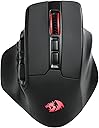
🎮 Dominate your MMO universe with precision, speed, and style!
The Redragon M811 PRO Wireless MMO Gaming Mouse combines 15 programmable buttons, ultra-fast 2.4GHz wireless connectivity, and up to 26,000 DPI sensitivity in an ergonomic design. Featuring dynamic RGB lighting and customizable software, it’s engineered for professional gamers and power users seeking ultimate control and comfort.


| Additional Features | Ergonomic Design, Programmable Buttons, Rechargeable, Wireless |
| Antenna Location | Gaming |
| Are Batteries Included | Yes |
| Are Batteries Required | Yes |
| Asin | B0BZ48R28T |
| Best Sellers Rank | #1,726 in Video Games (See Top 100 in Video Games) #91 in PC Gaming Mice |
| Brand | Redragon |
| Button Quantity | 15 |
| Color | Black |
| Compatible Devices | PC, Laptop, Tablet |
| Connectivity Technology | 2.4Ghz Wireless, USB-C |
| Customer Reviews | 4.0 4.0 out of 5 stars (1,080) 4.0 out of 5 stars |
| Enclosure Material | ABS |
| Finish | Matte |
| Hand Orientation | Right |
| Hardware Platform | PC, Mac |
| Item Dimensions L X W | 4.84"L x 3.38"W |
| Item Type Name | Gmaing Mouse |
| Item Weight | 148 Grams |
| Manufacturer | Redragon |
| Mfr Part Number | 209936298 |
| Minimum Required Operating System Version | Windows 10 |
| Model Name | Aatrox |
| Model Number | M811 PRO |
| Mouse Maximum Sensitivity | 26000 Dots per Inch |
| Movement Detection | Optical |
| Number Of Batteries | 1 Lithium Polymer batteries required. (included) |
| Operating System | PC/Mac/Linux/Unix |
| Power Source | Battery Powered |
| Range | 10 Meters |
| Style Name | Modern |
| Theme | Video Game |
| Unit Count | 1.0 Count |
| Warranty Description | 1 year |
User
Only one of its kind???
I have had this mouse since June 2024 and I absolutely love it. SUPER responsive, works whether or not you open the companion app. I can use my mouse to type in pins. It is the ONLY mouse I can find besides the AATROX by the same company(which is arguably the same thing despite its separate listing on both Amazon and the company website?) that has this set up. My only complaint is that the LEDs can't really be custom colors and only really work with the presets the app shows. It fits really nicely in my hand, the left and right mouse buttons are large so it doesn't take much to click. I LOVE the shelves for my fingers on the side which make it super comfy long term. It's a fairly quiet mouse overall. Scrolls like any other mouse. It's a little on the heavy side but glides smoothly and easily. Overall, really nice mouse and seems like a fair price for it. I will buy this again when the one I have eventually dies unless another brand makes this style in the future
User
Re-MAP EVERYTHING. If you’re into that.
Feels like a premium mouse. Buttons stable, sturdy and clicky. Programmable. ALL buttons are RE-MAPPABLE, with the lightweight, downloadable software. Software is surprisingly good, as I was expecting trash.Sensitivity is adjustable. Colors are whatever, cool I guess. Response in wireless is FAST, but you can also plug up for zero latency.Form factor is ergonomic and comfortable. If they let me design it, I’d flatten the top curve of mouse slightly, but that’s not a complaint.For MMOs, it’s the perfect mouse.
User
A great mouse, but not built for claw-gripping - built moreso for palm-grips.
A great mouse for the price. A great laser, plenty of customizable buttons, bright multi-color lighting, and not much to complain about.My one major complaint is a matter of personal preference anyway - I typically use mice with a "claw"-style grip. That isn't really possible with this mouse. It is definitely made for palm-gripping it, with a little extra lateral movement support from your pinkie on the side. It's a comfortable mouse if you're palming it though.The software is quite simple but capable enough. It allows you to export/import profiles, so swapping between them is easy enough. Just click the app in your tray -> click "import" -> select desired profile file -> select "apply" to toggle between them. If there are two you find yourself toggling between often, the dedicated button on the bottom of the mouse allows you to hot-toggle between two profiles. Just apply a profile via the software, hit the button on the bottom of the mouse, and then apply a 2nd, and then the button will toggle between these two freely. Of course, you're able to rebind all of the buttons on the mouse (except the profile switch on the bottom) to whatever you'd like. Keyboard keys, media keys, macros, DPI toggles, etc.The RGB implementation is great, has a few animations to pick from, and can get quite bright if you max it out (though I like to leave it all off). Its lighting is controlled by the application, but the scroll wheel's lighting is dependent upon the *DPI profile* color under the "Advanced" tab, ***not*** the settings on the "Lighting" panel which govern all of the rest of the mouse's lighting. You can set up to 5 DPI levels to toggle between here, and if you click the colored square next to each of these DPI setting lines, you're able to set the color of that particular line, and this actually governs your scroll wheel's lighting color. This allows you to disable the scroll wheel's light entirely, which I'm sure saves a bit of battery life.The battery seems to last long enough that I only need to plug it in to charge once every few weeks, using it for 5+ hours/day with a 1,000hz (high) polling rate while *not* in eco-mode via the switch at the bottom of the mouse. So I really can't complain there.A minor complaint about the software - I've tried to set the application to open on boot, but the mouse is often asleep when booting, so it fails to detect the mouse when the PC boots up (if you haven't yet clicked to wake the mouse), which closes the application automatically because no mouse is detected. It seems to keep resetting the polling rate to 125hz on occasion as well. Minor complaints though.There is no horizontal/sideways scrollwheel action btw. That being said, 6 months out, I vigorously mash that MMB on the regular and it isn't flaky yet, as is common with competitors in this space.*EDIT ADDITION 2024/09*When the mouse is woken from the sleep state with a click, it will occasionally (~10% of the time) register as either a keyboard key being held down, or keys rapidly firing. Turning the device off entirely via the switch on the bottom and then turning it back on fixes this. This is a somewhat significant issue. I've been lucky that it hasn't caused any irrevocable issues by interacting with my browser yet. -1 star for this alone -- I don't know whether it's a hardware or software-remediable issue, but I'll add the last star back on if/when an update is available to fix this issue.*EDIT ADDITION 2024/11*When pressing any of the buttons which are bound to things (other than the usual LMB, RMB, and scrollwheel), it will occasionally register the button as either held down, or will otherwise spam the result roughly 20x/sec until fixed. Fixed by pressing the relevant button/s again or turning the mouse off/on again. Very annoying. Still an overall great mouse for the price though.
User
Read this before buying!
I want to clarify some points that others reviewers have made.1. Software does not come in the box, however, there IS an instructions sheet with the website address to download the free configuration software.2. Windows Defender does not recognize the Redragon software, so you have to approve the installation and use... This does NOT mean it is a virus.3. Every button on the mouse IS MOST CERTAINLY assignable. However, you have to "record" the new button (or combination of buttons), then assign the new macro (that's what a button recording is called), then apply the new setting. This is all done in the free software.4. Redragon makes many peripheral devices, and EACH device has a unique download for the software. Make sure the download matches the device you have! Or it won't work.5. If the software is too confusing for you, there IS IN FACT videos on YouTube that will walk you through the process.6. If the mouse cursor feels "choppy", raise the polling rate in the software. It can be adjusted from 125-1000 mhz. The higher the rate, the smoother the cursor will respond.7. The "mode" button on the bottom of the mouse switches between 2 "profiles" that you can create in the software. Every time you press it, it switches between the profiles. However, there is no indication of which profile is selected unless you open the software and look at the settings you have adjusted.8. The mouse comes with a 2.4ghz wireless "USB dongle". This dongle has to be inserted in a working USB slot on your computer in order for the mouse to work wirelessly.9. Size is subjective. Everyone's hand is different. This mouse may be too big, or too small for your hand. That's life.Overall:I feel that these mouses are the best "bang for the buck" there is. They have features and quality that match brands that cost 2-4 times as much. Yes, the software is a bit utilitarian, but it is fully featured. If this particular mouse does not fit your hand, than try a different model. They makes many mouses of many different sizes. You won't find a better mouse at this price point.
User
Better options at this pricepoint, major precision issues
Switching from a Tecknet mouse with 5 side buttons to this, in a similar price range, because of the expanded side buttons. After using it for almost a week, I'm not happy with my choice and will be scouring ebay for a replacement for my discontinued Tecknet.To compare the two, the ergonomics of this Redragon mouse are awful. Only a full wrist-down grip is viable, and I normally do the claw. The center of the mouse is raised up super high, presumably to give it a more vertical grip angle, but this just causes issues. I have smaller hands and I have to choose between being able to reach the main buttons or rotating my hand to be able to use the first 4 numberpad buttons. There's nowhere to really grip the left side of the mouse with your thumb to slide the mouse to the right, if I hold it the way I used to hold my Tecknet (thumb against forward/back buttons) I keep accidentally triggering them because the switches are far too sensitive, the only other option being to stretch my hand out and hold my thumb against the edge of the thumbrest. Twice now typing this review I've accidentally gone to the previous page from just going to grab the mouse and bumping it. There's also no removable weight tray like the Tecknet had, and the mouse is too light for my liking with no recourse.As far as software goes, I'm happy with the tuning program for this mouse on the surface. Macro setup was nearly identical to the Tecknet, with good options available for dpi and whatnot. But... upon setting up a quick rapid fire macro identically to the one I made for my Tecknet, the mouse seems to almost lose connection between clicks (every 40ms.) My Tecknet allowed me to move the mouse to continue aiming while holding a key with the same rapid fire macro, and I shouldn't have to explain how "being able to move your aim" is a benefit when using a rapid fire macro. With this Redragon, the mouse completely stops reporting movement every time the macro makes a click. Beyond this, it will randomly slow down and stop when moving in a direction, as if your DPI randomly starts dropping like a bad call connection. This makes games unplayable with any kind of precision or consistency, and makes just using the mouse at all a frustrating and annoying endeavor. This is basic functionality stuff, no mouse labelled PRO should have issues I'd expect from something off of aliexpress for 8 dollars.My only positive is the battery and wireless setup. My Tecknet was wired, as have most of my previous mouses, so it's nice to have a wireless one and not worry about a bunched up wire pushing my mouse around when using the numpad in a game, for example. The battery life is fantastic. It came at 70%, as indicated by the app. It dropped to 40% earlier today, 5 days later. But, to keep comparison in mind... the Tecknet was hardwired.I'm almost embarassed I spent so much time writing this, maybe a sense of duty to warn others. It's just not worth it, the quality control is awful and the mouse isn't great even if it worked as intended. Go with another brand, I sound like a Tecknet shill but I've had 3 of their offerings and not once been disappointed, but other brands are available. Even Razer has some decently priced stuff.
User
OK... Odd feel and odder software
Ok mouse, but after a week I decided to go with a different one. The shape is just awkward for my hand/grip and the software was pretty basic.One odd thing is the mouse wont wake on system startup, so every time I booted my computer there was message (from the mouse software) that the mouse was off or offline. I would then have to click a button on the mouse to wake it and then close the notification window. The manual as well as their website state that you can wake the mouse by shaking it, I found this not to be the case, no matter how much I moved or shook it, it would not wake unless I actually clicked a button. So every time the mouse went into sleep mode, which is five minutes or so of inactivity I would have to guess where my cursor was and click a button on the mouse to make it active again.I like the overall shape of it, I was looking for a replacement for my failing G604, something with a thumb rest and side buttons but I just couldn't get comfortable with this one. I think if it was say 15% thinner and not so high on the back hump it would have felt much better, at least for me.The mouse is pretty inexpensive, so I'm going to just keep it as a backup. In case anyone is curious, I went with the Logitech G502 X wireless. Not exactly what I was looking for but overall a much better fit for me.
User
Great mouse for Office work
Don't use it for gaming. I don't even Game. I use gaming mice for shortcuts for copy, paste, show desktop, scroll apps....You kind of need the app to set up the shortcuts but they save to the mouse so if you configure it on one PC you can plug it into another PC without the app and get going. Other gaming mice from red dragon work the same way but the ergonomics and weight of this one are great for moving around, picking up in smaller work spaces. The cost is very economical for what you get compared to other brands.
User
It's functional, but not so much when wireless
There's a decent set of good functions for this mouse, especially for the price, but there's a few things to consider. First, you're going to get the best performance out of it by having it wired instead of wireless.I've had the dongle plugged into the back of my monitor (my monitor has a USB hub built in), the back of my PC, and the front of my PC, but I almost *constantly* have issues with it losing signal. When it loses signal, not only does it not want to just not move or register button presses, it also likes to send random down scrolls to the receiver. This is really annoying no matter if I'm gaming, browsing, or working on something, and it's almost constant.The other thing you need to consider is that the software isn't really that great. The program looks and functions alright, but the mouse sometimes doesn't seem to want to do all of its functions. Not only that, sometimes it gets stuck on a button press. The most common issue of that I face is either one of the tab switching buttons I programmed being held and opening all the tabs on my browser, or holding down ctrl+c or ctrl+v. The primary thing I need to say about the wireless functionality is that it's almost unusable unless there's absolutely NOTHING in the way of the receiver having line of sight to your mouse.That said, if you use it wired, it's actually a pretty great mouse. It just sucks that I can't give this a higher score because I bought this mouse to get away from wires. Instead, it feels like one of those crappy early generation wireless controllers you could buy that were basically IR based. This should be RF based, so I don't know why it's so touchy. This also sucks because I've been a pretty regular Red Dragon customer for about 7 years now. However, I think this is where I'm going to have to leave Red Dragon behind, as I want a quality wireless mouse that doesn't have these issues. If it was just one of these issues, I could figure working with it. But they all compound into a series of constant issues, and I don't like it very much at all, thus am unable to recommend it.Only reason it's not 1 star is because it's functional when wired, but that's a low bar to meet.
User
Great MMO mouse for a first time
An amazing MMO mouse with great accompanying software. Having sloped side buttons makes it easy to memorize and find the button you are looking for with out looking. To get the longest battery life (4+ days for me) I changed the RGB to black, effectively turning it off
User
Buena calidad en general
Es comodo de usar y el acceso a los botones solo hay que acostumbrarse por lo demas lo tengo hace 10 dias con una carga completa y solo a bajado al 80% eso si OJO sin las luces encendidas.Lo que no me gusta y no entiendo es que el software solo este en ingles y en chino INCREIBLE.Hecho de menos que la rueda del raton no tenga inclinacion a derecha e izquierda pero supongo que no se puede tener todo.Mi valoracion es de MUY BUENO RECOMIENDO LA COMPRA.
User
great mouse
works well. scroll wheel is easy. quality seems fine.
User
Lieb's
Preiswert, elegant, gute Ergänzung für World of Warcraft
User
HAS ITS OWN LIFE = UNUSABLE
AWFUL!Buy the Corded version instead!+ Buttons layout is fantastic.+ The buttons includes backward and forward buttons, which is amazing, and a must for the games i play. More manufacturers need to do this!+ The angles of the number buttons are perfect, so it's very easy to find the right button fast.- I wish it had 12 number buttons, or at least 10.- The angles of the buttons are perfect but the buttons themselves could have been like 40-50% slimmer to fit at least 2 more buttons and be easier to reach with your thumb.- It's very heavy. After it failed me too many times i unscrewed it and opened it, there are no weights inside, its just really heavy thick plastic and lots of components (the corded version is maybe 70% as heavy, so it's much better).- ALL OF A SUDDEN IT STARTS ENDLESSLY SPAMMING ONE OF THE NUMERBS BY ITSELF (like Number 33333333333 for example, but it can be any number) and it does not stop until i press in the other buttons.- In a spilt second it suddenly sends your cursor (or view angle in a game) to the ground or to the sky. It has its own life and acts super erratic, which makes it completely unusable. I have endured this shhh for months now but i cant take it anymore!- Un-precise: It's the first mouse that i have ever used that is so incredibly un-precise. So the Cursor never hits the same spot twice even if you move your hand the exact same way back and forth. So you contantly have to push the cursor to the edge of the screen, or lift it, to calibrate the cursors position. Absolutely worthless. Unusable for gaming.- Seriously the Cursor starts to LAG and stutter the cursor across the screen! WT??- A fully charged battery drains completely in a few ours if you use the 2.4Ghz setting.- All of a sudden it changes the Speed setting so it becomes super fast across the screen, and no amount of pressing the speed setting buttons will make it perfectly right again. Only way to solve it was to either unplug the Connector and turn off the mouse, or if that didnt work: Restart the computer.Update: I have bought and tested the Corded version (Redragon M811 Aatrox MMO) since no other company is smart enough to manufacture a number-pad mouse that also has Backward and Forward buttons i had to buy it. The corded version has NONE of the problems that the Wireless has! It just works as intended. Almost Perfect for the MMO i play, i just wish it had at least 10 buttons. I dont use the software because i dont have any use for it, i use mine for gaming, so i can't say anything about the program, but the corded one just works, like a mouse should).
Trustpilot
2 months ago
2 days ago