Desertcart purchases this item on your behalf and handles shipping, customs, and support to Uruguay.
๐ธ Restore your Pixel 7โs perfect shotโbecause blurry memories are so last year!
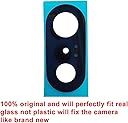
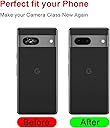
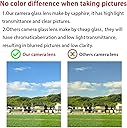
This Perzework 2-set rear camera lens replacement kit for Google Pixel 7 features OEM sapphire glass for superior durability and clarity. Designed exclusively for Pixel 7 (not Pro), it includes pre-installed adhesive, a professional repair toolkit, and a detailed installation manual with 24/7 support. With two lens sets and a 1-year warranty, it offers a reliable, DIY solution to restore your phoneโs camera to pristine condition.
| ASIN | B0C6WXNGK7 |
| Best Sellers Rank | #6,114 in Cell Phones & Accessories ( See Top 100 in Cell Phones & Accessories ) #17 in Cell Phone Repair Kits #123 in Cell Phone Replacement Parts |
| Brand | Perzework |
| Camera Lens | Prime, 21mm f/1.85 standard lens made of sapphire glass, no image stabilization, manual focus |
| Camera Lens Description | Prime, 21mm f/1.85 standard lens made of sapphire glass, no image stabilization, manual focus |
| Color | Pixel 7 |
| Compatible Camera Models | Google Pixel 7 |
| Customer Reviews | 4.5 out of 5 stars 457 Reviews |
| Exposure Control Type | Manual |
| File Format | MP4, JPEG |
| Focal Length Description | 21 millimeters |
| Focus Type | Auto Focus |
| Image stabilization | No image stabilization |
| Iso Range | 100-3200 |
| Lens | Standard |
| Lens Design | Prime |
| Lens Type | Standard |
| Light Sensitivity | 100-3200 |
| Manufacturer | Perzework |
| Maximum Focal Length | 21 millimeters |
| Media Type | ProductImage |
| Model Name | Perzework 2 Set Back Rear Camera Lens Glass Replacement for Google Pixel 7 |
| Number of Items | 2 |
| Unit Count | 2 Count |
| Video Capture Format | MP4 |
| Video Capture Resolution | 1080p |
| Viewfinder Type | LCD screen |
| Water Resistance Level | Not Water Resistant |
G**N
Pixel 8 Pro replacement camera glass easier than it looks
I was actually preferring a similar listing, but this one was delivered a day earlier so I went with this replacement. If you are careful this is a pretty easy replacement. I used the tweezers for most of the removal as the glass had a spider web fracture coming from the center. Q-tips with alcohol helped with taking off the double sided tape. No heat was necessary. For safety and preparation I suggest nitrile gloves, safety glasses, a plate or surface, and then paper towels or plastic underneath. A few fractures of glass did go flying so I vacuumed the whole area with a dust buster and floor vacuum. The black double sided tape that is underneath the glass helps some of the pieces stay together and I worked my way to one edge then around in an oval. Shaking the glass pieces onto my plate that were falling onto the lenses. I used the tweezers to pull away from the lenses and use the sides as leverage and then scraped with the scalpel when needed. I continually applied more alcohol with a Q-tip around the edges to clean and also remove the black tape. If I got a little space with the glass I dabbed some more alcohol to loosen it for removal. Unfortunately I did not have another camera to film this but everything came off cleanly. Remember to remove some stuck tape from the center of the microphone but I do not think it is necessary to remove all the tape around the microphone. Once it was mostly clean of glass I used a Q-tip with alcohol, the dust cloth provided in the kit, as well as the tweezers to clean the edges and remove any additional glass pieces around the lenses. I also stuck the dust buster over the lenses to see if I could pull up any debris as tiny bits might have fallen behind the sides of the lenses. Lastly I used a provided wipe for the lenses and the glass area, the provided dust tape, and the provided dust cloth. Satisfied with the cleanliness of the phone I then applied the first replacement glass using the tweezers to pull the blue side tape off. I must have manhandled the replacement as the glass fit perfectly but i tried to press or slide it in and cracked the first replacement on the side. I had not tamped down the replacement and the tape had not set all the way so I had to repeat the process of removing the glass. The second replacement went in perfectly so I left the top tape on and used the cloth to gently press it into place. Overall probably the best replacement part I have ever done for a phone so far and would definitely do this again. On a side note, this may have been covered under my warranty but dealing with google as well as their authorized repair shop was a much bigger hassle than ordering one of these for next day delivery and repairing it. The repair itself was less time for me than even a round trip to the shop.
K**R
Need to grab some extras but really good
Add super glue to your cart too. I have glass screen protectors always on my Pixel 6 over the camera area and the screen. My phone was fine being dropped from the top row bleachers onto the rocks, but couldn't survive 10 minutes in my purse, lol. Usually it only breaks screen protectors, but this time, it got the actual camera cover. These came a day early. I borrowed a heat gun and had it done in about half an hour (many interruptions from other ppl), but the tools were pretty good. It is wildly messy breaking up that glass. One minor impale. I also used Goof Off to get the residual adhesive off. It popped off a side piece of the pixel camera housing, but I used nail glue to re-adhere. Really tough to get it all completely clean with no specs of dust on the lenses after removal, good luck.... But it went on perfect fit and I heated it a bit with the glue gun again to get a nice seal, and it appears to be working perfectly. I definitely do recommend these.
R**A
Perhaps better than factory lens
There's a lot of options for Pixel 7 replacement lens but this one seemed to check all the boxes. If you have a Pixel 7 it's probably a matter of time before your lens shatters. Mine popped EXACTLY the same as all the others I've seen online. I wanted a real glass replacement that would fit perfectly. This one does both. The listings show the lens from both sides so some purchasers think there's 2 lenses included, but unless it shows 4 views (2 lenses, both sides) you only ordered one. My recommendation is get 2. The included instructions were generic but very clear. It helps to heat the old lens with a hair dryer to loosen the adhesive. I also set up a vacuum cleaner hose so that it sucked up the glass bits as I picked off the old lens, It came off rather easily and I made sure everything was removed and clean before placing the new lens into the indent. There's a clear protector on each side of the new lens--remove ONLY the front one and use the provided tweezers to lift it off and put it in place. I took the rear one off and somehow put a fingerprint on the inside of the lens, which I didn't realize until I had it in place. It didn't really affect the picture quality, but I'm a perfectionist so I had to change it. That's why i recommend getting a kit with 2 replacement lenses. Interestingly enough, the replacement lens was harder to remove than the factory one. In either case, there's plenty of surface area for the adhesive to bond to so I doubt very much this would cause the phone to lose its waterproof rating, As recommended, I heated up the new lens with the hair dryer to activate the adhesive (both times) and I think that's what makes it bond really well. It took probably 15 minutes from start to finish. Overall I couldn't be more pleased with this product. It's so high quality and so easy to replace that I no longer worry about the Pixel lens breakage problem.
M**R
Worked great!
The kit worked great and I would have given it 5 stars, except the instructions are less than desirable. I have a few recommendations that I found beneficial. The first is to take a few minutes to get good lighting set up, a flat comfortable place to work, and some reading glasses (even if you don't normally use them). Second, do not use a hair dryer or heat gun as the directions state - fortunately, I learned this from a couple of youtube videos prior to doing the work. I found that there's a bit of a sweet spot regarding the temp and adhesive, which seems to be approximately 80 deg. If it's below that, the adhesive is very stiff and the broken glass is difficult to pull off. But if it gets much warmer than that, the adhesive gets very 'gummy' and won't cleanly pull off phone. I used an incandescent light for a mild heat source adjusting the distance from the phone from about 6" to 12" until I found that temperature sweet spot. Then "take your time" removing the broken glass in pieces - I was able to do it without getting a single scratch mark on the area where the adhesive sticks. I used a curved exacto blade rather than the pointed one that comes with it, which I think was very beneficial for not putting a single scratch mark on the sealing surface. The instructions also don't tell you which side of the new part has the adhesive, but it's the side with the thicker plastic sheet on it. Based on my above experience with the temperature of the adhesive, I decided to slightly cool the new piece before began installation so that the adhesive wouldn't stick before I had it 'exactly' in position. I cooled it to about 60 deg, pealed off the adhesive plastic cover, carefully positioned it, then 'very gently' pressed it in place. After that, I brought the lamp closer to let it warm up and soften the adhesive, after which I put a towel on it and firmly, but evenly, pressed to get a good bond. Then just pull off the outer plastic cover. The camera works great at all distances and you would never know it had been repaired.
P**O
Decent replacement lens
Decent affordable kit. Has everything you need. FYI ,struggled getting remaining glass out of my phone camera using alcohol helps loosen it.( By the way that has nothing to do with the kit or product) Installation was easy. No issues with our image or any glares at the moment. Be patient. Pixel pro 7. Will update if needed
F**E
Easy to use and saves money
The quote I got to replace my broken lens glass was $250. I ordered this instead and saved myself $230. It comes with everything you need (I also bought compressed air but didn't need it), and the instructions are easy to follow. Made my phone like new!
A**R
Phone protection
Nice phone lens protection and easy to install. Would recommend to everyone.
M**E
Affected camera quality
Three stars. Kit worked out fine. Adequate supplies and the replacement lens fit fine. However. After replacement there is now some noticeable shading/streaking in the camera image that wasn't there previously, especially in artificial light. Not sure if the opacity of the replacement lens is not the same as OE or what the issue is. No other complaints.
N**H
Great quality, no impact on image quality.
Great kit, works as advertised, no impact on image quality.
C**3
good
good
Trustpilot
2 weeks ago
1 month ago