Buy anything from 5,000+ international stores. One checkout price. No surprise fees. Join 2M+ shoppers on Desertcart.
Desertcart purchases this item on your behalf and handles shipping, customs, and support to Uruguay.
⚡ Power your network like a pro—fast, smart, and effortlessly sleek!
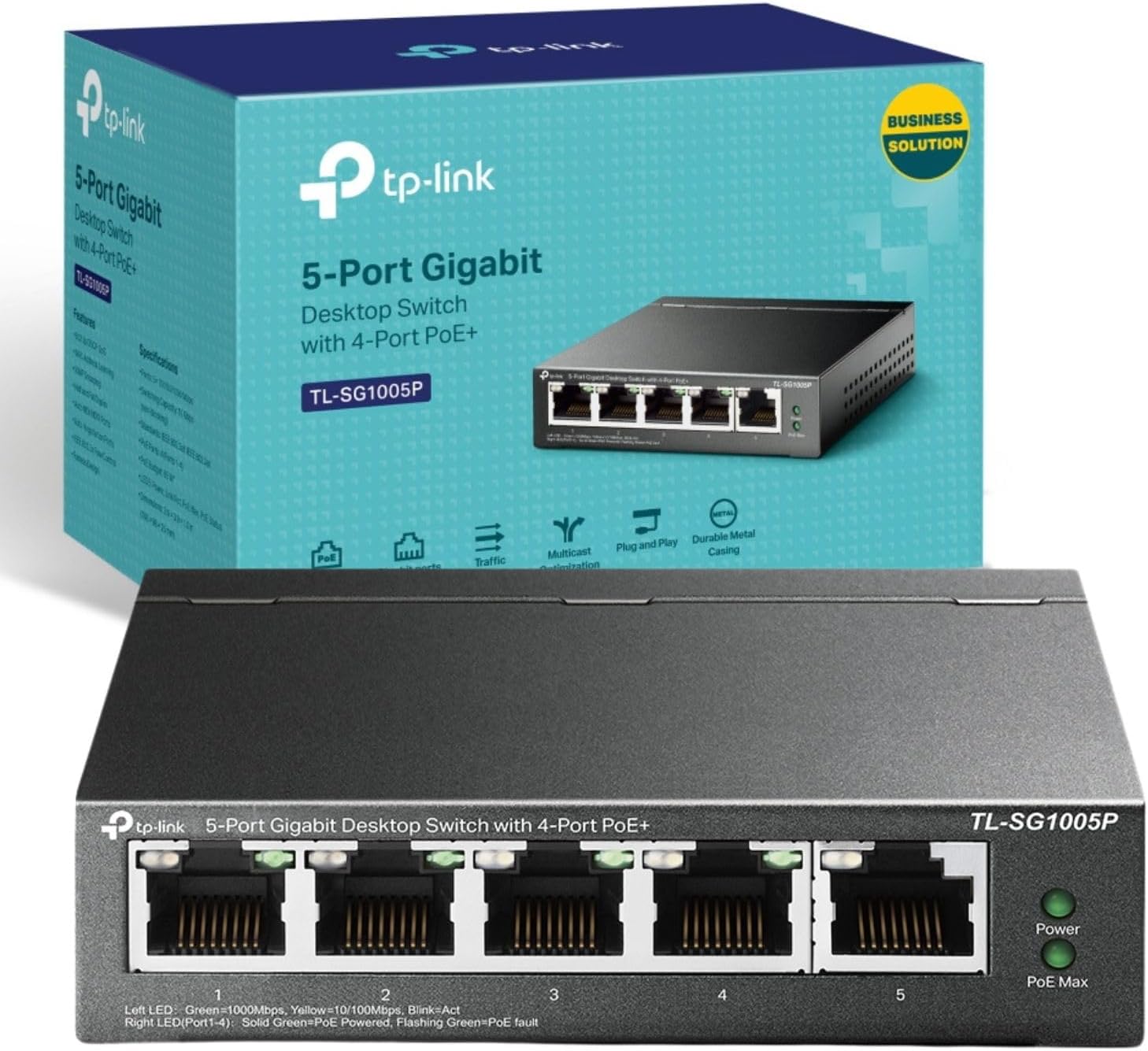
The TP-Link TL-SG1005P is a 5-port unmanaged Gigabit switch featuring 4 PoE+ ports delivering up to 30W each and a total 65W power budget. It supports IEEE 802.3af/at standards, offers intelligent power management to prioritize devices, and ensures smooth traffic with 802.1p/DSCP QoS. Its durable metal casing and fanless design provide quiet, reliable performance, while plug-and-play setup means no technical hassle. Ideal for professionals expanding smart home or office networks with power-hungry devices like IP cameras and VoIP phones.


| ASIN | B0769C24T1 |
| Best Sellers Rank | 1,731 in Computers & Accessories ( See Top 100 in Computers & Accessories ) 17 in Network Switches |
| Box Contents | Package Contents TL-SG1005P, Power Adapter, Installation Guide |
| Brand | TP-Link |
| Brand Name | TP-Link |
| Case Material Type | Metal |
| Color | Black |
| Colour | Black |
| Compatible Devices | Camera, Desktop |
| Compatible devices | Camera, Desktop |
| Country of Origin | China |
| Current Rating | 1.31 Amps |
| Customer Reviews | 4.7 out of 5 stars 26,692 Reviews |
| Data Transfer Rate | 1000 Megabytes Per Second |
| Global Trade Identification Number | 06935364083229 |
| Interface | RJ45, PoE |
| Item Dimensions L x W x H | 10L x 9.8W x 2.5H centimetres |
| Item Type Name | TP-LINK Desktop Unmanaged Switch, 4 x 10/100/1000 (PoE), 10/100/1000, PoE (56 W) |
| Item Weight | 8.82 Ounces |
| Manufacturer | TP-Link |
| Manufacturer Part Number | TL-SG1005P |
| Maximum Power | 65 Watts |
| Model Number | TL-SG1005P |
| Number of Ports | 5 |
| Number of ports | 5 |
| Platform | Not Machine Specific |
| Product Warranty | Lifetime Warranty |
| Product dimensions | 10L x 9.8W x 2.5H centimetres |
| Switch Type | unmanaged PoE |
| Unit Count | 1.0 count |
| Upper Temperature Rating | 40 Degrees Celsius |
| Voltage | 53.5 Volts (DC) |
G**R
⭐️⭐️⭐️⭐️⭐️ Great for My Home Network - Plug and Play, Solid Performance
This TP-Link 24-Port Gigabit Ethernet Switch was exactly what I needed. Plugged it into my router and instantly had wired connections running all round the house - fast, stable, and no configuration required. The steel case feels durable and professional, and it’s quiet in operation. Can be rack-mounted or desktop, it fits neatly into a home setup. Ideal for smart TVs, consoles, PCs, and anything else that benefits from a solid wired connection. Has no weight to it at all so ideal for anywhere really. Highly recommended if you’re expanding your network and want a reliable switch that just works.
R**D
Great little VLAN switch.
VLAN) and a Draytek Vigor 2860 Router to play nicely with each other in terms of VLANs and tagged/untagged traffic. The Vigor seems to have a few issues with tagged and untagged traffic on the same port, including some embarrasing routing leaks that are being looked at by their support team. This switch does the job perfectly and I now have the general WiFi going to a standard hub and internal VMs on an ESXi host. Guest Wifi is routed direct to internet, and test WiFi going to test VMs via the Vigor and a second NIC on the ESXi host. The switch can work as normal without any VLAN config just fine, or can be configured for one of three different VLAN modes. After initial check out in port mode with ports 1-4 in one VLAN and 5-8 in another I dived in to the wonderful world of tagged VLANs which I thought I understood. I do now... With hindsight it's actually easy to configure. Give an ID and friendly name to a VLAN, select which ports will connect to it and if they should leave tags in place or not for outbound traffic, save and repeat for next VLAN. Each port can have multiple tagged VLANs connected. Easy. I had three issues. Sorry, I mean learning experiences: The management functions of the WiFi router are only accessible via VLAN 1 (undocumented) which is nothing to do with this switch of course, but it means you need to have VLAN 1 defined between the router, switch and tagging set up so you can still reach it from a management PC. At least 1 port on the switch must also be assigned to VLAN 1. I'm thinking this is a TP-Link thing and kinda makes sense. At least its mentioned in switch documentation, and since I need VLAN 1 for the Wifi it's no big deal. There's 4094 other IDs to chose from after all. For untagged traffic entering the switch from a normal PC or hub, you need to configure the default VLAN for that port *on a separate config screen" if you want the traffic to go on a VLAN. Really obvious in hindsight, but took me a little while to figure out what was going on. Maybe the lesson is not to try doing this late in the evening after a long day, nice dinner and couple of glasses of wine. Although it's only been in use for a couple of weeks it's doing the job very nicely. I'm using this for a home office & lab but I'd have no issues using in a "proper" commercial environment either.
P**J
I bought one of these units 10 years ago. Delivers good performance and rock steady reliability.
Quite spooky really, I bought one of these units 10 years ago tomorrow! We moved house and office recently and was looking for a quality 24 port switch at a sensible price. for my office Entered the model into search which highlighted that I bought this self same unit 10 years ago! My first unit has never missed a beat in ten years and is plug and play as far as I'm concerned, no tweaking or management needed. I didn't realise I had owned the unit for so long, I don't buy bleeding edge products, I just want good performance and reliability and this unit has delivered that to me for a decade as of tomorrow. So a ten candles on the outer case and an order for a second one for the office!
H**W
Excellent value for money but has some firmware issues you need to be aware of
I am using a couple of 8 port unmanaged TP-Link switches both in plastic and metal housings across the house for years and they have worked without problems. This is my first experience with a managed switch from TP-Link. The web interface through your browser-of-choice is easy enough and works from Windows or Linux, but the setup of the 802.1Q VLAN is not very intuitive at first. I like the concept of two configurations, the currently active one and the last saved one (restored after reset or restart). It allows one to test new configurations with an easy fall-back if it goes wrong and you locked yourself out of the switch for example. On the other hand, if you want to keep a change, make sure not only to click "apply" but also to "save". There are reports on the network that there is a bug in the firmware and it will not always save the latest changes of the configuration. I have not noticed that myself but then I am using the latest firmware v3 (20160722) and the problem may well have been fixed. There is another problem which from reports on the TP-Link forum appears to plague the switch since the very first release v1 (2014) and that has not been fixed in v3. I noticed on the monitoring tab that the switch counts a proportionately small but steady number of receive errors "RxBadPkt" on the two ports that have VLAN egress tagging enabled. No receive errors for other ports and none of the 8 ports shows any transmit errors. I checked both devices connected to these ports and replaced cables but it did not make a difference and I have not noticed any adverse effect of the errors. The problem only occurs on VLAN tagged ports. One member on the forum reported that TP-Link stated that this is a problem of the way the chipset does statistics. Reportedly it causes every tagged packet of exactly 64 bytes length to increment both the Good and Bad packet count. As mentioned, I have not seen any problems in operation and if you need an affordable switch that understands VLANs, the TL-SG108E provides unbeatable value, so 5 stars minus 1 because of the faulty statistics.
D**S
Solid professional-grade unmanaged switch, 24 gigabit ports for plenty of network capacity
I needed more network ports, and already had a TP-LInk 8 port gigabit switch which I was very happy with - so I was in two minds whether to bodge it and buy another of those and daisy-chain them, or do it properly and buy this 24 port switch and leave myself plenty of room for expansion, and save having yet another wall-wart PSU hanging off my extension lead. I'm glad I made the right choice - this unit seems solid as a rock, is fanless so it's silent, has a sturdy metal case which is good for heat dissipation as well as being tough, can be rack-mounted (brackets are supplied) and uses a standard kettle lead rather than an ugly wall-wart PSU. As with most unmanaged switches, it's dead simple - you just plug stuff in to it, and, er, that's it, it Just Works. It has been working great as the core switch in my network - performance is rock solid, no complaints at all, even with an Amazon Fire box downstairs streaming HD video, my laptop using plenty of bandwidth to my home server, etc - it keeps up with everything with no issues. If you need to expand your home or small office network but don't require a managed switch, I'd more than happily recommend this.
T**N
Cheaper than top brand names, but every bit as good a quality.
I've always liked TP-Link gear. Good quality, solid construction and works as they should. I've quite a number managed and unmanaged switches, routers, wireless extenders and access points on a fairly substantial network linking several buildings. Over the last 13 years, none of them (literally not one) has ever failed or let me down. I call that good value for money. TP-Link has since become a much bigger fish amongst network equipment suppliers, no doubt due their consistent manufacturing and quality control policy. This is an entirely honest review based on my own experience. I have bought and paid for every piece of TP-Link equipment I own. I do not or have not received any items for free in exchange for my comments.
J**N
Good switch for a home network
I got this to replace my old 10/100 router (which I was using as a switch) which needed to go. Mainly I was looking for a no-hassle switch that offers gigabit speeds. I wasn't particularly interested in the fact that it is a managed switch, but it's nice to have the feature available. Speed-wise, the switch performs as you'd expect. I have my TV and NAS plugged into it and my PC goes through the router and then to it. With this setup, I get copying speeds to and from my NAS of around 120MB/s which is a vast improvement over my old setup. Build quality is solid, the interface is easy to work with and performance is top-notch! One important thing to mention if anyone is planning on getting this as their first managed switch is to first plug in the switch on its own to a PC or laptop and configure the static IP before you plug it into your network.
A**H
Does what it says on the box ;-)
This is a great low cost switch. I had to rebuild my editing and post production studio. You can imagine the amount of network cables running about. I originally bought the 'unmanaged version" because it was cheaper but found when using multiple ethernet items some of them slowed. I switched it for this mamanged one and instantly saw an improvement. I knoiw have 5 running the studio machines, wifi, computers, speakers, recorders, printers, scanners blah blah. What i love about these switches is that if i have a slow old printer on the network or a slow old computer ... it compensates and just send signal at the speed it needs 10/100 or 1000Mbps. Thanks to these switches i have the fibre broadband in 4 rooms and they all run now at full speed ... even if we are all using at the same time. Lastly, I had a friend who is a technophobe ! He had wires and splitters all over the place from his router to run his heating, Sky, TV, Amazon Cube, Computer, Wifi, Streamer, etc. A real mess. I bought him one of these and he stripped all the wiring out. Had just one cable from his router to this switch and then plugged all the items into this switch. Everything now all run at full speed. No setting up. Straight out of the box ... plugged it in ... plugged the ethernet cables in bingo bango all up and running. Fantastic bit of kit for the price.
S**O
Produto de excelente qualidade
N**9
Excelente switch PoE no gestionado para red doméstica o pequeña oficina
Resumen rápido: - Switch de 5 puertos Gigabit, con 4 puertos PoE+ que permiten alimentar dispositivos compatibles por el cable Ethernet. - Instalación simple: “plug and play”, sin configuración compleja, ideal para cámaras IP, puntos de acceso WiFi u otros equipos PoE. - Carcasa metálica y diseño robusto (sobremesa o pared) lo cual aporta durabilidad. - No es un switch gestionado: los usuarios que requieran control avanzado de red pueden echar en falta funciones como VLANs o monitorización detallada. Especificaciones clave: - 5 puertos RJ-45 10/100/1000 Mbps. - 4 de los puertos soportan PoE+ (IEEE 802.3af/at). - Presupuesto de potencia PoE total hasta ~65 W para todos los puertos PoE. - Carcasa de metal, diseño silencioso (sin ventilador), adecuada para ubicaciones domésticas u oficinas pequeñas. Opinión detallada: Lo adquirí para instalar en el “armario de red” de mi casa, donde tengo varias cámaras IP PoE y un punto de acceso WiFi PoE. Desde que lo instalé ha funcionado sin fallos y ha simplificado el cableado: en lugar de tener adaptadores de corriente para cada dispositivo, ahora solo un cable de red alimenta tanto datos como energía. La instalación fue muy sencilla: lo conecté al router con un cable de red, y luego cada cámara y AP entraron al switch y quedaron alimentados. No tuve que tocar ninguna configuración: el equipo detectó los dispositivos compatibles PoE y les suministró energía automáticamente. Muy adecuado para quien no quiere complicarse con configuraciones avanzadas. La calidad es notable; la carcasa metálica da sensación de robustez, y el hecho de que sea fanless evita ruidos — es ideal para un entorno doméstico o pequeño despacho. Además, los puertos Gigabit aseguran que el tráfico de vídeo de múltiples cámaras no sea un cuello de botella. Ahora bien, hay cosas que conviene tener en cuenta: Al no ser gestionado, no hay interfaz de configuración avanzada (como QoS fino, control de tráfico PoE por puerto, monitorización detallada) más allá de lo básico. Si tienes una red más compleja o profesional, podrías necesitar algo más avanzado. Aunque 65 W totales es suficiente para varios equipos PoE+, si vas a alimentar cámaras o dispositivos muy potentes o muchos, hay que calcular bien el consumo conjunto para no superar ese límite. Montaje en pared: Los puntos de anclaje podrían ser más estándar si se fija en pared (aunque en sobremesa funciona perfectamente). En resumen: Para una instalación doméstica o de pequeña oficina con varios dispositivos PoE, este switch cumple muy bien su función, simplifica y ordena la red, y lo hace con buena calidad. Por eso le doy un 4 sobre 5. Pros - Alimentación PoE + datos en el mismo cable, reduce líos de adaptadores. - Puertos Gigabit, ideal para vídeo/cámaras, etc. - Carcasa metálica, silencioso y de instalación sencilla. - Muy buena relación calidad/precio para lo que ofrece. Contras - No es gestionado → menos opciones de configuración avanzada. - Presupuesto de potencia PoE limitado a ~65 W → hay que planificar consumo si muchos dispositivos. - Para montaje en pared, quizá haya que buscar adaptaciones (si no vienen orificios estándar).
M**D
جيد جدا
جيد جدا
M**S
High quality switch
Commercial grade PoE switch. Very well made. Solid. Well worth the money.
S**Z
Fantastic value. Very reliable.
This thing is all it needs to be in a tiny, low power package. Already have 5 devices using it religiously with 3 of them being 24/7 servers with port forwarding. Zero hiccups and everything I needed it to do was straightforward and just worked. Recovery from power outages is very fast. Boots up in no time. Having the ability to hang it on the wall was also great and helped save space. No brainer purchase for my setup. Highly recommend.
Trustpilot
3 days ago
2 weeks ago