Buy anything from 5,000+ international stores. One checkout price. No surprise fees. Join 2M+ shoppers on Desertcart.
Desertcart purchases this item on your behalf and handles shipping, customs, and support to Uruguay.
🚀 Elevate Your Workspace Anywhere with KEFEYA’s Portable Powerhouse!
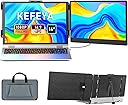
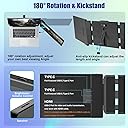
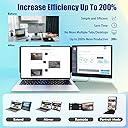
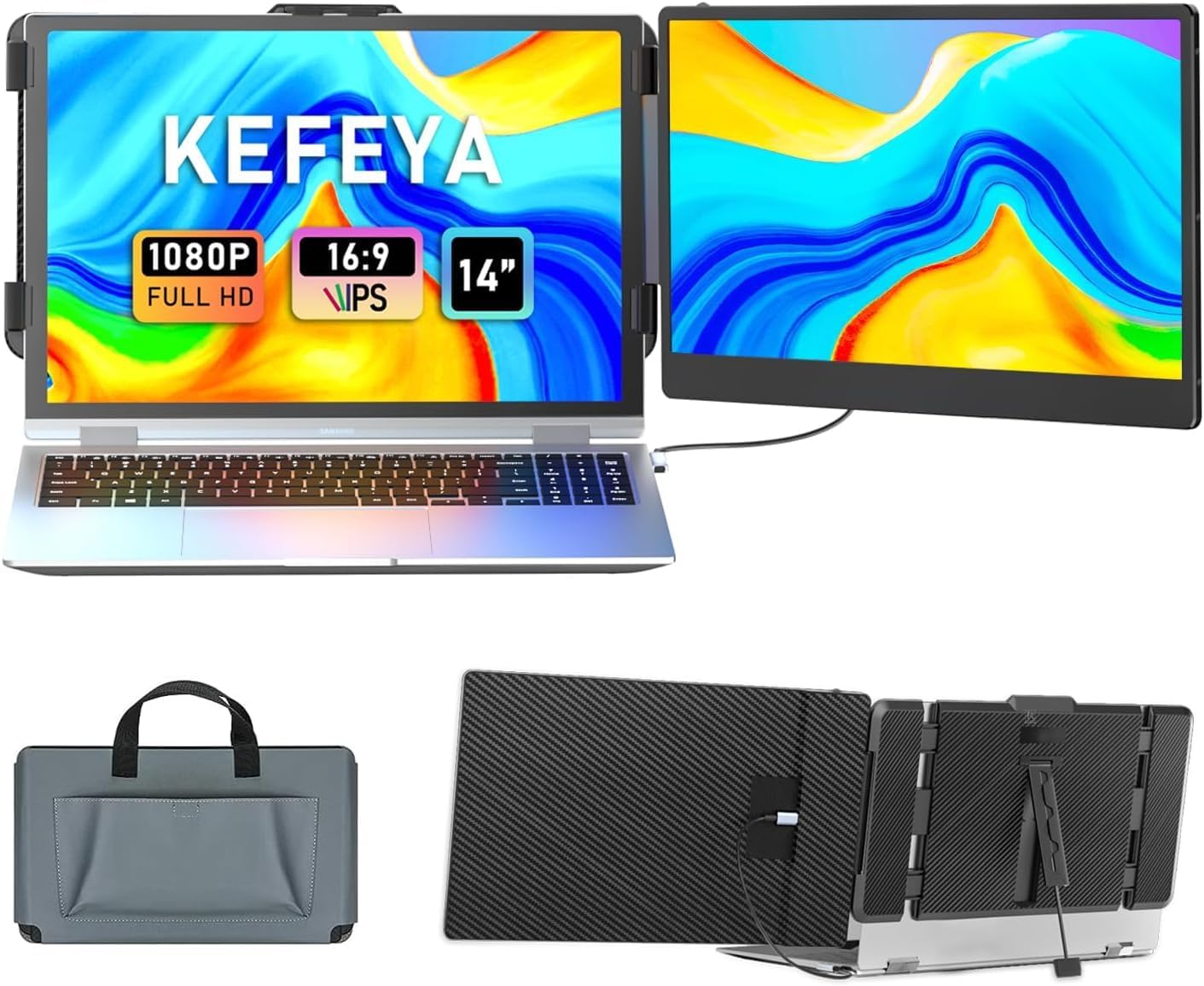
The KEFEYA 14" Laptop Screen Extender is a lightweight, portable Full HD 1080p IPS monitor designed to double your productivity by enabling multi-window multitasking. Featuring plug-and-play USB-C and HDMI connectivity, 180° rotation, and multiple display modes, it offers vibrant visuals and flexible setups compatible with a wide range of devices including Windows, Mac, Android, and gaming consoles. Perfect for remote professionals, gamers, and multitaskers seeking a sleek, travel-friendly dual-screen solution.


| ASIN | B0CFKLK9JY |
| Additional Features | Portable |
| Aspect Ratio | 16:9 |
| Best Sellers Rank | #853 in Electronics ( See Top 100 in Electronics ) #25 in Computer Monitors |
| Brand | KEFEYA |
| Brightness | 300 candela |
| Built-In Media | 1 x HDMI to USB-C cable, 1 x Laptop Screen Extender, 1 x USB A to USB C cable, 1 x USB-C to USB-C Cable |
| Color | Black |
| Color Gamut | 72 |
| Compatible Devices | Intel, AMD, ARM, Android, Windows, Mac, M1, M2, M3, Chrome, Linux, Type-C phones, PS4, Xbox, Switch, M1 Pro/Max, M2 Pro/Max processors |
| Connectivity Technology | HDMI, USB Type C |
| Contrast Ratio | 1000:1 |
| Customer Reviews | 4.6 out of 5 stars 5,018 Reviews |
| Display Resolution Maximum | 1920 x 1080 |
| Display Technology | IPS |
| Display Type | LCD |
| Hardware Connectivity | HDMI, USB Type C |
| Has Color Screen | Yes |
| Image Contrast Ratio | 1000:1 |
| Item Dimensions D x W x H | 0.9"D x 13.89"W x 8.14"H |
| Item Weight | 1.04 Kilograms |
| Manufacturer | Shenzhen Baijiayoupu Technology Co., Ltd |
| Model Name | KEFEYA S1 |
| Model Number | S1 |
| Mounting Type | Desk Mount |
| Native Resolution | 1920x1080 |
| Number of Component Outputs | 1 |
| Picture Quality Enhancement Technology | HDR, IPS, Full HD |
| Refresh Rate | 60 Hz |
| Resolution | FHD 1080p |
| Response Time | 2 Milliseconds |
| Screen Finish | Matte |
| Screen Size | 14 Inches |
| Screen Surface Description | Matte |
| Series Number | 1 |
| Shape | rectangular prism |
| Specific Uses For Product | Business, Personal, Gaming, Multimedia |
| Total Number of HDMI Ports | 2 |
| Total Usb Ports | 5 |
| Viewing Angle | 178 Degrees |
| Voltage | 5 Volts |
E**G
Lightweight, Clear Display & Super Convenient for Work
I’ve been using this single screen extender for my laptop for a while now, and I honestly really like it. First of all, it’s super lightweight and easy to carry around. It doesn’t make my laptop feel bulky at all, which is great since I often bring it with me to work or different places. Setup was also very simple—I could get it up and running in just a few minutes without any hassle. The connection has been very stable so far, no random disconnects or lag. The picture quality is clear and sharp, which makes it comfortable to use for long work sessions. I usually use it for work, like having emails open on one screen and documents on the other, and it makes everything so much more convenient. It really helps with productivity, and I don’t feel as cramped working on just one screen anymore. Overall, I’m very happy with this purchase. It’s simple, practical, and works exactly as expected. I would definitely recommend it if you’re looking for a portable screen extender.
K**A
Absolute game-changer for multitasking! Crisp, portable, and true plug-and-play.
I switch between a Surface Laptop and a Dell Latitude for my daily tasks, and this KEFEYA screen extender has completely transformed my workflow. I bought this specifically because I didn't want the hassle of disconnecting my gaming monitors every time I work from the house. I was a bit skeptical about how well a portable dual-screen setup would work, but this exceeded all my expectations. Setting it up was incredibly straightforward. It is true plug-and-play just like advertised—I hooked it up via USB-C, and it fired right up without me needing to download any clunky drivers or software. It grips securely onto both of my laptops without feeling overly heavy or threatening to snap the hinges (both of mine fall perfectly into that 13-17" compatible range). What I love about it: Screen Quality: The 14" FHD 1080P IPS display is surprisingly crisp and bright. The colors pop and the viewing angles are fantastic. It easily matches the quality of my built-in displays, so dragging windows across screens feels seamless. Portability: It folds up neatly and is lightweight enough that it doesn't add a ton of bulk to my laptop bag. It's perfect for getting a desktop-level dual-monitor experience when I'm traveling or just working away from my main desk. Versatility: It comes with all the necessary cords (USB-C and HDMI) and connects flawlessly. If you are someone who feels bottlenecked by a single laptop screen but needs to stay mobile, this is worth every single penny. Highly recommended!
A**L
Amazing Portable Laptop Screen Extender – Easy Setup & Great Quality!
I’m really impressed with this portable triple monitor for my laptop. The detachable design is super convenient, and it even comes with a nice leather bag so I can easily pack it and take it anywhere. It’s perfect for working from home or setting up a workstation while traveling. The screen extender makes multitasking so much easier. I can have multiple windows open at the same time for work, video calls, or even watching something on the side without constantly switching tabs. It definitely helps me stay more productive throughout the day.
G**N
Perfect Portable Dual Screen Setup for Work & Travel!
This KEFEYA screen extender is easy to set up and works perfectly. The picture quality is clear and bright, and it makes working and multitasking so much easier. Lightweight, portable, and definitely worth it!
T**L
Not gaming quality - but good as second monitor
First, out of the box, it's a very easy setup IF you have a fully powered USB-C port on your laptop. Most newer ones do but be sure you have such a port (usually indicated by a small lightening symbol by it); if you don't, even though they send you USB-C to USB-A and USB-C to HDMI cables, they will NOT power the monitor enough. I imagine you'd have to buy the separate power adapter for the monitor they mention in the ad (NOT included) to make such a setup work. So be aware of that. I suppose perhaps they don't work just on my particular laptop, but I doubt that's the case. With the supplied USB-C to USB-C cable it works perfectly. Well, I won't say "perfectly" (and this is the reason I gave only 4 over all stars) because as you can see from the first picture, when compared to my native monitor, the colors are different. It doesn't matter what setting I use or adjust on the S1 monitor. I can never get it to be like the native monitor of my laptop (ROG STRIX). I suspect the reason for this is because one cannot utilize "HDR" on this monitor. Note the picture of the HDR setting. It's off by default and for good reason; if you turn it on, the screen goes dark and will not return until you turn HDR off. I suspect it can't be turned on because, maybe, you'd need the power adapter they mention to enable that feature. (the power from just the USB-C port, even a full powered one isn't enough). This is my suspicion but I can't confirm it as I don't have the power adapter they mention (I don't even know what it is to be honest, as it's rather vague their description of the "power adapter"). Regardless, HDR will not function on this monitor with just the equipment they provide. Now, with that said, it's a *perfectly fine* monitor for what I wanted, which was just a second monitor to turn my laptop into a mini-desktop setup. So I could play games on my laptop (in full screen) while sitting in my favorite chair and still have the ability to check email (or other websites) on the other screen. It's perfect for this, and really will be perfect for many situations that don't entail gaming. As you can see from the refresh rate tests attached, the refresh rate is approximately 50Hz (even though it says "calculating" the test never got to a state where it would be "finished" as in the test for my native monitor at 240Hz). But the test is accurate as it accurately reports the refresh rate for my native monitor. So, I'm quite confident it's accurate when testing this monitor. I can't tell you what website I went to test it, as my first review was rejected, I THINK because the screenshots had the testing website URL in it. So, I edited that out. Hopefully THIS review goes through. But you can search for any refresh test online it's quite easy and straightforward. The point is, that this is NOT a gaming monitor by any stretch of the imagination, but it's perfectly fine for non-gaming applications. The first picture of the entire setup is NOT edited in any way, that's how the color difference is. At first it was a little annoying (disappointing really) but I got used to it and really don't notice the difference anymore, but it is there in an objective sense. The colors don't seem as "rich" (i.e., they're washed out) on the S1 monitor compared to my laptop's own monitor. Again, not sure why but I suspect it's the HDR issue above. But again, really doesn't matter for doing stuff that's not gaming. As you can see, I don't use the kickstand that comes with it (on the back of the monitor). I'm not sure why it was built into the design it doesn't seem necessary. I was a bit concerned that the hinge may become worn and eventually not support the weight of the monitor but as I write this now it's well over a month since I've had this monitor and still the hinge/support system (without the kickstand) supports its weight perfectly fine without showing any signs of wear on the hinge. So again, not sure what the kickstand is for. I wouldn't worry about the weight of it in other words, it's more a question of whether or not you are expecting a decent refresh rate for gaming and/or if you don't have a USB-C connection. Don't buy this for gaming; don't buy it if you don't have a USB-C port. DO buy it though if you just want a mini-desktop (like me) and don't care too much about the (somewhat slight) color differences. You actually might not have a difference if you don't have a gaming laptop actually. As a side note, the weight of it is not too heavy to be supported by lighter laptops like an HP Elitebook, which I also have for work. Again, you don't need the kickstand even for a light laptop like that. It holds up fine on its own. I hope you found this review useful. Edit: A few days after posting this review, the seller reached out to me to try some color adjustments on the monitor, to see if that would work to get the S1 to be the same as my own laptop's monitor. While sadly they didn't work, it did make the difference less noticeable, (not pictured). For this reason (since they reached out to me) I'm revising my review to five stars. It was good customer service I'd say.
D**N
Great for multitasking
Great second screen for laptops. Expandable for lots of different sizes. Good quality picture and very easy to set up. Not sure why it came with a carry case since it easily fits in a laptop briefcase or backpack
K**M
Great product - kickstand question.
This product is great. Fairly easy to set up. I had trouble with display and contacted support and they walked me through a little wheel adjustment on this screen that greatly improved the display. I didn’t even see the wheel at first. However, why is the kickstand on the laptop side, not on the monitor side? I find that the weight or perhaps just gravity will occasionally cause the screen to fall off the laptop connection. I have a book propped under this monitor now which by ridiculous. The kickstand on the monitor side would fix this. I cannot find any device to use to prop this up and keep it fully sturdy. An adjustable kickstand on the monitor would totally fix this! Why is the kickstand on the monitor side anyway?
E**N
Love these screen extenders
I love these laptop screen extenders. It has made a huge difference in my daily work. Having this extra display space makes it feel less cramped, and multitasking is so much easier. Because of this extra display, I can work more effectively (whether I’m working on multiple projects at once, or simply just browsing around; it saves me a ton of time switching between tabs). These screen extenders are so easy to set up—basically it’s just plug-and-play. Just connect the cable to the laptop, and it immediately recognizes it. The screen 1920 x 1080 resolution is sharp and clear, and I like how these screens can be rotated either horizontally or vertically depending on my needs. These screen extenders are thin and lightweight. It fits perfectly in my backpack, making it convenient to bring it everywhere. Overall these extenders are well made, and I think I will be able to use them for a long time. I recommend this product.
R**.
Well made product
Product is well made and looks sturdy, packaging was excellent. The Product meets my expectations. Happy with my purchase
E**A
Perfect for simple set up
Perfect for if you travel for work. Not necessarily for on the go use but if your work station changes frequently ie office then hotel then home - this is a great tool. Screen and display quality is good. Comes in a little pouch and all the cord management so makes it easy to take places. Stand on the back is great to keep the monitors up.
P**R
Hervorragende mobile Monitor Erweiterung mit top Bildqualität und einfacher Einrichtung
Ich bin absolut begeistert von der KEFEYA 14” Laptop Bildschirm Erweiterung. Die Einrichtung war wirklich unkompliziert, einfach anschließen und sofort loslegen, ganz ohne aufwendige Installation. Dank Plug & Play funktioniert alles reibungslos mit meinen Geräten, egal ob Laptop, Smartphone oder Konsole. Die Bildqualität ist hervorragend. Das Full HD IPS-Display liefert scharfe, klare Bilder mit kräftigen Farben und guten Blickwinkeln, was besonders beim Arbeiten mit mehreren Fenstern oder beim Streaming von Inhalten auffällt. Die Größe von 14 Zoll ist ideal, um produktiver zu arbeiten, ohne dass der zusätzliche Bildschirm zu sperrig wirkt. Auch die Verarbeitung macht einen hochwertigen Eindruck. Der Monitor ist stabil, gleichzeitig aber leicht genug, um ihn problemlos unterwegs mitzunehmen. Besonders praktisch ist die breite Kompatibilität mit Windows, Mac, Android sowie Konsolen wie Switch und PS5, dass macht das Gerät sehr vielseitig einsetzbar. Insgesamt eine klare Kaufempfehlung für alle, die ihre Produktivität steigern oder unterwegs ein erweitertes Setup nutzen möchten.
C**T
Brilliant
Works seamlessly, very functional and perfect for a 14" laptop! Love it.
A**A
Great Product, But Cracked Screen – Seeking Support
I really enjoyed using this screen — the functionality was excellent, and it fit well with my laptop. However, the screen unfortunately cracked despite being carefully stored in my laptop bag and only used a few times. This was very disappointing, especially given the limited usage. I attempted to reach out to product support but have not received any response. I would really appreciate it if the supplier could review this issue and consider a replacement, as I genuinely liked the product and would like to continue using it.
Trustpilot
2 weeks ago
1 month ago