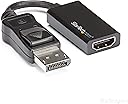
🚀 Elevate your workspace with flawless 4K and rock-solid connections!
The StarTech.com DisplayPort to HDMI Adapter (DP2HD4K60S) is a high-performance active video converter supporting 4K UHD at 60Hz with HDCP 2.2 and 7.1 channel audio. Featuring a latching DisplayPort connector and EMI shielding, it guarantees a secure, interference-free connection. Compatible with DP 1.2 hosts and HDMI 2.0 displays, this compact adapter requires no drivers and works seamlessly across major operating systems, making it the perfect tool for professionals seeking reliable multi-display setups.


| ASIN | B01M6WK3KU |
| Best Sellers Rank | 11,903 in Computers & Accessories ( See Top 100 in Computers & Accessories ) 64 in DisplayPort to HDMI Adapters |
| Department | Unisex |
| Guaranteed software updates until | unknown |
| Item model number | DP2HD4K60S |
| Manufacturer | Startech |
| Product Dimensions | 21.59 x 19.56 x 1.02 cm; 24 g |
R**K
Hugh Quality Dependable Choice from a trusted Brand
The **StarTech DisplayPort to DVI Adapter** is a high-quality product that delivers exactly what you'd expect from a trusted brand. Known for their reliability in tech accessories, StarTech continues this trend with this well-constructed adapter. It's compact, durable, and feels solid in hand, making it perfect for both professional and personal setups. In terms of performance, the adapter works seamlessly, allowing you to connect DisplayPort-equipped devices to DVI displays without any hassle. The video quality is excellent, supporting resolutions up to 1920x1200, making it ideal for both office use and media consumption. The plug-and-play setup means there’s no need for additional drivers, and installation is quick and straightforward. What really stands out is the build quality. The connectors fit snugly, ensuring a secure connection, while the cable itself is flexible yet sturdy, resistant to wear over time. Whether you're using it for extended desktop setups or connecting to an older monitor, this adapter gets the job done reliably. Overall, the StarTech adapter is an excellent choice if you're looking for a dependable, high-performance solution to bridge your DisplayPort to DVI needs.
A**R
Proper DP to HDMI conversion
I have a DP KVM switch and a HDMI monitor. I had a cheap DP to HDMI cable and this worked fine for 2 desktops with DP connectors (DP GPU to DP KVM, then DP to HDMI monitor). However, I could not get a laptop to recognise the monitor via a USB-C to DP converter (Laptop USB-C to USB-C to DP Converter to KVM...). I thought the issue was with the laptop, but some time later tried a different laptop and had the same issue. I spoke with Startech Technical Support for query with a different device, and also mentioned this. They recommended getting a proper DP to HDMI converter and this works perfectly. I am pleased as I was thinking I would have to buy a new monitor, but can use this one for longer now. Excellent advice and assistance from Startech Tech Support!
P**R
does what it says on the tin
This does what it says on the tin - converts Display port output to HDMI - ie plugs a HDMI TV into my computer with a DisplayPort port. It appears well made (unlike some of the other similar products reviewed on Amazon...) and I just leave it plugged into the HDMI cord stuck in the back of my TV, then can just connect to computer when needed. Sound does work most of the time, but a couple of instances it has not connected sound for a good 20-30 secs from pugging in. My HD cable TV box also takes a few seconds to come up with sound when it first connects, so maybe its the TV, not the peripherals... Anyway, for a quick solution to connect my laptop with dP to HDMI TV, this fits the bill. Worth spending a few extra pounds to have one that doesn't fall apart in your hands like others reportedly do...
R**N
Fantastic product allows my DVI monitor to work from a DisplayPort
Only a few weeks ago I tried the equivalent DisplayPort to VGA adaptor which was impressive. This little DVI-D adaptor is, if it's at all possible, even better and provides an absolutely rock-solid picture at its full resolution of 1900 x 1200. It connects securely to my standard DVI cable and the other end plugs and latches into the DisplayPort socket on the back of the Dell computer I'm using. The flexible cable ensures you haven't got it sticking out at right angles on your PC. All-in-all, very secure. I didn't see any drivers being loaded, it just started working, so it's truly plug and play. I have no negatives to report; its been working for about a week now and I never even think about it, it "just works". Recommended if you have DisplayPort on your PC (they look a bit like a cross between a USB and HDMI connector).
L**Y
Does what it says
I used to scrimp and save on cables, adapters, etc but these days I just want something that will work exactly like it says it will. Put simply, startech stuff is expensive, but it's solid, reliable, and it works *exactly* like it says it will, e.g I just plugged this in to a displayport plug on a high-end GPU and connected it to a 4K monitor, and I have a 60Hz image that is exactly the same as if I'd plugged it straight HDMI to HDMI. Others are cheaper, but if you can afford this and just want something that is guaranteed to work, then I think it's worth it.
R**E
Works great as DP to DVI but note - Does not work as DVI to DP!!
Great cable, solid and well built - does what it says it’s supposed to. Note, this is a DP to DVI cable, NOT a DVI to DP cable. This can be used with a DP equipped computer to output to a DVI display, but not a DVI equipped computer to output to a DP display!
J**H
It works beautifully
Hooking up the company supplied HP Elite X2 1013G3 laptop to a 4K 28" Samsung display via an HP G2 dock that only has a pair of full size Display Port connections, My home PC uses the existing DP connection on the display so I needed the adaptor to hook up to one of the two remaining HDMI ports. Not cheap but works perfectly.
M**V
Does what it says on the tin, but...
Does what it says on the tin, but it does not support HDR or 10/12 bit monitor displays. Plenty of cheaper adaptors do have such functionality.
T**N
Not even 120 ha could be because of the notebook from me
A**E
tut wases soll und das langt ja auch falls diese art adapter wieder brauch en sollte ist fdieser wieder meine erste wahl
I**A
El cable es de grueso calibre, el plástico es de buena calidad; al igual que los conectores.. Volveria comprar otro sin duda.
J**I
When I first upgraded to a two monitor setup I was a dummy and didn't even check to see what kind of ports I needed for my monitors, oh well that's what adapters are for right? Well I got two cable adapters that ended up secretly causing a myriad of weird display problems. It took several hardware tests before I was able to find and solve the problem. Extremely frustrating. Then a couple months later I got some shiny new tech that required a third hdmi port. Too bad I only had two. This led to some deep research into the best adapters and reading lots of reviews. I ended up picking out this one, a good price and good reviews. I was ready and waiting for my entire computer to blow up again, but it didn't! Maybe my standards are low because of all the crap I went through with adaptors that should have worked but didn't, but I love this thing. It's small and doesn't get in the way of my wiring and it works great! I haven't had a single issue with performance, it's pretty much like the adaptor isn't even there. I'm cursed when it comes to technology, but not even a curse is able to slow this adapter down!
K**T
Worked as expected. A simple, cost-effective way to convert DisplayPort graphics connections to use older DVI monitors. StarTech products are generally good quality, and these did not disappoint. Reliable connections, decent price. These are not the cheapest adapters out there, but I trust the brand enough to spend a little more. Note to multi-monitor users: I run three and sometimes four monitors. All of mine are older DVI monitors. I use an AMD FirePro DisplayPort graphics card. I found that some newer HD graphics cards with support for several monitors, AMD for sure, may require some of the connections to be active in order to support more than two monitors. These passive connectors are great if you are only running two DVI monitors or are adding one or two DVI monitors to a setup that has active connections to existing monitors (such as direct DisplayPort connections). If using more than two DVI monitors and converting from DisplayPort, you may need to purchase active adapters (such as the StarTech DP2DVIS) in order to use more than two monitors concurrently. Consult the user manual for your graphics card, or reach out to the manufacturer's tech support to be sure.
Trustpilot
4 days ago
3 weeks ago