Desertcart purchases this item on your behalf and handles shipping, customs, and support to Uruguay.
🔥 Upgrade your binge game with the fastest, smartest 4K streaming stick!
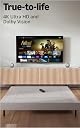
The Amazon Fire TV Stick 4K Max (2026) is the most powerful streaming device in its class, featuring a 2.0GHz quad-core processor, Wi-Fi 6E tri-band connectivity, and 16GB storage. It supports 4K Ultra HD with Dolby Vision and Dolby Atmos for an immersive viewing experience. With Alexa+ voice remote, cloud gaming via Xbox Game Pass, and a sleek new design, it transforms any compatible TV into a smart entertainment hub—perfect for professionals who demand speed, quality, and convenience.
| Size | 99 mm x 30 mm x 14 mm (only housing) 108 mm x 30 mm x 14 mm (including the connector) |
| Weight | 43.5 g |
| Processor | Quad-core 2.0GHz |
| GPU | 850MHz |
| Storage | 16GB |
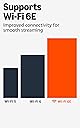
| Wifi | Wi-Fi 6E tri-band: 802.11 a/b/g/n/ac/ax (2.4GHz, 5GHz, and 6GHz) |
| Bluetooth | Bluetooth 5.2 + BLE |
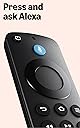
| Voice Support | Yes, with the Alexa Voice Remote Enhanced (included) or free Fire TV app (available for download on Fire OS, Android, and iOS) |
| IR device control with included Alexa Voice Remote Enhanced | The included Alexa Voice Remote Enhanced can control Fire TV Stick 4K Max and certain functions (such as power and volume) on a wide range of compatible IR-enabled devices, including TVs, soundbars and A/V receivers. Note: Certain functions may not be available on some IR-enabled devices. |
| Cloud Storage | Free cloud storage for digital content purchased from Amazon |
| Ports | HDMI 2.1 output with ARC input support, micro USB |
| Audio Support | Dolby Atmos, 7.1 surround sound, 2-channel stereo, and HDMI audio pass through up to 5.1. |
| 4K Support | To watch movies and TV shows in 4K Ultra HD, you need a compatible Ultra HD TV. All services may not be available in 4K/HDR. Certain services are subject to change at any time, may not be available in all areas, or in 4K/HDR, and may require separate subscriptions. Learn more about services. |
| Content formats supported | Video: Dolby Vision, HDR 10, HDR10+, HLG, H.265, H.264, VP9, AV1; Audio: xHE-AAC, AAC-LC, AAC+, eAAC+, AAC-ELD, MP3, AMR-NB, FLAC, PCM/WAV, Vorbis, Dolby AC3, eAC3 (Dolby Digital Plus), Dolby Atmos (EC3_JOC), Dolby AC4, Dolby MAT, Dolby TrueHD pass-through, MPEG-H pass-through, DTS passthrough, DTS-HD passthrough (basic profile); Photo: JPEG, PNG, GIF, BMP |
| Output resolution supported | 2160p, 1080p and 720p up to 60 fps |
| System requirements | High-definition television with available high-speed HDMI input, high-speed internet connection via wifi. Wi-Fi 6E router needed for Wi-Fi 6E support. Auto-Low Latency Mode is included in the HDMI 2.1 standard. |
| TV compatibility | TV must support minimum HDCP requirements for protected content playback. Compatible with 1) 4K UHD TVs with HDMI capable of 2160p at 24/25/30/50/60 Hz and HDCP 2.2 or 2) high-definition TVs with HDMI capable of 1080p or 720p at 50/60 Hz. Learn more about high-definition. |
| Warranty and service | 1-year limited warranty and service included. Optional 1-year, 2-year, and 3-year extended warranty available for U.S. customers sold separately. Use of Fire TV is subject to the terms found here. |
| Content availability | Certain apps and services are subject to change or withdrawal at any time, may not be available in all areas and languages, and may require separate subscriptions. |
| Accessibility features | VoiceView screen reader enables access to the vast majority of Fire TV features for users who are blind or visually impaired. Watch videos and TV shows with closed captioning displayed. Captions are not available for all content. You can also listen to Fire TV with compatible Bluetooth headphones. Learn more about compatibility. |
| Included in the box | Fire TV Stick 4K Max, Alexa Voice Remote Enhanced, power cable and power adapter, HDMI extender cable for Fire TV Stick 4K Max (2nd Gen), 2 AAA batteries, Quick Start Guide |
| Software Security Updates | Learn more about these software security updates. If you already own a Fire TV, visit Manage Your Content and Devices for information specific to your device. |
| Size | 38 mm x 157 mm x 17 mm |
| Weight | 51 g (without batteries) |
| Batteries | 2 AAA (included) |
| Technology | Bluetooth and infrared |
| Compatibility | Fire TV Stick 4K Max (2nd Gen), Fire TV 2-Series, Fire TV 4-Series, Fire TV Omni Series, Fire TV Omni QLED Series, Fire TV Cube (3rd Gen) |
L**T
Fabulous Product--Easy Set-Up
This is our third Fire Stick, and this one is for my office as we are dropping cable tv. We connected it easily, and it works as described. It is compatible with my LG television and the volume and picture is ideal. I am happy.
K**N
Perfect upgrade
I am an older woman and it took less than 15 minutes to hook up. Remote and sound bar paired without doing anything. I could already speak with Alexa from the remote. Nice clear pictures and sound. It updated my older tv to run better and faster. It did take some time to find and set up my apps, then reopen and log in to each. Now everything in in one place when I turn the tv on. Love it!! Update- I ordered a second one for my son on 6-24 didn't receive until 7-16!
T**.
It’s better than the other two fire sticks that Amazon sells.
Very nice fire stick. If you’re thinking of getting a fire stick, I recommend you just go ahead and buy this one. I have all three versions in different places in my house. I have the lite, for example, in my garage. This one is noticeably quicker and snappier. Also ambiance mode is nice. It’s also nice to have the smart home features right there. I can’t attest to the remote, though, since I use the better remote that the sell. EDIT: I'm so upset with this thing. It's been just under a year since we bought it (writing this August 2026, purchased September 2025). A week ago I was still praising this fire stick. Now out of nowhere and for seemingly no reason whatsoever, it has started crapping out on me. It randomly freezes up on me and won't do anything, forcing me to unplug the device and wait, before plugging it back in and trying again, only for it to freeze up again a few minutes later. The only thing I can find online that might help is to clear all the caches for the app that I use, which I've done, and it still keeps doing it. You're suppose to be able to hold the center button and the play button to force a restart, but even that doesn't work MOST of the time and the two times it DID work, it got stuck on the "Your Fire TV is turning off" message, and never actually did so. I have over half the storage space left, partially because I didn't have a ton of apps to begin with, and partially because I uninstalled a few hoping to resolve this issue. I checked for software updates but its up to date, so that's not it either.
J**I
Best Yet
This major upgrade is worth every penny. Extremely easy to set up. Delivers great screen resolution and reliability.
U**3
Amazon Fire TV Stick 4K Max
OK, have had for a few months now. Biggest problem is that it's tricky to get the thing to work without pulling the power cord and re-inserting it to get my Vizio TV to "see" it on startup. When I first got it, when I turned the TV on, it would not find the device a lot. This happened about 50% of the time starting the TV. After research and playing around, the following works best for me, but is not a guarantee that the TV will see it EVERY time. 1. I always use the Vizio remote to power up and power down the TV, NOT the firestick remote from the firestick input. This means when you turn the TV OFF, turn it off AFTER hitting the HOME button on the Vizio remote, and then OFF from there. 2. On occasion, RESTART the firestick using the settings on the firestick remote. 3. Sometimes I still have to remove the power cord from the firestick, wait 30 seconds, and then re-plug the power cord to get the TV to "see" it again. For this, I bought a 3 foot HDMI dongle to make access to the firestick easier. Recommended especially if it's difficult to get behind your TV. The above steps greatly reduced the frequency with which my TV would fail to see the firestick input. That all being said, the Firestick Max performance is outstanding. No more lag and stutter that I used to get watching live sports and other broadcasts using the Vizio TV's native input. It was horrible watch NFL games before installing the stick. Works well, with some caveats.
S**P
Highly recommend!
An incredible upgrade! Apps open instantly, navigation is buttery smooth, and the 4K picture quality is stunning. The extra storage makes a huge difference compared to older models. Blown away by how fast and responsive this streaming stick is. Setup took minutes, the voice remote works like a charm, and it handles heavy streaming without a single stutter. Highly recommend!
J**I
Fast, Fun, and My Go-To Streaming Device!
This new model of the Amazon Fire TV Stick 4K Max is an amazing streaming device! It is incredibly fast, smooth, and fun to use. It has completely become my primary device for all my streaming needs. I rely on it heavily every day to watch various platforms like Disney+, Amazon Prime Video, Netflix, Shahid, and many others. The performance is top-notch, and the streaming quality is flawless. Easily a 5-star product!
G**S
Updated to 5 stars
Bought this to replace my older stick which worked good but was slower , new stick is much more responsive but has issues . My stick freezes constantly requiring a power cycle to reset it , some days are ok but some days it’s useless constantly locking and freezing , many times it will not wake up from sleep with the select button requiring a power cycle , frustrating , doesn’t matter the content or app being used , tried all the “fixes” from the Amazon forums to no avail . Too late to return it , wish I had my old stick back that worked flawlessly for years . Bought a second one for my family room but it probably will go back as I do not want a repeat failure . After conversing with customer service they decide to replace the unit and the new one works much better , updated review , thanks CSservice
Trustpilot
4 days ago
1 month ago