


Buy anything from 5,000+ international stores. One checkout price. No surprise fees. Join 2M+ shoppers on Desertcart.
Desertcart purchases this item on your behalf and handles shipping, customs, and support to Uruguay.
🚀 Quad-Port 2.5G PCIe NIC — Power Your Network Like a Pro!
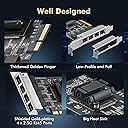
This 4-port 2.5G PCIe network card, powered by the Realtek RTL8125B chipset, delivers multi-gigabit Ethernet speeds with broad OS support and advanced networking features. Designed for professional-grade setups, it fits standard and low-profile PCIe slots and supports VLAN, jumbo frames, and PXE boot, making it ideal for high-performance PCs, servers, and NAS systems.





| ASIN | B0C4H41C6X |
| Best Sellers Rank | #67 in Internal Computer Networking Cards |
| Brand | Binardat |
| Compatible Devices | Desktop |
| Customer Reviews | 4.3 out of 5 stars 331 Reviews |
| Data Link Protocol | Ethernet, IEEE 802.1Q, IEEE 802.1p, IEEE 802.3 |
| Data Transfer Rate | 2500 Megabits Per Second |
| Hardware Interface | PCI Express x4 |
| Item Weight | 0.21 Kilograms |
| Manufacturer | Binardat |
| Mfr Part Number | NA2G4 |
P**A
Worked instantly
Popped right in and Windows Server 2025 recognized it immediately. Link speed shows 2.5 gbps and download speed test confirms it.
S**E
Great for a router
Great for a lil diy router, really good quality and couldn't be easier to install. It's always nice to have extra hardware included, and I need it for a my low profile computer build, and no extra cost is always good!
P**.
Great NIC with good OS support.
I have purchased a few of these NICs for PCs and servers that only had 1 Gbps built in, and they work great with Windows, FreeBSD, and Linux.
A**R
Good product
Works great, noticed an increased snappiness to the computer.
A**W
Works
Great little 2.5gig adapter
T**M
Works fine but had issues with my motherboard
I tested this in 3 different machines. One of my ASUS motherboards had an issue that when you initially started the machine, the PCI-E was not active. This is NOT the fault of the card but the fault of the motherboard. For me to get the machine to boot fresh with the card active I was required to disable the onboard ethernet adapter. If you intend to use the onboard adapter and this adapter doublecheck reviews of your manufacturers motherboard before blaming the manufacturer of this board. To ensure you have setup the card properly. When you first install this, windows will install a default driver. I would double check the card works as expected by doing speed tests if you have internet speeds at 2.5Gbps. If you do not have those speeds you can setup iperf3 server and client and run a speed test between 2 computers. A poor mans version of this is to copy a large file from computer A to computer B. But if you do the copy file trick, you must ensure you hard drive speeds are at or above the 2.5G speeds. Some SSDs cap out at 100Mbs. Drives rated at 6G or 600Mbs likely will never run at those speeds. So keep that in mind when doing speed tests with data. If you noticed you are not getting expected speeds for the adapter. I would recommend downloading the realtek drivers from realtek. Once installed, you can change the adapter settings in the Device Manager to used 2.5G instead of the default often set to 1.0G. You may also want to turn on Jumbo frames. But in doing so check your router's capabilities for jumbo frames. Some routers will limit or restrict jumbo frames so keep that in mind. If turning on Jumbo frames and you speeds decrease you likely are having issues with your router. Some manufacturers, especially those with all 2.5G ports usually turn this feature on by default. Overall, after testing in 3 different machines. I plan to use this in my gaming PC. I can finally upgrade my internet speeds and take advantage of it for both my server and my gaming PC. A worthy upgrade in my mind since my day job includes having fast and reliable internet connection.
T**P
Does not work with PFSense
If you use PFSense, this card does not work. The BSD operating system does not have drivers available.
K**3
Stable and fast and only an x1 slot
Got this for an Unraid server I have that doubles as a gaming virtual machine so I could dedicate one port to the server and one to the VM and use my 2 Gbps Internet and also have low latency to the VM. It works and it’s stable so it gets the job done. Good investment!
G**W
Behaalt zijn topsnelheid
Getest op een Windows 11 machine die alleen een 1gbit aansluiting had. Deze netwerkkaart haalt netjes ongv de top van 2,5GBIT up en down. Bouwkwaliteit is goed.
R**K
Au top sur un serveur.
Binardat Adaptateur réseau PCIe 4 ports 2,5 G, contrôleur LAN RTL8125B: Installé à un PC serveur Proxmox pour me mettre de faire mes VLANs (Pfsense), les transferts sont vraiment au top dans mon infra (et une nette différence avec la carte de la carte mère qui gérait le LAN et VLAN) Petit soucis lors de l'installation de la carte sur le serveur, au démarrage Proxmox ne détectait plus aucune carte réseau du PC (7 en tout), j'ai dû faire une mise à jour de proxmox avec clef USB (mise à niveau et non nouvelle installation) pour que tout fonctionne corerctement. Vraiment au top, à voir dans le long terme (PC h24 / 7/7 en route).
L**N
Waste of time and money not compatible with PCIe x1
M**R
Funktioniert mit Synology 1621+
Funktioniert mit Synology 1621+ Treiber sind im Synology OS 7.x schon drin
K**N
Proxmox ok
Rapide. Compatible Proxmox sans pb.
Trustpilot
3 weeks ago
4 days ago