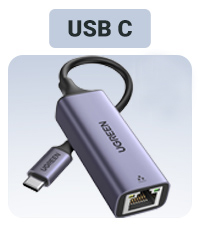
🚀 Upgrade your connection, dominate your digital world!
The UGREEN USB C Ethernet Adapter delivers ultra-fast 2.5Gbps wired internet via USB 3.2 Gen 1, ensuring stable, low-latency connections ideal for gaming, streaming, and professional use. Its plug-and-play design supports multiple OS platforms without driver hassle, housed in a sleek aluminum shell for portability and heat management. Compatible with a wide range of USB-C devices including MacBooks, iPads, and premium Windows laptops, it’s the essential accessory for anyone demanding reliable, high-speed networking on the go.


| ASIN | B0CD1FDKT1 |
| Best Sellers Rank | 798 in Computers & Accessories ( See Top 100 in Computers & Accessories ) 12 in USB Computer Network Adapters |
| Guaranteed software updates until | unknown |
| Item model number | UG-USBC-25052 |
| Manufacturer | Ugreen Group Limited |
| Product Dimensions | 36.02 x 3.5 x 1.5 cm; 60 g |
D**H
Rock-Solid Gigabit Speed via USB-C – Fast, Stable & Well Built
I bought this UGREEN USB-C to Ethernet adapter to get a more stable wired connection, and it does exactly what it promises. Plugged it straight into my USB-C port and it was instantly recognised — no drivers, no setup. I’m able to fully utilise my 1 Gbps broadband with consistent speeds and zero dropouts. Compared to Wi-Fi, latency is noticeably lower and the connection is much more stable, which makes a big difference for work calls, large downloads, and cloud syncing. Build quality is excellent: • Solid aluminium housing • Compact and lightweight • Cable feels durable and well-finished Tested on multiple devices and it’s been flawless so far — no overheating, no random disconnects. If you need reliable wired internet on a laptop or tablet that lacks an Ethernet port, this is a very safe buy. Pros: • Full 1 Gbps speed achieved • Very stable connection • Plug & play • Premium build quality Cons: • None so far Overall, a dependable, high-quality adapter that performs exactly as advertised. Highly recommended 👍
Z**Z
Excellent usb c to ethernet adapter from Ugreen
This usb c to ethernet adapter works exactly as advertised, I have used quite a few other brands and have found this to be one of the best so far, it works on the samsung a55 no problems the a55 max out at slower speeds around 350mbs but higher end devices will see your full speed, you will achieve full speed on devices with compatible usb c ports, such as higher end phones and tablets, laptops, it worked perfectly on a family members oneplus tablet and samsung tablet, full up and down speeds as advertised and minimal battery drain which great as other devices from other brands would drain the device even when not in use, and use up more power when doing the same thing which wasn't good at all, this works with a usb A adapter (also ugreen branded) which I had handy, no issues with a windows pc, build quality is excellent nice design. Usb c port fits well not too tight and not too loose. No heat issues after many hours of use and zero drop out or loss of connection so far, would have liked the cable to have been slightly longer but its flexibility makes up for it, a Usb A in adapter included would have also been nice addition to the package but I would still highly recommend this adapter and ugreen devices as they have yet to fail me to date. Just remember the faster the port the faster your speeds will go, some devices will max out at 350mbs others will give you the full 2400mbps with a decent quality ethernet cable of course. Ugreen does a slower speed model if thats all you need but for a few pounds more I would grab this if you can for the long term.
A**L
Top tier product!
Amazing value and does what you expect. My gaming pc ethernet port only allows up to 1gb so brought this adapter and hey presto, can easily use my full speeds of 2.2gb and offer the same low latency! Make sure you have a type c gen 3 port i think it is so it'll be capable of offering the speeds. Any lower the type c port will reduce the speeds it can give. Size is great for what it is. Connecting it is easy, plug and play. Feels premium and functions fully as expected!
I**N
simple upgrade
plugs in to a USB port and provides a 2.5Gb ethernet connection. Simple and effective as long as you have a 2.5Gb network to take advantage of the step up from the standard 1Gb. Win11 picked up the device straight away, no need to faff with drivers and a quick switch of the ethernet cable from the onboard 1Gb port to the Ugreen port it was up and running. For the £17 paid, solid option for when there's no room for an mobo based PCI card to do the same.
P**R
RTL8156 based 2.5Gbps ethernet adapter
I was looking for a 2.5Gbps ethernet adapter. My thinking is that even though right now, this is the only greater-than-1Gbps device I have, it is still a start. I hope to eventually buy a new router with 2.5G ports, and probably another one of these for my NAS. So that I'll actually be able to utilise the speed of the hard drives in the NAS when photo editing. I found some information that some of these adapters can have issues, but the ones that are based on the Realtek RTL8156 do not. This is based on that chip, and it was on offer, so it was an easy sell. I have it plugged in to the back of my monitor via a USB-A to USB-C converter. Basically my monitor contains a USB hub, and it in turn connects to my laptop via Thunderbolt 3. I use both an Apple MacBook and a Windows laptop. On the MacBook, it was installed automatically and worked like a charm. On Windows, it did not automatically install. Rather, it presented itself as an optical drive to the operating system. That seems to be deliberate, as there are driver installation files on that optical drive. However what I ended up doing was - as the manual suggested - download the drivers from the UGreen website. They work fine. Now a word of warning: the speed I got on both Windows and Mac OS was 100mbps (100baseTX). At first I thought maybe the USB port was working in USB 2 mode, or the adapter wasn't supplied with enough current. However it turns out to be far more basic: the cable I used was damaged, and so the auto-negotiation settled on a slower speed. When I tried it with another cable, I got gigabit speeds (1000baseT). It gets a bit warm, but it's nothing to be worried about. Mac OS reports the current draw as 256mA, which is well within the limits of what the USB 3.0 port on my monitor can provide (900mA).
P**S
Good quality adaptor from a reputable brand
Good quality adaptor from a reputable brand, works well and good value - all things I have come to expect from UGREEN.
A**T
Love it. Works as expected
N**N
🌟
I**M
Aynı pc de 2. bir interneti kullanmak için satın aldım işini yapıyor. 1G modeli vardı bunu görünce direk aldım. Oyunu anakart üzerinden takılı olan internetten. Yayını ise bu ürün üzerinden vermek için ideal.
Y**.
Gayet başarılı bi ürün
R**F
plug and play it is true with window 11 if the laptop have the built-in drive for this adaptor. if not you can download the software from realtek.it is working on usb4-c port of the laptop.i use a lan cable cat 8. i decide to put the wi fi off on the laptop to have a better speed on my other wi fi devices. i am very satisfy for this adaptor. extra info. it is working if your laptop have a built-in compatibility with this adapter. to check that,you go to window settings under network and internet.after you plug in the adapter to the laptop on the port of usb type c and a lan cable to the router. you can click on properties of ethernet on window settings. if you see realtek usb 2.5 gbe family controler,your laptop is compatible. if not you go on line directly to realtek site and download that software by choosing window 11. my laptop have a usb4 type c but a port of usb 3.2 gen 2 type c must working also. about the lan cable plug on this adapter work better with cat 8 but cat 7 or 6 probably work also. my router have a 10 ge lan port. it is where i plug the lan cable from the adaptor. if you using a 1 ge lan port,can influance the speed of your internet. another important factor about the speed of internet is the plan you have. i have a internet plan of 2 gigs. the result of speed is 2170 mbps for download and 216 mbps for upload. i have not try to do aggregation on my router because this speed is an off for me. because i have other wi fi devices on my network i decide to put the wi fi off on my laptop to increase the speed on this other devices. if you have more question ask copilot in window. this ai know a lot.
Trustpilot
2 months ago
1 month ago