📚 Elevate your digital paper game — where productivity meets style.
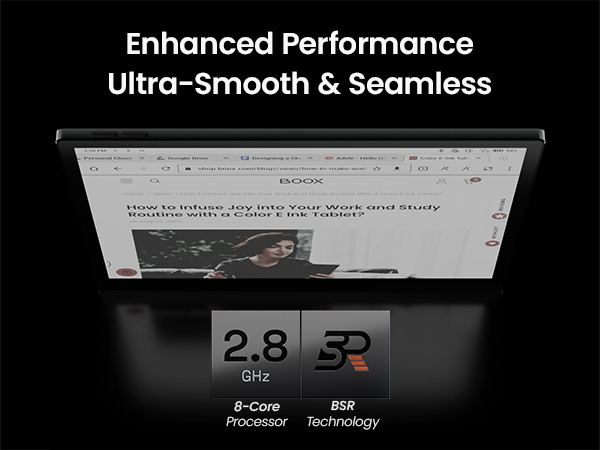
The BOOX Tab Ultra C Pro is a premium 10.3" e-ink tablet featuring a vibrant Kaleido 3 color display and 300 ppi B/W resolution, powered by a 2.8GHz octa-core CPU and 6GB RAM. It offers 128GB storage, Android 12 OS, and advanced stylus support with 4096 pressure levels. Designed for professionals craving a paper-like reading and writing experience, it includes Wi-Fi, Bluetooth 5.0, a 16MP rear camera, fingerprint security, and a long-lasting 4600mAh battery that can last weeks on a single charge.


| ASIN | B0CHM54YZK |
| Age Range Description | Adult |
| Aspect Ratio | 16:10 |
| Battery Average Life | 1 days |
| Battery Capacity | 4600 Milliamp Hours |
| Battery Cell Type | Lithium Ion |
| Battery Power | 4.6E+3 Milliamp Hours |
| Best Sellers Rank | #141,802 in Electronics ( See Top 100 in Electronics ) #1,864 in Computer Tablets |
| Biometric Security Feature | Fingerprint Scanner |
| Brand | BOOX |
| Built-In Media | device |
| Camera Description | Rear |
| Color | Dark grey green |
| Compatible Devices | Personal Computer |
| Connectivity Technology | Bluetooth, Wi-Fi |
| Customer Reviews | 3.9 out of 5 stars 198 Reviews |
| Display Refresh Rate in Hertz | 60 |
| Display Resolution Maximum | color1240 x 930 (150 ppi) |
| Display Type | E Ink |
| Generation | 1st Generation |
| Graphics Description | Integrated with advanced features |
| Hardware Interface | USB Type C |
| Human-Interface Input | Touchscreen with Stylus Support |
| Item Dimensions L x W x Thickness | 8"L x 7"W x 0.25"Th |
| Item Weight | 0.99 Kilograms |
| Lithium-Battery Energy Content | 15.17 Watt Hours |
| Manufacturer | BOOX |
| Memory Slots Available | 1 |
| Memory Storage Capacity | 128 GB |
| Mfr Part Number | Tab Ultra C Pro |
| Model Name | Tab Ultra C Pro |
| Model Number | Tab Ultra C Pro |
| Native Resolution | B/W: 2480 x 1860 (300 ppi) |
| Operating System | Android |
| Operating System Family | Android |
| Other Special Features of the Product | Stylus Support |
| Photo Sensor Resolution | 1 MP |
| Processor Brand | Qualcomm |
| Processor Description | 8-core, 2.8 GHz |
| Processor Speed | 2.8E+3 MHz |
| RAM Memory Installed | 6 GB |
| RAM Size | 6 GB |
| Rear Facing Camera Photo Sensor Resolution | 16 MP |
| Screen Size | 10.3 Inches |
| Size | 10.3 IN |
| Speaker Description | Dual Speakers |
| Total Usb Ports | 1 |
| Video Capture Resolution | HD 720p |
| Warranty Description | 1 year warranty |
| Warranty Type | Limited |
| Wireless Compability | Bluetooth |
| Wireless Technology | Bluetooth, Wi-Fi |
K**R
Best tablet and ereader on the market with color and eink display! Best for kids as well!
I had a very awful experience with kindle. I bought 1 for my daughter. I thought since kindles are the latest rave and it was such a great deal. She couldn’t stand it. I took a look at it and she is right. The lagging, ghosting, and navigation are awful. Tried to pass around to others. No one cared for it. The trade in wasn’t worth it. Completely taken advantage of by Amazon. I will be absolutely honest. Due to what happened with the kindle. I did months of research before buying an ereader. I joined multiple groups of books and ereaders. I found that no matter the name or brand of an ereader the super cheapest one’s have the most issues and don’t last long. If you pay cheap, you simply get cheap. I was torn on the price tag, so I went and asked the IT experts (those who live and breathe in the technology field. Very far in careers like CTO, VP, engineer etc.) All explained to me how important ram is. Turns out they are completely right. Ram is huge, the higher the better! As far as my ereader I paid the extra for the ONYX BOOX Tab Ultra C Pro. It is worth everything I paid for & more! In life I’ve found you get what you pay for. I went looking for 3 main things. I am not a fan of black and white. I specifically wanted color, an ereader that has google playstore ( I read off multiple apps and get free books off multiple apps &saves me $ from having subscriptions), and the size mattered when I was looking for an ereader. I truly wanted an ereader that was at least 10 inches because I was use to reading off a bigger device (my iPad) It checks all my boxes and more. It has a stylus, notes, does docs, tablet & ereader in 1, has color, 128 GB of memory plus has a slot for memory cards if needed, 8 core processor, 6 GB of Ram, Kid Friendly Navigation going between kids mode and adult mode, Similar to a scribe, however has way more better features, Has refresh button for ghosting, Has a calendar for notes , book journal, and so much more. No more subscriptions. I can download whatever app I want to read from. My point is I went in for 3 main things and & I’m so glad I paid the extra and got those extra features. I paid over $500 for mine and I have no regrets. You simply can’t put a price tag on technology. There are payment plans. I am not embarrassed to say that I haven’t ever used them. I’ve got the best qualities on products, by simply using them. So if you see an ereader that you are in love with and have to have, don’t let that price tag scare you away. My ereader I’ve seen go from $400 to $800. I shopped around before I got mine. eBay, Best Buy, Amazon, boox site, & Walmart all sell them. My boox ereader has truly been a great investment and I use it a lot and more than just an ereader. I love taking notes on it! I use the notes, the docs, and the calendar feature a lot. Free and discounted ways to read With a boox ereader 1. BookBub- Can go on website or download app. BookBub allows you to get free or discounted books and can send to the app you read from based on if the book is available for that app you read from. It uses kobo, kindle, nook, Apple Books, etc. 2. Free your kindle days. You can download books for free to many different apps such BookFunnel, smashwords, kobo, kindle, nook, Apple Books, etc for free. You don’t have to have a kindle for this. 3. Kobo has free books on their website. https://www.kobo.com/us/en/p/free-ebooks 4. Hello books website. Just tell them your email and on certain days they email you free and discounted books. 5. Libby- You can open up multiple library accounts in your state so you have access to free books. 6. Hoopla- Only allows 1 library acct at a time, so may have to sign in and out and create multiple accounts. 7. Red feather romance- sends free books to your email. Books can be downloaded to kobo, kindle, nook, Apple Books, google play, etc. 8. Free Booksy- emails you free or discounted books as well. Only good for that day, so check your emails. Books can be downloaded to kobo, kindle, nook, Apple Books, google play, etc. 9. Planet Ebook website has free books on site you can read from. 10. Free-ebooks.net has free books on there you can read. 11. Manybooks.net can download free books to your ereader or device you read on. 12. Librivox website can download free books to your ereader or device you read on. 13. Open library app 14. Feed books 15. Smashwords 16. Project Gutenberg can download free book to device or ereader you read on 17. Google Books 18. PDF books world website. Can download free books to your device or ereader. 19. Decisions choose your story - App where you choose your character name, hair, clothes, and choices in story. Only free by watching ads. Different type of reading if you’re in a reading slump. 20. Readict App 21. Inkitt App 22. Wattpad App 23. Novel flow app 24. GoodNovel app 25. Whispers FM app 26. NovelToon app 27. Galatea can read on website or app for free. App has lots of spice books, dark romance, erotica, etc. If you truly love it can upgrade for a subscription for 69.99 a year and includes audio. About $5.83 a month broken down. 28. Dreame app 28. Nook has free ways to read on their app. 29. Bookraid website 30. Thriller/mystery books website book adrenaline 31. Bookgorilla 32. Bookbasset 33. https://author-blossom-seafarrer-jvjrsu.mailerpage.io/?utm_source=newsletter&utm_medium=email&utm_term=2025-05-17&utm_campaign=Delve+into+the+Unknown+with+Our+Intriguing+Paranormal+Newsletter+ 34. https://book-mojo.com/freereads/ 35. https://www.barnesandnoble.com/b/free-ebooks/ebooks-nook/_/N-ry0Z8qa
L**R
BOOX Tablet Tab Ultra C Pro - A Great Epaper Tablet So Far.
Purchased just about a week ago. Works very well. No screen issues or bad pixels and is not locked down. I added a memory card as well. Also is open with the Android store. Not locked down like the Kindle Scribe or the ReMarkable. I have a Kindle Scribe as well and can say the Boox is by far better. The tablet colors are great and placed all of my downloaded Android apps in the setup folders. Cannot do that on the ReMarkable or the Scribe. Some points to note. If you adjust the refresh your are going to cut back on the battery life considerably. If you want to play games like Solitaire or Chess, you are going to cut back on battery life. If you want to try and watch videos, you bought the wrong device. I mean, you can technically watch videos... but its not meant for that and its painful. So those that give this tablet a bad review for that need to quit misrepresenting what this device is best used for. I was able to download the Kindle app from the Android store and it works great. All of my books downloaded once I logged in. No issues at all and no apparent hit to the battery life either. The Kindle app on this tablet is not the same as the Kindle Scribe. Books show full color as allowed by the epaper tablet display. You cannot write on the books you download. But to be honest, you are not doing that on the Kindle Scribe anyway. As far as taking notes, there are bunches of templates and the OCR works ok even with my chicken scratch writing. To be fair to the advertising, when writing on the tablet, it does feel like paper. Unlike like other tablets with higher resolution that it feels and sounds like you are writing on glass. I have the Scribe as well and I will say the Boox feel more like paper than the Scribe does. I really like the split screen function. With that I can open a Kindle book at the top of the screen and have my notes open at the bottom and take notes easy enough. Another is that I can read in the dark very well. The backlight is good. Not sure the impact on the battery life. Pretty sure there is a difference but did not try to measure. Also, there is a camera on the back. Have not used it very much. As with the videos, the camera pics displayed on the tablet is not all that great. But just like using this for videos, if that is what you want, then go and get an iPad or a Fire tablet because that is what they are much better for. To protect this Boox tablet, I went and picked up the Bozhuorui cover. This does a good job protecting the tablet and also securing the magnetic pen. Once I have had this a few more weeks will come back and add / modify this review and rating.
Z**A
Beware! Screen Damage with Minimal Use – Extremely Disappointing for a Premium Device
I purchased the BOOX Tablet Tab Ultra C Pro (10.3" ePaper) on December 12, 2023, hoping for a reliable, high-quality device for occasional reading and note-taking. Unfortunately, after less than a year of minimal use, the screen is severely damaged, with glitching and lines running across it, rendering it completely unusable. This is shocking for a premium product that had been working perfectly fine just yesterday. The screen was completely normal when I last used it yesterday. Today, I took the tablet with me in my backpack—something I've done several times before without any issues. There were no metal objects or sharp items in my bag that could have damaged it. However, when I took it out of my backpack today, the screen was like this. I rarely used this tablet—mostly for light reading and notes, maybe a few times since I bought it. I expected much better durability from BOOX, especially at this price point. It's unacceptable that a device marketed as a "durable ePaper tablet" couldn't withstand being transported in a backpack. If you're considering buying this device, be aware that it might not last as long as you expect, even with careful use. I'm incredibly disappointed and would urge potential buyers to think twice before investing in this model. Edit: they asked me to pay 310USD + shipping fees to replace the screen even do it's not an external damage, so I would like to clarify several important points: 1. The screen displays internal malfunction symptoms rather than physical damage: 2. The screen surface remains completely flat with no cracks or indentations - There are no visible impact points or pressure marks - The glitching pattern suggests an internal electronic or display component failure - The device was always handled with care and stored properly. The issue appeared suddenly without any physical trauma to the device. 3. This appears to be a warranty-eligible defect rather than user-caused damage, as the symptoms are 4. consistent with internal component failure rather than external damage.
A**P
Jack of all trades but master of none....Highly versatile e-ink tablet.
Bought this to take notes for meetings at work. Works as advertised. Writing feel is ok... Not as paper like as other more expensive brands. However it does offer more functionalities and options than others. So recommended for people searching for a more versatile e-ink tablet. But if you're just looking to take better notes, I would recommend the reMarkable Pro. The writing feel on that is like no other, despite color refresh "annoyance".
R**.
Productive, portable, great battery, decent colors.
This is a great device for productivity. I do think the camera on the back is completely unnecessary. It is e-ink, so keep in mind the experience watching videos and responsiveness will never be as good as an LCD screen. And that's by design. The use-case for a device like this is focused productivity - reading and writing, not multimedia consumption and the smoothest switching between apps. This is a good middle ground since you can still run note-taking apps like OneNote and Obsidian due to full Android OS. Some people complained about the screen getting damaged when carrying in a backpack. This is true and happened to me as well. The screen does get easily damaged. Be careful not to ever drop it. And I'd recommend getting a cheap and light tablet carrying case and putting this in it and then in a backpack. Also, I brought a universal tablet hand strap for it and can carry it around in one hand while writing with the other. This adds a ton to the portability. Great for using on busses, while walking around, etc. This is in contrast to the Remarkable paper pro which is designed more as a desk device.
R**E
Missed the mark
The protruding camera on the back makes this non-functional device. Video shows how it'll jiggle on a table so it's pretty much useless unless you're holding it with one hand in the air and writing in the other. Pros: The Android OS is pretty fast, and the AI-powered handwriting to text is pretty smooth. I liked the interface in general and the hardware is very sleek and aesthetic. I like that I can download any app I need like an offline image to text converter or weather app..etc The 2.8Ghz processor kept up with my navigation and clicks, it was pretty lightweight to hold and I personally didn't have any issue connecting to wifi as most of the other reviews mention. Cons: Very pricey for an Eink device. Camera on the back does not allow device to be flat on a surface, so it will wobble in a way that you can write a full letter without uninterrupted contact with the screen surface. Cannot pick it up from its right side, need to slide to edge of table to get fingers under it. I sent this product back and went with another brand, since their website did not provide any visuals on whether the others did or did not have protruding cams on the back, and I did not want to spend another month research high powered Eink readers so I went with my original second choice. Recommendation: This product is a no-buy. Other products may be much better from this brand so don't rule them out completely.
A**K
Wonderful product
Super easy to use and I love that it looks like paper rather than a typical tablet screen. It also helps keep me from using it like a typical phone or tablet (I don't download useless apps) to help keep me from getting distracted from reading. The writing aspect is also seamless and works great. It can get very bright or very dim depending on your environmental lighting. The colors are definitely not as vibrant as a regular tablet, but still accurate for the most part. The only complaint I have is the pen comes with a rubber cap to protect the nib but it doesn't snap on or have any way to firmly attach it and I finally lost it after a year of having the tablet. You can't order another either and it really bothers my perfectionist brain. But other than that, it has been an excellent product!!!
C**C
I did my research and wanted to love this Boox pro, BUT..
I really did want to love this book's pro I thought I had researched everything about the different Eink tablets, what a let down. I with ask those YouTube reviews and watching even Boox's own how to guide i thought this would be easy to set up and use in all the ways I wanted...... NOT what happened. I have had issues with things saving, screen glitching and changing from written to popping up a text box and I for the life is me can't figure out how to turn the written text into a PDF /text file to share.. (the tech side may me more my issues but I've read the instructions and watched videos and my device just doesn't do it). I have a faulty products but I'm just not been happy with this over perfect Notebook. I have found that I like the brightness and some of the functionality of making each notepads, not at smooth as the remarkable. I have had the chance of sitting next to somebody who had the brand new remarkable and she looked my color, the options with the pen and general set up better. There are things that I found that my Boox was better at, but the remarkable had a clear screen and the refresh was crisper. I still like the Boox a bit better and the color is better and the pen rate is better. I have found the size of the tablet to be a little bit more bulky than I am comfortable with. I like to bring it with me and it barely fits in my purse trying & it was a pain to find a car that was protective and portable. I had to modify the one I did find and I pray everyday I use it that I don't drop it.. The tablet is bulkier and more of an awkward size than I anticipated, thicker then an normal iPad or the remarkable it's more square. I do not like the magnetic cases because I like to travel and write notes and there's no hand hold now is it protective, but that's mainly what you get as options for cases... You cannot keep track of the silicone cover for the plastic marker like tip for the pen, so you end up having more wear and tear on the tip and I find the tips just don't last long, barely used maybe a month. I have replaced the tip three times at this point and I don't feel like I overly use it and I don't have a heavy hand so definitely invest in replacement tips. Even after months of having this I am still learning this product and all the things you can do. This f dies have an android base, but different than your phone/ android it's very basic in nature and slow , it will keep you off the Wed and focused, that's why I got it. I don't know if I got a glitchy 600$ product, however trying to get service help through Amazon they say call boox and the Boox website says go through Amazon. I feel like I could have gone with the cheaper smaller model & been happier because I would have paid almost half the cost and gotten the things I currently use, when it's not glitchy. Hopefully when I get a hold of Boox they will help me with the functionality issues that I'm having. -the screen is glitchy it changes the text box and written box and several other weird functionality things that are hard to explain in text. I will update everybody when I get some help...
ع**ه
الالوان جدا قاتمة
سعر مبالغ فيه بامكانيات صفرية مافي اي شيء مميز بالجهاز حتى بطاريته ضعيفة وسعره يمكن تشتري فيه اشياء افضل بكثير لا انصح فيه اطلاقاً
P**L
Great?
Great ebook reader. I love it. Especially good when reading coloured comics. I love the look of the old Eagle and Valiant issues that I love. Worth every penny to me. Technically it meets its specs.
G**O
La mejor Tablet de tinta electrónica
Estoy realizando un posgrado en investigación y divulgación científica por lo que la búsqueda de una herramienta eficiente para mis largas jornadas de lectura digital era fundamental. Después de mucho investigar, me decidí por la BOOX Tab Ultra C Pro, y no puedo estar más satisfecho con mi elección. Desde el primer momento, se siente la alta calidad de esta tablet. No he encontrado ninguna otra tablet en el mercado que ofrezca las mismas características, funcionalidad y calidad. Una de las cosas que más me sorprendió es la pluma magnética incluida. Es increíblemente precisa y se adhiere firmemente a la tablet gracias a su sistema de magnetizado resistente, lo que evita que se pierda fácilmente. La pantalla de la BOOX Tab Ultra C Pro es extremadamente amigable para la vista. Después de pasar horas leyendo documentos científicos y libros digitales, no siento el cansancio visual que experimentaba con otros dispositivos. Esto es esencial para mantener mi productividad y confort durante mis estudios y trabajo. El hecho de que funcione con el sistema operativo Android 12 es un gran plus. Tener acceso a la Play Store me permite descargar una amplia variedad de herramientas de trabajo. Desde aplicaciones para leer y anotar documentos hasta herramientas para trabajar en archivos y reportes, todo está al alcance de mi mano. Además, la tablet ofrece diversas herramientas de navegación que facilitan la investigación en línea, algo crucial para mi campo de estudio. La transferencia y vinculación de archivos, libros y documentos desde otros dispositivos hacia la tablet es sencilla y rápida. Esto me ahorra mucho tiempo y facilita la gestión de mis materiales de estudio y trabajo.
F**.
Thankyou freebie cover and amazing product
Coming from ipad it's definitely not easy transition, however we are all looking up for monochrome and eye friendly stuff. Thankyou seller for amazing product and delivery was timely within same day. I would definitely recommend the seller and in future consider buying from them.
Z**Z
Comes with a cover (the brown magnit cover)
Spent extra money buying one, now I have two. As for the device....it's great. Had it for a week now and it became part of my life much faster than I thought it would. I had the Sasmung s7+ and stopped using it, because it became a chore to use something that lasts for 6 hours and charges for 2. Would 100% recommend this to everyone that wants to read more and be able to take notes without needing to stress about battery life.
Trustpilot
3 days ago
1 month ago