


Buy anything from 5,000+ international stores. One checkout price. No surprise fees. Join 2M+ shoppers on Desertcart.
Desertcart purchases this item on your behalf and handles shipping, customs, and support to Uruguay.
๐จ Unleash your inner artistโanytime, anywhere, no strings attached!
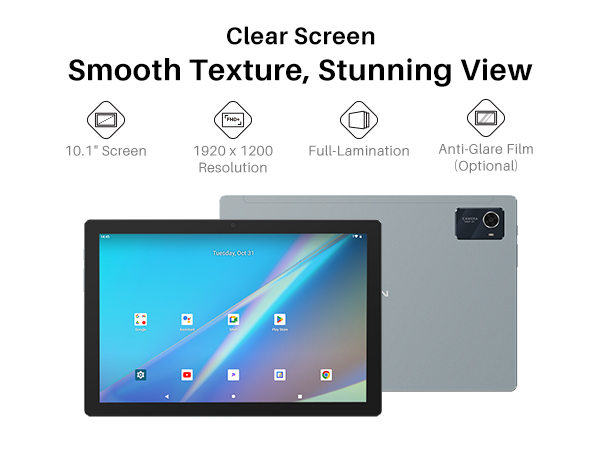
The HUION Kamvas Slate 10 is a standalone 10.1-inch digital drawing tablet featuring a full-laminated 1920x1200 IPS screen, 4096-level pressure-sensitive rechargeable stylus with tilt, and runs on Android 12 with 8GB RAM and 128GB storage. Designed for artists and beginners alike, it offers powerful performance, long battery life, and portability without needing a computer, making it an ideal creative companion on the go.




| ASIN | B0C6DSZD73 |
| Active Surface Area | 216.576ร135.36mm |
| Additional Features | Anti-Glare Film, Front Facing Camera, Headphone Jack, Rear Facing Camera, Stylus |
| Best Sellers Rank | #45 in Computer Graphics Tablets |
| Brand | HUION |
| Built-In Media | HS200 Stylus with 1 Replacement Pen Nib, Leather Adjustable Stand, SD-Card Ejection Pin, Quick Start Guide, Standalone Drawing Tablet with Screen, USB-C Cable, US Power Adapter |
| Color | Grey |
| Compatible Devices | Tablet |
| Connectivity Technology | Bluetooth, WiFi 2.4G&5GHz |
| Customer Reviews | 4.2 out of 5 stars 971 Reviews |
| Display Type | LCD |
| External Testing Certification | Nรฃo aplicรกvel |
| Item Dimensions L x W | 9.57"L x 6.34"W |
| Item Weight | 575 Grams |
| Manufacturer | Shenzhen Huion Animation Technology Limited |
| Mfr Part Number | KT1001 |
| Model Name | Kamvas Slate 10 |
| Model Number | KT1001 |
| Native Resolution | 1920x1200 |
| Operating System | Android 12 |
| Pressure Sensitivity | 4096 Levels |
| Screen Size | 10 Inches |
| Special Feature | Anti-Glare Film, Front Facing Camera, Headphone Jack, Rear Facing Camera, Stylus |
| Specific Uses For Product | Animation & Desiging, Digital Writing & Photo Editing, Drawing & Painting |
| Target Audience | Student, Teacher, artist, designer, illustrators |
| Warranty Description | 1 Year Warranty |
S**S
Good portable option. Mostly exactly what I wanted after fixing.
EDIT // Huion reached out to me to determine if my tablet is faulty. Will update conclusion, but I've added more thoughts below // EDIT 2 // Huion sent me a replacement pen. This arrived as the pen only, no nib, so I used the one the original pen came with (you get a few). Immediately notice the nib fits differently. I wish I could show this, but it's quite small and I can't really convey through photos. But it immediately felt different. After some test drawing, it does seem the pen I received was faulty. With working pen, it is much easier to vary line weight and achieve thin lines with nice points without erasing. Drawing is more natural and it will register quicker strokes. Before, I found using smaller brush sizes really difficult too. Now, with a working pen, I haven't had issues with size or textured brushes seeming weird. I can mostly draw as normal, which is good! I still stand by my statement of not trusting Huion products without also getting the extended warranty, so I added the Amazon 2 year to mine. This will be the second Huion tablet I purchased that ended up faulty. However, their customer service was MUCH better this time around. They clearly care more than they did previously and reached out to me, which I definitely appreciate. Clearly I not only liked my original Kamvas13 tablet enough to keep using it even if the colors were incorrect, I went on to try this one too. Was I initially worried it wouldn't be as good? Yes. But now that it works properly, I feel much more comfortable with it. While the tablet is not as good as their other pen displays (like kamvas13), I do think this would be very suitable for a beginner tablet or for someone who is already familiar with tablets that need to be connected to a laptop or PC who want something more mobile. It is lightweight and easy to hold. Sketching on it feels more accurate now. I adjusted the pen pressure settings once when I received the new pen. I've switched tools and brushes in CSP and have not had the issue of having to adjust the pressure again between tools or brush types. So using it is way easier. Overall, for portability it's great. Some of my old review still applies, so I've left it. The case is pretty mid. It's nice that it comes with one though. I still recommend an elastic band or something to hold it closed and to keep the charger and glove together with it. Especially if you travel. You can see this in my photo. No, it isn't as good as say the Kamvas13, but I feel like it is still suitable as a portable tablet option. I've also moved files from it to my laptop and haven't had issues with color or quality being different. So, for me, I wanted a tablet that could be portable and stand in for my tablet tied to my laptop because I just can't always juggle all that. For this, it works more closely to how I had hoped! It still feels like any other android tablet to use, but this is good for portability and familiarity and it's less disappointing now that I'm not struggling to use it. If you are having any considerable issues, I do recommend you reach out to Huion! They were friendly and easy to talk to. Was it still usable defect? Yes, but it shouldn't feel THAT different or difficult to use. So please don't hesitate to reach out to Huion if something feels off! Because you should be able to use it mostly normally. There is a little difference between using android interface and a laptop, of course, but not to the point where it feels like a bad time now. I have left my old drawing where you can see a lot of blunt round edges, but have added a new drawing for comparison. The video is still the faulty pen. I've left this in case it helps someone else too. I have changed my review from a 3 star to 5 because of this. I'm more comfortable in recommending it to others now. // original unedited review below because it shows where my previous issues were and some general things still apply // First, DO NOT BUY HUION PRODUCTS WITHOUT A WARRANTY. I've used their products and they are fine but seem to have issues immediately once the manufacturer warranty runs out. They will not allow you to pay for repairs or otherwise compensate you. Please buy with caution. Now, the tablet is very mid. It's easy enough to set up and use, but I've found the pressure is difficult to adjust. You have to use a pretty heavy hand. No matter how I change settings, I can't seem to fix this. I normally draw lightly, so this was really difficult for me. I'm disabled and can't draw at a laptop much currently, so I bought this fully excepting it to be disappointing because it just isn't the same. I did want it to be good and hoped it would surprise me, but it's just not as responsive for drawing as it should be. It feels like a generic tablet, just with preinstalled art programs. Feels like buying a random cheap tablet and pen could get the same result. It doesn't feel like it was catered to or made with art in mind. I use CSP with mine. I've already used it on a PC so I'm familiar with it. I did appreciate that it had a few programs on it for you to try by default though, and did play with the others first. The settings seem to have to be adjusted separately for each one. I plan to download others and will edit this if I find one that works better than the preinstalled ones. I do recommend people check the app store for the app of your choice. I already had a different app I used and Google said it was available, but surprise! It actually isn't. Thankfully, I am also familiar with CSP, but had to upgrade my plan to use on both android and a laptop. It seems nearly impossible to achieve a variety of line weight. Regardless of tool or settings, you just can't get a whispy line. Adjusting pressure just results in a choppy line or no line at all. I have to use the eraser tool after to get a sharper line without a more blunt end. I've found this to be the case regardless of the tool or brush type, but have only used the basic ones available in CSP. Colors seem accurate. I have only done sketches so far, but the colors are close or the same when viewing on other devices. The colors were incorrect on my other huion (Kamvas13) due to a defect so this has a very obnoxious improvement lol (again, don't rely on manufacturer warranty! I used the old tablet for years, but the colors stopped being really early on, just barely a year of owning) I have not had issues with battery on pen or tablet and they seem to charge in a timely manner. Middle. Not really fast but not super slow. Kind of just as expected. I've only had to charge it once so far, but I've also been using it to read ebooks. It comes with an art glove and case. The glove will be big if you have small hands. It's a one size fits deal. But it's soft and does its job. The case doesn't hold the tablet up well and it's difficult to remove the pen (but my hands don't work well so it might be me). There's a gap in the case behind the pen that's probably helpful for removing the pen if you have working hands lol. I use this and bend the edge of the case to pop it out (the plastic there is flexible). It's a bit awkward, but works for me. I do appreciate that the pen is secure, though. No worries about losing it or it just randomly falling out. Case flap is prone to, well, flapping. I had an elastic fabric pen case that wraps around sketchbooks and use this so keep it closed while carrying it or traveling. There is no included pouch or anything for the charger or glove, so this solution also keeps all the things you need together securely. Worked very well on a plane! Photos to show what I mean. I put stickers on my case to see if it would help with holding it with different friction, but it's mostly the same. Really easy to find the tablet if I set it down though. Overall, it's passable. If you're on a budget and are expecting a product that reflects that, it delivers that. May be better for coloring vs drawing. Despite it being a little disappointing, I am happy to be able to draw wherever I feel like and not have to be attached to a laptop or PC. There is a slight learning curve of you have used another tablet in adjusting to the limitations of this one. WOULD NOT RECOMMEND FOR BEGINNERS. I know a lot of people are saying it's good for a first tablet, but given the frustrating issues, I'm afraid it might turn new users away. I think it's most suitable for use in combination with a better tablet on a laptop or PC.
E**L
A good intermediate or beginner tablet thats not too expensive
So far everything has been good. The tablet was easy to set up. It has good durability but obviously don't drop it (i already did once and its alright). It only took a moment to link it to my phone. The stylus works well though after a few days of using it I've noticed it wont draw or will be choppy (it keeps reading my palm, i think that's the problem) Initially the pressure sensitivity worked well. Im not sure whether or not thats from my art app (ibis paint x) or the actual tablet. I got it on sale and for the price I paid i would say it's worth the money. Definitely wait for a sale before you buy though. Its not the highest quality tablet but it works. The left side of the tablet gets warm quickly but i haven't had to turn it off due to heat yet.
F**R
Elevate Your Digital Artistry with the HUION KAMVAS 13 Drawing Tablet
If you're a digital artist looking to take your creativity to the next level, the HUION KAMVAS 13 Drawing Tablet is the perfect tool to unleash your imagination. As someone who's passionate about digital art, I've had the pleasure of experiencing the seamless performance and innovative features of this cutting-edge drawing tablet firsthand. Here's why I believe the KAMVAS 13 is a game-changer for artists of all skill levels: Seamless Drawing Experience: The KAMVAS 13 features full lamination technology, seamlessly combining the screen and glass for the most natural drawing experience imaginable. With precise cursor positioning and minimal parallax, you'll feel like you're drawing directly on paper. Plus, the scratch-resistant anti-glare film ensures clear visibility without distracting reflections, allowing you to focus on your artwork with ease. Premium Pen Technology: Equipped with the Huion PenTec 3.0, the PW517 stylus delivers unparalleled responsiveness and accuracy. With 8192 pressure levels, 60 degrees of tilt support, and 266pps report rate, you'll enjoy precise control and a realistic pen-on-paper feel. The shortened pen nibs and improved nib firmness further enhance accuracy and reduce offset, making every stroke feel effortless and natural. Effortless Connectivity: The KAMVAS 13 offers easy cable connection options, with two Type-C ports for added flexibility. Whether you're using a 3in1 Type-C to HDMI connection or a full-featured Type-C to Type-C single cable connection (sold separately), setup is a breeze. Plus, with support for Android devices, you can connect your smartphone or tablet for on-the-go creativity. Optimized Workflow: Streamline your workflow with the KAMVAS 13's programmable hot keys and customizable stylus switches. With 8 hot keys along the side and 2 customizable switches on the stylus, you'll have quick access to your favorite shortcuts and tools. Whether you're working in Illustrator, Photoshop, SAI, or any other creative software, the KAMVAS 13 ensures smooth and efficient operation. Versatile Compatibility: Compatible with Linux (Ubuntu), Mac (macOS 10.12 or later), and Windows computers (Windows 7 or later), the KAMVAS 13 adapts to your preferred operating system with ease. Whether you're a digital artist, graphic designer, or student, this drawing tablet is the perfect companion for unleashing your creativity. In conclusion, the HUION KAMVAS 13 Drawing Tablet offers unmatched performance, innovative features, and versatile compatibility, making it a must-have tool for any digital artist. Elevate your digital artistry and bring your imagination to life with the KAMVAS 13.
K**E
Not incredible but not bad
Nice but can be glitchy.... worked perfect for almost a year then now it randomly clicks and flickers when not in use. Almost sounds like.....clicking of electricity? Battery doesnt charge well anymore .....Idk but other than that its okay and im still able to use it
S**S
Highly Recommend for Beginners
I am new to digital drawing and have been looking for a drawing tablet that won't break the bank for a while now. I first tried two different digital pencils with my touchscreen laptop, and that wasn't bad, but it was nowhere near as good as this tablet. It is such a smooth drawing/writing experience with the tablet. The first few times of use I just kept writing cursive and watching the pen work. It's the best one I've used. There is no lag or wavy lines at all. My drawings are turning out great. There is a learning curve, so expect that if you are a beginner. I have 3 complaints. First, I hate where the button on the pen is. It is right where I usually hold my pencils so I accidentally push it a lot. I've gotten more used to it now, but in the beginning it was frustrating. Second, I don't like the drawing app it comes with. I don't think it has enough options. That is definitely preference though. Luckily, you can download any drawing app you like (I like Infinite Painter). And lastly, the tablet seems to drain when not in use. However, I go days without using it. I think I am used to phones not draining as much, but I don't think this tablet is that advanced. It's not a huge deal, especially if you use it often and charge it often. None of my complaints are enough to not give 5 stars. Overall, I highly recommend this tablet.
B**N
Defective cables, drivers, and the single worst customer care experience I've had.
What a trip this one. Bought this on black friday on impulse. Reviews overall looked good, minus some issues with faulty cables and whatnot. Good outweighed the bad, right? Well. No. I apparently received one of those faulty cables. The display would work fine, but the USB and touch interface would endless disconnect and retry, never fully connecting. Reading what I could, it seemed to be a cable or driver issue. First thing was first, I tried the USB on every port I had, even plugging in the auxiliary power connector into a wall charger to make sure it wasn't a power delivery issue. No go. I tried downloading updated drivers and firmware. The driver software was updated Nov 02 this year. OK. The firmware installer completely crashed and gave fatal errors on install, and I later discovered doesn't even support or detect my model. (Need the Pro version). So I contacted support. They wanted all sorts of obtuse information to put in warranty information and start a support ticket. Whatever, jump through the hoop. And then I waited. And waited. Four days later I finally get a scripted response in badly formatted english giving me 20 steps on how to test the HDMI. It's a USB problem, not HDMI... So I shot back. I also informed them many other people are having this same issue in the reviews. Reply: please provide us a video of the issue, including how it is connected to your cell phone. What? I already stated that I'm using their included cable. I look up a youtube video (There are many and more) detailing the rapid disconnect issue and send that off. Reply: please provide us a video of the tablet connected to your cell phone.. What? I've specifically stated that I was using their 3-in-1 cable and described how it was connected. Explicitly stated that I will not be sending them a video of my tablet connected to a phone because my tablet is NOT connected to a phone. And that this lack of active thinking with their support is looking bad on them as a company. Well, my ticket is closed, and I'm back at square one. With a faulty tablet I can't use. I contact Amazon, who, being Amazon, had my back and sent me a replacement cable (with credit compensation) which I am now using. Lo and behold? Now the screen flickers as well, and the USB still doesn't initialize. I'm returning this piece of crap and never looking back at Huion as a company.
A**R
easy to lose the nibs. but easy for traveling
very straight forward to use if you have used a tablet, ipad, or even a smartphone before. took a little getting used to the pen and setting up how the button on the pen would respond. batterly life is not bad. took a 9hour flight with it last year and it survived playing netflix pre-downloaded movies, and multiple ep. come with a case which was nice. only came with one extra pen nib. an the nib is super easy to lose and fall out. down side is i cant seem to find replacement out side of the huion website for $$. + shipping. ok for a first time tablet for someone that likes to draw with out the mess of pencil shavings, paint, pens, and paper everywhere. but would say find one with a better pen that has more availability of replacement nibs if they use them.
T**S
Update: Glad I gave this another chance. OLD: Will give a second chance.
UPDATE: So I got the new tablet yesterday, right on time. I'm glad I gave this a second chance, despite what happened and the other bad reviews. *not that many to me tbh* Anyway screen is solid, and was fully charged, I didn't expect that. The pen is right on point. A few updates, but that's expected. The colors look great, sound without headphones is pretty clear. *My hearing is garbage* but could hear the sound/music/movies etc clearly. Tried a few drawing apps, and found some new ones to replace Sketchbook. I did go and buy the 3-year warranty/insurance since some reviews said it died right after their warranty was up. So if I can get a minimum of 3 years, good enough for me. Will be getting one for the kids next. They destroyed their old tablet so they gotta wait. OLD: From an intense computer user's point of view. The system stats on this tablet are well worth the price. This is the main reason I went with this tablet, and will give it a second chance. When I received the tablet, the packaging was in great/solid condition. I made sure both the pen and tablet had a full charge before turning it on. The tablet came on, but the screen itself would not. The back light came on, but not the actual display. The start-up sound was clear, pen was rechargeable which was fine. Some of the other reviews made me second guess, but after spending many hours reading and comparing other tablets, none seem to come close regarding the stats. Also trying to keep within $200 to $300.00. Seems the best option out of the others. Tldr: Screen non-functional, took several days to receive Doa product. Will update the review after receiving 2nd chance tablet. "Allegedly" arriving tomorrow. 2/26/2024
A**S
Perfecta para viajar
Me encanta, muy fรกcil de cargar tus aplicaciones y llevar a dรณnde quieras seguir editando tus creaciones
D**E
Great creative pen display tablet at an affordable price.
Few weeks after purchase review: I bought it to replace an older drawing tablet. Decided it was time to move up to drawing on screen. I Got it during a promo code sale and includes a bundled stand, a $60.00 value for a total of $120.00 savings. The package comes with a microfiber cleaning cloth, a bunch of nibs, nib holder, and a drawing glove. Everything you need to get started, save for downloading the latest drivers from the website (Something you should do anyways, for any computer accessory device). Being able to draw realtime on screen like you were using a pen/pencil on paper makes a big difference vs a plain tablet. I love the texture of the provided pre-applied screen protector, it feels like your pen device is drawing on paper, very pleasant to use. I also love the fact that the pen is battery-free. I've long grown tired of batteries dying, needing recharge or replace batteries on devices such as mice & keyboards. Product is very light weight, very comfortable to work with wherever your sitting. Included 2-in-1 cable seems to have enough length to be able to have a laptop placed off to the side. A USB 3.0 SS 'Super-Speed' port seems to have enough power, not needing to plug in the additional red-colored usb plug when using it with a laptop. I havn't bought or tried the usb-c to usb-c optional cable yet, may do so in the future. Connectivity to a cell phone via usb-c cable seems a very interesting feature, may be worth trying out! The display menu is easy to get into, and very bright at factory defaults. Like my monitors (laptop& desktop) I find its easier on the eyes to turn the brightness setting down a fair bit, and its still very bright and vivid enough to use. Darkmode display theme also helps, but generally the drawing program canvas is going to be white until you start filling it in with color. The display panel is an 8-bit IPS panel, very accurate and has better color range than my laptop 6bit panel. Screen resolution is 1080x1920, and is perfect for the display area, all program menus and icons are readable and visible. I'm using the default display mode set by the Kamvas driver and window options, so it mirrors the laptop display. Tip: I went into Windows Battery Settings / Power & Sleep, changed what closing the lid does while Powered on Both Plugged In and On Battery mode, (set it to 'does nothing') and simply close the laptop lid, I find its less distracting, and makes for a viable option when running on battery power instead of being plugged in. You can also change the display preferences to set it as a secondary monitor mode, and use the laptop screen for displaying reference material which can be handy, but it does take a bit of setting up to get working properly. The drivers/software make it easy to customize per application the side-buttons as well as make it left- or right side /handed functionality. The Kamvas 13 has 6 side-screen programmable shortcut buttons, I probably could have used another 6 or more buttons. This feature is very handy to use and set per-program. The Pen has 2 programmable buttons as well, I set them up as Middle and Right click functions, replacing the need for using a mouse. Tip: Do you want to extend an enhance the functionality of your Kamvas? I found some time ago a 3rd party handy utility app called RadialMenu (it's a bit buggy sometimes will crash and require reinstall, but there's nothing else out there I find that works for extra key inputs and shortcuts without using the keyboard, RadialMenu is great in that you can assign keys and shortcut combos as press or toggle, keys like Ctrl, Alt, Shift as toggles and keys 0-9 and A-Z as 'regular press once' and you can forgo needing using a keyboard entirely while working in your graphics program). I really wish Huion would create a utility app like this. With RadialMenu, I'm able to sit in my favorite armchair, set the laptop on the coffee table stand beside my and have the Kamvas on my lap. The unit came calibrated perfectly edge to edge / corner to corner out of the box, no need to calibrate it. Krita, Gimp, Autodesk Sketchbook, work fine out of the box, no issues - especially as those are free programs. Purchased programs like Adobe work as expected. No jitters issues on straight lines, pen pressure and tilt work fine. Drawing pen display tablets have come along ways in the past 10 years, becoming more accurate and affordable. I'm really glad I made this purchase. If in doubt, go google the product reviews and youtube reviews, I did, and choose this product.
K**ๆง
ๅฎไพกใงใใณไปใใฎ่ฏใใฟใใฌใใ
ๆฌใ่ชญใใ่ปฝใ็ตตใๆใใใซไฝฟ็จใใฆใใพใใๅ้กใใใพใใ
M**Y
good for a tablet
a decent tablet but i still have notiible glare and the performance gets jittery when using the art apps. not bad but noticible
M**K
Great customer service
Update; 4 weeks of use, my nephew loves the pad. He easily managed the set up by himself and believes that it is elevating his drawing skills. He rarely leaves home without it. The battery also seems to stand up well to the constant usage - very happy. Iโve bought this item as a gift. It is yet to be opened, but I wanted to acknowledge the excellent customer service received from Huion. I had a price match query, not only was my query responded to very quickly, but they were also most accommodating and matched a sales price. All very efficient and polite. Cannot fault them. Iโm confident my nephew will be delighted with the drawing pad. I look forward to reviewing the product in use.
Trustpilot
1 week ago
1 day ago