Buy anything from 5,000+ international stores. One checkout price. No surprise fees. Join 2M+ shoppers on Desertcart.
Desertcart purchases this item on your behalf and handles shipping, customs, and support to Uruguay.
🖨️ Compact power, big productivity—print smarter, not harder.
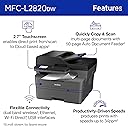
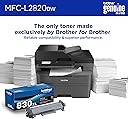
The Brother MFC-L2820DW is a compact, monochrome all-in-one laser printer designed for small offices and professionals who demand speed, efficiency, and connectivity. Offering fast 34 ppm printing, a 250-sheet paper tray, and a 50-page auto document feeder, it streamlines high-volume tasks. Dual-band Wi-Fi, Ethernet, and USB connectivity provide versatile device integration, while the 2.7” touchscreen enables easy access to cloud printing and scanning. With Brother’s Refresh subscription trial, toner management is effortless, making this ENERGY STAR® certified printer a reliable, eco-friendly choice for modern workspaces.


| ASIN | B0CPL9C83B |
| Additional Printer Functions | Copy, Fax, Scan |
| B&W Pages per Minute | 34 ppm |
| Best Sellers Rank | #2,701 in Office Products ( See Top 100 in Office Products ) #5 in Laser Computer Printers |
| Brand | Brother |
| Built-In Media | AC Power Cord, Drum Unit, Telephone Line Cord, Toner Cartridges |
| Color | Black |
| Compatible Devices | Laptops, PC, Smartphones, Tablets, iPhone |
| Connectivity Technology | Ethernet, USB, Wi-Fi |
| Control Method | App, Touch |
| Controller Type | Android |
| Customer Reviews | 4.4 out of 5 stars 828 Reviews |
| Display Type | LED |
| Dual-sided printing | Yes |
| Duplex | Automatic |
| Hardware Interface | Ethernet, USB |
| Initial Page Print Time | 8.5 Seconds |
| Ink Color | Black |
| Item Dimensions D x W x H | 15.7"D x 16.1"W x 12.5"H |
| Item Type Name | Multifunction Printer |
| Item Weight | 22.5 Pounds |
| Manufacturer | Brother |
| Maximum Copies Per Run | 99 |
| Maximum Copy Resolution Black and White | 600 x 600 dpi |
| Maximum Copy Speed Black and White | 34 ppm |
| Maximum Media Size | 8.5 x 14 inch |
| Maximum Print Resolution Black and White | 1200 x 1200 Dots Per Inch |
| Maximum Sheet Capacity | 250 |
| Model Name | MFCL2820DW |
| Model Number | MFCL2820DW |
| Model Series | L2820 |
| Number of Drivers | 3 |
| Number of Ethernet Ports | 1 |
| Number of Trays | 1 |
| Other Special Features of the Product | Auto Document Feeder, Auto-Duplex, Display Screen, Energy Star, Envelope Printing, Epeat Qualified, Network-Ready, Scan To E-Mail, Touch Screen |
| Output sheet capacity | 250.0 |
| Paper Size | Up to 8.5 x 14 Inches |
| Print media | Envelopes, Labels, Paper (plain) |
| Printer Connectivity Type | Ethernet, USB, Wi-Fi |
| Printer Output Type | Monochrome |
| Printer Type | Laser |
| Printing Technology | Laser |
| Processor Count | 1 |
| Resolution | 300 x 300 |
| Scanner Type | Flatbed, Sheetfed |
| Special Feature | Auto Document Feeder, Auto-Duplex, Display Screen, Energy Star, Envelope Printing, Epeat Qualified, Network-Ready, Scan To E-Mail, Touch Screen Special Feature Auto Document Feeder, Auto-Duplex, Display Screen, Energy Star, Envelope Printing, Epeat Qualified, Network-Ready, Scan To E-Mail, Touch Screen See more |
| Specific Uses For Product | Home, Office |
| Total USB 2.0 Ports | 1 |
| Total Usb Ports | 1 |
| UPC | 012502672654 |
| Unit Count | 1.0 Count |
| Warranty Description | 1 Year Limited |
| Warranty Type | Limited |
E**S
Great machine at a very competitive price. Would buy it again.
Another excellent entry in the Brother universe of good and inexpensive printers and multi-function machines. Is operating much faster than the one it replaced, which gave us a good several years. Convenient if remote printing; the printer bin capacity is 250 pieces of paper. Because we use other Brother printers, software (both desktop and phone) set up was seamless and easy. I would buy another if I needed one. Very quiet.
N**K
Simple, Reliable Printer for Everyday Use
The Brother MFC-L2820DW is a great all-in-one printer for black and white printing. It’s fast, easy to set up, and prints sharp documents. Scanning and copying work well too, and it connects to Wi-Fi without issues. If you just need a solid printer for everyday use at home or in a small office, this one works great. It arrived quickly and was packaged well.
B**.
Works with Linux (print and scan)
Fantastic network/wifi printer, both printing and scanning work well with my Debian 13 Linux desktop (kernel 6.12.74).
J**E
Time to actually get printer operational.
Easy to assemble but a first timer may have problems. Instruction drawings left some guessing. No problems with WiFi connection. Same with internet hookup. Pleased with actual printing and ease with print selection. I purchased based upon outside recommendations. Chose laser jet black and white for cost savings.
D**O
GREAT
Works wonderful, easy to set up.
M**K
Read the reviews for toner cartridges
First off the print yield for the cartridge is not what is advertised. I think it’s advertised at 1300 and we got fewer than 500 pages from the original brother Toner cartridge. Secondly, I wish we would have purchased a printer that had color but being retired and using it for our home,we thought what do we need color for? That was a mistake. Other than that the quality of the print is good, it’s very quiet except for when you turn it on and the alert is quite loud. It’s easy to use and I guess the value for the money is sufficient it connected wirelessly very easily.
G**6
Silly, Exasperating, Pitiful Excuse for a Printer
Several years ago I switched from Brother printers to Canon. This piece of junk reminds me why. When I needed to replace the Canon that had served me quite well for 6 yrs (prior Canon lasted 5), it was for cosmetic reasons; printer still worked. This time Canons with features I need were all too large and heavy. So I took a chance on Brother. How bad could it be, right? Answer: VERY bad. My main requirement for a printer, besides the obvious, is an ADF. Other lasers I saw with that feature were bulky and heavy. The Brother came and no wonder it was so light. It looked and felt like a toy. I'd say it performed like a toy, but it would have to improve to garner that much credit. First, who the #!%$&* thought it would be a good idea to design a printer that requires user to go in BACK of the printer to clear a paper jam?! Every office I've ever worked in, every home office I've ever had, printers are against a wall. I have yet to see one sitting in the middle of a room. For certain types of jams, I have to pull printer out about a foot or so, turn printer around, then clear the jam. WHY MUST I REPEATEDLY HAVE TO "RECOVER" WIRELESS CONNECTION? No such thing as a quick print job--at least not the first print job of the day. I never turn off the printer, but do turn off my PC every night. Next day, every day, I have to go into printer settings, choose "Recover WLAN," wait about 5-10 minutes for document to print. I've learned to fix breakfast while it warms up, wakes up, or whatever it's doing all that time. Those are the biggies. More minor annoyances: Screen doesn't stay lit. Very strange defaults, some of which I still don't know how to disable or change--assuming that's even possible. I've used printers for 25+ years. I've had Epson, HP, Canon; Canon being best, but all were ready to go once set up--and stayed ready till they gave out. My 1998 printers were better than this Brother. Okay, so will it print from my phone or tablet? Yes, both. But that doesn't make up for its many inadequacies. Scan? Yes. Adequate I suppose. Fax? I've had no reason to try that. Obviously, I DO NOT RECOMMEND this Brother printer.
R**N
Great printer
Good printer!
J**M
Laser
Buena impresora aunque no se puede escanear doble lado.
H**I
Worth my money!
Pricey but in the long run, this is a good printer!
J**N
Efficace
Parfait pour le bureau
A**E
Parfait
Il est très bon comme produit. Longtemps hésité mais je ne regrette pas mon choix
K**R
Wireless setup brother app issues...beyond that it seems to work
Wireless setup app complete failure. Android phone attempt. Would not connect. I had to use manual setup mode. I am able to wirelessly print but not via the Brother app. Several other reviews said similar wireless setup issue.. wasted a lot of time trying to figure it out because brother really pushes the wireless setup via app in their quicksand guide. Instructions somewhat unclear too. So far it works fine as a printer. I have not used scan or fax features.
Trustpilot
3 days ago
1 week ago