Description
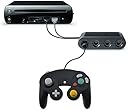
- Play a variety of games on your Nintendo Wii U / PC using your classic GameCube controller. This compatible with GameCube controller adaptor allows you to connect up to 4 GameCube controllers to your Wii U or PC.
- Enjoy your favourite titles, including Super Smash Bros. Brawl and Super Smash Bros. Ultimate, with the GameCube controls you know and love. Supports the built-in Vibration Feedback with no delays by plugging the two USB ports of the adapter into your Wii U system or PC USB connector ports.
- Switch between 'Switch / Wii U' and 'PC' mode with the switch on the side, which is clearly marked. Supports classic retro GameCube controllers as well as WaveBird wireless controllers. Simple plug and play setup.
- Compatible with Windows XP, compatible with Vista, compatible with Windows 7, compatible with Windows 8,32 bit and 64 bit and compatible with Mac OS under the PC mode. Supports GC / Wii Emulator Dolphin.
Evolution of Eden 4 Port Controller Adapter Compatible with GameCube, Nintendo Switch, Wii U and PC - USB Connection Converter for Multiplayer Games - BlackEnjoy your favourite titles, including Super Smash Bros. Brawl and Super Smash Bros. Ultimate, with the GameCube controls you know and loveFeatures1 x 4 Port Controller Adaptor compatible with GameCube Play a variety of games on your Switch / Wii U / PC using your classic GameCube controller- Simple plug and play setup- Supports the built-in vibration feedback with no delays- Switch between 'Switch / Wii U' and 'PC' mode with the switch on the side- Connect up to 4 controllersCompatibilityCompatible with Windows XP, compatible with Vista, compatible with Windows 7, compatible with Windows 8,32 bit and 64 bit and compatible with Mac OS under the PC mode. Supports GC / Wii Emulator Dolphin.Compatible with standard GameCube controllers or wireless WaveBird controllers.Compatible with genuine Nintendo controllers and 3rd party versions.
Review: Great for Smash Ultimate, Mario Sunshine - I decided to write a review for this seller after spending a while using it. Short story: It works for PC and for the Switch. It works perfectly for Smash and Super Mario Sunshine in 3D All-stars, including the vibration feedback. More details: I bought this ahead of time while awaiting the release of Super Smash Brothers Ultimate. I was also drawn by the plug & play aspect of of it in PC mode, as well as its similarities to the design of the official adapter. I own an original GameCube controller from 2002. My initial impression was that this device did not work for the Switch or PC. I was, however, mistaken. Firstly, when connected to a PC, the ports are in reverse order compared to the GameCube. The rightmost port is Port 1 in this case. I do not own the official adapter so I could not comment whether this is true for that too, but I only realised my error after attempting a calibration test in Windows for all the ports. When connected to the correct port, the calibration test showed input was being registered. When testing with the Switch and setting the adapter appropriately, my second mistake was having the joy cons and the GameCube controller both attempt to register as player 1. When correctly assigned, the Switch will detect it as a wired USB controller. I would like to clarify a statement by Nintendo regarding the compatibility of the GameCube controller. Using this adapter, your GameCube controller works with all games and even on the home screen. However, at the time of writing, there is no vibration feedback from any game other than Smash Bros Ultimate. You should also be mindful that it is missing buttons unique to the Switch, as well as a gyroscope, which may limit or prevent gameplay. Edit: With the release of 3D All-stars, Super Mario Sunshine was ported to the Switch. Strangely enough, the pressure sensitivity of the GameCube's L/R buttons work in this game! This is the only instance I know where a Switch game would utilise this feature of the controller! You can do the quick splash trick, but the button sensitivity is rather different. You also have more granular control over how quickly F.L.U.U.D will charge up for the rocket and propeller nozzles. Regarding its usage for N64 online, this does the job okay for actual gameplay, but owed to a lack of button remapping on Nintendo's behalf, I would not recommend this as a solution for N64 games. You must press the L and R buttons fully for the console to register the input, the positioning of the Z button is unlike the ergonomics of an N64 controller, and you lose the ability to do things like save state or exiting to the home menu.
Review: Works as described - Used this on my switch and pc and works perfectly. So far I havent had any issues with this product and would recommend it!