⌨️ Elevate your desk game with customizable clicks and wireless freedom!
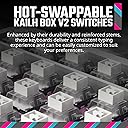
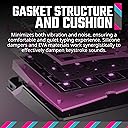
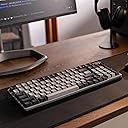
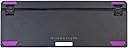
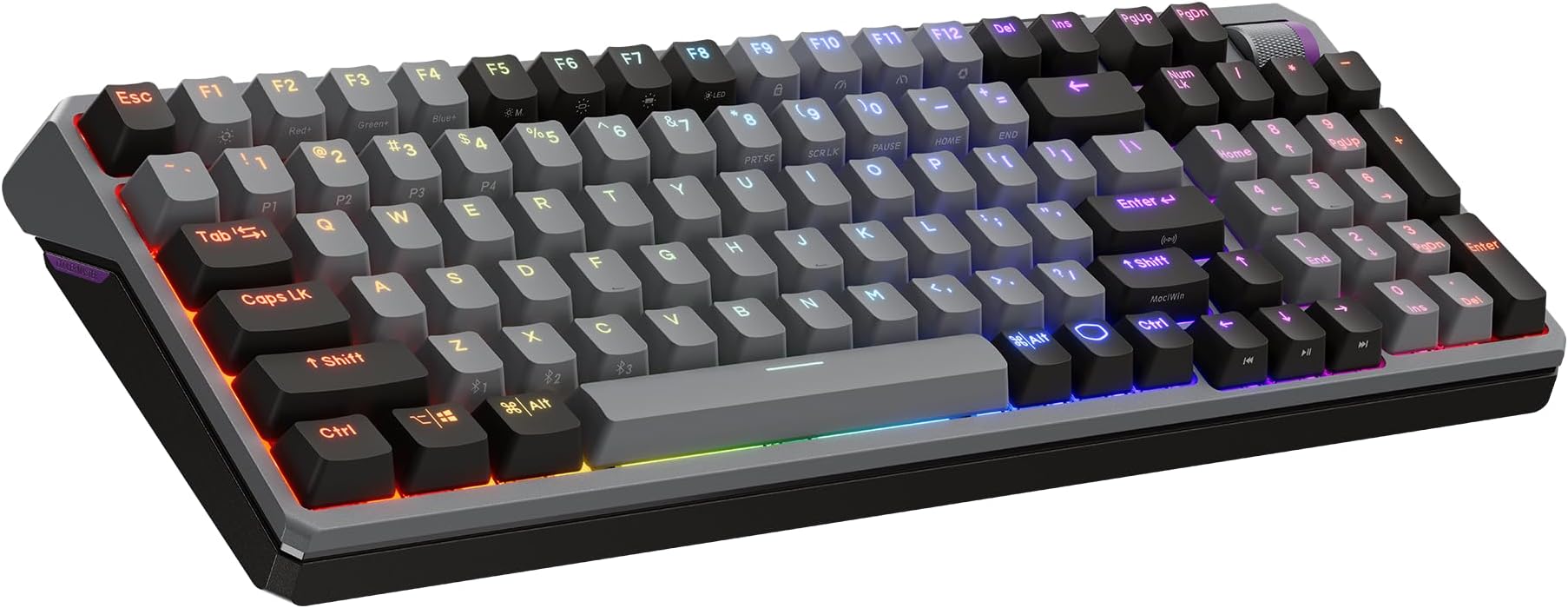
The Cooler Master MK770 is a premium 98-key mechanical keyboard featuring durable Kailh Box V2 soft click white switches with hot-swappable capability. Its gasket-mounted design reduces noise and vibration, while hybrid wireless connectivity (Bluetooth 5.1 and 2.4GHz) ensures lag-free performance. The keyboard includes a tactile 3-way dial for volume and RGB control, making it a versatile, space-efficient choice for professionals and gamers seeking both style and function.


| Additional Features | Gasket Structure, Hot-Swappable Switches, Kailh Box V2 Soft Click White Switches, Tactile 3-Way Dial, Wireless Bluetooth|2.4GHz |
| Antenna Location | Business, Everyday Use, Gaming, Multimedia, Photo Editing |
| Asin | B0CTN3MKDS |
| Best Sellers Rank | #1,085 in Computer Keyboards |
| Brand | Cooler Master |
| Built In Media | 2.4GHz Dongle, Cherry MX Green Switch Kit, Extension Adapter, Keycap Puller, USB Type-C to USB-A Braided Cable |
| Button Quantity | 98 |
| Color | Soft Click White |
| Compatible Amazon Tablet Models | Amazon Fire HD 10 13th Generation, Amazon Fire HD 8 12th Generation, Amazon Fire HD 8 Kids Pro 12th Generation |
| Compatible Devices | Gaming Console, Laptop, PC, Smartphone, Tablet |
| Compatible Operating System Family | Windows |
| Connectivity Technology | 2.4GHz, Bluetooth, USB 2.0 Type A (Computer Side), USB-C |
| Customer Reviews | 4.1 4.1 out of 5 stars (142) 4.1 out of 5 stars |
| Enclosure Material | Gasket Structure, Metal, Plastic, Rubber, Silicone |
| Generation | 1st Generation |
| Global Trade Identification Number | 00884102111365 |
| Hand Orientation | Ambidextrous |
| Item Dimensions L X W X H | 14.99"L x 5.53"W x 1.69"H |
| Item Weight | 1052 g |
| Keyboard Backlighting Color Support | RGB |
| Keyboard Description | Mechanical |
| Keyboard Layout | QWERTY |
| Manufacturer | Cooler Master |
| Mechanical Keyboard Switch Model | kailh_box_white |
| Mfr Part Number | MK-770-GKKW1-US |
| Model Name | MK770 Kailh Box V2 Soft Click White Switches |
| Model Number | MK-770-GKKW1-US |
| Number Of Batteries Required | 1 |
| Number Of Keys | 98 |
| Power Source | Battery Powered |
| Style Name | MK770 Space Gray White |
| Switch Type | Clicky |
| Theme | Gaming |
| Total Usb 2 0 Ports | 1 |
| Unit Count | 1 Count |
| Upc | 884102111365 |
| Warranty Description | 2 Year Manufacturer |
| Water Resistance Level | Not Water Resistant |
User
Amazing quality and adorable aesthetic
OBSESSED with my new keyboard! The colors are a perfect pastel sorbet and the mechanical clicks the keys make are so buttery and satisfying! Great for gaming and no sticking when you press any of the keys. Feels very sturdy too, it'll definitely last a long time.
User
Best keyboard!
I’ve had this for about a month now and I love it so far. I work from home and use this keyboard on the daily, both for work and gaming. The keys are wonderfully clicky, plus it comes with 8 extra silent switches as well as a key and switch puller to swap them if need be, I personally have put a silent switch on my space bar, as it’s probably my most used key and when jumping in games the clicky sound did start to annoy me lol. It has three modes for connecting to your computer, a wired setting, a Bluetooth setting, and also one of those little usb things like a mouse. I haven’t tried the Bluetooth but with the other two settings I’ve never had any kind of lag or delay issues. It comes with instruction on all of the extra buttons and how to change the lighting settings, which was very helpful, and overall I find it very easy to remember the functions of the specialty keys. The lighting is great, once you figure it out what’s what it is very easy to change the lighting settings, and has some great presets, as well as you can manually change the color by using the “red blue and green” keys to make it exactly the color you want. Overall, at ~80 it’s an absolutely amazing price for a keyboard I foresee a long future of continued use.
User
Keyboard From My Dreams!
This keyboard is damned near perfect. I've only had it for a few days, but I'm already in love. It's heavy so my meaty fingers don't move it around. The click is.. 👌🏾😫 so sweet, but also not too crazy loud. The lighting schemes and extra features are beautiful. It seamlessly works on the dongle and switches from BT to USB instantly! All in a compact rechargable board. God I'm getting old to be so excited about this thing. My multi device workflow has never been upgraded so well by one device. Excellent keyboard for a space saving techy stickler like me.
User
Solid board, decent price, crap battery
Just got this board earlier this week (it's now May 26, 2024). The layout is solid, and it's actually the only layout I run. This is the smallest keyboard layout I've found that still has a full size numpad (i require that since i'm a network engineer). I will say i like it and intend to keep it, but i'm not buying another (normally i buy 2x of w/e keyboard i like; one for work, one for personal).-----Thoughts--- Operating system: I use Linux exclusively as far as personal goes, and my work computer is an MBP. It works fine on both, but the software is supported on neither. I don't care much about this, not even sure what the software allows but it would be nice to check it out and see if i could set commonly used macros or rebind keys/etc.--- Battery: the battery is quite crap tbh. Their claims are wild, I'm running full brightness LEDs and i have to charge it every day. The $75 RK similar keyboard I have mitigates this by merely turning of the LEDs after ~2 mins of inactivity - and i only have to charge that one once weekly. Seems like this is an obvious solution which CM decided against for w/e reason--- Connectivity: No issues at all pairing quickly with my PC, Amazon Fire tab, as well as my Motorola phone. 2.4 mode also paired quickly.--- Feel: I really like the feel of typing on this. I've been exclusively using mech keyboards for ~8 years now but i'm not a keyboard nerd. I don't know the actual terms but the switches (or w/e it is) feel great to type on, and it's responsive.--- Volume knob: I love the idea of this but don't like the implementation. I really have to focus to 'press' the knob for mute without accidentally rolling up/down. Would prefer to have had the knob at 20-40% the size and a separate button for mute.--- Keycaps: the alternate printing of output that is achieved when holding the 'function' key is near impossible for me to see. Would prefer a brighter font here.--- Color: I got the grey one, looks awesome in person. Nondescript look with a splash of color. Purple is my fave color so that likely helps a lot here.Other things are minor and personal preference; for example i wish the delete/insert keys were swapped. I guess the software could do this but i'll never know. I'd say to give this board a try, personally i wouldn't have bought it knowing what i know now.
User
Great keyboard, awful battery life
Great keyboard but the battery is a joke.I have enjoyed this keyboard a lot but the battery won't last a day. It's a shame since the keyboard looks and feels nice but what's the point of having a wireless keyboard that needs to be constantly connected. I had a G915(way smaller) and a redragon and their batteries lasted way way longer. I think it may be something related to the "sleep" function, sometimes it just doesn't go into sleep mode. As I was writing this it died, and I started the day with 85%, it didn't lasted an 8 hour shift. I'll return it.
User
Very marbly !
Great value for the quality of the construction. Gasket fit works well, and adds a good feel when bottoming out keys.Really great impression for being a stock full build. The sound is so good, I really haven't felt the need to tape mod or add extra foam. Kaihl reds sound great and aren't scratchy, but I may add cream blacks in the future.CM's software works well and is intuitive enough to get in and make changes quickly. Haven't experienced any bugs with it.The foam installed in the board works well for absorbing bottom out noise, and reverberating a very creamy sound.Overall a big love for this. Now if only CM could release some better mice !
User
Bluetooth not connecting to laptop, phone, or tablet - software and user guide hard to find
Out of the box the keyboard would not connect via Bluetooth to my Lenovo X1 laptop, my Android cell phone, or my Android tablet, all of which work with other Bluetooth devices. Finding the software and user guide for the keyboard was difficult. Finally, it has pulsing lighting as the default, which is annoying. I was able to connect to my laptop with the cable, but I bought this for its Bluetooth connectivity. I am returning it. On the plus side, the Box White V2 switches are great and the keyboard is quiet and solid.
User
Great keyboard, wimpy switches
This is a nice keyboard. People seem to have had trouble with the software hanging, not opening; I have had no such difficulties. The LEDs are kinda purple-ish if you want white, so keep that in mind. I like how I can color individual keys (I keep WASD in green, for instance.)I will say... the "Kailh Box V2 White" switches in this keyboard are not impressing me. I'm sure they're good for the soft kids these days with their keyboard ricing, but I am looking for Cherry Blue-levels of clack and something that makes the muscles in my fingers hurt. Model M territory. These are quite wimpy (though they seem good quality.) Good news is, with this keyboard, you can change them out. Very heavy duty, you could do some damage with this. And the scroll wheel (I just use it for volume) is very sturdy and works well.I use this keyboard almost exclusively in Linux, and it works fine; you can't change any settings of course, but what settings you save to the keyboard are kept in the keyboard memory. I think you could probably assign different "profiles" and use key combos to switch between them in Linux, but I don't need that.
User
Articulo basura
Los primeros días funcionaba muy bien después como una semana de uso dejo de de funcionar lo terminé echando a la basura basura 🗑 de teclado muy enojado con cooler master
User
The Hidden Gem No One Talks About
After spending weeks researching for the perfect keyboard, I ended up finding the Cooler Master MK770 almost by accident — and honestly, it turned out to be a hidden jewel in its price range. Since I struggled to find good real-world reviews when I was shopping, I’m writing this to help anyone else in the same situation.My Requirements==============I needed a keyboard that:• Works on both Windows and macOS without constant remapping• Provides an excellent typing experience for heavy daily use• Has a numpad for my workflow (I rely on custom AutoHotkey mappings and enter numbers frequently)• Can handle occasional gaming• Isn't overpriced like some premium 200+ USD optionsGaming keyboards were either TKL (missing productivity keys) or Windows-only. Productivity keyboards like Logitech MX series lack a 2.4GHz dongle or wired mode. So finding all these features in one board seemed impossible… until the MK770.Pros====• True Windows/macOS compatibilitySwitching is dead simple — just press Fn + Shift. No need for remapping every time.• Dual OS legends printed on the keycapsUnlike many keyboards, this one includes both Mac and Windows labels natively. No swapping keycaps or guessing.• Amazing typing experienceThe factory switches feel soft, creamy, clicky, and genuinely satisfying. One reviewer even called it the best typing experience they’ve had in years — I agree.• Tri-mode connectivity1. Bluetooth2. 2.4GHz wireless3. WiredBluetooth is great for normal use and less demanding gaming, but you can switch to 2.4GHz or wired for competitive gaming.• Excellent sound dampeningVery quiet and refined for a board in this price category.• Solid plastic buildNot metal, but definitely sturdy and well-made.• Bluetooth pairing up to 3 devicesSwitching between them is nearly seamless.• 4 onboard profilesGreat for different setups or custom lighting/macros.• MasterPlus software supportIncludes remapping and macro creation.• 3-way multifunction rollerControls volume by default and can be remapped (could potentially be customized to do scrolling via AutoHotkey, haven't tested it yet though).• Compact 95% layoutKeeps the numpad and all major keys but trims unused spaces.• Modern, clean aestheticsThis was the deciding factor for me over the YUNZII YZ98.• Function row is not offsetThis is a big plus for me.Unlike many keyboards this means no muscle memory relearning and no mispressing when switching between keyboards.Cons====1. Terrible battery life (the biggest downside)Even though it's advertised as 4000 mAh, it drains extremely fast.With RGB: expect daily charging, maybe moreMy workaround:• Static lighting at the dimmest setting• Auto-sleep at 3–5 minutesThis gives me about 2–5 days per charge.2. MasterPlus software is weak• Doesn’t refresh battery or brightness status when changed from the keyboard• Requires restarting the app to update info• No battery percentage indicatorWorkaround: connect via Bluetooth → check OS Bluetooth settings for percentage3. No dedicated CapsLock/NumLock indicatorsInstead of an LED, the key just flashes white or disables RGB briefly.You can’t tell whether the lock is currently on — it’s very inconvenient.4. Some users reported sluggish inputNot everyone experiences it, but it’s worth mentioning.5. My wired-mode issue (may not affect others)The first time I plugged it in wired, it charged but didn’t register inputs. After several keyboard system resets and replugging, it worked and never failed again. Likely a first-time driver installation glitch.Conclusion=========The Cooler Master MK770 delivers a rare combination of:• Full OS compatibility• Great typing• Numpad productivity• Gaming capability• Attractive design• Tri-mode connectivityIf you can tolerate the battery and software flaws, this keyboard is one of the best options in its price bracket — especially for mixed Windows/macOS users.Will I keep it? Probably yes, because nothing else meets my exact use case without going above $200.Would I buy it again? Probably not, mainly because of the battery and software — but for now, it’s still the best option for my workflow.
User
Great Keyboard
Was looking to replace my Corsair K70 Mk.2 with something more solid.My requirements were:- Have Bluetooth connectivity- 2.4 GHz connectivity- Wired connectivity- Must have USB-C- Be from a reputable brandThis keyboard fulfils all my requirements and I’m very happy with the build of it. Don’t be fooled by it’s plastic body, it’s very solid. If you are a programmer, home and end keys are on the numpad.THE ONLY THING… is that the keyboard doesn’t prop up high enough with the feet extended. So for that I give it a 4 star rating.
Trustpilot
2 months ago
1 month ago