Buy anything from 5,000+ international stores. One checkout price. No surprise fees. Join 2M+ shoppers on Desertcart.
Desertcart purchases this item on your behalf and handles shipping, customs, and support to Uruguay.
🎨 Elevate your art game—draw beyond limits, no PC required!
The XPPen Magic Drawing Pad is a 12.2-inch standalone drawing tablet featuring a breakthrough 16,384-level pressure-sensitive X3 Pro stylus with tilt support, delivering a natural pen-on-paper feel on its anti-glare, high-res screen. Powered by Android 14, it offers 8GB RAM and 256GB storage expandable to 1TB, enabling direct app downloads and multitasking without a computer. With a long-lasting 8000mAh battery and ultra-portable slim design, it’s engineered for professional digital artists seeking precision, mobility, and eye comfort.


| ASIN | B0CRD6J83V |
| Active Surface Area | 53.34 square inches |
| Additional Features | 16384 pressure levels X3 Pro stylus, Anti-Glare Glass, Front Facing Camera, Headphone Jack, Rear Facing Camera |
| Best Sellers Rank | #23 in Computer Graphics Tablets #177 in Computer Tablets |
| Brand | XP-Pen |
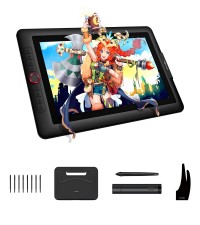
| Built-In Media | AC Adapter, Glove, Quick Start Guide, Replacement Nib, Stylus |
| Color | Purple |
| Compatible Devices | Headphones, Keyboard |
| Connectivity Technology | Bluetooth 5.1, USB, Wi-Fi 802.11 a/b/g/n/ac (2x2), WiFi 2.4GHz & 5GHz |
| Customer Reviews | 4.6 out of 5 stars 683 Reviews |
| Display Type | LCD |
| Item Dimensions L x W | 11.02"L x 7.56"W |
| Item Weight | 590 Grams |
| Manufacturer | XP-PEN |
| Mfr Part Number | MDP1 |
| Model Name | Magic Drawing Pad |
| Model Number | Magic Drawing Pad |
| Native Resolution | 2160 x 1440 |
| Operating System | Android 14 |
| Pressure Sensitivity | 16384 Levels |
| Screen Size | 12 Inches |
| Special Feature | 16384 pressure levels X3 Pro stylus, Anti-Glare Glass, Front Facing Camera, Headphone Jack, Rear Facing Camera Special Feature 16384 pressure levels X3 Pro stylus, Anti-Glare Glass, Front Facing Camera, Headphone Jack, Rear Facing Camera See more |
| Specific Uses For Product | 3D Modelling, Animation, Drawing |
| Target Audience | Student, Teacher |
| Unit Count | 1.0 Count |
| Warranty Description | 1 Year Warranty |
M**G
They fixed the mis-alignment issue
So- friend kept insisting that I try an iPad Pro, try it try it try it. "It's the best tablet for artists not at a desk". Ok, fine, I tried it and it was solid. Great colors, solid pen- that needs to be charged, but also it was $1,500 for the 'affordable one' which was also on sale when I bought and the pen wasn't included. I returned it because iOS is infuriating to do anything with. I saw this, saw some reviews, saw it had a pen alignment problem but also saw comments saying 'they fixed it'. So for $500 you get a tablet, the pen, the charger,a glove, a case and there's a variant (that I got) that comes with a keyboard. This thing is fantastic to draw on, feels exactly like my desktop tablet (different brand but they're comparable). Has no trouble handling Clip Studio Paint with even high res files , vector inks and what not. Solid battery life too, I can't guess what it was specifically, but it lasted me a while and I didn't have to charge it after I was done sketching and inking. The pen feels better than the Apple Pencil- like they're comparable but this one feels a lot nicer and if you want a bigger one? The XP Pen gen 3 pens work with this- and they're not remotely close to as the same price. I tried some simple multitasking too where you can put a smaller window in the top corner while drawing and playing music via AIMP. No problems at all, handled it easily. Confident that as long as you're not doing giant canvas sizes with giant complex brushes? It'll work good. I haven't tested it more extensively than my cellshaded style with vector inks and far too many layers for what I need but it works super well. The screen is really, really nice. It's a textured glass that gives a nice feel to drawing and seems to be oil resistant. Which is great because you're touching it a lot to adjust settings or the canvas. So the oils would build up normally and cause inconsistent strokes. Yes it doesn't have the M4 chip or a fancy camera or an oled. But, you're likely getting this to draw and not go that level of ham with the iPad. The keyboard that you can get? It's fine. Very ok. It doesn't feel amazing to type on and the trackpad is not great, not unusable but it works. It's perks are it seamlessly latches to the device with magnets and connects and protects your device when moving the tablet around. There's no battery to worry about but also no extra ports. But also it only works when it's attached, so you'd have to feel out if that's good. Plus, it slides around if the table is smooth- which most are. So maybe a separate bt keyboard would be better for you. I highly recommend the device. It's a good piece of kit and isn't wallet destroying like the iPad or Surface. Just be sure you're ok with the android apps around- which there are plenty these days! It just pays to do some research before diving in.
S**M
Perfect drawing tablet for my son
I bought this XP-Pen Magic Drawing Pad for my son, and it has been an amazing purchase. The screen is clear and responsive, and the pen works smoothly with no noticeable lag. It feels very natural to draw on, which is great for sketching and practicing digital art. The size is perfect—not too big or heavy—and it’s easy to set up and use. My son has been using it nonstop and really enjoys creating artwork on it. The build quality feels solid and well made. Overall, this is a great drawing tablet for beginners and young artists. Highly recommend!
V**G
Great tablet, still waiting for a good drawing software for Android
Got this from the spring sale for $380 and have had it for two months. So far I’m incredibly impressed with the screen resolution and the response time (both better than on my iPad Air gen 2). The screen is matte and extremely smooth, not prone to finger prints, and to my surprise it came with a robust case that also has a pen holder for the stylus which juts out tabs gives a nice 15 degree tilt when you set it down on a flat surface. The camera is alright but that is to be expected. My only complaint is that with Android software I haven’t come across a really great drawing app that is comparable to ProCreate. I have Krita installed and the UI is similar to that of a PC application unfortunately and not gesture/tablet friendly. It’s super annoying that when I draw my palm accidentally activates the tap which opens a track wheel of brush types to select from. I would have to wear the hand sleeve every time if I want to prevent that which is a bit inconvenient. For the price point you really can’t complain and I’m happy to support smaller brands like XPPen who actually care about customer experience unlike Wacom who exploits their customers with extremely unnecessary high price points. Before this I was using the XPPen 13.3 pro connecting with my PC which is much more clunky and takes up a lot of desk space, not to mention the 3 wires needed to charge, connect the device and the display. I love taking the Magic drawing pad on the go with me wherever and love that I can use my BT keyboard and it’s actually quite easy to navigate with it! If you are sick of Apple’s planned obsolescence with their devices (my $800 iPad broke right after the warranty ended, about a year after being purchased) why not spend half the amount and support an awesome company and get better resolution/responsiveness and a stylus that doesn’t require charging? I’ll admit as an artist, I don’t use it too much for art but for everything else it’s perfect. EDIT: I ended up grabbing another one for my girlfriend before the spring sale was over because we both loved it so much and I didn’t wanna miss out on an awesome deal! Tried convincing my friends to get it as well!
G**W
My New Favorite Drawing Tablet
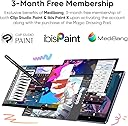
I’ve been digitally sketching on my iPad Pro 11” since 2020, but I wanted a dedicated drawing pad with a matte screen. The XP-Pen Magic Drawing Pad (2025) checked all the boxes for me: it has a matte textured screen, a large display (12.2 inches), is lightweight, has a long battery life, and the pen stylus doesn’t need recharging (unlike the Apple Pencil). A bonus is that it comes with a protective case that has a built-in holder for the stylus, making this drawing pad a very good mobile solution right out of the box. The 256GB storage capacity is ample for my needs, and it can be expanded via a microSD card slot. The 2025 version of the Magic Drawing Pad (MDP) has several significant upgrades compared to the 2024 version: 16gb RAM (8gb physical + 8gb virtual), Android OS 14, and the X3 Pro Slim pen stylus. It now supports tilt functionality, but I found it to be poorly implemented, so I turned it off as it was practically useless. The MDP can be fast-charged using the included 33W power adapter. It also comes pre-installed with creative apps: Clip Studio Paint, IBIS Paint, and MediBang Paint. However, I tried each of these apps and didn’t like any of them. On my iPad, I was using drawing apps such as Concepts, Sketchbook, and Procreate, along with the GoodNotes app for note-taking. I was pleased to find that Concepts and Sketchbook are available on Android OS, and I discovered that Infinite Painter is similar to Procreate. I gladly replaced GoodNotes with StarNote (which is available for both iPadOS and Android OS) to enable manual syncing of files between my iPad and the Magic Drawing Pad. When comparing the drawing and note-taking experience between the iPad and this MDP, I much prefer using the MDP because its matte textured screen is outstanding for use with a pen stylus because it mimics the feel of paper. I am very happy that I got this Magic Drawing Pad especially when it was on sale. However, it's important to note that, according to XPPen, it's not possible to update the Android OS of the MDP—so it is stuck at OS 14—even though the latest available is Android OS 16. Additionally, if you use software like Clip Studio Paint, keep in mind that their major yearly updates only support the four most recent versions of Android OS.
J**D
Great tablet that made the best gift this season!
Got this as a Christmas gift for our (adult) son. He never puts it down now. It has a nice weight to it. Super easy to set up and is a good quality drawing tablet with extra functionality such as email and all the Google apps. The brightness is adjustable and we didn’t notice any lag. It comes with a protective case, the drawing pencil and a half glove to keep your hand from affecting the drawing, allowing you to use a natural drawing and writing style. It also doesn’t need a computer to work as it can stand alone and even get internet. Very good value for a great little drawing tablet.
J**N
Stupid name, gorgeous screen, silly bloated software.
EDITED: I recently purchased the "Magic Drawing Pad" bundled with the attachable keyboard. Many years ago I was let down by the offerings of the iPad and MS for the costs and the lack of true customization. Not only have I been wanting to get back to drawing by hand rather than pushing a mouse around I needed to replace an aging laptop I use while traveling. It didn't need to be a power house for AAA gaming but needed reasonable speed for some emulations of old games and systems. I need to be able to draw, watch stuff, maybe do some basic gaming, read a pdf or look over some building plans with more comfort than on a laptop screen... So far this seems to fit the bill but it is not without its quirks. Pros: Awesome vibrant screen with a nice ratio close to 4:3 makes emulation of old computers awesome. The maximum brightness is very intense indoors. I have yet to try it outside but I am sure it will help in areas that are well lit. Reasonably good sound from the four speakers. I had it setup listening to shows while doing the dishes. No batteries for the stylus - I was not looking forward to sourcing and charging AAAA batteries. Included case seems decent for protection and gives a space to display art or a picture over the tablet logo. (Honestly an odd choice to have a transparent layer that somebody can easily hide the XPPen logo but hey whatever I like it.) The stylus seems excellent. I had no problem picking a brush type in any program I have tried and immediately drawing naturally. Dex like desktop mode built in and seems to work well enough. Cons: No headphone jack. Something that gets to be remedied with another adapter. Default file manager included is horrendous garbage. Eye searing orange main color. NXTVISION is a poor gimmick that takes great color and either burns it out with over saturation or gaming mode kills it for maybe, eye-comfort? I'd rather a straight forward adjustment/calibration tool to adjust to your liking with standard controls mirroring good monitors. Constantly floating pen options icon is irritating. (It should only show up when the stylus is detected.) Have to wear a silly hand cover to reject palm input. (Here's a thought; when the stylus is detected, reject all input except the stylus.) UPDATE: I found the setting to disable touch on the screen. There is a quick menu button (like for WIFI and BT) that you have to access by swiping down and editing your quick buttons. I still think the better option in a software update would be to optionally disable touch when the stylus is detected. Bloated annoying software installs targeting Windows users and younger people. (Daily Board pops up out of the blue and shows you the latest Taylor Swift info and cannot be fully disabled/removed. Also cannot disable Messages and had to uninstall and disable a host of garbage from Google and MS. ibisPaint X seems like a cash grab and I loath software as a service.) Finding out how few apps are formatted for a tablet experience on Android. Almost everything is phone formatted and does not make good use of the added screen space / width in landscape mode. Or app login screens like Proton's offerings are stuck in portrait mode even when you are docked. (Time to write some bugs to the devs.) Keyboard input doesn't wake the screen. (Might be a setting somewhere? I haven't found it.) Trackpad doesn't scroll screen like on a normal laptop. (Yeah, sure, stick my hand out and scroll... but that is annoying when docked to the keyboard and tires the arm.) Other/meh items: Does the stylus really have 16k levels of pressure? Nah, probably not. It works very very well though. Keyboard pogo pin dock is a bit sensitive... it seems to easily go out of connection with a slight bump though it does sit tight in the slot. Magnets hold well but the tiniest of shifts seems to make the keyboard not function. A quick tap on the top of the tablet to re-seat it solves the issue. A bit on the heavier side but I haven't found a problem holding it and drawing in Krita and Sketchbook. Goofy default "teen" inspired background shows I am probably not this device's target audience. It is a shame that it is trying to pander when it could just take itself seriously, do away with the bloated software and act like the professional level tool it can be. Developer mode annoyingly constantly tries to get you to turn it off. I get it, you don't want people (teens) mucking with their tablet internals but some of us know what we are doing and don't need our hands held all the time. Overall: I really like the device and the price was right. Getting a decent reading app on there with the 1440p screen resolution is fantastic for reading and drawing. Scaling of emulators with that many pixels means more options for clean integer scaling and it even has the horsepower to run some nice shaders even when running something as demanding as the Amiga. Android is still a bit of a mess but I can't deal with Apple's products and policies. (Years ago I had an iPad that fell into disuse and I eventually sold.) If there was an option to dual-boot linux install on this thing like some of the gaming handhelds available out there it could really be a game changer. A fully functional computer on the go and an easy to use dedicated content creation/consumption device in one is my dream. I hope the company doesn't screw it up in the future with software updates that are forced that strip out features or add more bloat. I will probably get back into dev mode and connect through adb tools and take my chances to disable/force remove some junk that can't otherwise be done from the settings menus. UPDATE: I did get back into dev mode and used adb to disable the annoying distracting apps and anything I will never use. Huzzah!
A**Y
A wonderful device for digital artists who don't want to be tied to their desk
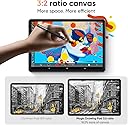
I bought this after being tired of being tied to my desk anytime I wanted to draw digitally and I love it. The screen feels great to draw on and the display quality is really nice. The aspect ratio is also a big win and it makes it feel just as good to use vertically as it does horizontally, I prefer drawing in vertical aspect most of the time but 16:9 displays make that feel cramped and awkward. This display has a 3:2 aspect ratio which is enough to make a vertical orientation comfortable. The only downsides are that the palm rejection isn't great, you should wear a drawing glove while using it, and the cursor tends to be a bit offset. The offset can be fixed in some programs, like CSP so if it bothers you it can be corrected. It also lags a bit with Infinite Painter, but CSP, HiPaint, and Sketchbook all feel great.
B**N
Better than an Ipad if your goal is to Draw.
Just a perfect purchase! (2025 Model with Android 14, Only this model with Androrid 14 version, works on PC!, you can use this as a Display tablet like any Huion/Xp-Pen/Wacom and connect it to your PC - requires your PC to have a USB-C port with video support such as DisplayPort Alt Mod, check if your PC or laptop has this USB-C port ) on Android, You can use CPS, Ibis Paint (+Any other Android App), This Screen Size is the best feeling when drawing. (Smartest change I made in 2025.. I was using an iPad, but this is a whole new game. So yeah, I recommend it 100%.
D**Y
Thank
Good quality
G**S
Produto incrível
Cumpre exatamente o que promete, a qualidade do produto é excepcional, com algum pequenos problemas. Prós: -Melhor tela/caneta do mercado -Bom acabamento -Compacto e de fácil manuseio -Ótima proporção de tela -Bom custo beneficio -Bateria durável Contras: -Acessórios caros -Android defasado, (até o momentos dessa avaliação) Clip Studio deixara de dar suporte -Processador Mediatek MT8771 tenebroso, muito fraco, não roda jogos com bom desempenho, é limitado a somente ilustração, é compreensível a escolha do processador, porém ainda é um tablet caro, ele merecia um Snapdragon ou até mesmo um Mediatek melhor -Wifi fraco, é necessário estar bem próximo do Roteador para ter melhor aproveitamento da internet Mesmo com todos estes contras, ainda vale a pena, o trabalho que a XpPen fez nessa tela é surreal, até o momento nada no mercado de tablets chega perto desse experiencia de parecer que a tela é uma folha de papel como esse tablet consegue, melhor experiencia de ilustração digital que eu já tive.
A**D
ممتاز
ممتاز
D**K
Buena opción portátil
Llevo un par de semanas usándola. La compré para tener una forma de trabajar durante viajes. He estado trabajando con Clip studio e Infinite Painter y el rendimiento es muy bueno, algo peor en Clip Studio pero es por la mala optimización del programa. La camara no es mala, e incluso puede correr algunos juegos como Wuthering Waves y Zenless Zone Zero (gráficos bajos). La pantalla mate es bastante amigable a la vista, pero bajo el sol desde luego que cuesta ver algo. El lápiz es bueno, algo raro de usar si vienes de usar otras tabletas gráficas, pero uno se puede acostumbrar rápido. Los diferentes tipos de punta que incluyen están muy bien, pero en mi caso, una vino doblada. La batería es duradera, la cargo una vez al día por los largos periodos de uso que le doy dibujando, y a veces viendo videos o leyendo cómics, estoy seguro que a alguien que le dé un uso menos continúo la batería le puede durar días.
B**S
Tablet ótimo para desenhar
Se está buscando um tablet para desenhar e mais em conta que um Apple ou Samsung, ele é ótimo e cumpre muito o prometido! Amei desenhar nele, precisa fazer alguns ajustes nas aplicações que for usar, mas funciona muito bem, amei a tela fosca e nao reflete quase nada de luz, a textura pra desenhar tambem é ótima. A câmera não é boa, mas comprei com o propósito de desenhar e nisso ele é incrível. Abre aplicativos como tiktok, instagram, etc normalmente e funciona bem. A capinha que vem é legal, mas gostaria que a marca tivesse outras opções, como uma capa que dá pra abrir e fechar na frente igual outras marcas. Vem de fato com o período de Premium do Ibispaint junto, precisa entrar no site da xppen pra resgatar o código e inserir no aplicativo para ativar.
Trustpilot
5 days ago
3 weeks ago