Buy anything from 5,000+ international stores. One checkout price. No surprise fees. Join 2M+ shoppers on Desertcart.
Desertcart purchases this item on your behalf and handles shipping, customs, and support to Uruguay.
๐ Elevate Your Workspace with Triple the Vision!
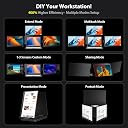
The KYY Triple Laptop Monitor Extender is a 14-inch 1080P FHD IPS portable screen designed for seamless integration with both Windows and MacOS systems. It features a user-friendly setup, a stable built-in stand with adjustable angles, and a remarkable 210ยฐ rotation capability, making it ideal for multitasking and collaborative work. With a commitment to quality, it comes with a 3-month return policy and a one-year warranty.


| ASIN | B0GRDZFF9N |
| Additional Features | Alloy, Eye Care, Lightweight, Portable |
| Aspect Ratio | 16:9 |
| Best Sellers Rank | #28,574 in Electronics ( See Top 100 in Electronics ) #723 in Computer Monitors |
| Brand | KYY |
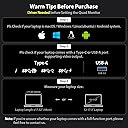
| Built-In Media | 1 x 15.6" Portable Quad Monitor, 1 x USB Disk (with Display Driver), 1 x USB-C to USB-C Cable (for power delivery), 1 x USB-C to USB-C Cable with a USB-C to USB-A Converter Head (for video connection), 1 x PD30W Power Adapter (USB-C) |
| Color | Black |
| Compatible Devices | Windows Devices (driver needed), macOS Devices (driver needed),Android Devices (driver needed), Linux Devices (driver needed) |
| Connectivity Technology | USB Type-C 3.1 for video output(Type-C Full Function Port), USB Type-C port for power delivery |
| Contrast Ratio | 1200:1 |
| Customer Reviews | 4.8 out of 5 stars 52 Reviews |
| Display Resolution Maximum | 1920 x 1080 Pixels |
| Display Technology | LCD |
| Display Type | IPS |
| Hardware Connectivity | USB Type C |
| Has Color Screen | Yes |
| Image Contrast Ratio | 1200:1 |
| Item Dimensions D x W x H | 1.18"D x 15.2"W x 10.9"H |
| Manufacturer | KYY |
| Model Name | X90G |
| Model Number | X90G |
| Mounting Type | Desk Mount |
| Native Resolution | 1920x1080 |
| Number of Component Outputs | 1 |
| Picture Quality Enhancement Technology | High Colour Gamut, Low Blue Light Technology |
| Power Consumption | 28 Watts |
| Refresh Rate | 60 Hz |
| Resolution | FHD 1080p |
| Response Time | 1 Milliseconds |
| Screen Finish | Glossy |
| Screen Size | 15.6 Inches |
| Screen Surface Description | Glossy |
| Total Thunderbolt Ports | 1 |
| Total USB 3.0 Ports | 2 |
| Total Usb Ports | 2 |
| Unit Count | 1.0 Count |
| Viewing Angle | 360 Degrees |
| Voltage | 28 Volts |
| Warranty Description | 1 year |
P**.
FINALLY! I HAVE BEEN LOOKING FOR THIS.
This may be a long review, but I hope you take the time to read it. I am a remote worker, and often I would need to setup my work environment in different places weekly. I just cannot carry a 32 inch monitor with me everywhere I go, so previously I have two KYY monitors that I can just shove in my bag and take them any where with me. The pro is that I have the ability to extend my laptop screen easily, I can carry the whole setup without breaking my back, and they do not take up a lot of desk space. You never know what kind of desk you would get in a hotel room, so desktop real estate is important. The con is that two monitors use two USB ports, and sometimes you are just to be able to connect another monitor and you are short on USB ports. The USB hub just doesn't work well and just another thing to get lost when traveling. NOW, I have my hands on the new triple portable monitor for laptop. When traveling, you truly only have one unit that included all 3 monitors, no more worrying about keeping the extra cases to protect your monitors. Two USB cables, one to connect to the laptop and the other for the additional power for the monitors. That's it! Pro, (1) easy setup with the included driver. I was able to have the monitors working within two minutes. (2) the form factor makes this easy to pack and travel with. (3) occupies ONE USB port on the laptop for all three monitors. Con, nitpicking here, the form factor is a bit bulkier than expected, but it's one unit with three monitors. That's it! In summary, I do enjoy the new setup. Now I have enough work area to display all the things I need to do. I do need a bigger bag now, but that's another story ๐. I will report back after a while if there are any issues, but so far everything looks solid and I plan to use this for a long time. Thanks for your time. ๐
W**Y
Multitasking at its best
What an incredible portable monitor setup. It's about as compact as you can get with having 3 additional monitors for your laptop travels whether for business or personal use. Who would have thought that when traveling with your laptop that you could have so many additional screens in such a small package. Of course it's not a featherweight setup due to the amount of hardware needed to display so many screens, but it's not overweight like you might expect from a setup like this. The setup is pretty simple and straightforward although the couple of different instructions it came with could be modified a bit to direct you where to start first for initial setup of screens, what cables are needed, but to specifically call out first step that a driver is required before any hardware setup. It wasn't too challenging to put the pieces together however. Once drivers are set up then any subsequent connection of laptop to monitors is a cinch. Just the two cables: power and cable to connect to your laptop (which has adapter for USB or USB-C). The quality and clarity of the monitors are great in initial use so far. Having a setup like this can make working remotely super helpful in order to work on and view multiple screens at a time. The setup can mirror or extend the display of the laptop for different options. It's about as clean of a setup as you can get with looking sleek and taking up hardly any additional space compared to having external monitors with their own bases and all. You could technically set this up for 1 additional monitor, 2, or 3, whichever you prefer as you can see from different options I have in photos. Each one can be turned on/off individually with their own monitor settings for personal preference. This is going to level up my working remotely options quite a bit. It's compact when packed away so that it will fit next to a laptop in a backpack for ease of traveling and only a couple of small cables and wall adapter are needed that keep the bulk away.
J**C
SO MUCH ROOM FOR ACTIVITIES!
Been using the quad monitor version for a few days now, and I really love how easy it is now to just SEE what you need readily available on screen instead of having to tab out and cycle through all your open programs, folders, and browsers.. The single cable connection (+ power cable) made it incredibly easy to move from one place to another, or pack up to go longer distances. If you can, I would suggest putting some kind of cushion in between the monitors for added protection. I have ubuntu installed on my laptop and even though the included driver installed successfully, It didn't work immediately. I'm not sure if it's a hardware thing (compatibilities with different brands of laptop manufacturer), a GPU issue, or just the operating system, but I did have to tinker around and look for various solutions for a couple days. But I did eventually get it to work and I don't think I can work without it anymore. My main issue was the "MOK key". For Windows laptops it just worked right out of the box without even installing the driver (I still would though for stability). Overall I'm very happy I got quad monitor extenders and can't see myself without it again.
D**N
Portable Command Center
Does exactly what it advertises. One USB-C cable into the laptop, no driver install for mirror mode, extended with a quick intall, no fuss โ Windows picked up all three external screens immediately. Arrived well packaged and the build quality is genuinely impressive for the price point: aluminum housing, hinges that hold their angle, and a built-in kickstand that means you're not clipping anything to your laptop lid. Looks durable โ time will tell on long-term wear, but first impressions are great. See attached photos. Four screens (laptop + three) is a real productivity unlock. I can have email, a code editor, terminal, and a reference doc all visible at once instead of constantly alt-tabbing. The one tradeoff: it's heavy. But that's the deal you make for a portable command center โ you can either have lightweight or you can have four screens of real estate, and I'd rather lug an extra couple of pounds than fight for screen space on the road. Throw it in a backpack and you've got a full workstation anywhere. No complaints so far. Setup took under a minute and it's been rock solid since.
A**K
The Ultimate Remote Work Set Up
The Ultimate Remote Work Set Up! I loved my KYY second screen, but recently upgraded to this Triple Monitor set up and couldn't be happier. The hardware/ product itself is sleek & solid. Feels like an Apple product. The images/ display on the monitors are crystal clear. The set up is great, not only for remote work but its also great for a home office. This basically gives you 4 separate computer screens to work off of, and it has definitely helped improve my productivity at work. You can also configure the monitors for different setups (long vertical screen for spreadsheets or chat screens) It's a bit heavier than my portable second screen, but it easily fits in a backpack or briefcase. Very happy with this!
A**R
Works exceptionally well, once you get the driver issue figured out - here's how I did
If you haven't restarted your computer in a while (especially if you are running windows 10 or 11) before installing doing a full restart would be helpful. Sometimes things "hang" and when installing monitor drivers it's always been to start with a clean slate, not a bajillion programs and browser tabs running. There's a driver stick included with this monitor that you need to install before the monitor works fully. It is best if you install this FIRST before hooking anything up. Being online also helps - if the program errors out, you can go to the manufacturer website and download updates drivers manually, if you have to. (or if your firewall is being wierd) Secondly, check your laptop's port power output, and if you can use the included USB-C charge adapter to provide more power for your monitor. This is the best option because the more power the laptop has to deliver, the hotter the circuity will get. As far as the system itself, it's awesome, and effectively replicates far more expensive and bulky setups that desktops typically use. Resolution is 1080p, I don't think it can go any higher because that would require too much throughput, but it's entirely fine when you have four monitors to work with. All in all rather than spending far more on a desktop-similar setup you can get something similar if not better for a much better deal with this monitor / screen extender combo. Def. recommend
G**T
Easy to set up and very usable screen device, just a couple of concerns.
Review of KYY X90A 14 inch dual monitor laptop screen extender. Overall this is a quality and usable product that I am happy to have. Would I recommend or order as a gift? Yes. Would I order this again? Yes. Pros: Usable Easy set-up Seems durable Handle Cons: Poor stand Heavy Poor viewing angles Slightly dim Upon opening this Screen Extender I was shocked by the weight. It makes me feel it is of good quality and durable. It was packed in a nice box with quality graphics. The foam protects it well and I was confident it was not damaged during shipping due to the packaging. The fit and finish is quite nice and feels professional. I like that it is a metal case similar to a smaller macbook or laptop. It does add extra weight but I like that this may dent versus crack if damaged. I do not like that the bezel has a machine finish that acts like a mirror and reflects ambient light causing some glare. Appropriate cables and adapters were included and were very much usable. I like that they include a power brick to plug into the wall and that it is not hardwired. The USB-C input is functional with power if the device such as a laptop is plugged in and able to supply power. One of my only complaints is that the back kickstand is not optimized well. I feel that it needs a foot that extends under the laptop or behind the body in the middle of the device to provide adequate stability. I used it briefly in its advertised configuration with a screen on either side of the laptop I am using. but the screens could not be angled how I would like them due to not being able to balance the weight of the screens using the included kick stand. That being said I am currently using this in a portrait orientation and I disabled one of the screens. It is much more stable in this orientation and adds to the productivity of my laptop. Though not as much as two extra screens would have. Connectivity wise it was fairly quick to set up. Windows 11 does Identify the screens, native resolution and basic settings that are optimal. It took me a while to configure these as I wanted but that was more to do with my limited experience with Windows display settings. The screen itself does seem to be appropriately advertised for 1920x1080. It does have poor viewing angles and lacks some brightness and colors seem slightly off compared to my MSI GF65 Laptop display. I tried this with both a Windows 11 Laptop and a Samsung S22 Ultra. The laptop was easy and fairly intuitive and did not ask for drivers to be installed. The screens did want me to download a driver on my phone but did not prompt it. Which I guess is a positive and a negative. I do not like downloading drivers for products or like when my phone is prompted to download an unknown APK file. I went to the app store and was able to download the "drivers" which were less than helpful and only allowed me to mirror my phone screen. Would recommend only using this with a Windows 11 device. I am sure it works with Mac as advertised, but I was unable to test. Would I order this again, for myself? Yes; However, if another option was not more compatible for my needs or more competitively priced I might be tempted to tryout another option.
J**E
Easy set up
This is an excellent solution if you need more real estate on your laptop. Itโs a great size - and goes perfectly around my laptop so that I have more screen space. I love how it folds up so that I can easily fold it up to put it away, making it an excellent portable screen extender. Itโs also lightweight for what it is, so I can slip it into my laptop bag. The picture quality is sharp and clear, and the sound is good. This has been great for zoom calls so that I can have multiple documents open while on calls. I was also amazed by how easy it was to connect- I just plugged it in and it was ready to go. This is an excellent product.
Trustpilot
2 weeks ago
2 months ago