Buy anything from 5,000+ international stores. One checkout price. No surprise fees. Join 2M+ shoppers on Desertcart.
Desertcart purchases this item on your behalf and handles shipping, customs, and support to Uruguay.
🖋️ Elevate your Surface experience—write, draw, and create like a pro!
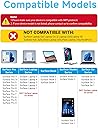
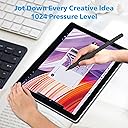
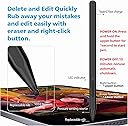
The Milikilo F97 Stylus Pen is a premium, fast-charging digital pen compatible with most Microsoft Surface devices (excluding Laptop Go series). Featuring 1024 levels of pressure sensitivity, tilt support, palm rejection, and dual magnets for secure attachment, it offers a seamless, lag-free writing and drawing experience. With no Bluetooth required and an 80-hour battery life from a quick 40-minute USB-C charge, it’s designed for professionals and creatives who demand precision and convenience on the go.


| ASIN | B0CYXWKWNY |
| Are Batteries Included | Yes |
| Are Batteries Required | Yes |
| Battery Average Life Standby | 30 days |
| Battery Description | Lithium-Ion |
| Best Sellers Rank | #2,849 in Cell Phones & Accessories ( See Top 100 in Cell Phones & Accessories ) #61 in Styluses |
| Brand | Milikilo |
| Charging Time | 40 minutes |
| Color | Black |
| Compatible Devices | Laptops, Tablets |
| Compatible Tablet Computer Models | Microsoft Surface Go 4, Microsoft Surface Pro 11, Microsoft Surface Pro 3 |
| Customer Reviews | 4.3 out of 5 stars 1,472 Reviews |
| Enclosure Material | Aluminum |
| Item Diameter | 1 Inches |
| Item Dimensions | 6.22 x 0.39 x 0.39 inches |
| Item Weight | 14 Grams |
| Manufacturer | Milikilo |
| Material | Aluminum |
| Mfr Part Number | F97 |
| Minimum Required Operating System Version | Windows 10 |
| Model Number | F97 |
| Number of Batteries | 1 Lithium Ion batteries required. (included) |
| Pressure Sensitivity | 1024 Levels |
| Unit Count | 1.0 Count |
| Warranty Description | 1 year manufacturer |
A**O
Love the pen.
So far I have no complaints. It came in a couple of days ago and I haven't needed to charge it yet - I've been using it pretty regularly. So the charge lasts for some time. It connected right to my Microsoft tablet. I'm still getting accustomed to using the pen with the buttons attached for erase and the right click (I mainly use the right click), but the little writing I've done with it is smooth. The responsiveness to my tablet is good. Sometimes it's a little iffy, but I have a refurbished tablet and not entirely sure of that can be part of it. Good quality and seems sturdy. It is magnetic and holds well. It allows me to do inventory for different things and gets the check boxes on Excel that I normally have trouble with otherwise. Will be buying again if needed.
A**.
Instant pairing and zero lag, a no-brainer alternative to the $100 official pen.
I needed a backup stylus for field work because I didn't want to risk losing my expensive official Microsoft Surface Pen on a job site. I honestly expected this to feel "cheap" or have connectivity issues, but I can't tell the difference in daily performance. The "MPP" Magic (No Bluetooth needed): Because this uses the Microsoft Pen Protocol (MPP), there is no fiddling with Bluetooth settings. As soon as I turned it on and touched the screen, it worked. • Pressure Sensitivity: It tracks perfectly. If I press harder while sketching a diagram in OneNote, the line thickens exactly like the OEM pen. • Palm Rejection: This is the dealbreaker feature, and thankfully, it works here. I can rest my hand fully on the screen while writing, and it doesn't register stray marks. Magnetic Attachment & Charging: It has a strong magnet that snaps firmly to the side of the Surface Pro, just like the original. • Important Note: While it magnetically attaches, it does not wirelessly charge (unlike the Slim Pen 2). You have to plug it in via USB-C to charge it. However, the battery lasts forever. I’ve used it for a week of meetings and haven't needed to recharge it yet. Tactile Feel: The tip has a nice amount of friction. It doesn't feel like slippery plastic-on-glass; there is just enough resistance to make your handwriting look neat. Verdict: Unless you are a professional digital artist who needs specific tilt-shading capabilities of the high-end Slim Pen 2, save your money. For taking notes, marking up PDFs, and general navigation, this is an absolute steal.
J**N
Instant setup, USB-C charging, and smoother writing than the original Surface Pen.
I’ve had ongoing issues with Surface Pens purchased from Best Buy, so I decided to try this one instead, and I’m so glad I did. Although I’ve only had it for a few hours, it’s already far better than any of the original Surface Pens I’ve used. Shipping was fast (arrived within two days), and the pen itself looks great in the emerald green color. It charges via USB-C and comes with two extra pen tips and a pen tip extractor, which is a nice bonus. The biggest surprise was that I didn’t need to connect it to Bluetooth at all; it worked immediately as soon as I turned it on. It also arrived fully charged, which was greatly appreciated. I’m especially happy to be done with AAAA batteries, which are frustratingly hard to find in stores. The writing experience is excellent: very responsive, with strong pressure sensitivity that accurately translates into line thickness. There’s no noticeable lag, and it feels natural to write with. The pen fits comfortably in my hand and is very easy to use. For reference, I’m using it with a Microsoft Surface Book 2, and it works perfectly. Overall, I’m genuinely excited to start using this pen in my day-to-day work.
J**E
It works
Works like a charm, I can now draw on screen and finish art faster .Charge seems to last long and it's magnetic.
A**H
Excellent product.
A very sleek and effective product. Work seamlessly. Fits great in hand and function like an actual pen on screen smooth.
A**R
Product Defects
The pen worked great for the first few days. I was able to handwrite digital notes with very good legibility. The pressure feedback generally worked quite well. My pen may have been defective. After 2 weeks, the pen would write while floating above the tablet surface, creating scribbly illegible notes. After 1 month, the pen stopped working all together. I tried all of the troubleshooting listed in the self-serve support. Would replace, but window has passed. Cannot recommend this product. Paired with Microsoft Surface Go Model 1962
H**N
I would recommend it to most people.
The pen comes in a really nice box, well packaged, and there wasn't any pairing or anything; it just worked. The only reason why I didn't give it a higher score is because the button is a little hard to press if you don't have good dexterity in your fingers (like me). I don't think that's a defect of the stylus, it's simply just the design of it. All in all though, an amazing stylus.
R**O
Don’t hesitate
Easy setup, perfectly compatible with my surface pro and very durable. Works like a charm as intended
M**A
Good
Works fine, on surface pro 4
S**A
Penna
Funziona perfettamente con surface
T**M
Great pen. Works exactly as expected and uses genuine microsoft tips/nibs
Works great. I have a Surface Pro 7, 9 and 10 and this pen works on all of them without an issue. It holds well (magnetic) on the side of the tablets. I also like that it uses the genuine microsoft tips/nibs. This way you don't need to search for some obscure 3rd party consumables when it is time to replace them. Charging via USB is a nice bonus and simple. No need to constantly buy batteries. All this at a fraction of the price of the original MS pen. Now if they can make one with the form factor of the newer "Microsoft Surface Slim Pen 2", that would be great, so it can easily fit in the dedicated slot that is present on the newer Surface Pro 9 (and above) type covers.
C**R
Excelente y compatible con Kobo Libra Color
Está súper bonito, muy cómodo de usar, dice que el botón inferior es para borrar pero en este caso subraya y el botón superior borra, solo es cuestión de acostumbrarse, lo compré para mi Kobo Libra Color y funciona muy muy bien.
K**U
Definitely a good product to buy
Unfortunately, I am not an artist to evaluate this stylus as an artist might, but I can review it as someone with years of experience in buying tech products and carefully selecting quality items by thoroughly comparing alternatives. The package arrived intact, wrapped in transparent film. Inside, there is a stylus, two additional detachable nibs, a tool for changing them, a USB Type-C cable, and instructions in multiple languages. What impressed me immediately after unboxing was that this stylus is completely plug-and-play. A quick press of a button is all it takes to start drawing or writing right away. There's no need for manual pairing or setup – everything works straight out of the box. Notably, I have a rather old Microsoft Surface Pro 3, and the compatibility is fantastic. The body is made of aluminum and feels solid, with no visible seams. Nothing creaks or sticks out. The double button on the body also feels reliable and doesn’t wobble when pressed. The nib is securely attached and made of a plastic that won’t scratch the tablet screen. It’s important to note that the nib isn't conductive, so it won’t work with other touch devices. Be sure to check compatibility in the product description. The stylus size is very comfortable, and even though I have a fairly large hand, it feels like a regular pen and is not uncomfortable to hold. The magnets inside the body are strong enough to stick to any metal surface, though, unfortunately, my tablet lacks convenient mounting points. The only available area is near the port for the original keyboard, but that’s not an issue for me personally. As for the stylus performance, I’m writing this review just hours after unboxing, so I can’t yet evaluate battery life, but I’ll focus on the user experience. As mentioned before, all features work right out of the box without any need for configuration or connection. The stylus maintains a strong connection with the screen and can accurately detect the cursor position even from 2–3 cm away. There are no issues with touch sensitivity; the pen always responds to contact with the screen without any line breaks when drawing or handwriting. The pen recognizes tilt relative to the tablet screen, not relative to the ground, making it convenient for use in any comfortable position for the user. It also supports pressure sensitivity. This feature felt slightly awkward at first, but I attribute that to not being used to it yet. Overall, the pressure sensitivity works excellently, allowing for both very fine and broad strokes without changing the brush size. Maximum pressure is reached with a regular press, which prevents damaging the tablet screen with excessive force. Palm rejection also works perfectly. I had no issues with my hand resting on the tablet’s touchscreen. There were no phantom touches or accuracy issues (*note that I have disabled the Windows feature that turns off the sensor when a pen is connected; the stylus handles palm rejection on its own). The sleep mode after 10 minutes of inactivity works well too, with the stylus waking up upon pressing any button. Both the right-click and eraser buttons work as expected. Pros: low price, good body materials, high build quality, rich functionality, ease of use, plug-and-play Cons: none found
Trustpilot
2 months ago
2 weeks ago