🖥️ Small size, big impact — power your productivity in style!
The Intel BOXNUC5CPYH 2015 Mini PC features a 2.16 GHz Intel Celeron N3050 processor, supports up to 8GB DDR3 SDRAM, and includes integrated Intel HD Graphics for smooth 1080p visuals. With ultra-low 6W power consumption, Bluetooth 4.2, and 802.11ac Wi-Fi, this compact barebone PC offers customizable performance and connectivity in a sleek, space-saving design—perfect for professionals seeking efficient, flexible computing without the bulk.


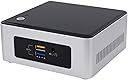




| ASIN | B00XPVRR5M |
| Additional Features | Mini pc |
| Aspect Ratio | 16:9 |
| Box Contents | Mini PC, User Guide and Manual |
| Brand | Intel |
| Brand Name | Intel |
| CPU Model | Celeron N3050 |
| CPU Model Number | Celeron Processor N3050 |
| CPU Speed | 2.16 GHz |
| Cache Memory Installed Size | 2 |
| Cache Size | 2 |
| Colour | Black |
| Computer Wireless Type | 802.11ac |
| Cooling Method | Air |
| Customer Reviews | 3.5 out of 5 stars 512 Reviews |
| Display Type | External Display (LED/LCD) |
| Global Trade Identification Number | 00675901321464, 00735858293167, 05032037071277 |
| Graphics Card Description | Integrated |
| Graphics Card Interface | Integrated |
| Graphics Co Processor | Intel HD Graphics |
| Graphics Description | Integrated |
| Hard Disk Description | HDD |
| Hardware Interface | HDMI, USB |
| Human Interface Types | Keyboard |
| Item Dimensions | 13.7 x 12.5 x 11.6 Centimeters |
| Item Weight | 1170 Grams |
| Manufacturer | Intel |
| Maximum Display Resolution | 1920 x 1080 |
| Memory Clock Speed | 1600 MHz |
| Memory Slots Available | yes |
| Memory Speed | 1600 MHz |
| Model Name | BOXNUC5CPYH 2015 |
| Model Number | BOXNUC5CPYH |
| Model Year | 2015 |
| Native Resolution | 1920 x 1080 |
| Network Connectivity Technology | Wired |
| Operating System | None |
| Personal Computer Design Type | Mini PC |
| Processor Brand | Intel |
| Processor Count | 1 |
| Processor Speed | 2.16 GHz |
| Processor Type | Celeron N3050 |
| RAM Memory Technology | DDR3 |
| RAM Type | SDRAM |
| Ram Memory Maximum Size | 8 GB |
| Scanner Resolution | 1920 x 1080 |
| Speaker Description | dual speakers |
| Total HDMI Port | 1 |
| Total USB Ports | 4 |
| Total Video Out Ports | 4 |
| UPC | 755034342007 735858293167 675901321464 |
| Video Output | HDMI |
| Video Output Interface | HDMI |
| Video Processor | Intel |
| Wireless Network Technology | Wi-Fi |
| Wireless Technology | Bluetooth |
M**A
Value for money
Good for day to day tasks and have a capable hardware. Coupled with good quality RAM and a SSD, it can perform well for browsing, video playback and office. A lot smaller than expected. Looks good and every thing works out of box with ubuntu 16.04. no driver issues. For windows, drivers are easily available in Intel site. Just don't expect gaming and i5 class performance . We get what we are paying for.
A**R
Never buy
The under performer!! With 8400 you can buy an AMD board and priceesor with a cabinet and it will be much faster and smother. Or one can go for Intel if ready to pay 1500 more over 8400 . And the speed will be unmathed. Price is too much for what they are offering in this NUC
V**K
Awesome tiny device for everyday use.
Got a year old product with manufacturing date of June 2016. I wonder if Intel gives warranty from date of purchase or date of manufacture. Coming to the product, it is a small hand sized, low powered (6 watts) and low in performance. Probably just a tad better than an android box or raspberry pi. Bought and installed 64GB micro sdcard in sdcard adapter and got laptop ram of 4GB. Get 8GB ram for these devices if you have money lying around. The extra 4GB ram makes a difference in speed. Linux Mint can be installed on a 64GB SDXC card easily. Didn't have money for windows which requires hdd and that means spending more money on hdd and windows license which drives up the cost by another 10k. Total I spent on this was 9k for this NUC + 2.9k for 4GB LPDDR3 ram + 1.2k for 64GB sdcard and around 250 for a usb to keyboard + mouse adapter. Linux Mint is free. Keyboard, mouse and 4 port external usb hub was was shared from main pc. You can buy them for around Rs 600 - 1k. Its good for browsing websites and for other small day to day tasks. Linux Mint 18.1 boots up in less than 15 seconds. Libre Office opens in 12 seconds or so. Firefox opens in less than 5 seconds. Only four usb 3 ports on this, but you can use a usb hub to use for mouse and keyboard and usb sticks. This unit gives enough power for 8 usb devices. Running this continuously from 2+ days and it hasn't got hot. Great for a media sharing device that is always on. I installed VLC and Kodi on this to test how it fares while playing 1080p HEVC files with Flac audio. VLC has issues with video getting pixellated and some green screen in some scenes. Lots of frame drops and cpu was at >90% always. Same with Kodi Jarvis (v 16) but it was better than VLC in playing videos. Audio out was from a usb dac so it was good. Not bad for something costing less than 15k. Drawbacks - Can't run this without any monitor (or TV attached) on hdmi or vga port. Device will not boot. Intel's own original bios can't be flashed on this for some reason. So you're stuck will 2 years old bios. On Intel site this device has reached end of life, so get a newer device. Support for this has just stopped. So no more drivers or updates. Cannot run this in headless mode. No support from Intel devs. They're telling people to flash to latest bios but device just does not like the new bios. Those wifi all in one keyboard + touch pad or mouse things don't work in bios. So you can't press any keys to setup OS or bios. They work properly after installing the OS though.
A**R
Works Great with Openelec
This is a good product for HTPC based on OpenElec. You need to install RAM and SSD/HDD for getting it working. For running openelec you dont even need a HDD/SSD, you can install OS into USB though I have not checked that yet. The latest Openelec 6.0 with kernel version 4.0 and higher should be used. This NUC is not powerful enough for windows system smoothly, so it should be avoided . Linux based system should work well with kernel version greater than 4.0. I managed to get it work using following parts. RAM Kingston 4GB KVR16LS11/4 http://www.amazon.in/gp/product/B00CQ35GYE?psc=1&redirect=true&ref_=oh_aui_detailpage_o01_s00 SSD Transcend 64GB TS64GSSD370 http://www.amazon.in/gp/product/B00K9HID2G?psc=1&redirect=true&ref_=oh_aui_detailpage_o01_s01 Keyboard Logitech K400R http://www.amazon.in/gp/product/B008QS7TRK?psc=1&redirect=true&ref_=oh_aui_detailpage_o02_s00. TIP: the small receiver does not work nicely from 10 feet, its recommend to use the USB extender that comes with it. Though 4GB ram and SSD might seem to be overkill for this kind of set up, I plan to install full Linux Dstro like Ubuntu/Mint in future to get most out of it. For strictly running Openelec Rasberry PI2 might be a good alternative, but I find NUC a little more versatile for my use. I also managed to configure Logitech Harmony 650 remote with this NUC and it can power the NUC and shut it down nicely. All KODI functions can be accessed using this remote. Update 1 I tested this with playback of 1080p trailer of Mad Max encoded in h264 with bit rate of 16Mbps and it played it perfectly with cpu load under 20%. You can safely ignore the complains of other users who can't yet figure out how to play full HD video. Update 2: I played a 720p video encoded in HEVC or x265 and this little thing managed to play it smoothly. Though CPU usage went up to 50% and I am yet not sure if it was through hardware acceleration or software or both, but nonetheless it's a good sign.
B**L
Its good - small CPU - for minor use - avoid for regular use
For normal use its very good, but you will get frustrated if you have to work with heavy softwares because its an celeron processor. I had installed it on my shop just for printing purposes, due to space restrictions I jave to go for smaller CPUs. I had installed an 60GB SSD and 4GB RAM, kust enough for it. Installed Windows 10 on it and its running just OK with some lags Pros: 1. Built quality is very good, its full metal body and its very sturdy. 2. very small in size, you can also clamp it on wall. Cons: 1. Laggy due to celeron processor 2. Expensive. 3. Due to metal body amd lack of 3 pin plug you may get some shocks (I had personally experienced it twice). 4. On heavy use its gets hot. 5. RAM and Hard drive need to buy seperately. I will only recommend to buy this CPU if you have any special requirements like lack of space. or just for small tasks to do. Only buy this if you have knowledge of computer because you jave to do regular cleanup of software, otherwise it will be so laggy that it will not be usable. For the people who want to do daily work on PC, please avoid it and go for a assembled PC.
H**O
ok, but avoid
not value for money. price should not be more than 4000. we need to buy ram/ssd/windows seperately , cost will be more than double. performance is also not good , my acer aspire e11 with N2840 processor works better than this with N3050 processor ,with same rest of components(4gb ram/128gb ssd) .This is very low powered one. hangs all the time . better go with a low end laptop with similar specifications.
T**N
ram is ddr3L 1600mhz
The booting time is amazing. only seconds it will boot and shutdown. it is very very small than we expect. ubuntu and windows will load. support 2TB HDD and 8GB ram. have wifi and bluetooth. processor is dualcore. 64bit. not for extreme operations. a normal comopact computer. i liked it a lot.
D**A
Good Value for Money - basic computer
Excellent value for money with prompt delivery. My objectives were to replace an aging home computer for under Rs.15,000/- including all the software. Primary usage - documents (word processing and spreadsheets), presentations, photo-editing, basic internet usage. I installed this NUC with 4GB RAM and a 120GB SSD. I already had a display unit and a bluetooth enabled (Microsoft) keyboard & mouse set. Installed Ubuntu 14.04 (I had problems with 16.10 which I have yet to resolve). This version of Ubuntu may have issues with newer printers but there are work-around solutions.
Trustpilot
2 weeks ago
1 month ago