Buy anything from 5,000+ international stores. One checkout price. No surprise fees. Join 2M+ shoppers on Desertcart.
Desertcart purchases this item on your behalf and handles shipping, customs, and support to Uruguay.
🚀 Print Fast, Print Smart, Print Like a Pro!
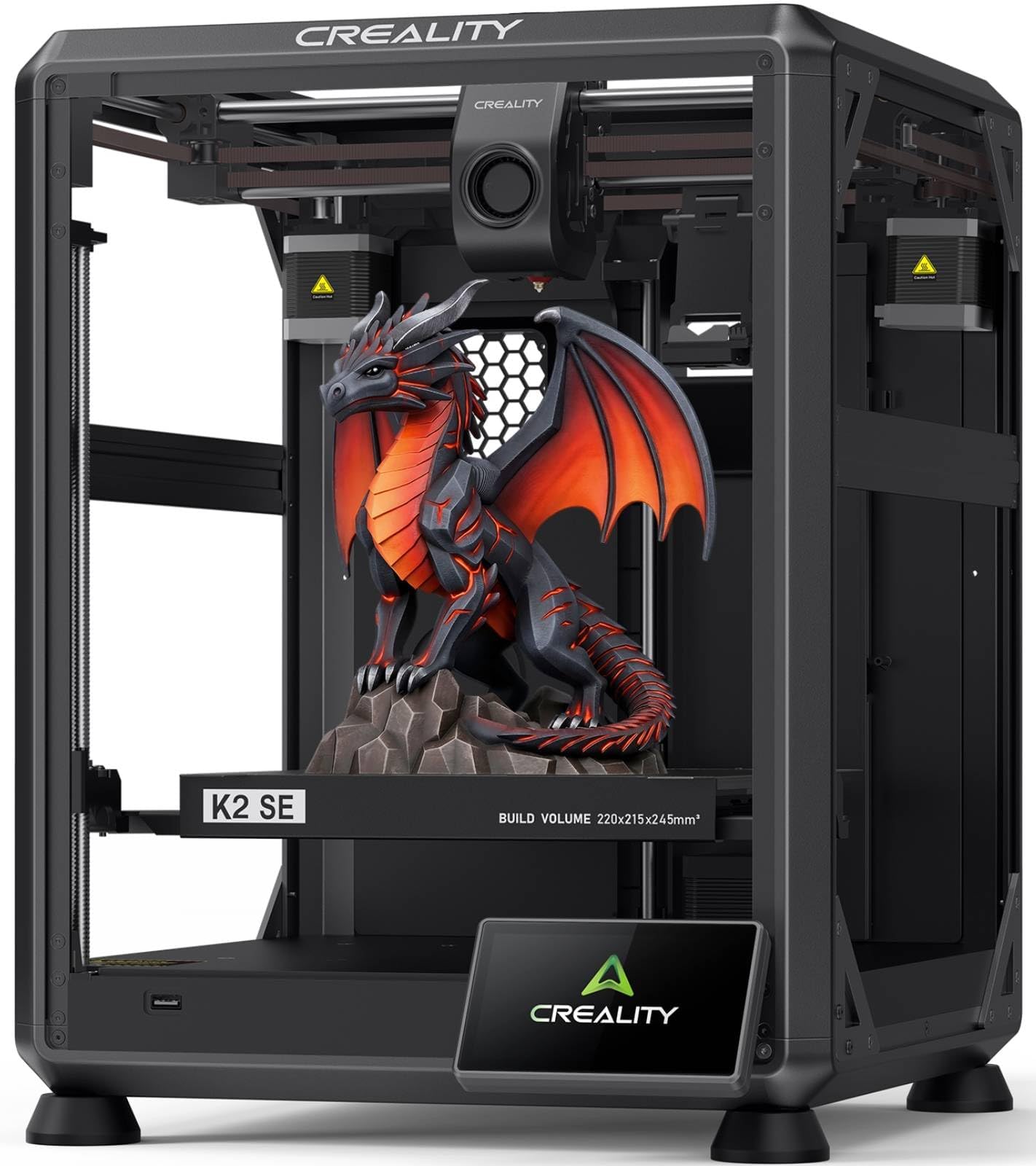
The Creality K2 SE 3D Printer combines a high-speed CoreXY system capable of 500mm/s printing with a robust die-cast aluminum frame for exceptional stability and precision. It supports expandable multicolor printing via the Creality CFS system, features a direct drive extruder with quick-swap nozzles, and offers beginner-friendly automatic bed leveling and setup. Designed for professionals and enthusiasts seeking reliable, fast, and versatile 3D printing with minimal hassle.


| Best Sellers Rank | #6,561 in Industrial & Scientific ( See Top 100 in Industrial & Scientific ) #7 in 3D Printers |
| Brand | Creality |
| Color | K2 SE |
| Compatible Devices | Personal Computer |
| Customer Reviews | 4.0 out of 5 stars 1,648 Reviews |
| Item Weight | 12.5 Kilograms |
| Product Dimensions | 13.98"D x 13.96"W x 18.98"H |
| Supported File Format | 3MF |
E**H
Forget Adventurer 5M , This is the true and easy to use beginner machine
This is my 3rd 3d printer. Once I spent about 45 minutes assembling it has been printing nonstop since the amazon driver dropped it off, these are the best for reliability and perfect for hobbyists. It is not the quickest machine out there, but it makes up for it with a quality print good price as well.
I**K
Not the biggest kid on the schoolyard, but plays a solid ground game.
The K2SE is an excellent printer for users who are still interested in learning and growing within the 3D-printing ecosystem, but who no longer want to spend the majority of their time troubleshooting basic hardware issues. While it may not be a flagship, top-tier machine by today’s standards, it represents a significant step forward—especially when compared side-by-side with older platforms like the Ender 3 Pro. Out of the box, the K2SE delivers a level of refinement that once required extensive upgrades on earlier printers. Features such as automatic bed leveling, filament runout detection, a sturdier frame with vibration-dampening feet, and a properly supported raised Z-axis bed all come standard. The addition of cloud access and a fluid web interface—complete with optional root access for advanced users—bridges the gap between a consumer-friendly machine and a system that still rewards technical curiosity. My first print, a simple Kirby model, was intentionally done with minimal tuning to get a baseline feel for the machine. The results were impressive, especially coming from years of compensating for aging components on my Ender 3. With that printer long overdue for a new extruder, I had grown accustomed to managing variables that simply don’t exist on the K2SE. The consistency and reliability here are immediately noticeable. Although I didn’t have the budget to add the multi-filament CRT system at launch, the printer’s upgrade path is clearly well thought out. Planned expansions like an enclosure, camera monitoring, and multi-material support make it easy to justify future investments. I would also welcome a firmware or hardware update that introduces Bowden extruder support, as it could further improve filament switching speeds and overall print performance. As someone who has stuck with the same Ender 3 since long before touchscreens, CR-Touch, and modern quality-of-life upgrades became commonplace, it’s refreshing to see Klipper remain a core component of the K2SE. For users who are on the fence about moving away from heavy DIY builds, this printer strikes a compelling balance—offering reliability and speed without sacrificing control. Perhaps the most underrated benefit is time savings. The K2SE is noticeably faster than older models, and its intuitive touchscreen interface makes it accessible even for non-technical users in my household. After setup, my wife and children can confidently start prints on their own, which speaks volumes about the usability of the system. Print quality alone justifies the upgrade for patient users. While some may find the stock cooling fans slightly underpowered, the machine compensates with excellent compatibility for multi-tool and threaded expansion systems—an advantage over many Bowden-dependent designs that require significant modification for production or multi-material workflows. And as a final bonus, despite being scheduled for February delivery, the K2SE arrived weeks early. Getting this machine ahead of schedule was the perfect way to confirm that the upgrade was absolutely worth it for the value price point.
R**N
Don’t buy
This printer is pretty awesome. Here is the biggest catch to it. We have spent hundreds of dollars on the app and or validating what we could buy between buying filament and everything else. This thing does not connect properly. It is very technical if you are not smart. This is a terrible thing to buy. I’m a very educated person and so are the other 3 to 4 people in my household that have all tried to use this thing it will not let you change individuals to print off it and even the amount of money you spend to buy credit credits and or other items that you want to purchase in the store do not print properly. This sucks don’t buy it even though this equipment is awesome. This is the worst thing I wish I’d never bought. I do not say this in the test and or ignorance I have studied. I have read up. I’ve looked at forums. I’ve been on Reddit. Everyone says this creatality is extremely difficult and we have definitely found this out firsthand. I would definitely return this, but I think my window has closed. It sucks when you buy a product and you have it for like 2 to 3 weeks before you get to use it but then your window to return it is closed. The app does not match what is online and or if you have more than one person that wants to print, you cannot share unless the other person is logged out and even if the person is logged out, it does not always match the same, so for example, I have tons of money and credit on my account, but it will not let me print out certain apps and or creations then it tells me that it will work on our item that we have purchased, but then it’ll say it does not work. It will not print. 3-D printer is a scam. It sucks. It has great potential but this is not the one for you. Don’t waste your money too much money.
S**S
The K2 SE is a great entry level printer. Don't let the naysayers get you down!
I bought the K2 SE because it was inexpensive and I wanted to get into 3D printing. I had a Creality laser engraver that worked well, so I figured I'd go with the brand I knew. I bought the additional enclosure because I was planning to use this in the garage where my wood shop is, and I wanted to keep some dust out. I have been pushing this thing pretty hard for three months now and it has not so much as looked at me cross eyed. It takes everything I throw at it. The quality seems to be there, as nothing is wearing out. I have a little superlube oil and grease to keep up the maintenance, and I suspect any failures people report have been on unmaintained machines. If you're the type that drives your car without changing the oil, 3D printing is not for you. A quick note on 3D printing, for the uninitiated. When you see the one and two star reviews for the K2 SE, make sure you read why the reviewer is leaving the low rating. "Doesn't come with filament" - if you're not buying a combo with filament, none of the printers on the market come with filament. "Makes bubbles and pops when printing" - this is wet filament and not the fault of the printer (dry your filament). 3D printing is not a set it and forget it proposition, at least not at first. It requires a little skill (that can be built), a little knowledge (the U of Tube), and a little patience while you learn how to use the machine. Now for the machine itself... The print quality surprised me as a first time 3D printer user. I have purchased 3D printed items in the past and the lines were not something that impressed me. The K2 SE prints pretty much the same quality as the higher end Bambu Labs printers. The speed is all I could ask for, and I have fed this thing all kinds of PLA, PETG and TPU from Creality, Sunlu, Polymaker and AnyCubic without a problem. Any issues I have had have been the fault of the operator (me) not knowing I had to dry PETG before I use it. I have a Creality filament dryer now and dry my PETG right out of the package, then store it in an airtight container with dessicant. I have two printers running dried PETG sitting behind me right now and they're doing great. If I have a single complaint about the K2 SE, it's the bed size. At 215 x 220 it's smaller than the industry "standard" of 256 x 256, and if you get some of the larger prints that are designed for a "standard" sized printer, they won't fit the build plate. But I knew that coming into this, because they advertise the size right up front. Overall, I'm happy with the K2 SE. It was an excellent entry level printer and I have learned a lot from using it. I may even buy a second to add to my growing farm.
D**H
new tech is better than old tech. easy to use and prints great.
i have had a Monoprice MPSelect for maybe 10 years. I have printed a LOT with it. Finally it was clogging at every turn so I decided to upgrade my printer. I dont print that much so the price point on this printer was about right. Enough money to get a good product, but I dont need a camera or multi-filament so why pay for them. Creality and this printer in particular got good reviews. Its a pretty big step up from the MPSelect. AUTO LEVELING? what? thats awesome. i was turning allen screws in the build platform before. thing is FAST. good grief. put it ona stable table or it will shake itself off and away and down your hallway. the only problem i have had is having prints come loose while printing so i am currently experimenting with blue tape vs glue stick, heated bed vs not heated (for PLA), and whatever else i can read about to try. glue stick seems to be winning. the larger build plate is nice (mine was 100x100?) and nows its 220x220. i can print that rPI case i have been wanting to.
R**R
Creality K1 SE - Prints great with stock settings - needs a side spool mount
I bought the Creality K1 SE a little over a week ago. I had an Ender 3 S1 before this printer. The K1 SE is so, so much easier to print with right out of the box! I definitely recommend it. It's a good way to get the improvements that were built into Creality's K1C, but at a nicer price. Plus, you can install your own version of Klipper if you want. I've printed 10 or so things in PLA and PETG, and I haven't had any failed prints. The automatic bed leveling has just worked. I have not had any problems with bed adhesion. On the Ender 3 S1, I only used a textured PEI plate, but the smooth build plate on the K1 SE works fine. The extruder cooling fan also seems ok for what I've printed so far. I printed an overhang test and the 75 degree overhang looks fine, but it had trouble at 80 degrees. The bridging test looked ok. (The longest bridge was only 25 mm on that test however.) I've put the printer in a soft-sided enclosure that I had used for my old Ender 3 S1. (It's easy to find similar encolsures.) The LEDs on the K1 SE are bright enough to see inside which is something that I was concerned about before I purchased. However, this enclosure makes it difficult to access the back of the printer where the filament spool is mounted, so I designed a mount that clamps onto the side-bar - see the pictures. The files are on Printables - "Creality K1 SE Side Spool Mount".
J**E
Reliability, Productivity, Efficiency
Straight out of box printing. Easy to use interface. My favorite is the synchronization across the network, no cords nothing straight to PC. So easy and convient with the Creality Slicer software and mobile app. Love printing things when im away from home (as long as I remember to clear the bed before I leave lol) Would give 6 stars but upset I didnt buy 2. JR07
G**F
Almost Good
The nozzle cleaning is completely ineffective. The wiper pushes material up the sides of the nozzle and melts onto the nozzle. The result is the nozzle leaves burnt debris on the prints. The calibration before each print only probes 5 points on the bed and the results are not satisfactory, with the nozzle being variously too close or too far from the bed. To adjust the z offset you have to go through several menus and the machine seems to not remember where you set it last time. Print quality is good except for VFAs. Part cooling fan is very loud at full speed.
J**B
Prima product
Makkelijk te installeren. Zorg wel dat je als je alles weer in elkaar zet de x-as waterpas vast zet, dit voorkomt problemen met het bed.
P**R
Zum Aufrüsten ein Top zubehör
Ich hab die zweite z achse mit z spindel in meinen Ender 3 v2 Eingebaut , der Aufbau war nicht unbedingt sehr schwer und die teile fühlen sich sehr hochwertig an . Jedoch kommt die z spindel nicht geschmiert an .
J**R
Material
Note la mejora de impresión con este doble eje , va genial y los materiales son bastante buenos , el montaje se me dio bien pero hay videos en internet para ver algunas posibles dudas
G**Z
Excelente producto
10/10 super recomendable, un mes con ella y funcionando al mil%
N**D
Bra
Bra grejer
Trustpilot
4 days ago
2 weeks ago