Buy anything from 5,000+ international stores. One checkout price. No surprise fees. Join 2M+ shoppers on Desertcart.
Desertcart purchases this item on your behalf and handles shipping, customs, and support to Uruguay.
⚡ Elevate your game and workspace with ASUS VG248QE — where speed meets stunning clarity!
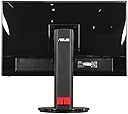
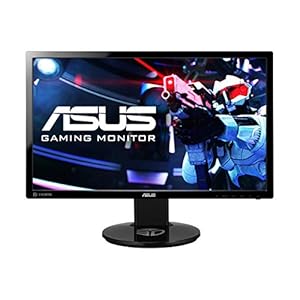
The ASUS VG248QE is a 24-inch Full HD (1920x1080) LED monitor designed for professionals and gamers craving ultra-smooth visuals with a 144Hz refresh rate and 1ms response time. It features 16.7 million colors, an ergonomic fully adjustable stand, multiple connectivity options including DisplayPort, Dual-link DVI-D, and HDMI, plus built-in stereo speakers. Backed by a 3-year rapid replacement warranty, it delivers exceptional performance, comfort, and reliability at a competitive price point.

| ASIN | B00B2HH7G0 |
| Adaptive Sync | G-Sync Compatible |
| Additional Features | Height Adjustment |
| Aspect Ratio | 1.78:1 |
| Best Sellers Rank | #1,843 in Electronics ( See Top 100 in Electronics ) #77 in Computer Monitors |
| Brand | ASUS |
| Brightness | 350 cd/m² |
| Built-In Media | Audio cable, DVI cable, LCD monitor - 24" |
| Color | Black |
| Color Gamut | 72.00 |
| Connectivity Technology | Featuring DisplayPort, Dual-link DVI-D, and HDMI ports for multi device connections |
| Contrast Ratio | 80,000,000:1 |
| Customer Reviews | 4.6 out of 5 stars 4,609 Reviews |
| Display Resolution Maximum | 1920 x 1080 Pixels |
| Display Technology | LED |
| Display Type | LED |
| Global Trade Identification Number | 00886227325177, 00886227350940 |
| Hardware Connectivity | DisplayPort, HDMI |
| Has Color Screen | Yes |
| Image Contrast Ratio | 80,000,000:1 |
| Is Electric | Yes |
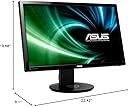
| Item Dimensions D x W x H | 9.1"D x 22.42"W x 19.68"H |
| Item Weight | 5.5 Kilograms |
| Manufacturer | ASUS Computer International Direct |
| Model Name | VG248QE |
| Model Number | VG248QE |
| Mounting Type | VESA Compatibility - Mountable: 100 x 100 mm |
| Native Resolution | 1920x1080 |
| Number of Component Outputs | 3 |
| Picture Quality Enhancement Technology | WLED/ TN |
| Pixel Pitch | 0.276 |
| Power Consumption | 2 Watts |
| Processor Count | 1 |
| Refresh Rate | 144 Hz |
| Resolution | FHD 1080p |
| Response Time | 1 Milliseconds |
| Screen Finish | smooth |
| Screen Size | 24 Inches |
| Screen Surface Description | smooth |
| Shape | rectangular prism |
| Specific Uses For Product | personal |
| Total Number of HDMI Ports | 1 |
| Total USB 2.0 Ports | 2 |
| UPC | 803982832832 115970724358 886227350940 886227325177 |
| Unit Count | 1.0 Count |
| Voltage | 220 Volts |
| Warranty Description | 3 Years with ASUS Rapid Replacement Service |
| Warranty Type | 3 Years Full Manufacturer Warranty |
K**N
Nice screen, just what i wanted
I bought 4 of these monitors as I just may have a small gaming addiction. Although better than having a crack addiction, my choice led me here for a monitor with a better frequency which in turn gives better refresh. All in all, I do not regret one thing except that I had to pay for them. I used 4 of these, in pairs vertically to frame a 30" Dell I had previously. I set my old Samsung displays which, neither were Vesa compliant, on other PC's in the home giving them major upgrades and then used these. I mainly game 5 or 6 different games at the same time and needed more space. I do however love the joy of being able to do research having word open, multiple webpages and documents and maybe a program or two without flipping through. Very productive. Pros: 1. They are pretty darned fast with no flaws that I have found, dead pixel or image projection. 2. Although they came in with some settings that were quite bright, another reviewer gave the link to a preset profile which was super easy to upload and bring them to a more manageable appearance. Worth the little extra effort, the profile works for all as they are simply the same display. You may need to tweak it, nothing is made exactly the same and you may simply not like the way it looks. It is called preference. 3. I have triple SLI Nvidia gtx680's. The ability to use the displayport on these screens was a big plus. Displayport will be the standard as they will shift vga, dvi-x out at some point for the sheer performance. DVI was used on one as I only had three ports and that works great as well. The displayport interfaced displays were jacked up to 144 mhz but I have to tell you that I am unsure I personally see the massive difference. Maybe I do not play the right games, but Crysis 2 looks sweet 4. Although I didn't use them, the base looked real nice. This is one place that some displays really skimp you. Not much more for me to tell as I did not implement them. 5. Cable management was a nice little touch. I still cable tied everything down the back side but they do provide a way to route the cables in a clean manner. Cons 1. Minor, very minor. Since the buttons were on the bottom, I needed to leave some room to have the ability to turn them off if needed. Do I? Almost never and that is only because of the stand and placement I used. Not pulling a star for that. I would buy them again but I sure hope I don't feel the need to :) Update 09/112019: Still going strong and not one issue after all these years. A couple small notes: - Asus as a brand has lost all my respect because of the lack of quality their overall company brings out in products today including my new graphics cards, but these displays held up great with 0 display issues. - In regards to the graphics cards, I have 2 Asus Strix GTX1070's and both have lost one display port now. One lasted a month and needed warranty replacement for a firmware lockup and the new one came only to lose one of the two display ports like the other. This is a trend. I do not believe the display is an issue because i can switch to the working display port on the same card with no issue and the other that went out was to one of the other screens. - Sound. Not sure why it likes to do this, but every single time I update my graphics driver it latches the sound driver as default. Weird, I didn't tell it to but Nvidia seems to think my main sound needs to come out through one of my displays. Multiple ways you can stop this. - When loading the graphics driver, always click advanced setup and choose clean install, graphics driver and physics driver only. Skip the sound driver all the way and it will never mess with default sound. - Go into sound properties and delete the sound devices pertaining to the display. Drives me nuts. Displays themselves still rock and even with the Asus name I would consider buying them again. Really, REALLY hard to beat a Samsung display but these have worked real well for me.
E**R
Great monitor, essential for gaming
Definitely the best monitor I have ever used. I would say this is tied with my mouse (deathadder 2013, huge upgrade from my s***ty stock mouse) as the best upgrade I've gotten for my gaming setup so far. Even moving the cursor from this to my 60hz display on the side of it you can see noticable mouse lag. The 1ms input lag for this display, in addition to the 120hz and lightboost (greatest thing ever, incredibly clear movement) there is almost no lag at all in what you're seeing. I play competitive tf2 in the esea, and I can pretty safely say this has let me improve a lot. Though I was decently good before I got this, I feel like I have a MUCH better visability and grasp of movement/aiming with this. It's really like going from a tiny little SD television to a giant flat screen HD, everything is so much clearer and visible. The one downside I have found is the colors and scan lines. Without lightboost the colors are great, you can find a couple sites with drivers and special settings to use for this monitor, however with lightboost on everything is washed out and purple tinted. I've gotten used to it but it may be a surprise at first. I've been using the program flux which changes the color temperature by time of day to try and offset this and it looks much mroe natural now. With lightboost as well you can see visable scan lines across the screen. You can probably look up google images or threads about it to see examples. I'm not sure if mine is just faulty or all of them do this but it is not that big of a deal, unless you have the monitor right in front of your face. Love the adjustable height and swivel, power button is really easy to hit haha and the built in timers and crosshairs are pretty cool.
R**0
Pleasantly surprised by the color
I don't really understand the complaints about the color with this monitor. It was the one thing that kept me from purchasing it and I was pleasantly surprised to find that people are generally wrong as the gamut volume is about 93% sRGB accurate. With a proper ICC color profile with Display Profile and some monitor OSD tweaking, the color on this monitor is way more than adequate for gaming and movies. It's actually very pleasing. The best looking IPS panels will be 100% sRGB and near 100% Adobe RGB but also be pretty awful for gaming. TN panels are now approaching 100% sRGB (the best I've found was 97%) and maintain their fast refresh and response rates. Keep in mind that for a good TN gaming monitor you will be spending $200 and it will be 60Hz. For just $50-70 more you can get 120Hz and 3D. Asus also has a great RMA policy on this monitor and my last Asus monitor is 5 years old and still chugging. Never blinked. That said, 120Hz is just okay. It isn't a game changing experience for me. I forget about it in the mix of action. The first time I experienced it, it was definitely noticeable but within the next 10 minutes it was indistinguishable unless I focused on the smoothness. It's nice to have but not game changing. I haven't tried 3D and I'm sure I will find that to be a gimmick. Some of the reviews of 3D gaming have me intrigued but I'm not looking to drop another $60 just to try it. Just a very solid monitor, overall. No real flaws or areas where you wish it were better. Some OSD tweaks would be nice but not a big deal. Being able to save profiles would be nice. The stand is very solid and I had forgotten how nice it was to have the ability to raise it to proper eye level. The cable management is fairly poor mostly because of where the cables plug into the monitor itself. I use DVI and the red cable management clip on the back routes the cable right into eye view under the panel. That's annoying. I ordered and DisplayPort cable to see if that helps. Also stays very cool. I feel no actual heat coming off the top of this monitor with my brightness being 24. It seems to sip power and give off very little heat in return - keeping in mind it is winter and under 70F in my place. If you are worried about color, dont be. If you are coming from IPS you wont miss much and with gaming in mind, you will benefit more than you lose.
T**M
Best gaming monitor for the price
The Asus VG248QE is THE best gaming monitor for the price due to its affordability, features, and build quality. This monitor is, in my opinion, the perfect size to meet the needs of someone who plays multiple genres of games. I play a MOBA, an MMORPG, and various other titles of different genres off and on and the monitor is the perfect size for all of the gaming that I do. The screen itself is incredibly sharp and offers great viewing from most angles. As is the case with TN panels, you really need to be sitting in front of the monitor for the best experience. If your situation differs, you need to consider paying up for an IPS panel - the cost is significantly higher but viewing angle problems will no longer be present. As a side note... to confirm my theory that this monitor is the perfect gaming monitor at the right size, I have seen it all over professional gaming events on Twitch. The 144hz difference, in my opinion, was incredible and well worth the cost over a traditional PC monitor. You will notice from the moment you set the refresh rate in Windows that your mouse moves more smoothly like butter and you gain so many more frames of vision that you were losing before! One thing that is not explained well out of the box is that you must use the included dual-link DVI cable to achieve the maximum refresh rate of 144hz and a setting in Windows needs to be set as it will default to 30hz or 60hz. I can't recommend this monitor enough to all PC gamers requiring quick reaction times (any game online). Note: I performed independent research and asked gamer friends for their advice before purchasing and was not provided a review copy. I have no involvement with Asus though I am very impressed with them now.
V**S
3 years review - triple monitor
This is my review after almost 3 years, purchased this on march/april(?) 2016 and have these as a triple monitor setup since that day. I should note that when I originally purchased the 3, one of them had a poor lit panel which I returned for a replacement within a week. 3 years later I have not had a single problem with these monitors- display wise. The 'ergonomic' base/adjusting was a little bit of an issue when setting the 3 monitors side by side in a little bit of an arc formation. The issue which is ridiculous to remedy is that because of all of the adjustment options in all directions, its almost impossible to get all monitors perfectly even but Ive learned to live with it over time because unless you go all out and use a level to get things perfectly horizontal and plumb, they will be small inconsistencies. This however is the nature of these 'super adjustable' bases. The refresh rate of 144hz as well as 1ms response time was actually a blessing in disguise I did not realize until I purchased a separate 28" 75hz 5ms monitor recently which I almost instantly regret. If you are not looking for a 4k panel, then 144hz and at most 1ms response time is almost required for gaming. Even single player games, rotating the camera around is so fluid and clean, on the other 75hz panel it hurts my eyes because of the blur/disfiguration from moving the camera. Now the other debate is whether to go 24 or 27/28". The picture on the 24 is going to be a little more dense and 'compact' for lack of a better term because of the smaller screen. The larger screen may have slightly pixelate the image which I noticed on my recently purchased viotek 27" 75hz monitor. I know its not the same quality and screen as this but for still images, the difference is noticable especially after getting used to 24" panels. If you dont know what I am talking about go look at a 55" or larger tv on 1080p resolution at a electronics store. The image gets stetched out the larger you go. All things aside, I cant find myself replacing these monitors anytime soon unless 2 or more die at the same time. The quality for its time has been great and still holds up today. I should probably also mention that pc speakers are almost always terrible when compared to an actual external sound speaker system so that should never be a factor in deciding on a monitor. Nowadays alot of people want the low bezel monitors (main reason why I purchased that 27" for another room) but In my experience those have been plauged with more problems (asus included) than panels such as this. While I would like smaller bezels nowadays, its not worth replacing this just for a trend which will either change or be further improved later on. Not sure if already mentioned but no dead pixels either which was a surprise since I thought after a year I was going to get a couple. Good job on these asus lol.
C**R
Worth the investment but takes some tweaking.
I'm so glad my friend talked me into buying a high quality monitor for gaming. I never considered a monitor to really make much of a difference in display quality but I can't describe the difference between this and a budget monitor. The 144Hz is what I originally bought it for but the deep contrast and colors this thing offers is amazing. Unfortunately that isn't apparent without some work. The display settings out of the box are atrocious. I spent a good deal of time tweaking the settings and got to a point that I thought was acceptable, and let me tell you, ASUS couldn't make the menu navigation more unintuative if they tried. I was beginning to regret my investment a little for a while. If the colors weren't bleeding, they were washed out. I had a hard time getting a good value range. The blacks just weren't black enough. The whites were dull. Finally I found the settings that worked for me (almost as much as I worked for it) and I couldn't be happier. I am wowed every time I open a game. For those of you who have bought this and are struggling to find the right settings, what finally ended up working for me was just the default scenery mode setting with the sharpness set to 50. If colors seem too saturated just live with it a while and see if you change your mind. I was too used to cheap monitors to appreciate the color range at first. If you're not sure that you have the right settings try holding a magazine or textbook photo next to your monitor in a well lit room. Also try asking yourself these questions: Do you have a good value range? You want your blacks truly black and your whites nice and bright. You shouldn't be able to describe either one as gray. Is your color contrast good? Can you clearly see subtle differences in similar colors? Do textures stand out properly? Are your colors washed out? This monitor can get super bright but don't let that trick you into thinking whitened colors are okay. The colors can get deep and vibrant as well. Do your colors bleed? This most obvious around text. Dark colored text should not have a whitened border around it. Similarly, bright text should appear to be a single distinguishable color. Otherwise your sharpness is likely too high. This is also possible if you notice "extra" pixels around text. In the end I'm incredibly satisfied with this monitor. It's just a shame I had to do so much experimentation to bring out its potential.
P**D
Beautiful Monitor (PS4 REVIEW)
Ok guys so I got this monitor exclusively for my PS4, with that said I know I will not be able to take advantage of the 144Hz and the other feature's that the monitor has. The one thing you can take full advantage is the 1ms response time and the Game Plus Function with different recitals, I will be honest I was very skeptical about this feature. Well I unboxed it and put it together, took about 5 mins and fired this baby up. I adjusted the color, etc,etc, simple to do. Well I am a BF4 player so I went into that game and fixed the settings, I went into the training range to try out the game plus thing, at first I was ok so this is knida of cool. I played around with it for a bit just to get my eyes adjusted to it. Well I went into my first TDM match,using the SAR, well I went 39 and 5, went into another game 45 and 10, third game 35 and 6!!! I kept on playing for about 2 hours and every time I would end a match with over 25 kills and les then 10 deaths?? To be VERY honest this game feature helps out so much that at times I felt like I was cheating. I also did notice that I felt that I had an advantage towards other player with response time, I don't know its weird but you WILL notice it! Now before you guys start saying that this is bs, I also have a gaming rig with a ASUS VG278H which I also used with my ps4. The only reason I got this monitor is because with my VG278H I just felt that my reaction time was slow on my part, not on the monitor, this was an issue with me. I am an older guy so my eyes are not what they use to be plus I where glasses, And I also play at my desk. The ASUS VG278H is an awesome monitor too don't get me wrong, but now this smaller one I can focus my eyes a lot better for me. Bottom line this monitor is beautiful and yes you will see people say you will not benefit with this monitor if you are using it for a console. It's your money do what you like with it, but from a PS4 fan this monitor works awesome. The one tip I will give is the TRACE FREE fuction, set that to 60 or 80, not a 100 you will see a bit of screen tearing or like the ps4 is trying to catch up to the monitor, other than that GET THIS MONITOR!!!!
S**S
The best 120+ hz gaming monitor I've ever owned
I purchased this monitor on April 10th, 2014 and received it on April 17th. I'm going to go over what I liked and do not like about it. I owned a Ben-Q XL2420T 120HZ monitor prior to this unit, so I will be comparing both of them according to performance and price. First I'll talk about 144hz compared to 60hz for those who do not know: 144Hz is a way of describing how many times the image on your monitor refreshes every second. 60hz means that the image you see on your monitor is relayed from your computer to your monitor 60 times per second, and 144hz means 144 times per second. Basically you see more then double the amount of information your graphics card is processing with a 144hz monitor compared to a 60hz monitor. NOTE: If you are looking to purchase this monitor for console gaming, there are better alternatives. You will not be able to utilize the 144hz feature. Consoles only put out 30-60 frames per second, so a 60Hz monitor is all you need. Now on to the review Pros- -144 Hz is amazing. There is no ghosting when making fast movements in high action games. The increased amount of frames you are able to see gives you an extremely good edge against your opponent. -Perfect screen size for me. The 24 inch screen allows me to have a good field of view in the games that I play so I don't miss valuable information, but isn't so large that I need to constantly scan with my eyes to be aware of the image on the screen. -Good physical size. The circular base of the stand measures roughly 9 inches, so it doesn't take up more desk space than it needs. -PRICE!!!!!!! I paid about 500 USD for my Ben-Q XL2420T. This monitor has 24 more Hz than the benq, similar build quality, and costs about half as much. At 279.99, this is the best monitor I have ever purchased. Cons- -The colors out of the box are a little bland, but with proper tweaking I found color settings that worked well for the games I play. All in all, this is an amazing monitor, the price is right, the features are worth more to me than the price. 5 stars.
C**S
Estupendo monitor para gaming
Yo compre este monitor para usarlo por el momento en la consola (PS4), aunque planeó en un mediano o largo plazo armarme una PC, y aunque el modelo del monitor es del 2013 aun sigue siendo vigente y produciéndose en 2017, debo decir que para tener un panel TN no le tiene nada pedir a un panel IPS, mi argumento se basa que en la mayoría de los paneles TN cuando se ven desde arriba o bien respecto de los lados la imagen tiende a oscurecerse y este panel presenta eso pero de forma minima lo cual le da un alto valor en mi opinión, en pocas palabras los ángulos de visión en que se pueda observar no le perjudican del todo como a otros monitores con paneles TN. En cuanto lo que ofrece, posee un puerto HDMI que otorga un refresh rate de hasta 60 hz ideal para una consola, un puerto DVI-D que da unos 120 Hz, un puerto Displayport que concede refresh rate de hasta 144 hz y finalmente un puerto 3.5 mm para audífonos o algún otro dispositivo de audio. En cuanto al contenido, está el monitor ensamblado al soporte (el monitor se puede mover hacia arriba y hacia abajo aproximadamente unos 15 grados), la base que permite moverlo sobre su posición unos 45 grados, un cable de corriente, un cable DVI-D, un cable de audio 3.5mm y una guía rápida de ensamble y uso del monitor. Ahora bien, detallare mi experiencia de uso en una consola (PS4) e iniciare con el brillo, el cual es sumamente fuerte, los presets que trae (GAME, Standard, Theather, Scenary, Night View y sRGB) no son los mejores asi que en mi opinión es mejor calibrarlos por cuenta de uno mismo, en cuanto al sonido el monitor tiene unas bocinas de 2w que va de 0 a 100 el volumen, y de verdad no esta nada mal para un monitor, en espacios reducidos (un estudio, recamara o en un departamento sonara bastante bien). En cuanto a los acabados, es plástico de buena calidad color negro en acabado brilloso tanto la base del monitor como los bordes y parte trasera del monitor y el soporte tiene acabados de un plástico mucho más duro color negro con vivos en rojo en mate ambos. Otra característica del monitor es que tiene a compatibilidad con 3D Vision nVIDIA. Finalmente el envió llego al día siguiente, ya que soy suscriptor PRIME, a través de Amazon MX Logistics, el monitor venia sin protección extra mas que la que trae de fabrica que considero es mas que suficiente para su traslado.
A**Y
Must have for Gamers
Asus Vg248qe has been in the market for some time now nearly 5 years but hasn't lost its shine in this segment. Had an issue in delivery but Got the product well packaged an all the in box items were found in order. Display is crisp and gaming on this flawless. Colours are smooth and settings can be changed easily via OSD menu which is easily operatable by buttons under screen. Height adjustment is also butter smooth. For getting 144hz Dual link Dvi or display port is needed. (Dual link Dvi is included in box).
J**N
Buen producto
Estupendo monitor y calidad de imagen, aunque no he probado el 3D todavía. Buen tamaño de pantalla para la mayoría de aplicaciones, lo tengo en un escritorio de 80 cm de profundidad y perfecto. Se ajusta en inclinación, altura y giro (izq-der), fácil y muy rápido. Por su calidad y precio es un producto perfectamente recomendable.
P**S
Perfect
Stand is good ; fixable position . Color and quality is great ; 144 refresh rate . simply loved it
G**E
Great monitor with useful features
I will be using this monitor for a mixture of gaming and some photo / video editing. Initially the monitor has a slightly warm colour cast for my taste, and is a little too bold in terms of brightness and contrast, but with only 15 minutes or so adjusting the user settings I was able to get it set so that white looks white, and the colours don't look over saturated or washed out on highlights. It now looks superb for all applications and is well worth spending a bit of time on, getting the settings right to individual taste. just out of the box, the factory defaults weren't to my personal taste, but I expected that to be the case as with almost any given monitor. Gaming and Video look great, with no traces and great clarity. and, as aforementioned, with a bit of personal preference tweaking, photo's look natural and vibrant without being overly colour saturated. Great gaming monitor, but also perfectly suitable for other applications too.
Trustpilot
1 month ago
4 days ago