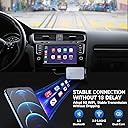
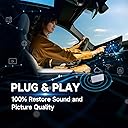
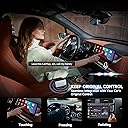
🚗✨ Drive smarter, not harder—wireless CarPlay that keeps you connected effortlessly.
The Jemluse Wireless CarPlay Adapter transforms your factory wired CarPlay into a seamless wireless experience with ultra-fast 8-core processing, 7A microchip stability, and a premium aluminum alloy build. It auto-connects instantly without draining your iPhone battery, supports all CarPlay functions including navigation, calls, and music, and is backed by a 365-day hassle-free warranty. Perfect for professionals who demand convenience and reliability on the road.
| ASIN | B0DLH387T4 |
| Best Sellers Rank | #190 in Bluetooth Car Kits |
| Brand | Jemluse |
| Color | White Black |
| Compatible Devices | iOS Devices (iPhone, iPad) |
| Connector Type | USB Type C |
| Customer Reviews | 4.0 out of 5 stars 2,799 Reviews |
| Item Dimensions | 21 x 17 x 18 inches |
| Item dimensions L x W x H | 21 x 17 x 18 inches |
| Manufacturer | china |
| Model Number | B0DLH387T4 |
| Unit Count | 1.0 Count |
| Warranty Description | 1year |
L**A
very convenient thing
Hi everyone! CarPlay doesn't work without an iPhone. Therefore, it is always only part of the car’s media system. My Tiguan trim has a console with wired CarPlay. Wireless CarPlay is not that uncommon, it just happened to me. But! Motorists, take note. Wired CarPlay is preferable to wireless. The set of applications in CarPlay does not depend on the version of the car’s media system. All programs are simply “picked up” from your iPhone. This also means you don't have to pay to upgrade CarPlay: it will match the capabilities of the iOS version on your iPhone. CarPlay takes your apps from your iPhone and displays them in a different interface on the car’s media system screen. Kind of like a projector. The media system displays alerts, messages, call history, map directions and, in general, almost everything that you have done or continue to do on your iPhone. Quite convenient. What you turn on first and why people use CarPlay in the first place. Apple Music was implemented beautifully; all tabs are accessible from the screen in the car, except for search. All so that you are not distracted by entering names while driving. This kind of concern makes me happy. Messages" for CarPlay was also greatly adapted. You won't find message history or attachments. The application will allow you to listen to the last message in the selected dialogue and immediately dictate a response to it. The message will be read out loud again before sending. It will reach the recipient in text form, sometimes with funny speech recognition errors. There can be no talk of any full-fledged correspondence. The Messages app on CarPlay is more of a backup. Suddenly something urgent comes up. So forget about the poop emoticon, stickers and other goodies. Calls were never affected. On the contrary, they have become more convenient. CarPlay navigates through Contacts, shows a list of recent and favorites, and allows you to enter a number manually. All this works with both the buttons on the steering wheel and the physical keys of the console. Missed call notifications are also synchronized with your phone. Everything works quickly, is easy to turn on and is not distracting at all. 10 speakerphones out of 10. I get into the car, connect to Lightning and completely forget about the existence of the iPhone. The machine dictates all incoming messages to me, not only iMessage, but also regular SMS. The basic functionality of Maps is quite sufficient, and calls do not distract from the road at all.
D**E
Very convenient device
I really like this Wireless CarPlay Adapter for Apple, Cosmic Gray. My car is a 2024 Mazda CX-5 Select and my phone is iPhone 15Pro. Original problem: My Mazda has CarPlay only if you plug in the iPhone via USB. It works great for my needs of navigation (Apple maps or google maps) and phone calls. But it is a hassle to always plug in the phone for short trips. I had trouble getting Bluetooth to be reliable if the iPhone was not plugged into the Mazda. Reading about the problem on the internet, it seems some people say Mazda is the issue and even more people say the relatively new iPhone 15Pro is the issue. Therefore, on short tips I pretty much had to plug in my iPhone in order to make or receive calls. The wireless adapter solves this problem. For me it was easy to setup and it works great. The armrest of the Mazda has an inside compartment with 2 USB-A ports. I plugged this adapter into one port and a USB cable in the second port to be used to plug in the iPhone for longer trips. Once the Mazda doors are unlocked, power is applied to the 2 USB ports and the adapter is turned on. By the time I get in the car and start the engine, the adapter is already connected to my iPhone which remains in my pants pocket. And CarPlay come up on the Mazda display just as if the phone was plugged into the Mazda. There appears to little to no delay on phone conversations or navigation maps. After a trip, the Mazda USB ports are turned off after a short delay after the doors are locked and I walk away with the key FOB in my pocket. So, the adapter is only powered on when I’m using the car. It is great. What about phone battery drain? For my use on short trips (less than 45 minutes), I do not notice any abnormal drain to be concerned about. I have my iPhone charge to full at 80 to extend battery life. After driving 20minutes to an appointment, 2 hours at the appointment, and 20minute drive back home, the iPhone battery was at 70%. Not a problem for me. What happens if I plug my phone into the Mazda for longer trips? I haven’t gone on any long trips with it yet, but my quick testing shows the phone charges and the wireless CarPlay remains active. What about music? I briefly tried Spotify from my iPhone and it works great, but I didn’t do much testing.
T**4
Not durable. This is a REVISED review.
REVISED 11/18/2024: This worked GREAT for about a year. Bought this one in July of 2023. 15 months later and it started automatically "Disconnecting" from my car radio head unit for no reason. I contacted the company and they sent instructions on what to do to get it to reconnect. Unfortunately those instructions did not solve the problem. It's out of warranty, so if you do decide to purchase this plan on purchasing a replacement every 13 or 14 months! Each morning, when I start the car, the dongle initiates and wireless car play App is available on my radio. Then when I stop the car, kill the motor and get out, when I return, whether it's 15 minutes or 4 hours, The radio displays "Unable to connect to Wireless Car Play - Please unplug your unit and after a couple of minutes, plug it back in." I've tried that countless times but it never engages again UNTIL the next day when I first get in the car and then it connects without any problem. Very irritating. Now I just connect with the usb port and a cable to my iPhone which always works perfectly indicating that the problem is with the Adapter and NOT my car equipment. Now I see why it's only a 30 day warranty. My initial review from over a year ago follows: ------------------------------------------------------------------------------------------------------ First, the instructions are more complicated than necessary. Here's what to do: 1- Move your car away from your house so it can NOT pick up your home wifi signal. 2- Be sure your iPhone bluetooth is turned on. 3- Plug the unit into the usb port you normally use for your wired CarPlay. 4- Answer "yes" to any prompts you get on your phone AND/OR on your car radio display. 5- You're DONE! I rented a car last week with wireless CarPlay and was amazed how easily and seamlessly it worked with my iPhone; didn't even have to take the phone out of my pocket. So I read several reviews and this Jemluse model got high praise so I figured I'd give it a chance. Setup was easy although the instructions were more confusing than they should have been. As soon as it connected, the CarPlay option was displayed on my car's radio screen. I touched CarPlay and away we went. Now every time I get in the car, CarPlay comes on automatically just like in the rental which had built in wireless CarPlay. So far it is amazing and worth every penny. I'll let you know if it fails later on, but do far, so good! I have a 2021 Subaru Ascent. NOTE: This will not put CarPlay on a car that does not ALREADY HAVE wired CarPlay; it only converts the wired function to wireless. PS: It comes withe a LIFETIME warranty but only if you register within 15 days of Amazon purchase.
M**R
Converts a wired-only Apple CarPlay car into a wireless car (and does it well)
In general, I like this unit a lot. I now leave my phone in my pocket, and it automatically connects to AirPlay if I have bluetooth and Wi-Fi enabled on my phone (which I normally do, but sometimes don't). It works well ... I have only two quibbles with it, neither of which are cause by the device, but they may affect your interest in purchasing one: 1) If your phone has Wi-Fi and bluetooth enabled, then the device will automatically connect and launch CarPlay (sometimes I want to use non-carplay features, and while it is easy to switch, it might be annoying that it defaults to launching CarPlay (many people wouldn't care about this). 2) If you pick up your phone (e.g. when stopped) to use it for something else, it drops out of CarPlay, and on my car, the car then defaults to the car's navigation app (which I never use and don't like - but it came with the car). I'd much prefer if the car defaulted to whatever I had last selected (in this case, radio) So both of these quibbles are about the interaction of the unit with the car's on-board screen (which includes audio, but also things like the heat / air-conditioning). Nothing about this is due to problems with the unit (more about the car's onboard software), but it may affect your decision to purchase. As for the unit, if you want wireless CarPlay, this gives you the capability, and it works well. Finally: The setup instructions are explicit and very particular about the steps and order of actions. Follow them EXACTLY, or setup can become difficult. It works, but it's more complicated than it should be. I had jumped the gun and didn't follow them exactly, and then I had a bit of work to do to get things back to original state to start the setup process again. The second time it worked perfectly.
B**K
Was a little confusing at first, runs hot, but has been working exceptionally well!
This product is great, though I had some difficulty setting it up initially. It took a moment to figure out, but once I did, the setup was smooth and it auto-connects seamlessly. One minor frustration is that both my wife and I use it, and our phones sometimes compete for the connection when we get into the car. To avoid this, I get into the car about 30 seconds before her if I’m driving. The unit does run a bit warm to the touch, but nothing concerning. For CarPlay, it initially connects via Bluetooth and then operates through your iPhone’s integrated WiFi. This is normal, but I initially had issues when my hotspot was turned on. I resolved this by turning off the hotspot, connecting to the unit, and then re-enabling the hotspot. Overall, the product has been running great.
S**B
Wireless.... Defeat the Cord Clutter....
I was excited to try this Wireless Apple Carplay Adapter. Simple to use as "Plug and Play". **It is important to note, this will only work IF you already have wired carplay in your vehicle. It will not add Carplay access if your car doesn't already have it. (My son was hoping my device might transform his out of date system, LOL.) Now, with that being said, the ease of using the wireless adapter has allowed me to get a faster connection and the ability to eliminate use of charging cords. This device is small enough to tuck away out of sight . Cords aren't a big deal, but sometimes I just don't want to feel "cluttered" when I'm traveling. Maybe that's just a me thing, but wireless is great. The device appears to be high quality and has an "Apple" feel and look (like a mini iphone/ipod). Adapter will work on USB or USB-C since it comes with the USB-C adapter. Directions were easy to follow for the setup of Jemluse Wireless Carplay Adapter. I have not experienced any lag so far, but I understand wireless stuff does glitche sometimes, but so far so good. There were some more techy directions included in the instructions, but we didn't need to do them. Price is right if you are looking for a cool device to toss the cable clutter and go wireless.
S**N
Eats through phone battery
This adapter functioned as advertised for me. No issues with pairing Bluetooth or WiFi and when connected , worked well with just very minor delay in functions. Not enough to be very noticeable. My main issue with this device is that it eats through my iPhone battery when it’s in use. Even for a short period of time, my battery drops pretty dramatically compared to a day when I don’t connect to the device. I have an iPhone 15 Pro running iOS 10+. For me, this steeres me away from using the device. I don’t usually have to charge my phone to make it through the day. If I use this device I do. For me, this is a deal killer. Bummed, because I like everything else about it. If you don’t mind charging your phone throughout the day, then this might not be a big deal for you. Also, if your car has a wireless charging pad to set your phone on while using the device, then maybe this wouldn’t be an issue. I like keeping my phone in my pocket, so having to take it out to put it on the pad is almost the same as hooking a wire to my phone to use wired CarPlay. Anyway, just my two cents and experience. Hope it helps someone decide.
T**O
Excellent CarPlay Adapter for Seamless Connectivity
Excellent CarPlay Adapter for Seamless Connectivity I recently purchased the CarPlay adapter for my car, and I must say it has been an incredible addition to my driving experience. This adapter has exceeded my expectations in terms of functionality and convenience. One of the standout features of this adapter is its ability to connect multiple phones simultaneously. This has been incredibly useful for my family, as we can all enjoy the benefits of CarPlay without constantly having to disconnect and reconnect devices. The setup process was straightforward, and once connected, the adapter seamlessly integrates with the car’s system. Now, I no longer have the hassle of manually connecting my phone to the car every time I get in. It’s a time-saving feature that I greatly appreciate. The overall performance of the adapter has been flawless. The audio and display quality are excellent, providing a smooth and enjoyable driving experience. Whether I’m using navigation, making calls, or listening to music, everything works seamlessly through the CarPlay interface. In conclusion, I highly recommend this CarPlay adapter to anyone looking to enhance their car’s connectivity. Its ability to connect multiple phones and streamline the CarPlay experience makes it a must-have accessory for modern driving.
R**.
Mejor compra !!
Excelente !!
J**M
Produto muito eficiente
O produto funciona muito bem e eliminou a necessidade do cabo para uso do CarPlay
R**K
Multi-user not seamless
Works great but must reconnect via Bluetooth every time you switch users
A**I
Not as described
There is delay in audio although a bit better than others but given the cost difference with other it’s not worth. However display quality is better and connectivity is seem less and quick.
M**E
Muy práctico y funcional
Por alguna razón se des configuró el CarPlay de mi camioneta y no lograron arreglar en la agencia y me desesperé porque me hicieron ir varias veces, así que lo compré para ver si funcionaba y hasta la fecha va muy bien y es de tamaño pequeño así que va en mi guantera y en cuanto entro al carro se conecta a mi cel , espero que siga así en lo que le atinan los de la agencia a ver la falla
Trustpilot
5 days ago
1 month ago