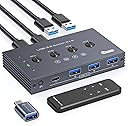
🔌 Power your productivity with seamless USB switching!
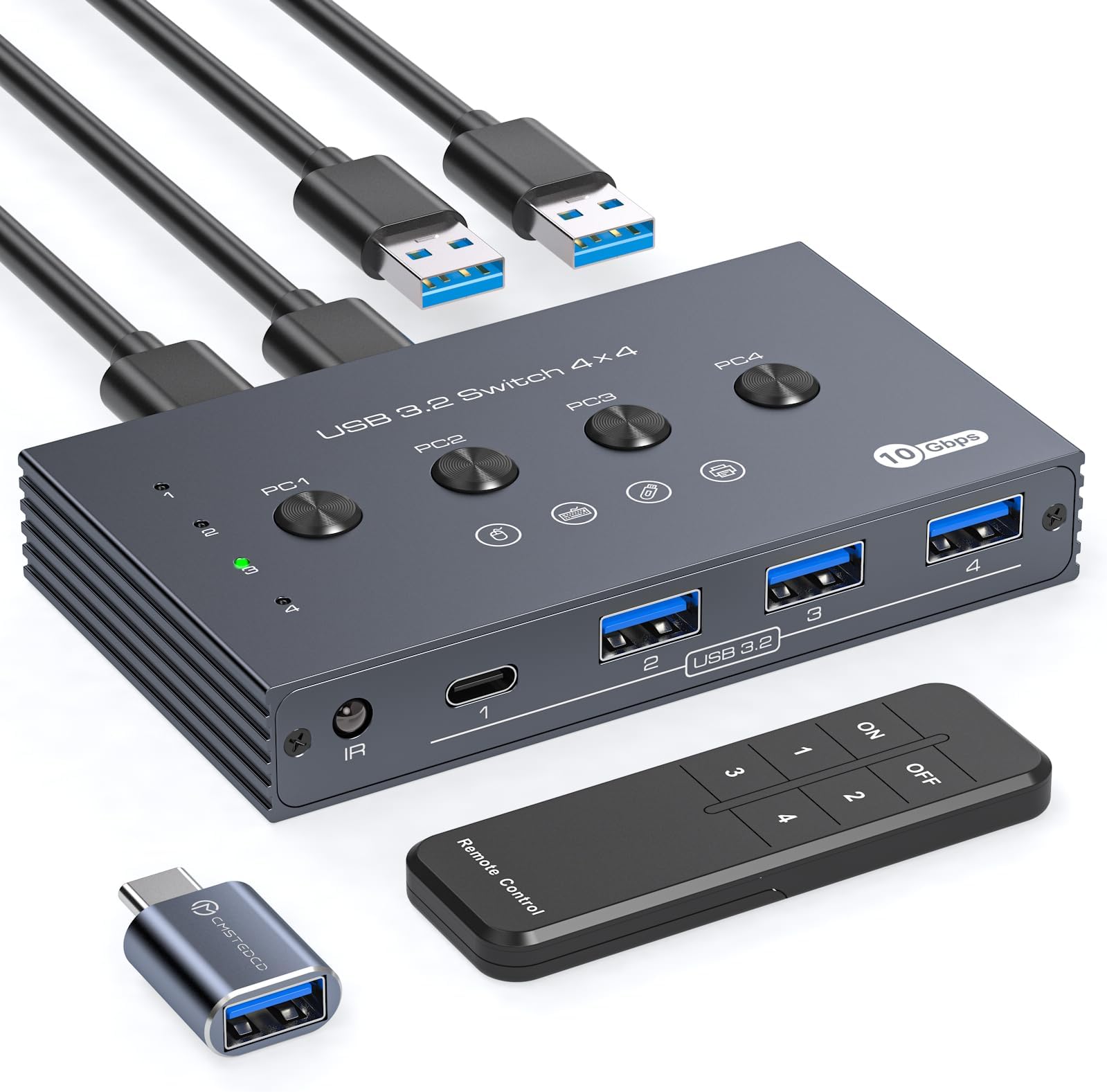
The USB 3.2 Switch Selector lets professionals effortlessly share 1 USB-C and 3 USB-A devices across 4 computers with ultra-fast 10Gbps data transfer. Featuring both button and remote control switching, plus a dedicated power supply for high-demand peripherals, it’s designed to streamline your multi-device setup and boost work efficiency.


| ASIN | B0DJT27BVN |
| Best Sellers Rank | #22 in KVM Switches |
| Date First Available | October 10, 2024 |
| Item Weight | 13.1 ounces |
| Item model number | TJUS-03USB Switch 202E |
| Manufacturer | TJCXELE |
| Package Dimensions | 7.4 x 6.85 x 1.54 inches |
T**M
Highly recommended
One of the best. I like the quality and design. Very easy to use. Enough cable length and very functional. Compatible with my office systems. Loved it. It’s definitely worth the price.
R**0
Setup is easy, no software needed.
This USB switch works great and does exactly what it says. I can share my keyboard, mouse, and other USB devices between four computers with just one button or the remote control. Data transfer is fast and stable. USB 3.0 devices work smoothly with no issues. I like that it has an extra power option, which helps when using external hard drives or other high-power devices. Setup is easy, no software needed. It saves a lot of time and keeps my desk clean. Very useful and highly recommended.
L**Z
Solidly built.
So, I fried my last USB switch (not this one) by somehow plugging a USB A cable in backwards. I'm still not entirely sure how things moved enough to make that physically possible, but I'm pretty confidant that it simply won't happen with this one. It feels rather solidly built, and the case is metal, not plastic. It works perfectly, it has a good mix of ports on the front, the USB 10Gbit support is very nice to have, and the remote is a great touch. The only reason why it's 4 stars instead of 5 is because the indicator lights are really, really small and dim. But the remote works well, the buttons work well, and on the whole, I am quite happy with it.
R**J
Easy and Convenient USB Sharing
This USB 3.0 switch makes sharing my keyboard, mouse, and printer between four computers effortless. The wireless remote is super convenient, and setup was quick. Works smoothly and saves so much desk hassle
D**.
Great Little Gadget for Sharing USB Devices Between Computers
Fantastic gadget if you want to share your USB devices across multiple PCs or laptops. The design is sleek, and the remote control is a nice addition, though it feels somewhat unnecessary. It also comes with a USB-C converter head, which is a thoughtful inclusion. Four ports might feel a bit limited, but you can easily connect a USB expansion hub, which also works. The only minor drawback is that switching isn’t instant and it can take a couple of seconds, but overall, I really liked the product and definitely recommend it.
W**1
Does not work with USB storage at 10Gbps
I wanted to like this USB 3.2 Gen 2 switch/hub, but unfortunately it has a significant flaw which defeats the whole reason I got this in the first place. Before that, I will preface with a few positives: - Nice aluminum construction - Clicky buttons - Uses a Genesys Logic GL3590 controller (see the USB details and PCB photos) - Actually works *perfectly* at 5Gbps speeds However, this isn't a 5Gbps USB switch, it's supposed to be a 10Gbps one, and this is where my issues arise. When attaching this hub to a 10Gbps port on a computer, it fails to connect to any USB attached storage! And when it does, the connection is very inconsistent and at worst it will sometimes cause the computer to BSOD (which happened to me a few times already). I've tried different 10Gbps USB cables, different ports, and of course different computers, and the results remain the same: if connected to a 10Gbps USB port, this switch does not work with USB storage. Moreover, I've confirmed the drives themselves work with no issues directly connected to the computer and I have of course used a power supply (as shown in the the review picture) to make sure the drives are getting enough power. But unfortunately, no combination of troubleshooting steps were able to fix this. This switch does work with slower devices like keyboards and mice perfectly fine when connected at 10Gbps, but again, this is supposed to be a 10Gbps USB switch. If I can't use the speed printed on the product, then why use it?
S**Y
Very nice usb switcher!
Fantastic texture with full metal casing. Enabled my desktop and laptops sharing only one set of peripherals!
K**N
Works fine, but doesn't "hold" USB connection, so theres a lag in switching
This works fine for switching USB between computers. When you switch, the computers don't "hold" the usb connection, so there is a few second delay between switching and being able to actually use the keyboard and mouse. I guess I should have anticipated that, but I found it annoying enough to return it and look for other options where the keybard/mouse ports are emulated for seamless switching. Products like that exist, but are more expensive.
T**C
This is a handy 4 port USB-3 hub, but with the added feature of 4 uplink ports, allowing up to 4 different computers to share the 4 devices at the front. The device detects as a normal USB3 hub, so when you press the button on top to select the computer, Windows will do its device detection sound., similarly, when selecting another machine, Windows detects the unplug event. There are 4 buttons on top, next to each rear cable, however the indicators LED's are in a row to the left, so not next to the socket or button. Throughput is good, matching the same speed as without the hub in place, so there is no speed reduction. The product claims to allow keyboards and mice to be used, which is true, however, this will lead to spaghetti on the desk as all the sockets are at the front, so its probably best used for devices without long cables, such as memory sticks etc. The device is self-powered by the host computers, but can also be powered by a micro-USB socket on the back. This is however only limited to 500mA, so there is no USB PD support on the device, this allows devices to consume higher amounts of power, for example if charging a phone. A remote control is also provided, which looks chunky and basic, I can't see the benefit of this, since you would presumably want access to the USB sockets you are sharing. The box construction is extruded aluminium and the edges are bit sharp, it would be better if they were softened a bit.
L**N
Used this 4 in, 4 out, USB 3.0 switch for a few months and it has worked reliably every time.
C**V
The build of the switch is really good, made of solid metal which probably also serves as a heatsink and with a relatively small desk footprint. As per photos, it has 4 inputs for 4 PCs and 4 ports for USB 3.0 5Gbps devices and 4 control buttons to switch between PCs, which can be also achieved from the included remote control as well. In addition, the switch requires a 5V power input from an additional USB port or any charger supplying 5V. The only slight let-down is the microUSB input port in the day and age of USB-C. The switch comes supplied with 4 good length USB connecting cables (~95 cm), a micro-USB cable for power supply and a remote which uses two AAA batteries, but which are not included. Performance wise, it works relatively well, I've connected 2 USB flash drives, a USB security key and a Logi Bolt dongle and they were all recognized by both devices to which the switch was connected to (desktop + laptop). The switchover takes about 7 seconds, depending also on the number and type of devices connected, but once done, almost everything works well. Why 'almost everything'?, it is because any mouse dongle I connected from Logitech (Bolt, Unifying, Wireless Pro) didn't work correctly, the mouse pointer stuttering and periodically randomly freezing for 1 second or so. At times, the pointer wouldn't even move so I moved the dongle to another port on the switch, after which it started moving again, but the movement was still erratic. However, if the pointing device was at a really close distance (<30 cm) to the receiver and in direct line of sight, the cursor worked well, but this is obviously not right, considering the approximate 10m range of Bluetooth. This would probably mean that the switch cannot supply enough current to any of the dongles so the paired mouse works correctly even at a greater distance. All the other connected devices like flash drives and security key worked without any issues, however, it is quite a let-down that neither of the connected mice worked correctly, hence the need for improvement. In conclusion, this is a gadget with potential, useful in quite a few device sharing scenarios, but with a major flaw when it comes to pointing devices.
A**R
This is an intriguing device. It is in housed in a 4 inch by 2 1/2 inch by 3/4 inch high metal box, powder coated in mid-grey. It manages to look both smart and utilitarian at the same time. Its function is to switch one of up to four separate computers to four (or more) shared USB devices. On one long side of the box there are four USB A sockets for the USB devices or peripherals and on the other long side there are a further four USB A sockets. These are to connect to the four computers. On top of the box there are four buttons labelled PC1 to PC4 and similarly labelled LEDs to indicate which computer is connected to all the peripherals. To achieve this selection at a greater distance an infra red remote control is also provided. As far as I can tell there is no reason why one or more USB hubs shouldn't be plugged into the USB peripheral sockets to markedly increase the number of USB devices that could be switched. The likelihood that doing this would exceed the available power over USB from the working computer has been anticipated. A micro USB lead for a matching port on the device is provided - but you have to find your own charger. The vendors suggest that users might connect keyboard, mouse and printer as well as a storage device to this switch. I visualise the unlikely situation of somebody with one keyboard and mouse but having four screens in front of them. There are rare situations in which this might be useful. Mostly, I believe people in this situation would prefer to have just the one monitor as well. In this case a KVM switch would make so much more sense. KVM Means keyboard, video and mouse. Despite the strap line saying This is a KVN switch it absolutely most undeniably and definitely is not. What I haven't tried out, largely due to cowardice on my part, is what happens with a USB drive attached to a peripheral port and I switch from one computer to the next. There is no mention in the microscopically printed documentation of what happens when one computer is buffering its writing to the USB drive which is switched part way through to the next computer. Are the electronics in this USB switch sufficiently clever to wait until the writing is complete? Somehow I doubt it and I am not reassured precisely because I cannot find it mentioned in the instructions. I would suggest that anyone wishing to share storage between four different computers invest in an Ethernet switch and some cables. Printer and scanning would also be easy to sort out over the network. There will be the rare individual for whom this will be an ideal interface between four computers but for me, and I suspect many others, this is a switch which has very little utility. It is not as advertised, it is not a KVM switch. Deduct one star. I have deducted another star because of my concerns about file corruption. I caution potential purchasers to first experiment with drives they do not mind being corrupted.
M**B
The smart metal case looks like a heatsink and screening function. The corners are a bit sharp, but it's weight help keeps it in place given all the cables to be connected. Four USB-A ports at rear come with 4 USB-A to USB-A connecting cables for four hosts. These are thicker as they support higher speed 3. Four USB-A ports at front take the cables for 4 separate devices. If connecting a flash drive care would need to be taken about premature ejecting of a live drive when switching hosts. There is an Infra-Red remote with 1-4 and on/off buttons. You need to provide two AAA batteries. The switch will work from host power, but with any higher powered device connected a separate USB-A to micro-USB connection for extra power is supplied. This could be handy for a battery powered laptop as one or more hosts.
Trustpilot
3 weeks ago
1 month ago