Buy anything from 5,000+ international stores. One checkout price. No surprise fees. Join 2M+ shoppers on Desertcart.
Desertcart purchases this item on your behalf and handles shipping, customs, and support to Uruguay.
💡 Elevate your space with smart lighting that’s always a step ahead.
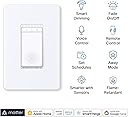
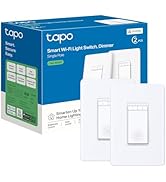
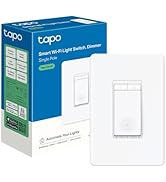
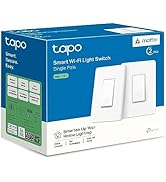
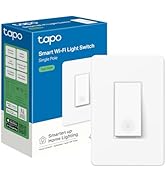
The TP-Link Tapo Matter Smart Dimmer Switch (4-Pack) offers professional-grade smart lighting control with full 0-100% dimming, seamless Matter protocol compatibility, and multi-platform voice control. Designed for easy installation with neutral wiring and 2.4 GHz WiFi, it enables remote management, custom schedules, and security-enhancing away modes—perfect for modern connected homes seeking effortless ambiance and smart automation.


| ASIN | B0DRZ77JQT |
| Actuator Type | Push Button |
| Best Sellers Rank | #1,644 in Tools & Home Improvement ( See Top 100 in Tools & Home Improvement ) #14 in Dimmer Switches |
| Brand Name | Tapo |
| Circuit Type | 1-way |
| Color | White |
| Connectivity Protocol | Matter, Wi-Fi |
| Connector Type | Screw |
| Contact Material | Copper |
| Contact Type | Normally Closed |
| Control Method | App, Remote, Voice |
| Controller Type | Amazon Alexa, Apple HomeKit, Google Assistant, SmartThings |
| Current Rating | 2.5 Amps |
| Customer Reviews | 4.6 4.6 out of 5 stars (666) |
| Included Components | Smart Dimmer Switch×4;Wall Plate×4;Wire Nuts×8;Screws×8;Quick Start Guide |
| International Protection Rating | IP00 |
| Item Dimensions | 5 x 3.33 x 1.77 inches |
| Item Weight | 0.95 Pounds |
| Lower Temperature Rating | 32 Degrees Fahrenheit |
| Manufacturer | TP-Link |
| Material Type | Plastic |
| Model | TS25(4-Pack) |
| Mounting Type | Pole,Wall Mount |
| Number of Items | 4 |
| Number of Positions | 1 |
| Operating Voltage | 120 Volts |
| Operation Mode | Off,Smart Switch |
| Specification Met | UL |
| Switch Type | One-way |
| Terminal | Screw |
| UPC | 810142820905 |
| Unit Count | 4.0 Count |
| Upper Temperature Rating | 104 Degrees Fahrenheit |
| Wattage | 150 watts |
S**Y
Great switches that are easy to install, look great and have great dimming.
These worked great for my application - dimming undercabinet LED lights. I connected this to a 24V dimmable LED driver (B0CPLLMKHH) that supports triac dimming and fits in a single gang box. The driver was connected to 24V dimmable FCOB LEDs (B091KG5K1Q) that will be in some aluminum channel. No flicker, no noticeable delay and super easy setup. I already have several light switches from Tapo, but these were the first Matter ready ones, so I was surprised when I opened my phone and Google assistant was asking for the number or to scan the QR code. I scan the code, named the device and it was done. Then when I opened Tapo app, it too just wanted me to name the device and location. I will say that the Tapo app handles the dimming better in that as you are dragging the slider the lights dim live whereas in Google, you have to let go of the slider for it to actually send the value to the switch. I also tested the voice command and it worked as expected, so that is great too. The switches come with faceplates that have hidden fastners, which I like, however I don't use them anywhere else in the house, and these switches will get in a multi gang box, so they will end up in the trash, which is a shame. Overall, I'm very happy with my purchase.
C**S
Backbone of my smart home lighting – 50+ device Tapo system
TP-Link Tapo Matter Smart Dimmer Switch – Voice Control with Siri, Alexa & Google Assistant This is the primary dimmer switch running in my smart home lighting system. I currently have more than 50 TP-Link Tapo devices installed throughout my house, including switches, dimmers, outlets, and plugs. These dimmer switches are a core part of that setup and control many of the lighting routines across the home. The dimming performance has been excellent. They handle LED bulbs very well with smooth dimming and no flicker, which is something I’ve run into with other dimmers in the past. One of the big advantages is Matter support. Since these switches can operate locally, they respond quickly and continue functioning even if the internet connection is down. Reliability has also been very good. After more than a year of use, I’ve only had one switch that needed a full reboot and reset, which is impressive considering the number of devices running in the system. The Tapo ecosystem has been easy to manage as well. I run several other Tapo switches and outlets throughout the house, and they integrate seamlessly together. The system also works well alongside TP-Link Kasa devices, and everything can be managed through the same app. While I do use Alexa for voice control, I actually prefer using the routines within the native Tapo app. The automation options there are a bit more flexible and work very reliably. Overall these have been very stable and have become the backbone of my smart lighting system.
S**E
TP-Link Quality Switch
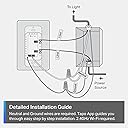
I had started on my smart home journey many years ago and had initially used Belkin Wemo switches for my light fixtures. The Wemos never worked well, and I had switched them all out a number of years ago, replacing them with TP-Link Kasa switches, which have been trouble free and worked great with both Alexa and the Kasa app. I have 5 Kasa dimmer smart switches and I recently decided to add another one. In my search on Amazon I did find the Kasa switch but also saw that there was a newer model, which is this Tapo model. It looks to be the same as my Kasa switch, but also supported Matter. The Tapo switch looks and installs just like the older Kasa model. With installation, it's straight forward, but key is having the neutral wiring as not all homes have them. You will also need to be a distinguish between the line and load wires (not important in older switches), so having a non-contact voltage tester would be helpful. The hardest part of the installation is tucking away the wires to get the switch to fit inside the wall box. The snap on cover plate gives the switch a nice clean look. With the switch installed, the next step is adding it to the app. It does not work with the old Kasa app, but the good news for me was that the Tapo app will work with my older Kasa smart devices. I downloaded the Tapo app and signed in with my TP-Link account, and it immediately populated all of my Kasa devices. Adding this switch was easy, just clicking on the "+" button and selecting the product. It found it right away and only took a few minutes. I have always liked the Kasa app and the Tapo app looks to be even better, as it's intuitive, though I will need some time to try out the features. On my Alexa, I did unlink my Kasa skill and then linked the Tapo skill, though not sure if I really had to do that. Alexa found the Tapo switch right away and works as expected in controlling it. As Tapo supports Matter, I did also add it to Apple Home Kit. None of my older switches support Home Kit, so this is the only smart switch on Home Kit. To add to Home Kit, it just requires the QR code from the device, which I did not find in or on the box, so I initially thought it's probably on the back of the switch, which didn't make much sense to me. However, in looking at the device in the Tapo app, there was an option to show the QR code, so problem solved. Adding to Home Kit was also quick and easy once I had the QR code. I have over 2 dozen TP-Link smart devices in my home setup. All of them are in the Kasa line except for this new Tapo switch. I can attest to the quality of their devices and am happy that TP-Link is continuing to bring new functionality to their line.
L**C
Muy bueno para un ventilador. Los únicos inconvenientes en mi caso, para el uso mencionado, son: -Los 7 niveles de los BOTONES FÍSICOS del dimmer para un ventilador de este tipo, no se pueden usar todos, solo son útiles los tres niveles más altos, en este orden: séptimo mñaxima velocidad, sexto media velocidad, quinto velocidad muy suave, pero agradable ...y de ahí hacia abajo, para un ventilador, los niveles de los botones físicos ya no son utilizables. -En la aplicación, se pueden personalizar 5 niveles, y en el caso de mi ventilador, programando tales niveles a 72%, 80%, 85%, 90%, 100% obtengo todo el rango de velocidades de mi ventilador, desde muy suave y silencioso, hasta viento violento, lo cual con los controles manuales del ventilador no es posible. -Desafortunadamente los niveles de los botones físicos, no se pueden personalizar como sí es posible mediante la app; aún así, como lo indiqué en el primer punto, esos tres niveles son muy prácticos. Si bien, este dimmer/atenuador está diseñado para luces y no para ventiladores, estoy bastante contento con los resultados con mi ventilador tipo industrial. ACTUALIZACIÓN DICIEMBRE 2025: Actualmente el dimmer YA SE PUEDE CALIBRAR desde la aplicación, en "calibración de atenuación". Con esto, la atenuación mínima y máxima, se ajusta por única vez; y con ello ya son 100% útiles cada uno de los 7 niveles de los botones físicos. En resumen, la desventaja inicial ya es cosa del pasado, ya funciona perfecto con mi ventilador, ya sea mediante los botones físicos, o mediante la app. Lo único que desearía, es que la escala de intensidad quedara encendida todo el tiempo en que está encendido el dispositivo (ya que esta se apaga en unos cuantos segundos), en fin, es un pequeño detalle, pero a más de un año de mi compra inicial estoy muy contento
M**T
Excellent produit très bien calibré et qui fonctionne à merveille.
L**G
Works as advertised, it is hard wired to the wall, you must have basic wiring knowledge to install it. Lever nuts will not work, you must connect the wires to the conductors (screws)
K**A
Funciona con Alexa muy bien y fácil de conectar y configurar, atenúa bien la iluminación de mi lampara LED.
D**N
Installation facile - application Tapo sous android - commandable depuis le téléphone si on souhaite- raccordement d'une terre, d'un neutre, d'un fil de 110 v et du départ vers la lumière. Ne convient pas pour un interrupteur 3 vois / va et vient
Trustpilot
2 weeks ago
5 days ago