🌟 Stay cool, stay in control — the ultimate temperature watchdog for pros!
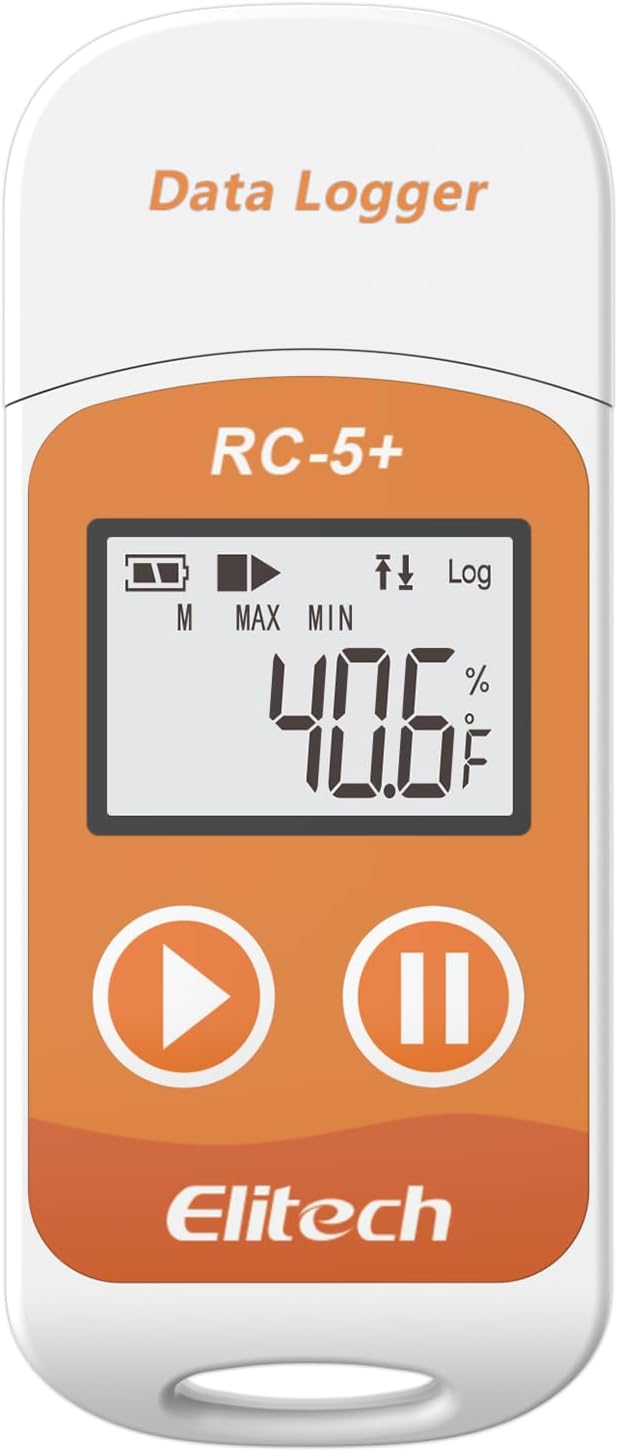
The Elitech RC-5+ Digital Temperature Data Logger offers professional-grade monitoring with a wide -22℉ to 158℉ range, ±0.9℉ accuracy, and 32,000 data points capacity. Its reusable, waterproof design features a 6-month battery life and an intuitive LCD display. Effortlessly generate encrypted PDF and CSV reports via USB without extra software, while customizable start options and alarms provide comprehensive protection for pharmaceuticals, food, and sensitive shipments.


| ASIN | B0DQKZ5XV7 |
| Additional Features | High Accuracy |
| Age Range (Description) | Adult |
| Age Range Description | Adult |
| Best Sellers Rank | #16,773 in Industrial & Scientific ( See Top 100 in Industrial & Scientific ) #2 in Industrial Data Loggers |
| Brand | Elitech |
| Brand Name | Elitech |
| Color | Fahrenheit(℉) |
| Connectivity Technology | Usb |
| Customer Reviews | 4.2 out of 5 stars 523 Reviews |
| Display Type | LCD Screen |
| Included Components | Elitech 1pack RC-5plus Fahrenheit, with user manual, calibration certificate |
| Indoor Outdoor Usage | Outdoor |
| Manufacturer | Elitech |
| Model | RC-5plus Fahrenheit |
| Model Name | RC-5plus Fahrenheit |
| Number of Batteries | 1 CR2032 batteries required. (included) |
| Outer Material | Plastic |
| Power Source | Battery Powered |
| Reusability | Reusable |
| Special Feature | High Accuracy |
| Style Name | Industrial |
| Unit Count | 1.0 Count |
| Upper Temperature Range | 158 Degrees Fahrenheit |
R**3
Handy device for recording temps, and easy to use!
I bought this little compact device to monitor the temperature inside of my storage unit. I pay for climate controlled storage and I noticed some of my things were starting to get ruined inside the unit. Sometimes I would show up and the temperature didn't feel right. Well, all of that was revealed after I purchased this and set it in the storage unit for a month! It turns out I'm not getting the climate controlled storage that I've been paying for, haha! Because of this, I now have evidence and proof that the storage unit has not been staying the proper temperature, and now I can file a claim for the things that were ruined and hopefully recoup some of my losses. The device itself is easy to use and it has a small built-in battery that's capable of lasting up to 6 months (and it's replaceable). Once you plug it into your computer and configure the settings, you simply set it where you want it and hit the play button. It starts recording until you hit the pause button. Once you are done, you just plug it into your computer and you can have a nice detailed report in either PDF or Excel spreadsheet format. I believe this was a great purchase and a great value for what it cost. For that small amount of money, it's going to save me literally thousands on the items that were damaged inside my storage unit! I highly recommend this device to anyone that needs accurate temperature recordings logs and data.
M**G
Marvelous compact temperature-data logger
I initially purchased two units, an RC5+ and an RC-5+TE. I have since purchased two additional "TE" units. These loggers are intended for use in monitoring shipments of food and other goods that need to be kept cold, so of course a record of the shipping conditions is essential. Check the specs to get an understanding of their outstanding flexibility. My use is in monitoring temperatures in rooms in which the air conditioning or heating may have problems, so I need to be able to monitor fairly rapid temperature changes. If you need to monitor for conditions like this, you should buy the "TE" version which adds an external sensor on the end of a cable about 3 feet long. Nothing magic about that sensor, there is another one like it inside the RC-5+ case and you can choose which to use, but the external one has much less mass than the case so it responds more quickly to temperature changes. It took me a little while on line to find the correct application software to download. For a Windows PC that is ElitechLogWin V6.4.0. There is an understandable user manual included in the app, but it has some omissions I found annoying. Most of those have to do with how to transfer data from the logger into the PC, how to configure the logger, and how to choose stored database files to display. This is like any other competent tool that's new for you, not everything is obvious and there is a learning curve. But the hardware and software work just fine, and the plotting routine (PDF only) is marvelously capable. Not only can you overlay multiple data logs, you can even display (and export!) logs that only partially overlap -- and the software takes care of this offsetting and scaling for you! And you can change the X-axis scaling and location of the viewing window; it's a little clunky in my opinion, but workable and I'm making fewer errors now. If I didn't feel these are marvelously capable and well worth their cost, I wouldn't have bought two more soon after the first two! The only reason it didn't get 5 stars from me is what I consider some obvious omissions in the user manual explanations. Martt Harding
O**T
The software is not intuitive but it works fine once you have figured it out.
Be sure you have it set to "internal" sensor. If you don't, it will appear to be recording but will not have any data when you check it 30 days (or however long you choose) later. That is pretty frustrating. To be clear, I tested it, and it worked fine then when I reset it to use it in again (in an outdoor storage container for 30 days), the software defaulted to 'external" sensor. So, I wasted 30 days recording nothing. In order to avoid this, make sure that the last page you set in the parameters is under settings/advanced. Set the sensor to "internal" then save parameters while still on that page. Go back to settings/advanced again and verify that it is still set to "internal" then unplug it. (You can set it to start recording at a predetermined time or to start recording when the device is pulled out of the USB port.) Once you have unplugged it, check the screen to make sure that it has the "record" arrow and also that it displays the current temperature. If it says "nc" on the screen then it has defaulted back to external sensor and you will have to repeat the process to set it back to "internal". To be fair, it works pretty good once you figure out the software, but it is disappointing to wait 30 days only to find out it hasn't recorded anything. Keywords: problem, mistake, error, failed, nc, -100, pdf, csv, data
M**R
Download software first
Download the free software, and its plug and play.
J**G
works great
works as advertised need computer to read file
T**B
Windows UI needs improvement
The software has issues. So you set the time zone, yet the main status panel in the software, still shows for some other unknown default time zone. So does it have the right time or not when the data is collected? Setting start immediate, does not change the main status panel in Windows 11 either. It always shows Wait for Start. The manual does not have the word clock in it or anything about time zones. But you can find setting that in the windows program. But I wanted the main panel to show the right time and the manual is not helpful. It uses the word time 48 times, but it's all about start time, timely manner and such. And why is the start mode not updated?
D**N
Read the Online Instructions
A very sparse set of instructions came with the item, so I had trouble getting it to work at first. I looked online and the instructions from the manufacturer there were much clearer. With that info, it is very easy to use. Once I got it running it did just what I wanted. The refrigerator in our new travel trailer wasn't holding temperatures right. I put this in the refrigerator and let it run for a couple of days. Then I plotted the results (done automatically from the vendor software) and was able to show the RV dealer what was happening. The refrigerator would get cold and stay cold for 6-8 hours, then it would stop cooling for 6-8 hours allowing the inside to get way too warm to keep food safely. It would have been very hard to see what was happening without this recorder. We've had some trouble getting repairs done on our trailer due to the factory refusing warranty repairs, but with the detailed data we gathered with this recorder we're confident the problem will get fixed.
N**C
Epic Failure
I purchased the Elitech RC-5+ to monitor the differences in temperature between my new smart thermostat. I found that set up was much more complicated, at least for the average everyday user than was necessary but, after a little research and an email to their technical support team on why it wouldn't sync the time with my PC, I was able to get it configured and put into service on February 2nd. On February 11th I was ready to download all of the data it was supposed to be capturing. That process wasn't too difficult however, the device only captured temperatures from Feb. 2 - 4th. The remaining 7 days it displayed an "NC" value in the temperature filed. Having found no reference to what this value meant, once again, I resorted to an email to their technical support team who indicated that it was most likely an internal failure of the device. I did try to reconfigure it but that resulted in no change. I'm in the process of returning it now. After using the original Onset® BoxCar® data loggers extensively in the past, I wish they would reintroduce them because they were so much easier to configure, they logged at the correct intervals, and the software was very user friendly for the average consumer.
Trustpilot
2 weeks ago
2 weeks ago