Buy anything from 5,000+ international stores. One checkout price. No surprise fees. Join 2M+ shoppers on Desertcart.
Desertcart purchases this item on your behalf and handles shipping, customs, and support to Uruguay.
⌨️🚀 Elevate your workspace with wireless reliability and marathon battery life—because your hustle deserves no interruptions.
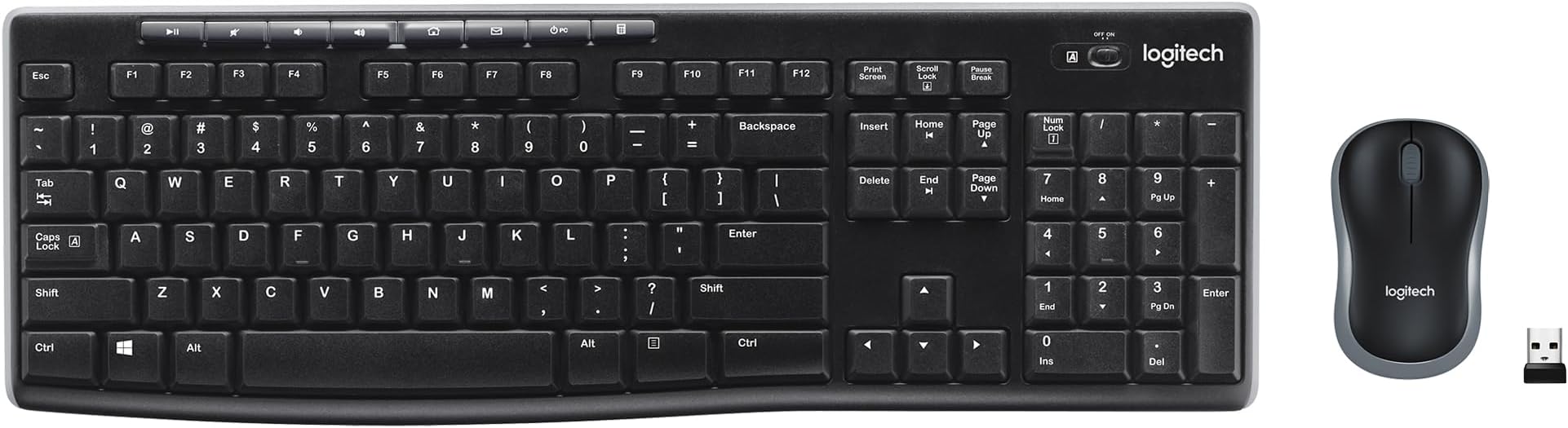
The Logitech MK270 Wireless Keyboard and Mouse Combo offers a reliable 2.4 GHz wireless connection with up to 33 feet range, a full-size keyboard featuring 104 quiet, low-profile keys plus 8 multimedia hotkeys, and an ambidextrous compact mouse. Designed for comfort and durability, it boasts a spill-resistant keyboard, 36-month keyboard battery life, and eco-friendly materials, making it an ideal, hassle-free setup for professionals seeking productivity and sustainability.


| ASIN | B079JLY5M5 |
| Antenna Location | Office,Home |
| Are Batteries Required | Yes |
| Best Sellers Rank | #1 in Computer Keyboard & Mouse Combos |
| Brand | Logitech |
| Built-In Media | 1 AA battery, 2 AAA batteries, keyboard, mouse, user guide |
| Color | Black |
| Compatible Devices | Laptop, Personal Computer |
| Compatible Operating System Family | Windows |
| Connectivity Technology | Wireless |
| Customer Reviews | 4.5 out of 5 stars 118,307 Reviews |
| EU Spare Part Availability Duration | 36 Months |
| Global Trade Identification Number | 00097855138996 |
| Hand Orientation | Ambidextrous |
| Item Type Name | Logitech MK270 Wireless Keyboard and Mouse Combo - Keyboard and Mouse Included, Long Battery Life (Frustration-Free Packaging) (920-008813) |
| Item Weight | 1.1 Pounds |
| Keyboard Description | QWERTY |
| Keyboard Layout | QWERTY |
| Manufacturer | Logitech |
| Mfr Part Number | 920-008813 |
| Minimum Required Operating System Version | Windows 10 |
| Model Number | 920-008813 |
| Movement Detection | Laser |
| Number of Batteries | 3 AA batteries required. (included) |
| Number of Keys | 104 |
| Operating System | Windows 10, 11 or later, Chrome OS |
| Other Special Features of the Product | Wireless |
| Power Source | Battery Powered |
| Special Feature | Wireless |
| UPC | 097855138996 |
| Unit Count | 1.0 Count |
| Warranty Description | 1Year Limited Hardware Warranty |
S**K
Very comfortable to use
This is a nice keyboard/mouse for the money. I ordered it in pink because it will help me to keep it separate from others I have. I have a tendency to forget which mouse goes with which keyboard. The color makes all the difference. In addition this works well and has a light up indicator for the caps lock which my older one does not. That was annoying to look up and see that everything was in caps by mistake. Good product.
D**K
Logo MK270
This Logitech MK270 wireless keyboard and mouse combo has been very reliable and easy to set up. Both connected quickly and have worked without any connection issues. The keyboard has a comfortable feel for typing and the mouse is responsive and smooth. Battery life has been great so far and it’s nice not having extra cords on the desk. Overall, this is a great, affordable wireless keyboard and mouse combo that works exactly as expected and is perfect for a home office setup.
S**S
Great keyboard and mouse combo. Long battery life and durable.
Have owned three of these units so far. That is over the span of 12 years. Works great, no setup and is durable. Highly recommend for regular use.
N**E
Perfect, Budget‑Friendly Combo
The Logitech MK270 Wireless Keyboard and Mouse Combo for Windows, 2.4 GHz Wireless is a great, cost‑effective set of everyday desktop accessories. It connects easily with a single USB‑A dongle, gives you a full‑size keyboard with a number pad and media keys, and includes a compact, comfortable mouse that works smoothly for typing and browsing. Battery life is excellent (keyboard and mouse both last many months), and the 2.4 GHz wireless connection stays stable without noticeable lag, so it’s reliable for office work, school, or casual home use. Overall, it’s a simple, plug‑and‑play wireless combo that delivers solid performance at a very reasonable price.
K**Y
Reliable and lasts forever Best budget option
I had this same model a long time ago and it lasted forever, I only had to get a new one because I lost the USB receiver, so I know for a fact they are very durable. For the price, you can't beat the compatibility you just plug it in and it works instantly. The appearance is very simple, it's not the most attractive or pretty keyboard since it has no lighting or fancy features, but it's built to last. The noise level is fine for a membrane keyboard, not too loud. In terms of ergonomics, it feels comfortable enough for daily work and the color is just the standard black that goes with everything. The best part is the battery life, it lasts months without needing a change.
C**M
K270 keyboard info that might help you
This review is a bit long, but has info that might help you. I posted it twice, once for the K270 keyboard and once for the M510 mouse. I have owned a K270 keyboard and M185 compact mouse for years. I bought them as the keyboard/mouse combo that Logitech sells. I have been happy with them. They are still working, but I decided that I would like to have a full size mouse. I settled on the M510 for the new mouse. The M510 mouse works with the unifying receiver. I did a fair amount of research before buying. I thought I could use the original K270 keyboard with the new mouse. I found that the older M185 mouse is not unifying. I thought that was odd because when you look at the seperate K270 Keyboard, it says that it is a unifying keyboard. Why would the combo set have a unifying keyboard but a non-unifying mouse? From what I have read online, when you buy the K270/M185 combo, it is NOT a unifying set. If you buy the K270 keyboard seperately, it IS a unifying keyboard. Since I wanted to get the M510 mouse, I had to buy a new seperate K270 keyboard since the one in the combo set is not unifying. I found this out ahead of time, so it was not an issue. I actually bought 2 each of the K270 & M510, for each of our 2 computers. Did not have any trouble getting them up and running. As a side benefit, the keyboard and mouse each come with a unifying receiver so I have a couple of spare receivers now. Registering them was an adventure. There are two methods to register, a serial number search or entering the info manually. The serial number search did not find any of them, so I did it manually. I did the keyboards first. After you enter the info for the unit you are registering, the registration software asks for the serial number. When you give it the serial number, I does a serial number search and verifies that the serial number matches that unit. This serial number search acutally worked (sort of). It found one of the keyboards correctly, but kept changing the other to a K295 instead of a K270. More on that in a bit. Next I registered the mice. When I got to the point where you select the correct model, the M510 was not in the list. I tried a few different things and finally found a trick that worked. When it asked for the model, I used M525 instead of M510. At the next step where it did the serial number search, it found the serial number was associated with the M510 and corrected the model entry from M525 to M510. Success with the mice. Back to the keyboard. I could not figure out a way around the registration error, so I contacted Logitech support and got a reply back from a support rep named Sharan. After a couple of email exchanges, Sharan was able to get the other keyboard registered correctly - Thank you again for your help, Sharan. I had noticed when I first started all of this that each unit has two serial numbers, one on the box and one on the unit. The two serial numbers did not match. Sharan told me that the number on the box is strictly for inventory use and the number on the unit is the one to use when registering. Anyway, both sets are now working and correctly registered. Happy with the purchase.
J**R
What's NOT to LOVE about this keyboard
As a professional typist with decades of 12-14 hour days of doing nothing but just typing, I am very picky about keyboards. Keyboards that meet my standards are getting fewer and far between. Within a strict budget - this Logitech Wireless Keyboard more than meet my exceedingly stingent demands and I am currently a happy-typer. My SAITEK PK02U ECLIPSE II KEYBOARD finally gave out by way of a repeatedly sticking spacebar, which I tried to repair many times, but finally to no avail. After four years of faithful service, I finally had to put that wondeful keyboard to rest. Now a retiree with a tighter budget I had to seek something more in line with my pocketbook. The one new crteria was that my next purchase be a wireless keyboard. I spent days and days reading keyboard reviews and finally decided, with reservation, to order this Logitech Wireless Keyboard. My experience with Logitech consisted of trying a few of their wireless mourses. I would always go back to my Microsoft Wireless Mobile Mouse 4000 - Botanic Pink of which I have two that I use daily and which I find the best mouse on the market. However, the description and reviews of the Logitech K270 seemed the most positive of all the keyboards and at $28.75 it was in my price range. I would have preferred to purchase it locally because I have a history of having to return keyboards because of being unhappy with the touch, sticking keys right out of the box, horrible configurations and key spacing, etc. However, no local business carries this keyboard in stock. I set aside an entire evening to set up my new keyboard, again based on previous history, and also because it was wireless, a new type of keyboard for me. I had a lot of extra time left for other endeavors that evening. Simply put; I opened the box, removed the keyboard and receiver from box, inserted the receiver in my computer tower, pulled out the paper tab from the battery door on the bottom of the keyboard, flipped out the feet on the bottom of the keyboard, turned the keyboard on, and started to type. I was amazed and pleased but I thought it was too early to review the product, I wanted to give it awhile to check out the actual fact of typing with this lightweight, well designed keyboard. The next morning I started with the new keyboard and wanted to test the touch and design of the keys placement on the board. Within 15 minutes I had forgotten that I was supposed to be trying out a keyboard; it simply became my keyboard. Now 24 days later I finally remembered I had never reviewed the product. That is because in that 24 days I have never actually given much thought at all to the fact that I am typing on a NEW keyboard. This was pretty much my first seamless keyboard replacement. I am of course aware that I don't have to keep adjusting the wire from the keyboard to the computer, that I don't have to adjust the sliding drawer where my keyboard rests because the wire is caught on something, that the wire isn't tangled in my feet because it is drooping to the floor, that the wire isn't keeping me from opening the sliding drawer far enough, and all those problems I have endured for years because I thought a wireless keyboard might not be responsive to my need for speed. In that regard, I have yet to notice anything, other than the lack of the physical wire, that tells me I am typing on a wireless keyboard. The touch of this keyboard just seems normal to me and hasn't caught my attention at all. This keyboard is designated as being Long-Range Wireless. My keyboard and computer tower are very close in proximity, so that was a feature I didn't need. However, I have tested this out and I can type on this keyboard down the hall from my office and into the dining room (next room over from office) and the response is fine. The second room over stretches the keyboards wireless limits and it starts to drop letters. I did not measure the distance. All in all this did not present a problem for me though. I never notice slowless or dropped letters or non-responsiveness where it matters, at my desk or in the next room either. The little feet on the bottom prop the keyboard at just the correct angle for me. I used to have to keep an additonal prop aid under my Saitek keyboard to get the cant just right. There is no wrist rest on this Logitech where there was on my Saitek. It took approximately 15 minutes for me not to miss it. My sliding drawer or keyboard tray is formica and like every keyboard I have had, the keyboard is a bit inclined to slide, but I long ago affixed rubbery-like shelf line Duck Brand 1100731 Non-Adhesive Select Easy Shelf Liner, Jumbo Roll, 12-Inch Wide x 20-Feet Long, Taupe with double-sided scotch tape to the surface of my keyboard slider. I placed new liner in honor of my new keyboard and voila, no slipping and sliding. The placement of the keys on this Logitech K270 keyboard are the nearest to the original placement of most of the keyboards I read reviews for. As a longtime typist the changing of major key placement and altering of the spacing between groups of keys always appears counter-productive to me. I don't understand the trend toward re-inventing the keyboard by every major keyboard manufacturer, but it continues to occur with even more frequency as the years roll by. This keyboard presented no problems for me whatsoever in that aspect. It sports a standard, full-size layout which I appreciate. I do however like the addition above the the F function keys, of several small short cut keys. I particularly enjoy the keys that takes me to my home page and to my e-mail (both with no set up required by me at all). There are also keys to increase, decrease, and mute the volume of videos, music, etc which I find helpful. There is also a key that brings up a calculator to the screen. I haven't had the keyboard long enough to encounter the need to replace the two AAA batteries required. The length of the battery power is estimated at 24 months or 2 million keystrokes per year. Now that I don't type all day everyday it might take me awhile to get to 2 million keystrokes in a year. There is an off/on switch on the keyboard to preserve battery power; however, I never turn mine off, nor do I turn off my wireless mouses. Just not a habit I ever developed. I would rather just change the batteries. I also have not utilized the feature available to allow just the one receiver for the keyboard and other compatible items such as your logitech mouse, but I have no reason to doubt that it wouldn't work perfectly as advertised. All in all this was easiest to set up computer keyboard I have encountered in years. The keyboard itself has everything required to make someone used to typing on a standard keyboard completely satisfied with the purchase. I recommend it highly.
Y**K
Easy and Works Great
This is perfect, works great, and so easy to connect. Just plug in USB and it's ready.
L**E
Excelente servicio
Me gustó mucho
S**.
Good product
Excellent keyboard and mouse for home use.It was well packaged and new.
H**S
Kit Top, porém, o teclado é inglês!
O kit é lindo! Igualzinho a foto! Ameiii!!! No entanto, o teclado é inglês. Por isso, não dei 5 estrelas! Ainda estou mim adaptando ao teclado, mas, já comecei pegar as manhas! E as teclas são maravilhosas para digitar! Macias e baixas! Top!!!
C**.
Recommend
Super easy to use, instantly connects and works as is. Simple cheap and quality product. Would recommend if looking for a good budget friendly wireless setup this is a good choice.
S**W
NA
NA
Trustpilot
1 month ago
1 month ago