Buy anything from 5,000+ international stores. One checkout price. No surprise fees. Join 2M+ shoppers on Desertcart.
Desertcart purchases this item on your behalf and handles shipping, customs, and support to Uruguay.
📸 Snap Like a Pro, Anywhere, Anytime!
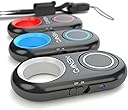
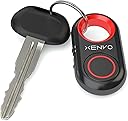
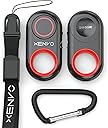
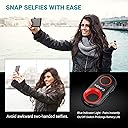
The Xenvo Shutterbug is a Bluetooth 3.0 wireless remote shutter compatible with iOS and Android devices, offering a 30-foot range for hands-free photo and video capture. Featuring instant auto-pairing, ergonomic design, and powered by long-lasting Lithium-Ion batteries, it ensures blur-free shots with zero shutter lag. Compact and portable, it comes backed by a lifetime warranty for lasting reliability.
| ASIN | B01K3G3A8O |
| Additional Features | Ergonomic |
| Battery Type | Lithium-Ion |
| Best Sellers Rank | #12 in Camera & Camcorder Remote Controls |
| Brand | Xenvo |
| Button Quantity | 1 |
| Color | Red |
| Compatible Devices | Camera, Smartphone |
| Connectivity Technology | Bluetooth |
| Controller Type | Android, iOS |
| Customer Reviews | 4.4 out of 5 stars 5,903 Reviews |
| Item Dimensions L x W x H | 4.7"L x 2.8"W x 1.2"H |
| Item Weight | 8 Grams |
| Manufacturer | Xenvo |
| Max Number of Supported Devices | 1 |
| Maximum Number of Supported Devices | 1 |
| Maximum Range | 9.14 Meters |
| Mfr Part Number | 4351641144 |
| Model Name | 4351641144 |
| Model Number | 4351641144 |
| Number of Batteries | 2 Lithium Ion batteries required. |
| Special Feature | Ergonomic |
| UPC | 861211000322 |
| Warranty Description | Limited Warranty |
R**E
Works great! Instruction video makes pairing and use a breeze.
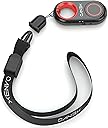
Instruction video makes the pairing and use of the Xenvo Shutterbug a snap. Uncomplicated set-up took me 2 minutes. The enclosed wrist strap and easy-clip (carabiner,) make this small device handy and impossible to lose. Works great!
J**.
I couldn't be more happy with this little product! Best product and setup experience EVER !
So far so good! Instructions were very clear. They have a Crystal Clear video that explains exactly how to set it up which is super easy... Paired right up and then I downloaded the free Open Camera app for my Android phone and it works perfectly. If you have an Android Samsung Galaxy 6 Edge Plus phone like me, you need to download this third-party app because the phone doesn't have the ability to set video so when you click it. Just takes a picture by default . "Open Camera" app lets you choose either video or picture and when you choose video and click the remote, it starts the video. Hope you understand what I'm saying because it's important if you want to take videos! I wish they was the ability to pause a video rather than just stop and start but that's not the fault of the remote. What it means is that he will be taking individual videos rather than just pausing a single video and then restarting it. I just got it and very pleased with this. It's a total LIFESAVER for me because I need to make a a series of explainer videos and didn't want to have to have someone else taking the videos. It also allows me to use a tripod so the videos will not be at all shaky! Super simple to sign up for their lifetime warranty with a QR code. Took 10 seconds! Easiest setup that I can remember with any product, best video directions, product works great, 5 stars+++! If you're considering a remote, this is the one to get! * QuikTip: to conserve the battery, remember to turn it off when you're not using it. Simply Slide the power button to off on the side of the unit. This package comes with an extra battery too. Woo-hoo!
P**E
Great remote shutter control
I have an old phone which I use exclusively for taking photos. I also have a selfie stick with a Bluetooth capability but for reasons unknown, the Bluetooth in the selfie stick wouldn't pair with phone so I bought this little device. It works great and is small enough to be hidden in any photos. It has a tiny on-off switch that I find very convenient. If this ever goes bad for any reason I will be buying another one.
J**E
Best camera remote I have so far
Very nice and easy to use. Love it
L**A
Works great. Missing extra battery.
I love this little shutterbug. It was easy to pair with my Samsung phone. It works exactly as it's supposed to. I've just received it and tried it out so I can't speak to battery life. I was disappointed that the extra battery was not included as promised both in the item description and the introductory video.
J**.
Perfect for iPhone, Good for Samsung, 90-second power-down
This does just what you think it should do. It "presses" the volume button on your phone, through a wireless remote. - When you turn it on the first time, the blue light is blinking, ready to pair with something. - On an iPhone, if the camera App is open in photo-mode, and when you press the button on the remote and release, it will take a picture. - On an iPhone, if the camera App is open in photo-mode, if you HOLD THE BUTTON DOWN it will record video, indefinitely. That is just how an iPhone works. The picture-frame for video is a bit narrower this way, versus the App being in regular video-mode. Think about (roughly) the shape of a holiday card versus a standard letter or bill from the power company. - On an iPhone, if the camera App is open in video-mode, and you press the button and release, it will begin recording video. If you press the button again, it will stop recording video. Regular video-mode records a slightly wider frame, than when the App is in photo-mode. - When you press the button on the remote, it is very quiet, but not silent. In most circumstances, if the device is in your hand and your finger is covering the button, it will not be heard. If the device is in your POCKET, it cannot be heard by others, probably not by you either. Range is a lot - 20 to 30 feet. - The device turns off after a couple of minutes. When you press the button again, it will turn back on, and re-pair after 2 seconds or so. I can't guarantee that this will conserve the battery if it is STORED away for a week. Turn off your remote when you are not using it. - Don't forget that your Apple Watch can be a view-finder for your iPhone, so that you can frame your shots better. The iWatch also shows when the camera is activated successfully by your remote. - 2 batteries in the package (sweet) - Also comes with a wrist-strap, and a Carabiner hook. - I have dropped mine a few times, the battery-cover usually pops-off, and the battery bounces across the floor. Never had a problem. I put the battery back, close the cover and its good as new. - Why do people complain about the battery cover? Yes you need to PRESS DOWN and also slide forward at the same time. No its not entirely easy, it isn't meant to be easy. - I've owned 4-5 of these remotes, because I carry in my pocket every day, and I LOSE them on occasion. Sometimes the battery cover gets loose over time, and starts popping-off inside my pocket. I put a 1/2" by 1/2" of SCOTCH TAPE on the bottom of the battery cover, and it is perfect again. After a month of being in my pocket every day, I might need to replace the scotch tape - I don't care. It's a good product and does what it is supposed to do. 8/29/2023 update: I have ordered several of these, labeled as Zodiac. Now the product shipped is called Xenvo. The current product powers-down after 85 seconds. I ordered another just to make sure. Both only connect for 85 seconds, then you press the button to reconnect, which take 6-8 seconds before an iPhone will take another picture. Probably a power-saving feature, but I do not care for it at all.
K**.
It works!
It works exactly like on the tutorial, which is what I was looking for. The button works every time so far, and appears to be durable enough to last, smooth plastic as opposed to sticky rubber is definitely better.
J**R
Works, but not well.
First, the pros: - Pretty easy to set up. Just pair it like any other Bluetooth device. My phone briefly complained about it needing an app, but it paired just fine the second time. - Quite compatible. Fundamentally, it's just a volume control; the button acts like one of the volume buttons on the phone. So if your camera app is configured to take a photo when you push the volume button (a common default) then it'll just work. But there's one crippling con: It seems to go to sleep really quickly. Once it connects, it'll take a series of photos just about as fast as you push the button, with almost no lag. But it disconnects when it goes to sleep, and takes several seconds to reconnect. So, if you have any meaningful delay between photos, you end up pushing the button a bunch of times before it wakes up, connects, and triggers a photo. I bought it to do product photography and let me take photos without touching the phone on the tripod, to reduce blurring. But since arranging products takes some time, I found it was always asleep when I actually needed it. It proved to be much more frustrating than helpful. Ultimately, my phone turned out to be ill-suited to that task anyway (thanks to a fixed, low aperture), but I abandoned this device long before that. The remote would probably work quite well when you want to take a bunch of photos in a short duration. In fact, I'm keeping it because it's probably useful for selfies. But it'd be a lot more useful if it stayed awake and connected for the entire time it was switched on.
S**N
Great device!
Well packaged, video instruction and works great with all my photo apps. Very little or no latency between pressing the button and the camera activating, this is great for remote shutter activation. Definitely recommend.
R**I
جدا جميل
ممتاز لاستخدام الموبايل والتصوير عن بعد
A**R
works really well and simple to set up
N**.
Producto usado y con desgaste
El producto me llegó usado y maltratado, voy a pedir devolución
K**M
A very handy device
Works perfectly.
Trustpilot
3 weeks ago
1 week ago