Desertcart purchases this item on your behalf and handles shipping, customs, and support to Uruguay.
🖱️ Wear Your Workflow — Control, Scroll, Present, Anywhere!
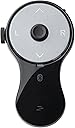
The SANWA 3-in-1 Bluetooth Finger Ring Mouse is a compact, ergonomic wearable device combining a mini mouse, wireless presentation clicker, and video scroller. Featuring Bluetooth 5.0 with a 32-foot range and 34 hours of rechargeable battery life, it offers seamless control over PCs, laptops, tablets, and smartphones. Designed to reduce wrist strain, it supports versatile use cases from professional presentations to casual video browsing and eBook page turning (Kindle app only). Lightweight and portable, it’s the perfect productivity companion for the modern multitasker.


| ASIN | B0DLGK55CD |
| Additional Features | Ergonomic, Portable, Rechargeable, Wireless |
| Battery Type | Lithium-Ion |
| Best Sellers Rank | #33,722 in Computers ( See Top 100 in Computers ) #959 in Computer Mice |
| Brand | SANWA |
| Button Quantity | 5 |
| Color | Black |
| Colour | Black |
| Compatible Devices | Personal Computer, Smartphone, Tablet |
| Compatible devices | Personal Computer, Smartphone, Tablet |
| Connectivity Technology | Bluetooth |
| Connectivity technology | Bluetooth |
| Controller Type | Bluetooth Control |
| Customer Reviews | 4.1 out of 5 stars 157 Reviews |
| Item Weight | 0.02 Kilograms |
| Manufacturer | SANWA SUPPLY |
| Maximum Range | 32 Feet |
| Model Name | GMABT156BK3 |
| Model Number | GMABT156BK3 |
| Number of Batteries | 1 Lithium Ion batteries required. (included) |
| Number of Items | 1 |
| Number of buttons | 5 |
| Special features | Ergonomic, Portable, Rechargeable, Wireless |
| Unit Count | 1.0 Count |
A**R
Almost Perfect
I bought this specifically to use as a mouse alternative for the PC to prevent RSI. It sits nicely in my hands, but I could see it being a bit too large for women/people with slender fingers. The construction is solid and the Bluetooth connectivity works flawlessly. The cursor sensor is responsive to very light touches and is easy to get used to, but it's closer to using a joystick than it is to a mouse - it's not as quick or precise as a mouse, but its speed does respond to the level of pressure you put on it, which is a nice improvement over using a joystick. The scroll wheel is also neither too tight nor too loose, and spins easily to light touches. However, it's awkward to reach with my thumb when using the ring mouse left-handed, which is a bit disappointing because I like to swap hands around to avoid repetitive movement. My biggest gripe with using this thing as a mouse is that the default Page Up/Page Down buttons are a waste of potentially useful button spots since that functionality is easily covered with the scroll wheel. I had to install AutoHotkey for Windows 10 to remap those buttons to something useful, namely mouse buttons 4 & 5 to navigate back and forward on webpages. I think you might be able to remap them natively with the built-in mouse and keyboard control center in Windows 11, but I haven't used Windows 11 yet to know for sure. Either way, it seems like a missed opportunity to make this thing a full mouse alternative right out of the box. Overall this is a handy little device for my purposes. If I could design a new one for myself, I'd add a second scroll wheel on the opposite side of the existing one to make the device more ambidextrous-friendly. I'd also add a single button perpendicular to the disk face at the top of the device, which would make click & drag much easier and faster to do if you wear the device on your middle finger. I'd also map the default function of the Page Up and Page Down buttons to mouse buttons 4 & 5 for mouse mode. I think that'd make it absolutely perfect. It's very nice as it is though.
A**A
Loved and used daily in classroom
Love this! Used it every day to teach. Easy to connect, and stayed connected even over 2-week breaks. Battery life is excellent, and it charges fully very quickly. Easy to hold, and could withstand the rare accidental drop. Buttons are a little tricky to get used to (because it mimics mouse button placement, which to me was backwards), but no issues with actual function. Used with a Windows PC, but since it’s bluetooth and I didn’t have to install any software or hardware, I’d say chances of Apple compatibility are excellent.
J**N
It Seems To Work Well, Takes A Bit Of Getting Used To
I bought this as the trackpad on my Panasonic Toughbook in my patrol vehicle is starting to glitch. It's really frustrating to have your cursor disappear, then reappear completely on the other side of the display. I wanted something small, easy to use, that doesn't add to an already cluttered up area. This mouse actually does a good job. It connected quickly and seems to be a stable connection. I run a bluetooth GPS antenna and a bluetooth printer, there are no problems with interference or the computer not liking the third bluetooth peripheral. The center "joystick" button takes a bit to get used to, as it's pretty sensitive. You don't actually move it, just light pressure in the direction you want the cursor to go and it goes there. The more pressure the faster it moves. The left and right click buttons are pretty intuitive, and the scroll wheel works well. After a couple of full shifts the only real complaint is a lack of fine control to click an arrow for a pull down menu in a report. Possibly going into mouse properties and slowing the mouse down a bit will allow finer control with very light input. I think a little more time with it will make it much easier. I think I'm going to buy another one for my laptop in the house, so I can ditch the corded trackball I currently use.
M**G
Almost a perfect mouse for a couch potato
I bought this because I built my first computer for my livingroom and wanted a couch potato experience without having to use a mouse and a table. This handheld mouse is almost everything I wanted (mostly an Apple TV remote type feel) but they missed 2 features, 1: having a usb dongle since Bluetooth doesn’t wake up computers from sleep, and 2: pretty big design flaw, they should’ve added a trigger button for the left mouse click. It becomes apparent and annoying having to let go of the thumb pad to click the left button, and even MORE annoying when you need to highlight, or drag a file. A trigger button would solve this and I was surprised when I opened the box to find out there was no button on the bottom.
R**N
Perfect for scrolling on the computer
I purchased this to save my achy wrist from a regular computer mouse. I can now keep my arm and wrist in a comfortable position while using my computer. This is perfect for reading articles and scrolling websites using the scroll wheel. Great for Amazon, news, Reddit, and other point and click websites. I would not use it for anything that requires click and drag, like moving a map or dragging an image. A regular mouse is needed for that kind of activity. Keep in mind this is small! See the picture with a quarter for scale. If you have small hands it will be comfortable to hold. If you have large hands it might not work for you.
Trustpilot
3 days ago
2 weeks ago