Buy anything from 5,000+ international stores. One checkout price. No surprise fees. Join 2M+ shoppers on Desertcart.
Desertcart purchases this item on your behalf and handles shipping, customs, and support to Uruguay.
🎮 Cut the cords, not the edge—game wirelessly like a pro!
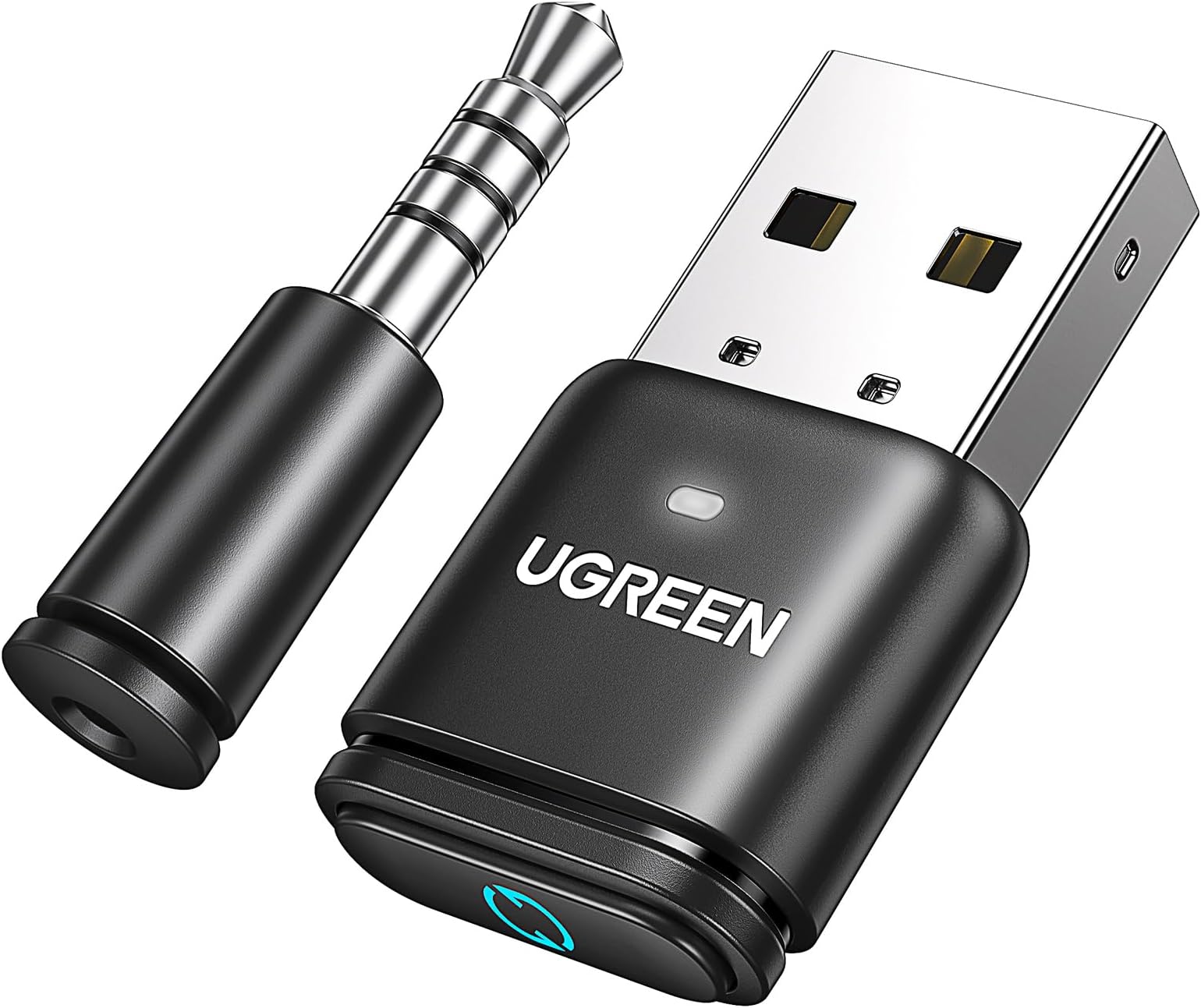
The UGREEN USB Audio Transmitter leverages Bluetooth 5.3 and advanced aptX codecs to deliver high-fidelity, low-latency wireless audio for PS5, PS4, Switch, PC, and Mac. Featuring plug-and-play ease, a 3.5mm microphone for voice chat, and a reliable 10-meter range, it’s designed for gamers and professionals seeking seamless wireless sound with minimal delay. Backed by a 24-month warranty, it’s the ultimate upgrade for immersive gaming and crystal-clear calls.


| ASIN | B0CCT75PK2 |
| Amazon Bestseller | #2,664 in Electronics ( See Top 100 in Electronics ) #6 in MP3 Player Bluetooth Transmitters |
| Brand | UGREEN |
| Color | Black |
| Compatible Devices | Gaming Console, Laptop |
| Connector Type | Auxiliary, USB Type A |
| Country of Origin | China |
| Customer Reviews | 3.8 3.8 out of 5 stars (1,919) |
| Finish | Metallic |
| Item Dimensions | 15 x 7 x 29 mm |
| Item Weight | 10 Grams |
| Manufacturer | Ugreen Group Limited |
| Mfr Part Number | 15765A |
| Model Number | CM668 |
| Number of Items | 1 |
| Number of Ports | 1 |
| Package Quantity | 1 |
| Power Plug Type | Type A - 2 pin (Japanese) |
| Specific Uses For Product | PC |
| Unit Count | 1 Count |
| Warranty Description | 2 Year Manufacturer Warranty |
ラ**朗
PS5/PS4に挿してヘッドホンの電源を入れるだけで簡単に接続でき大変便利。それほど高いものでもないので、もっと早く購入しておけばよかったかも。 本体のボタンを長押しするとペアリングモードになるけれど、ペアリングモードにしなくても初回接続できたような…。気のせいかもしれないけれど。 遅延は反射神経を要するゲームでなければそれほど気にならない程度。 遅延具合は接続先によるようで、Audio-Technicaのヘッドホン(1万円程度)で0.1秒、JBJLネックバンド型(3000円程度)で0.1~0.2秒、エレコムのワイヤレスイヤホン(3000円程度)で0.5秒程度。 できるだけ遅延なく使いたいなら接続先もそれなりのもの、もしくは低遅延モードで使用するのがよさそう。
錦**慎
PS5でワイヤレスイヤホンを使う為に購入 今の所ノイズなども入らず音質も問題ないです ただ、付属の端子マイクは音がこもって声が聞こえがにくいとフレンドに言われたので VCなどをする場合はヘッドセットを使うのを おすすめします
く**ん
PS5の音をワイヤレスヘッドホンで聞くために購入。 Edifireのヘッドホンを使っていますが特に大きな遅延もなく音飛びもありません(PS5本体との距離2.5m程度で利用) FPSなどで利用する方は有線の方が安心かと思いますが今のところ通信状態は良好です。
マ**ォ
プレステ5とaz100を繋ぐ用途で使用 接続は問題ないです。音質はかなり下ります2000円くらいのイヤホンの音質に聞こえました。 遅延はそこそこあるのでゲームには向かないと思います。 アニメなどでも気になる場合が多々あるかと。 とりあえずプレステなどでBluetooth接続さえできればいいという人ならあり。
ぼ**ぶ
PS5でRazer Blackshark HyperSpeedを使用するために購入。 Razer純正ドングル→こちらの商品。 まずこちらの商品は、 1.商品付属のマイクをコントローラに挿して マイク&ヘッドホンの別体で認識させて使用するモードと。 2.付属マイクを使用せずに、USBヘッドセットとして認識させ使用するモードがあります。 1の使用感は、音質はまあまあ、遅延とノイズが少々。 そして付属のマイクがゴミすぎて、フレンドに「お風呂でゲームしてる?反響するし耳に刺さるし不快」 と言われました。 2の使用感は、マイクはだいぶ改善されます。 フレンド曰く、 「一昔前のマイクみたいだけどまあ許せる」 しかし、今度はヘッドホンの音質がお風呂の中みたいになります。 フレンドの声はよく聞こえるけどゲームの音がガチャガチャして何が何だか分かりません。 音質を例えるなら100均イヤホンとか飛行機に備え付けられてるヘッドホンなどをもっとガチャガチャにした感じとイメージしていただけると良いと思います。 今では稀に見るゴミです。
A**ー
コネクティングも早くまた、2回目以降も即座に認識してくれるので、非常に使いやすい商品です。 以前は無名のトランスミッターを使用していましたが、本品のほうが良いです。
M**F
[ENG Review] Highly Recommended... But Be Warned Windows/PC Users!
To all Windows/PC users who's planning to purchase this unit. Please be warned. Even though this is a Bluetooth device, when this is plugged into your PC, this will NOT appear under Bluetooth devices. This will instead appear under audio devices. Because this is essentially a soundcard with a built-in Bluetooth connectivity. That said, in order to connect your Bluetooth headset, headphones and/or earbuds, you must press the paring button on your Bluetooth audio device (headset, headphones and/or earbuds). So don't worry. This UGREEN Bluetooth 5.3 device that you've purchase is not broken. You just need to initially pair it with your audio device. Pros: -Stable connectivity -Sound quality is good enough for the price. -virtually zero latency. Cons. -The manual can be confusing for beginners. -For PC users, there's no "quick connect" feature. Once you start your PC or turn on your Bluetooth audio devices (headset, headphones and/or earbuds) it takes almost 5~7 seconds to establish connectivity. So please be patient. NOTE: I think the reason behind this is because this Ugreen Bluetooth transmitter is trying to determine which codec feature your audio device has (aptX, aptX HD, aptX Adaptive). Final thoughts: For the price, zero latency and basic feature it offers, this is a highly recommended product. Go get one!
C**.
Works with PS5 and Switch
I was a bit worried at first because the instructions only mention Air Pods, but it connected no problem to my Bluetooth earphones. I haven't really tried the microphone, but the USB dongle works just fine. I feel like the quality of the audio isn't amazing, but it gets the job done for watching TV and playing games.
A**X
Exactly what I was looking for for my PS5. This adapter has AptX Adaptive support and so do my earbuds, which made it automatically go into AptX Adaptive mode once my earbuds paired with it. In this mode, audio quality is very good AND there is no noticeable latency. I can even play something like COD and not notice any delay in the audio. That's exactly what I needed. A really key feature is that on subsequent uses, my buds will automatically connect to it and it remembers to immediately jump into AptX Adaptive. I tried other adapters that would connect, but then default to a different mode and you had to physically push the button on the adapter itself or do some other kind of button pressing to get to the mode you wanted. This adapter is much more convenient. Also, something I had wondered about, so maybe other's do too, was if using bluetooth earbuds would cause any kind of interference with the dualsense controller. I'm happy to say I have not experienced any such problems. I should also mention that I don't care to use my mic at all like this as I have a normal headset for that. Therefore, I didn't do any kind of testing and can't comment on that. Something important to note and that you may see in other reviews is that the volume does default to being very low upon connecting each time. Even turning the volume up all the way within the PS5 settings only slightly helps. You must have earbuds/headphones with volume controls on them. As long as they do, you are good to go. Turning the volume all the way up on my buds and having the PS5 set to probably about 65-70% is where I want it. Maxing both is way too loud, so I don't think anyone would have issues. It's also important to note that your earbuds/headphones must have AptX Adaptive support in order to be able to use that mode on the adapter and experience unnoticeable latency. This is not a common feature, so chances are high that you don't have it. Look into that before you try to connect to any bluetooth adapter on any console really. If your buds/headphones just have normal SBC or regular AptX or even LDAC support then you will still have significant latency. Supposedly people with Airpods can have success with latency despite them not support AptX Adaptive, but I think that's just luck of the draw. So in conclusion, this adapter is as good as it gets for using bluetooth earbuds on PS5, but it does require your earbuds to have AptX Adaptive support and volume control on the buds themselves in order to have the best experience. If you have those things, the experience is perfect.
D**.
V good product. Works well with ps5, using to connect as Bluetooth headphones connectivity
C**S
Ich habe mir den UGREEN aptX 5.3 Bluetooth USB Audio Dongle hauptsächlich für meine PS4 gekauft und bin absolut begeistert. Endlich eine saubere Lösung, um meine kabellosen Kopfhörer ohne komplizierte Zusatzgeräte nutzen zu können. ✅ Einrichtung & Installation Die Installation war super einfach: Adapter in den USB-Port stecken, Kopfhörer in den Pairing-Modus versetzen und nach wenigen Sekunden war die Verbindung hergestellt. Kein zusätzliches Treiberchaos, kein Gefummel – einfach Plug & Play. Besonders auf der PS4, wo kabellose Headsets oft nur eingeschränkt funktionieren, ist das ein echter Gamechanger. ✅ Klangqualität Die Übertragungsqualität ist top. Dank aptX Low Latency gibt es praktisch keine spürbare Verzögerung zwischen Bild und Ton – selbst in schnellen Actionspielen passt alles perfekt. Der Sound ist klar, kraftvoll und stabil, auch bei längeren Sessions. Ich habe keinerlei Aussetzer oder Rauschen festgestellt. ✅ Freisprechfunktion Besonders praktisch finde ich die eingebaute Freisprecheinrichtung: Man kann nicht nur hören, sondern auch sprechen. In Multiplayer-Spielen funktioniert der Voice-Chat einwandfrei – meine Teamkollegen verstehen mich klar und deutlich. ✅ Vielseitigkeit Auch wenn ich den Stick hauptsächlich für die PS4 nutze, gefällt mir die breite Kompatibilität: PS5, Switch, PC, macOS – alles wird unterstützt. Ich habe ihn testweise am Laptop ausprobiert, und auch dort lief die Verbindung sofort stabil. ✅ Verarbeitung & Design Der Adapter ist kompakt, hochwertig verarbeitet und nimmt kaum Platz weg. Man kann ihn problemlos dauerhaft in der Konsole lassen, ohne dass er stört. --- 🎯 Fazit Für mich ist der UGREEN Bluetooth USB Audio Adapter eine perfekte Lösung für kabellosen Sound auf der PS4. Einfache Einrichtung Stabile Verbindung Hervorragende Klangqualität Voice-Chat funktioniert problemlos Universell einsetzbar Ich kann diesen Dongle jedem empfehlen, der seine Konsole oder seinen PC unkompliziert mit Bluetooth-Headsets nutzen möchte. Klare 5 Sterne von mir – Kaufempfehlung!
R**O
It does exactly what is described well - show up on a computer (or console, or other host device) as a USB audio device rather than a Bluetooth radio, and connect to headphones/speakers. The Bluetooth audio is output only. The sound quality is great, the latency was not particularly bad from my work computer with Airpod 2 Pros. Note that the microphone is the separate 3.5mm device that can be connected to a game controller. The Avantree DG80 provides bidirectional bluetooth headset audio if you need to use your headset microphone (at the expense of usually reducing audio quality while the microphone is enabled). The device does exactly what's described, it works well, and I was able to use it on my work computer where I don't have administrator access and the internal Bluetooth is disabled - from the computer's perspective, it's a USB audio device (like plugging normal USB headphones in).
J**.
Legit!
Trustpilot
2 weeks ago
1 month ago