

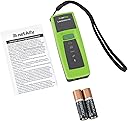



ネットアレイ(NetAlly) LinkSprinter モデル 300 【国内正規品】 LSPRNTR-300
Product ID: 733710174
⚡PoE対応で電源不要
📊クラウド連携で結果自動保存
📶内蔵WiFiでリモート操作
Desertcart purchases this item on your behalf and handles shipping, customs, and support to Uruguay.
🚀 ネットワーク診断の未来をポケットに!
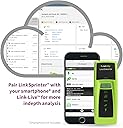
ネットアレイのLinkSprinter 300は、PoE対応のポケットサイズネットワークテスター。内蔵WiFiでスマホからリモート操作が可能、Link-Liveクラウドサービスと連携しテスト結果を自動保存・管理。スイッチ情報やVLAN、DHCP、ゲートウェイ接続性をワンタッチで診断し、色分けLEDで直感的に問題を特定。現場での迅速なネットワークトラブルシューティングに最適なプロ仕様ツールです。


| ASIN | B00UD6G2OY |
| Amazon Bestseller | #83,601 in Computers ( See Top 100 in Computers ) #479 in Computer Networking Switches |
| Batteries | 2 AA batteries required. (included) |
| Batteries Included | Yes |
| Batteries Required? | Yes |
| Battery Cell Type | Alkaline |
| Color | green |
| Customer Reviews | 4.6 4.6 out of 5 stars (344) |
| Date First Available | March 14, 2015 |
| Included Components | Instruction manual (English language not guaranteed), 2 x AA alkaline batteries, strap |
| Is Discontinued By Manufacturer | No |
| Item Dimensions LxWxH | 13.3 x 8.9 x 6.4 cm |
| Item Weight | 15.8 g |
| Manufacturer | ネットアレイ(NetAlly) |
| Measurement Accuracy | Not applicable |
| Part number | LSPRNTR-300 |
| Power source type | Battery Operated |
| Product Dimensions | 13.34 x 8.89 x 6.35 cm; 15.88 g |
| Style | 300 w/WiFi & Distance to Cable Indication |
レ**ー
ネットワーク疎通確認に大変便利!!
本体に電源ボタンとLEDアイコンが5ケ付いているだけのシンプルな製品ですが、DHCPでIPアドレスが取得できる環境であれば、LANケーブルを接続するだけでリンク確認やゲートウェイに自動でPing試験を行い、WAN (Google) に接続できればメールにて詳細試験結果を知らせてくれる優れものです。LANケーブル挿入時に一番下の雷マークアイコンが緑色に点灯すればPOE給電配下のLANケーブルであり、この場合は乾電池を入れなくても動作するみたいです。当然ながら詳細結果にはPOE給電電圧も知らせてくれます。現場で使用していない情報コンセントやLANケーブルがあり、それらがネットワークに繋がっているかどうかを確認する場合に大変便利です。 WANへの接続が確認できたのちに、内蔵Wifiを有効にしてから何かのモバイル・デバイスでモバイル・インターフェースを開きますと、LinkSpriter本体のIPアドレスをDHCP取得から固定IPアドレスに変更することや特定のクライアントなどのIPアドレスをターゲットにする設定変更を行えば、特定のクライアントなどにPing試験を実施することは可能なようです。又、この時にLANケーブルが接続された状態で接続しているHUBのリンクランプを点滅させることは出来ますので、HUBの接続先が分かれば、HUBからLANケーブルを抜くとワイヤーマップや線路長を表示させることが出来ます。しかし、7番8番のピンをわざとクロスしたLANケーブルで試験確認すると線路長は概ね合っていましたが、7番8番ピンがクロス表示されることなく正常なワイヤーマップを表示していました。LANケーブル単体の試験は他の機種に任せた方がいいようです。とは言えパソコンや仮HUBを接続することなく、ポケットサイズのLinkSprinterでネットワーク疎通確認が出来ることは素晴らしいと思います。ただ、ちょっと値段が高いのが難点です。 純正品の専用のケース (ホルスタータイプ) を探していましたが、日本では終売となっているようなので米アマゾンで見つけて取り寄せています。到着するまではLinkSprinter本体の色に合わせた緑色のハンドストラップを付けて道具袋に収納しています。ポケットサイズのシンプルな構成ですが結構役に立つ場合も多いので、大切に使っていきたいと思います。 (2021/04/26追記) 米アマゾンより純正ケースが到着したので収納して持ち歩くようになりました。ハンドストラップも以前のタイプだと気を抜いてLinkSprinter本体を取り出すときに落とすこともあるので、取り出し時に指に引っかかるように金具が付いたハンドストラップに交換しました。これで少しは以前より安心して持ち運べるようになりました。
E**U
運用中のネットワーク試験には最適なツールです。
以外に小さく重量も手ごろで、設定変更やテスト結果をiPhoneやandroidで確認できインターネットに接続できる環境での使用ではクラウドサービスを通してメールで受け取ることもできます。残念な点はPoeの電圧は判りますが電圧が出てるペアは表示されません。ケーブルの試験が出来ると説明にありますが断線とペア崩れと長さの測定しか出来ないです。工事で使うようケーブルのピン配置を確認できる様な機能はありません。 旧リンクランナーの代替えと考えられる方には期待外れとなると思います。
プ**ク
ネットワークトラブルに重宝
最近はネットワーク接続の製品が増え(特に無線WiFi)トラブルに良く遭遇しますが、これ一台有ればトラブルの切り分けに役立ちます。もう少し価格が安ければもっと嬉しいのですが、良くできた製品だと思います。iPhoneやiPad、などタブレット製品と連携すれば、IPアドレス重複やスイッチの問題ルーター側の問題とか判断材料になり、データも残せます。おすすめです。
D**B
If you do a lot of troubleshooting wired networks this tool is a must have
Great product for troubleshooting office network environments. Can hand to a tech and with very little setup they can run in to an office and plug in to confirm where an issue with the network could be. The email reports are particularly useful. They are expensive, but an excellent tool for improving productivity of engineers out in the field checking copper network taps.
K**V
Compact Easy to link
This is an excellent accompliment to my Fluke Cable IQ, On my latest project it has proved invaluable
G**G
Time saver
A huge time saver for troubleshooting. It quickly paid for itself in hours saved.
J**B
Buen producto profesional
Excelente llegó en buenas condiciones 👍
J**S
Quick Netzwerktester
Guter kleiner Helfer, Schneller Test, kann die Switchports und VLAN anzeigen (LLDP). Nur als Handgerät um zu sehen ob man Online kommt reicht die Anzeige der LEDs am Gerät. Bei Fehlern kann man sich per WLAN mit der Geräteseite verbinden und prüfen ob VLAN, Link, DHCP etc. nicht passt. Gut ist das der Online-Check via TCP erfolgt und nicht als Ping. Hat eine etwas versteckte Funktion auch die Kabellänge zu messen wenn kein Endgerät verbunden ist. Wenn man sich an die Cloud anmeldet bekommt man Ergebnisse per Mail, als kleine Doku geeignet. Ersetzt nicht einen 750MHz Messtest für gewerbliche Messungen! - Es ist nur ein Helfer um Fehler zu finden oder mal schnell VLAN zu checken.
Trustpilot
2 weeks ago
3 weeks ago