Buy anything from 5,000+ international stores. One checkout price. No surprise fees. Join 2M+ shoppers on Desertcart.
Desertcart purchases this item on your behalf and handles shipping, customs, and support to Uruguay.
✨ Elevate your PC game with a screen that’s as smart as it looks! 🖥️
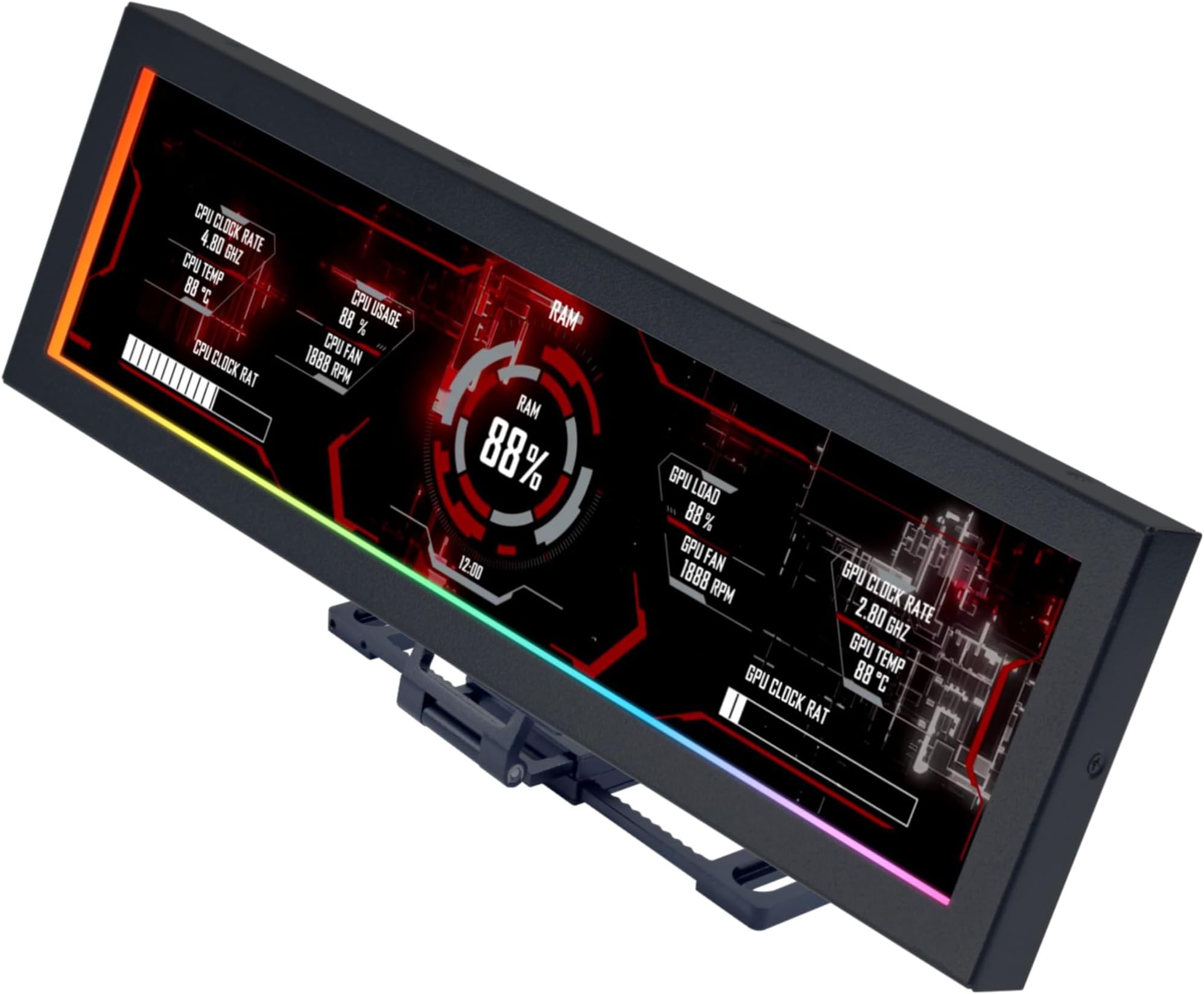
The Lian Li 8.8" Universal Screen is a sleek, high-resolution IPS LCD mini monitor designed for PC enthusiasts seeking both style and function. Featuring plug-and-play USB connectivity, versatile mounting options, and a fully customizable ARGB lighting frame, it displays real-time system stats and personalized visuals via L-Connect 3 software. Its compact design and adjustable tilt make it the perfect addition to any modern workstation or gaming rig.


| ASIN | B0FKH3NK1H |
| Additional Features | Tilt Adjustment |
| Aspect Ratio | 16:9 |
| Best Sellers Rank | #3,092 in Electronics ( See Top 100 in Electronics ) #129 in Computer Monitors |
| Brand | Lian Li |
| Built-In Media | Accessories |
| Color | Black |
| Compatible Devices | Desktop |
| Connectivity Technology | USB Type A |
| Customer Reviews | 4.5 out of 5 stars 322 Reviews |
| Display Resolution Maximum | 1920x480 |
| Display Technology | IPS |
| Display Type | LCD |
| Hardware Connectivity | USB |
| Has Color Screen | Yes |
| Item Dimensions D x W x H | 0.51"D x 9.33"W x 2.87"H |
| Item Weight | 530 Grams |
| Manufacturer | LIAN LI |
| Model Name | SM088X |
| Model Number | SM088X |
| Native Resolution | 1980 x 480 Pixels |
| Refresh Rate | 60 |
| Resolution | HD |
| Response Time | 1 Milliseconds |
| Screen Finish | Glossy |
| Screen Size | 8.8 Inches |
| Screen Surface Description | Glossy |
| Total Usb Ports | 1 |
| UPC | 840353051317 |
| Warranty Description | 1 Year |
| Warranty Type | 1 Year Manufacturer Warranty |
A**N
Great addition to any PC build
The Lian Li 8.8" display has been one of the most satisfying additions to my setup. The first thing that stands out is the versatility of the mounting system. You get multiple options with the included mount, which makes it incredibly easy to place the screen exactly where it fits your build’s aesthetics and layout. Whether you want it on the outside of the case, behind the glass, mounted to a fan (how I mounted), or tucked into a custom spot, the flexibility is there. Installation is surprisingly simple. Lian Li clearly put thought into the hardware design, and it shows as everything feels solid, well‑made, and premium. The build quality is excellent, and the screen itself looks fantastic, with sharp visuals and great brightness for both system stats and custom loops, etc. The only real learning curve is the software. L‑Connect 3 works well, but it takes a little time to get used to the layout and customization options. Once you get the hang of it, though, the possibilities open up fast. Overall, this display is a great way to personalize your build while also giving you useful real‑time system data. If you enjoy both aesthetics and functionality, this little screen delivers on both fronts.
F**A
High Quality Screen – Looks Amazing in My Case
I’ve been using the Lian Li Universal LCD screen for about a day now and I’m honestly really impressed. The first thing that stood out to me was the size — it’s bigger than I expected, and it actually fills the space in my case really nicely. The display is bright, clear, and makes the whole build look a lot more premium. Another thing I noticed right away is how solid it feels. The screen and housing feel sturdy and well built, not cheap or flimsy at all. Once it’s installed it stays in place well and feels stable, which is important for something mounted inside a PC. It definitely seems like it’s made to last. Setup was simple and once it was running it instantly made my PC feel more customized. Being able to display visuals or system info adds a really cool touch to the setup. Overall I’m really happy with it so far. Great screen quality, solid build, and it looks amazing inside the case. Definitely worth it if you want to add something unique to your PC build!
E**3
Great Software/Great Screen
I was a little hesitant because the reviews on this screen are pretty mixed, but after installing it myself, I’m genuinely glad I bought it. Installation was very easy and straightforward, even compared to other internal or auxiliary PC screens I’ve tried. One of the biggest positives for me is that it uses USB only, so it doesn’t eat up an HDMI or DisplayPort connection on your GPU. That alone makes it far more practical than a lot of competing screens. The software/app is solid, which is something I really appreciate. I’ve dealt with too many small PC screens that rely on sketchy, unfinished, or poorly translated software. This one feels polished and stable by comparison, and it just works without constant tweaking or crashes. Image quality looks great for its size, and it does exactly what I wanted it to do as a system display. Overall, this feels like a well-designed product that’s gotten a bit of an unfair review. If you’re on the fence because of the reviews, I’d say it’s absolutely worth it.
K**E
Nice system monitor - EZ setup
Super easy set up. There are templates available that will work for you immediately once you install L-connect 3 software. I wish there were more templates to choose from or a site to download some from, but I didnt find any on early searches. You can create your own as well with the software, but it will take some practice. The monitor looks great and seems pretty sturdy, metal case. The little stand works fine if you use it or you can just mount it in your PC if you like as well. Nice that you dont have to use a GPU slot, love that. 1920 x 480 looks nice and clear and color is also good.
S**4
Great fit.
Great size, installation was easy. Price is decent. The screen is good. My only issue is that I couldn't find were to adjust the time. No I did NOT read the instructions manual. It's easy to change the background and gif's no flickering and the appearance looks great!
S**N
Best addition to my PC setup!!!!
This was easily the best, and easiest addition to my PC setup I’ve made. The screen is extremely bright, without being overwhelming. Because of the universal frame, this device can be mounted in any build, in any case, and in any orientation. It can even be used outside of the case as a standalone monitor. It uses USB for power by connecting to your motherboard. This is the only part that can be a little annoying. Most motherboards will only come with two USB headers. Because of this, if you have a lot of fans or RGB items, those can already all be used up on ur build. All I had to do was order the NZXT USB hub extender. It costed me $20, and I was able to plug in all my fans, AIO cooler screen, and the Universal Screen. Given the size, i can’t imagine it not fitting in any cases, unless they’re super small. Overall, very happy with the purchase. Installation probably took me 15 minutes. If you’re interested in purchasing, I highly recommend looking at your USB headers, and making sure you have one free. If you do not have any left, make sure to also place an order for a USB extender. Once installed customization is a breeze. The L-Connect app works seamlessly. The screen was picked up by the app instantly. The app UI is fantastic in my opinion. If you have other Lian-Li products like infinity fans, you can control them from the same app. Overall, I’m extremely happy. I would reccomend this to anyone who is interested. Gives any build a super “custom” vibe.
T**W
Next level addition
This display is a great addition for anyone wanting to take their PC tower to the next level. Out of the box, this display is solid, versatile, and super easy to install. The size perfectly filled a space I had on my Element 9 glass case. The display is bright, sharp, and just simply incredible. Lian-Li checked all of the boxes that make monitoring my PC performance at a glance as well as boosting the appearance my case. The only downside is that there is a conflict with SignalRGB that causes the L-Connect app to close whenever SignalRGB is open. I was able find a mini workaround that lets me set the display up the way I want it before using SignalRGB. Im hoping this is an issue they can resolve down the road.
P**N
Great product with horrible software that compromises your system fans.
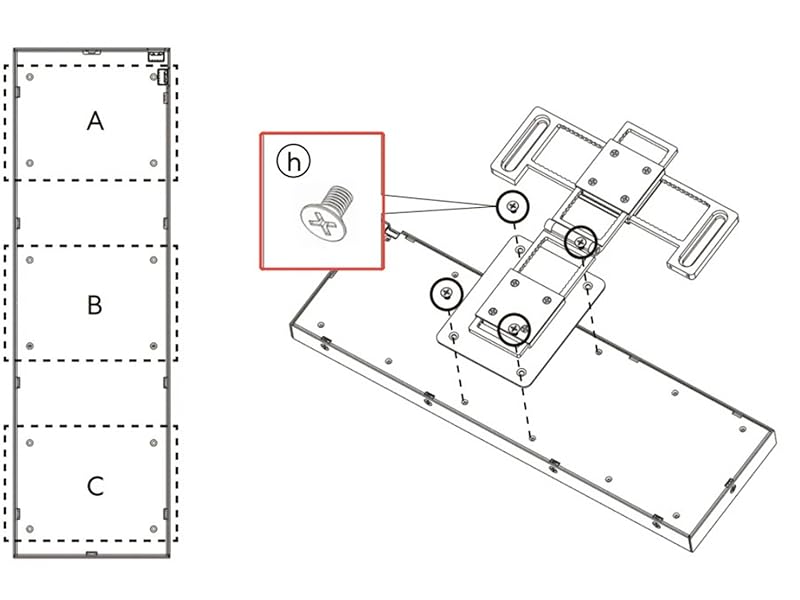
I’m giving this product a 3 Star rating because of the software to run the Universal Screen is playing havoc on my system’s fans. I’ll give a bulletpoint rundown of this product and associated software: 1. The Universal Screen is outstanding. Looks great, build quality is great, ease of installation is great, and it works great. 2. Installation was a breeze. You have tons of ways you can mount this, but the location I chose did not have any way of using the screws to secure the bracket. But they include double-sided tape. So I simply cut the tape to the shape of the parts of the bracket that come in contact with my case, stuck the tape to it, and stuck it down on the housing around my power supply. Holding good and looks great. 3. Software functionality. The actual functionality of the software is excellent and you have a massive amount of customization capability. You will have this baby up and running quickly with nice looking options available with just a few clicks of the mouse. If you want a complete custom look, you can do that as well. 4. Software interaction with your PC. Here is where the train goes completely off the tracks and is the sole reason for losing 2 full stars. As soon as I installed the L-Connect 3 software my system fans went haywire. My CPU fans are spinning at 100% and I initially had zero control over it. My 3 front fans stopped spinning and my top 2 fans were stuck at about 45% spinrate. I have no clue what my power supply fan was doing. I contacted a CSR on the Lian Li Discord channel and he directed me to update my BIOS and then change some fan settings there. This got my front fans spinning, but my CPU fans were blasting away at 100%. I could not manually adjust the CPU fan, but no auto fan speed. My top 2 fans are still spinning at 45% and I still have no control over them. My front fans are working, I can adjust them, but I don’t think they are being controlled by anything adjusting their speed. I have messaged the CSR who was helping me and it’s been over 24hrs and no response.
Trustpilot
1 month ago
3 days ago