Buy anything from 5,000+ international stores. One checkout price. No surprise fees. Join 2M+ shoppers on Desertcart.
Desertcart purchases this item on your behalf and handles shipping, customs, and support to Uruguay.
๐ธ Capture Every Angle with Ease!
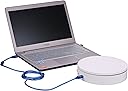
The 360 Degree Photography Turntable is a high-capacity, electric rotating platform designed for professional photography. With a 7.87-inch diameter and a robust 44-pound weight capacity, it allows for customizable rotation angles and automated shutter control, making it perfect for creating stunning product animations. Compatible with Canon cameras and controllable via app or software, this turntable is a must-have for any serious photographer.
| ASIN | B07BFNN8LD |
| Brand Name | ComXim |
| Customer Reviews | 3.3 3.3 out of 5 stars (19) |
| Manufacturer Part Number | MT200RUWSL20F+E3N3 |
| Material Type | Acrylonitrile Butadiene Styrene (ABS) |
| Maximum Weight Recommendation | 44 Pounds |
| Model Number | MT200RUWSL20F+E3N3 |
J**S
Performs as expected, extremely versatile
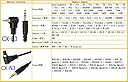
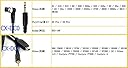
The ComXim 360 photography turntable is very easy to program and automate. The shutter chord provided did not fit my NIKON 7100, and I had to buy a 3 dollar adapter at Radio Shack to convert my cable for my remote switch to fit it. I don't own a Cannon camera so I can't tell if the provided chord works with their products. I think the chords provided would have been too short anyway. To realistically give you the flexibility to set up a light box, It needs to be at least 3 to 6ft long depending on your light Box. Just expect to find or make one on your own. You'll be happier in the long run. The hole for the connector is the same size as my old Sony Walkman head phones if that helps. My only other suggestion I'd pass on to ComXim regarding the product is move the silver product label to the bottom of the device. For now, I use a white platform on top to cover the chords and the label from ending up in my shots. I really want to avoid as much post editing as possible. Thinking about it though, the white is more of a cream. If you want to match your background or if you're doing chromatic separation you'll be using a green mat on top of it anyway. Bottom line, all of this very minor and easy to work around. It's really nice to focus, and frame your subject and press the play button and watch it take the shots. I use Adobe Light Room to crop the batch and I've written an Apple Script to run them all through photoshop to reduce them down to sizes appropriate for the web. Where it took me an hour to do this poorly by hand and with post, It now takes about 5 to 10 minutes from start to finish. It's worth every penny. A few tips for everyone: Before you shoot, put the table in continueous mode and watch it rotate through your camera. Balance the lateral movement of your subject as much as possible. Keep it centered and your cropping will be a breeze.
M**R
lasted less than a minute
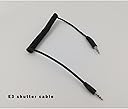
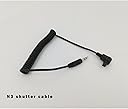
The turntable arrived in it's original box and not in an Amazon box The turntable looked and felt solid It came with a power adapter, a USB cable, two Canon camera cables and an extension for those cables That extension was a pleasant surprise as some customers noted that the camera cables were ridiculously short The manual is in Chinglish and makes no sense whatsoever The pictures do help I connected my Nikon cable for my D600 and started the turntable (empty) All worked fine via the remote for about a minute There was a Pffft sound inside the unit and I could no longer control the turntable The problem is the main unit and not the remote Tested the remote and the remote does send an IR signal I tried to download the app via the Android store but it's not there Luckily the manual has a QR code that will bring you to a Chinese website After fiddling and making some guesses the app downloaded Hurrah, I could control the turntable from my Android (via Wi-Fi) Well โฆ kinda sorta as the Android app crashes every minute The windows app was a little more stable but has the interface of a 1970's DOS program That being said, it does work I did put 40lbs on the platter and the motor did not struggle That is quite impressive Tested it with my Nikon D90 and my D600 and have no issues This could have been a nice device if it would have lasted longer than a minute
C**S
Great for Photogrammetry
Bought this specifically to use for Photogrammetry. It works great. I have a Canon Rebel T6. I am shooting small objects for 3D printing. I set up a light box and have the camera on a tripod. The turntable works flawlessly so far. I can set the rotation to how ever many degrees I want each picture taken at. The auto shutter works in sync with the turntable. I am right now using it to take a picture every 11.25 degrees. That is 32 turns to make a circle, doing this by hand would be cumbersome. The turntable turns 11.25 degrees and signals the camera to snap a picture and stops once it has completed 360 degrees. I can just walk away and work on some thing else. Cons: The documentation is pretty bad. I had to do a lot of experimenting with buttons on the remote to figure out how to do things.
K**M
Doesn't Work Correctly With Nikon Pro Cameras
[EDIT:] I was finally able to get the automatic shutter feature to work with my D850 by stripping and manually splicing the Nikon and Comxim cables together. The issue with the audio adapter that Iโd bought was that it was only a two-wire adapter, and the Nikon/Comxim cables were three-wire cables. Now that itโs actually working, the turntable functionality with just the remote is pretty nice. But Iโm only going to add one star due to Comxim not including even a generic 2.5mm to 3.5mm adapter in the box. Since I had to make a $20 Nikon-compatible shutter release cable unusable with its original remote to get the turntable to work. If Iโd done that to an actual first-party Nikon cable it would have been 3-4x as expensive. [end edit] The listing says to buy a Nikon control cable from their store. But there is no store, and none of their listings here on Amazon show such a cable. So I bought a 3mm to 2.5mm adapter in order to get the automatic picture-taking functionality to work. Only it doesn't work on my D850. Or rather, the shutter will fire ONCE, and the camera will only make slight clicking noises thereafter. Power-cycling the camera, or unplugging and re-plugging in the cable is the only way to get it to trigger ONE more shutter release.
Trustpilot
2 months ago
2 weeks ago