Buy anything from 5,000+ international stores. One checkout price. No surprise fees. Join 2M+ shoppers on Desertcart.
Desertcart purchases this item on your behalf and handles shipping, customs, and support to Uruguay.
⚙️ Power your network like a pro — control, scale, and conquer with Omada OC220!
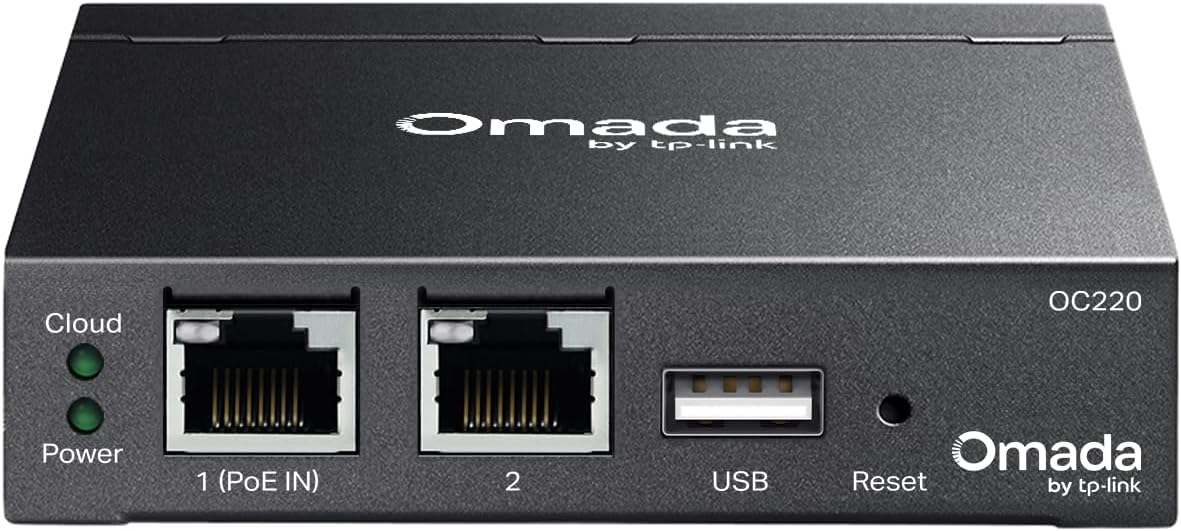
The Omada Hardware Controller OC220 by TP-Link is a compact, rack-mountable device designed for centralized management of large Omada SDN networks. Supporting cloud access and control of up to 130 devices, it offers energy-efficient power options and a rugged metal chassis, making it ideal for enterprise, campus, and multi-site deployments seeking reliable, scalable network management.
| ASIN | B0FRW8GM11 |
| Antenna Location | Business |
| Best Sellers Rank | #8,394 in Computers ( See Top 100 in Computers ) #160 in Routers |
| Brand | TP-Link |
| Built-In Media | OC220 |
| Color | Black |
| Compatible Devices | Personal Computer |
| Connectivity Protocol | Ethernet |
| Connectivity Technology | Ethernet |
| Coverage | Up to 130 devices |
| Customer Reviews | 4.7 4.7 out of 5 stars (61) |
| Frequency Band Class | Quad-Band |
| Has Internet Connectivity | Yes |
| Is Modem Compatible | No |
| LAN Port Bandwidth | 1000 Mbps |
| Manufacturer | TP - Link |
| Maximum Upstream Data Transfer Rate | 1000 Megabits Per Second |
| Mfr Part Number | OC220 |
| Model Name | OC220 |
| Model Number | OC220 |
| Number of Ports | 8 |
| Operating System | Omada |
| Other Special Features of the Product | Internet Security |
| RAM Memory Installed | 16 MB |
| Security Protocol | WPA2-PSK, WPA3 |
| UPC | 840460601115 |
| Wi-Fi Generation | Wi-Fi 5 and Wi-Fi 6 |
| Wireless Compability | 802.11ac, 802.11ax, 802.11b, 802.11g, 802.11n |
E**R
I love this little guy! It sips power, but most importantly, it allows the user to preconfigure a good chunk of their homelab before they even get the other components. Just remember to enable 'Agile' and 'Access Series', which will enable this OC220 to control all Omada SDN-based hardware. You find this by logging on and on the first page, look at the list of sites (the instance in which your actual network settings live). To the far right of that will be the Actions column. Hover your mouse over the icons until you find 'Edit', then click it. The image I've included is within the 'Edit Site' page, and make sure those two are turned on. This will allow you to adopt just about anything that the Omada SDN can control/manage. I'm a novice homelab nut who started taking my personal LAN security and performance seriously. I currently have an ER707-M2, ES205GP and an SG3210X-M2. The OC220 has made managing all this an absolute dream and easy for me to set up most of my network before the hardware even arrived, making pre-deployments a breeze. A word of caution is that there are some hardware components that are absolutely required to be present to set it up thoroughly, but the majority of the heavy lifting can be done within the controller. While this is the next iteration for the OC series, it brings a boost in CPU power, memory and a bump in units it can control (150 vs the OC200's 100). These changes are VERY welcomed and only 10-20usd more than the OC200 (at the time of this writing). However, it's still noticeably laggy at times when compared to having the SDN installed on a 1-litre PC that's easily more powerful; however, the OC series wins out in power consumption, which basically sips power compared to a 1-litre PC (think, Lenovo Tiny series or Dell's Micro series). Most might compare this to Ubiquit's Unifi SDN. I have limited experience with that (All I had was a budget AC-AP-LR and an Edgerouter X combo), so I, unfortunately, can not provide a comparison for those of you Ubiquiti refugees or those of you who are new and weighing your options. In any case, I hope my experience helps someone make an informed decision or, at the very least help them in their search for answers.
S**3
I have bought several of these OC200 now to manage customer networks remotely—solid performance and reliability from all the TP-Link products I use. There is a learning curve, but TP-Link releases new updates all the time.
A**A
After using the TP Link OC200 controller for a year, the OC220 is a great version upgrade. Much quicker in bringing up different screens both locally and using the app. Using the restore function of a previous saved backup worked flawlessly in moving to the new OC220. It's important to make sure both your OC200 and your new OC220 are on the same firmware version when restoring your backup. Great addition to the Omada series!
F**X
I've just refreshed my home network and am now using 100% Omada access points and switches! This hardware controller acts as the brains of the operation. Once this is assigned an IP address, it automatically detects all Omada devices and allows you to make configuration changes from one "WebUI" or the Omada app! On top of configuring VLANS, SSIDs, and other rules, this device also applies firmware updates to the APs / switches in your network. Clients are also tracked, which can greatly aid in troubleshooting! You can still manage your switches and APs without the controller, but you'll have to navigate to each device's IP address individually. This controller is what takes your network from "good enough for my house" to "business grade management". Setup was as easy as: 1. Plug into network 2. Open the Omada app and follow instructions!
B**N
This device allowed me setup a secure small business grade network in my home with Vlans and password protected guest networks. The GUI is not intuitive and difficult to navigate. I am fairly computer savvy, but the setup (VPN router, two switches, 5 AP's, 24 clients) was too complex for me. The good news is that the telephone support is the best I have ever received! California based and no foreign accent to complicate things even more.
Trustpilot
3 weeks ago
2 days ago