Desertcart purchases this item on your behalf and handles shipping, customs, and support to Uruguay.
🖱️ Elevate your workspace with precision and comfort—because your hand deserves the best!
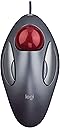
The Logitech Trackman Marble Trackball Mouse is a wired, ambidextrous ergonomic mouse featuring a large, smooth-gliding trackball and four programmable buttons. Designed for both right- and left-handed users, it offers plug-and-play USB/PS2 connectivity with zero setup required. Built with Logitech’s renowned quality, it enhances productivity and reduces arm movement, making it ideal for professionals seeking comfort and efficiency.


| ASIN | B001F42MKG |
| Additional Features | Ergonomic Design, Programmable Buttons |
| Antenna Location | Office |
| Battery Average Life | 2 years |
| Best Sellers Rank | #887 in Computer Mice |
| Brand | Logitech |
| Button Quantity | 4 |
| Color | Dark Gray, Red |
| Compatible Devices | Personal Computer |
| Connectivity Technology | PS/2, USB, Wired |
| Customer Reviews | 4.6 out of 5 stars 12,080 Reviews |
| Enclosure Material | glass |
| Global Trade Identification Number | 00097855052483 |
| Hand Orientation | Ambidextrous |
| Hardware Platform | PC |
| Included Components | Logitech Trackman Marble Mouse, Four-Button, Programmable, Dark Gray, Product Information |
| Item Dimensions L x W | 9"L x 3"W |
| Item Weight | 89 g |
| Manufacturer | Logitech |
| Mfr Part Number | 910000806 |
| Minimum Required Operating System Version | Windows 10, Windows 7 |
| Model Name | Trackman Marble Trackball |
| Model Number | 910-000806 |
| Movement Detection | Optical, Trackball |
| Movement Detection Technology | Optical , Trackball |
| Number of Batteries | 2 AA batteries required. |
| Number of Buttons | 4 |
| Operating System | Windows 10, 11 or later |
| Power Source | Corded Electric |
| Range | feet |
| Special Feature | Ergonomic Design, Programmable Buttons |
| Style Name | 910-000806 |
| UPC | 097855052483 |
H**S
Smooth, Comfortable, and Precise - A Surprisingly Great Experience!
I recently switched to the Logitech Trackman Marble Trackball, and I must say, it's a game-changer! Having used traditional mice all my life, I was initially skeptical, but the comfort and precision this trackball offers have won me over. First off, the ambidextrous design is thoughtful, making it suitable for both right and left-handed users. The curve of the device fits the natural contour of my hand, which significantly reduces the wrist strain I used to experience, especially during long hours of use. The tracking is smooth, with the marble gliding effortlessly - it took some getting used to, but after that initial period, I found it more accurate than my old standard mouse. It's fantastic for everything from daily office work to graphic design, offering precision that I didn't expect. One of my favorite features is the lack of constant mouse movement. My desk space is somewhat limited, and not having to move my arm constantly has freed up space and made my computer time more efficient. Installation was a breeze, as it was simply plug-and-play. No complicated software, no confusing setup, it worked straight out of the box. If there's any downside, it's that there are only two buttons, and I missed the scroll wheel initially. However, this became less of an issue as I grew accustomed to the trackball's operation, and the benefits far outweigh this minor quibble. All in all, the Logitech Trackman Marble Trackball has been an excellent investment for my comfort and productivity. I'd recommend it to anyone looking to change the way they interact with their computer for the better!
H**K
Rubber feet replacement success!
This mouse has saved my thumb from recurrent overuse and I highly recommend it. I will say that the rubber "feet" sit in three recessed spaces underneath and have repeatedly come loose. I tried various adhesives to keep them in place to no avail. Finally I obtained the clear bumper pads described below. The smallest of them are round and perfectly fit in the recessed screw holes and work like a charm! 202 Pcs Combo Pack Clear Adhesive Bumper Pads, Round Spherical Square, Self Adhesive Sound Dampening Transparent Rubber Feet Pads for Cabinet Doors Drawers Glass Tops Picture Frames Cutting Boards
R**É
Great product and value, but almost didn't make the 5th star
A little background: I've been a trackball user for over 4 years now and most of the work I do I'd done with the Logitech Cordless Optical TrackMan . I wanted another one of those, but seeing that they now go for $150 to $300, not the $55 I paid for it several years ago, I decided to go with this one. The great: The design works perfectly. The 2 custom buttons allow for good customization. I really like the fact that you move the ball with your fingers and not the thumb and that it has a very lo space requirement on my desktop. The fact that it has a cable doesn't bother me at all and I like not to worry about going low on batteries. The software has cursor speed and acceleration control which is just perfect for the use I give it (I really don't like to be moving the ball a lot to move from the outer edge of one screen to the outer edge the other screen). The bad: The trackball has no scroll wheel and middle button! And the software attempt to allow for scrolling is just plain poor. The right little button is also really not good for me, as being right handed, it's quite hard to press for me (but it's counterpart left button is easy to reach for me with my thumb). The workaround: After some searching, I found a way to emulate the scroll wheel using AHK (Auto Hot Keys) and a script a user wrote specifically for that issue. Now I have a scroll wheel functionality using the trackball itself (holding down the small left button) and also middle click using that same small left button. It works perfect and this gave the ball the 5th star. I find this arrangement of this arrangement for the scroll wheel quite more comfortable that using an actual scroll wheel, like the one on the other trackball I have, which has my finger aching every other day from use. Overall: Great product, excellent price. Get it, but also install AHK with the script to emulate the scroll wheel and middle button.
M**T
Interesting to try something different.
I have never tried a trackball mouse before, but after seeing some others use it and reading from several sources about some benefits of using a trackball versus a traditional mouse, I had decided to take the plunge and pick up one of the trackman marble mouses from logitech. There was no rhyme or reason as to the model I picked up, although I did look at a couple different trackball versions, such as one from Microsoft, which apparently is no longer being made hence why it is so expensive on amazon where you can find it, and another from Logitech which is more for gaming with the trackball being where your thumb would be. I didn't pick up the gaming version of the trackball because I thought my thumb would be in pain after a little while of using only one finger and making it move so many positions. I could be wrong in my feeling, but that's just the way I felt after watching people on youtube using that particular mouse. Getting to this particular trackball mouse though, the trackman marble has been very fun to use, so to speak, in that I am relearning to use the mouse with this new method. Using the trackball is something that is not too different to be a deal breaker, but it has been quite some time since using the mouse my first time, and I am still learning to control it to a pin point degree. It's not frustrating though with learning this new kind of control. Instead, I think of it as a kind of challenge in trying something new, and it's something that may hold more benefits than using a traditional mouse given more time I spend in learning it. The mouse itself is a fine design. I control the ball with BOTH my index finger and middle finger on my right hand with my thumb controlling the left mouse button and my ring finger or lifting my middle finger off to use the right mouse button. Having two fingers on the ball seems to be a good way for me to control the mouse pointer effectively. Or at least it's what I am comfortable with at the moment. I find that the mouse is constructed well, the body is a nice, polished, grey color, and I don't seem to have any dirt or stains on it, even after the amount of time I have used it. There is the usual dust and fuzz that you will see, most likely on the ball itself, so I try to make a point of taking that off if I do see it. Would I suggest this mouse? Yes, I would, even with some of the difficulty of switching over to trackball mouse after using a conventional mouse. Are there benefits to using a trackball over a conventional? To be honest, I don't really know. I suppose my wrist and arm are feeling more loose and not strained from using the trackball, so there is a medical benefit you could point to (potentially). But are you going to become the most experienced mouser with this secret trackball while everyone else is using a normal mouse, beating everyone in FPS's, League of Legends or DOTA 2 with getting every last hit, or climbing the leaderboard in OSU? No, I highly doubt it. It's just personal preference, so if you want to give it a shot, do just that and give it a try.
R**.
Love that I can use with either hand
I am a fan of trackballs and have been for many years. Cannot believe that many people have not tried one and still use so called mice that require a flat surface and excessive hand and arm movement to use. Have used on PC's and now on a Macbook Pro which my son who works for Apple bought me. I am being dragged kicking and screaming into the Mac world but am catching on. Do like the Mac's track pad better than Window's version and do like Iphoto but so far not much else. Completely hate Mac's address bar for browsers as font is far too small,,,,yes I know I can enlarge by changing screen resolution but isn't that a bit stupid! However even though I do somewhat like Mac's trackpad,,,I still cannot find a reason to use it over the Trackman Mouse,,,except for multi finger scrolling and other such capabilities. I have found a combination of the Trackman with Apple's trackpad does an excellent job. Wished the Trackman had scrolling feature as Apples absolutely stupid and narrow scroll bar is hard to target with the cursor. Apple,,,,take a look at these severe deficiencies and do a bit of work on these design flaws for us older folks. By far my favorite capability of the Trackman over competing track balls is the ability to use with either hand. When one gets a bit tired then I just switch to the other,,,,just as with a desktop mouse,,,which again I dislike immensely for stated reasons. The other trackballs forcing you only to your right hand certainly can lead to carpal tunnel as mentioned by others,,,so can single hand use of a regular mouse. But with the ability to switch hands in conjunction with some of the neat features of the Mac trackpad, it is the best of both worlds. Some have complained of the Trackman losing its way and hanging up at times. Mine do this too,,,I have 3 of them,,,and I have found if a hang-up which happens very seldom,,,I merely momentarily unplug from USB port and plug in again and all is well. Which reminds me,,,,,why on the MacBook Pro are the USB ports so close together,,,is real estate that valuable,,,. The problem of course is that certain USB plugs are too large to use both ports in use at the same time without the need to buy an adapter,,,,,,Apple in 30 years of business,,,,you should know better! Oh yes,,,did I mention that on the Mac trackpad,,,just how often you get your cursor where you want it,,,you hit the pad to click the place you wish and their stupid little cursor will jump off target, causing me all too miss the target. Apple tells me that I must be not hitting straight down on the trackpad,,,,,Yea they may be correct,,,,but should I have to dwell so intently to be certain that I do so. However even when I am extremely cautious,,,,far to often this silly little phenomenon occurs. Oh did I mention too that I am running Windows 7 also on the Mac,,,,as their miniscule tiny little tool bars and scroll bars sometimes annoy me so much that I either just boot Windows 7 or bring it up under Parallels. For you Apple fans out there,,,,they too screw up from time to time. I bought my Trackman(s) from Amazon 3 years ago at 18 dollars,,,looks like they are 22 plus now. But I still love the product and believe that every computer user should give one a try,,,,likely many would never go back to anything else. Don't waste your money on the other models if you have even the slightest hint of predilection toward carpal tunnel Before some of you Apple loyalists start jumping up and down,,,,I am on a MacBook Pro, Snow Leopard running a 15 inch high definition no glare screen. I am told this is one reason for the tiny fonts and skinning scroll bars,,,but again a bit stupid to have a Hi Def screen and run at a lower resolution isn't it? With Windows there is the capability to tell the system to make all fonts(all of them) 100 percent of normal, 125 percent, 150 percent. Sounds a bit challenging but someone at Apple should be up to the task I would think. Added on January 12, 2012. Logitech: Isn't it time to make this exact product wireless? Not with a long "dongle" out of a USB port, but a short stubby one as with your cordless desktop mouse(s). I've taken a look at your updated product that is wireless and appears that so far is not well received by many because of your design of a long "dongle". I would love to be able to control the cursor when standing a few feet from the computer,,,,and the mouse to usb cable is a another thing to mess up my desk. Would certainly make the product worth 6 plus stars for me.
T**6
Only Mouse I Want To Use!
I've been using this Logitech Trackman marble mouse since the late 90's, and been using personal computers since 1984. In that time, we've worn out one Logitech Trackman marble mouse after almost ten years(the first-- left button started being erratic), but bought several for our multiple computers. Once you've used one you'll never want to go back! There's several advantages: 1..The big one is accuracy. If you do ANY graphic work at all, even just fixing red-eye on photos, this is *the best* mouse to use. It becomes so intuitive and fluid, it's as agile and precise as your eye-hand coordination allows. It doesn't "get in the way" like a regular mouse. 2..Space saving. Even with a cord, this thing takes up less space than a wireless mouse, because it doesn't require movement. It also doesn't require a mousepad and works anywhere-- on your leg, on your chair arm, on a clear glass desktop. (I love it so much, I use it as my mouse with the laptop that I'm on for 8-10 hours a day! Yeah, it's that good.) 3..Aching wrists/fingers will be a thing of the past. This mouse is much more ergonomic and comfortable. 4..Versatile. Got both lefties and righties in the family? No problem! The Logitech software adjust for either with just a couple of clicks, and the mouse itself isn't shaped to favor one hand over the other. 5..BUILT LIKE A TANK!! Like I said, in ten years of heavy, heavy use by three computer nerds, with hundreds of thousands of clicks or more on the original unit, we wore out exactly *one* of these mice. And yeah, that mouse fell off the desk a few times, and the ball went bouncing across the floor probably a few times a month (One of us is a bit of a klutz). That said, you're less likely to drop it because you're not having to constantly move it. 6..User satisfaction. Everyone who uses one never wants to go back. Ever. 7..Excellent for those with limited hand movement. If you can move your thumb to click, have minimal movement in your arm and can rest your fingers on the ball, you can probably use this mouse. The four buttons can be specially programmed (say, if you've only got click-ability with your thumb, or your pinkie, for instance) and are configured so that accidental clicks aren't a huge problem. I can't speak for the wireless version of this mouse as I've never used or owned that model, and I *don't* recommend the version that puts the ball under your thumb-- that one *hurts* to use for very long. I hope Logitech NEVER stops making this mouse, because I have never found another of any kind, wired or wireless, that is so accurate, comfortable and well-built!
O**E
Best mouse ever!!
Great mouse for large hands and working too many hours a day.
L**N
Great mouse!
I am of the move-the-mouse-around-the-pad generation. I attempted to use a friend's mouse of this similar type and just hated it. Could not figure out how to use it. Then I used my brother-in-law's. It was this exact model. I don't know what it was, but with very little trial-and-error I was moving around the screen. I was enamored by it so much that I went home and looked into the purchase of one. I probably would not have considered a trackball type, but my husband and I were both complaining that our conventional mouse kept going off the side of the pad since we'd bought a 22-inch monitor. We were constantly having to lift the mouse and replace it on the pad to get to one side of the screen or the other. I had tried changing the speed of the mouse, but my husband's eyes don't track as fast as mine and it wasn't working for him. Once installed, our mousepad was gone and this Trackman Marble just sits in one place on the desk. It has left-/righthand capabilities which is perfect for me as I'm ambidextrous, although I keep it on the right for my husband. The mouse on my other computer is on the left. :-) It did take a bit getting used to now that I was using it exclusively. The small buttons located above each larger one scroll/cruise the screen down or up depending on the left or right one you press. Or, at least, this is how my buttons are set. This is a bit funky and I still error in the up and down choice, but it's never frustrated me. I sometimes have a bit of trouble setting the pointer/cursor directly where I want, but this is usually when I'm moving things numerous times. This could just be eye/hand coordination, fatigue, whatever. In most instances I find my mark quickly and move on. I love the facts that the stationery ball does all the moving, my mouse literally stays in one place, my fingers do all the work versus my whole hand and arm, and my desk is clear of that darn pad.
M**S
Awesome
Awesome trackball very quick delivery
B**T
Second purchase of this mouse
I've had this mouse for 10+ years and had to order a second one for use at work. I switch between left and right hands regularly to keep the pressure of my wrists. Ergonomic shape is brilliant!
G**G
Poco espacio
Perfecto para usar el ratón cuando se tiene poco espacio. La bola es cómoda y precisa. Los cuatro botones son programables. Sería perfecto si tuviera rueda scroll, pero para eso están las barras de desplazamiento en las ventanas. Muy recomendable.
J**C
Great mouse, fun to use!
The mouse works so well. The trackball is nicely weighted but still easy to move. No more wrist pain with this trackball mouse!
C**N
Excelente producto
Pros: 1.- Cómodo para evitar dolores en los tendones. 2.- Respuesta en movimientos rápidos para videojuegos. 3.- Se pueden reprogramar los botones. 4.- Funciona para zurdos y diestros. 5.- La longitud del cable es excelente (1.50 m). 6.- Precio (a mi costó $18.00 us dólares) Cons: 1.- La calidad de los push buttons podría ser mejor. ————————————————- Lo he usado por más de cinco años y en ese tiempo compré 4 Trackball. Seguiré comprándolo.
Trustpilot
2 weeks ago
2 weeks ago