💡 Light up your smart home game with effortless style and control!
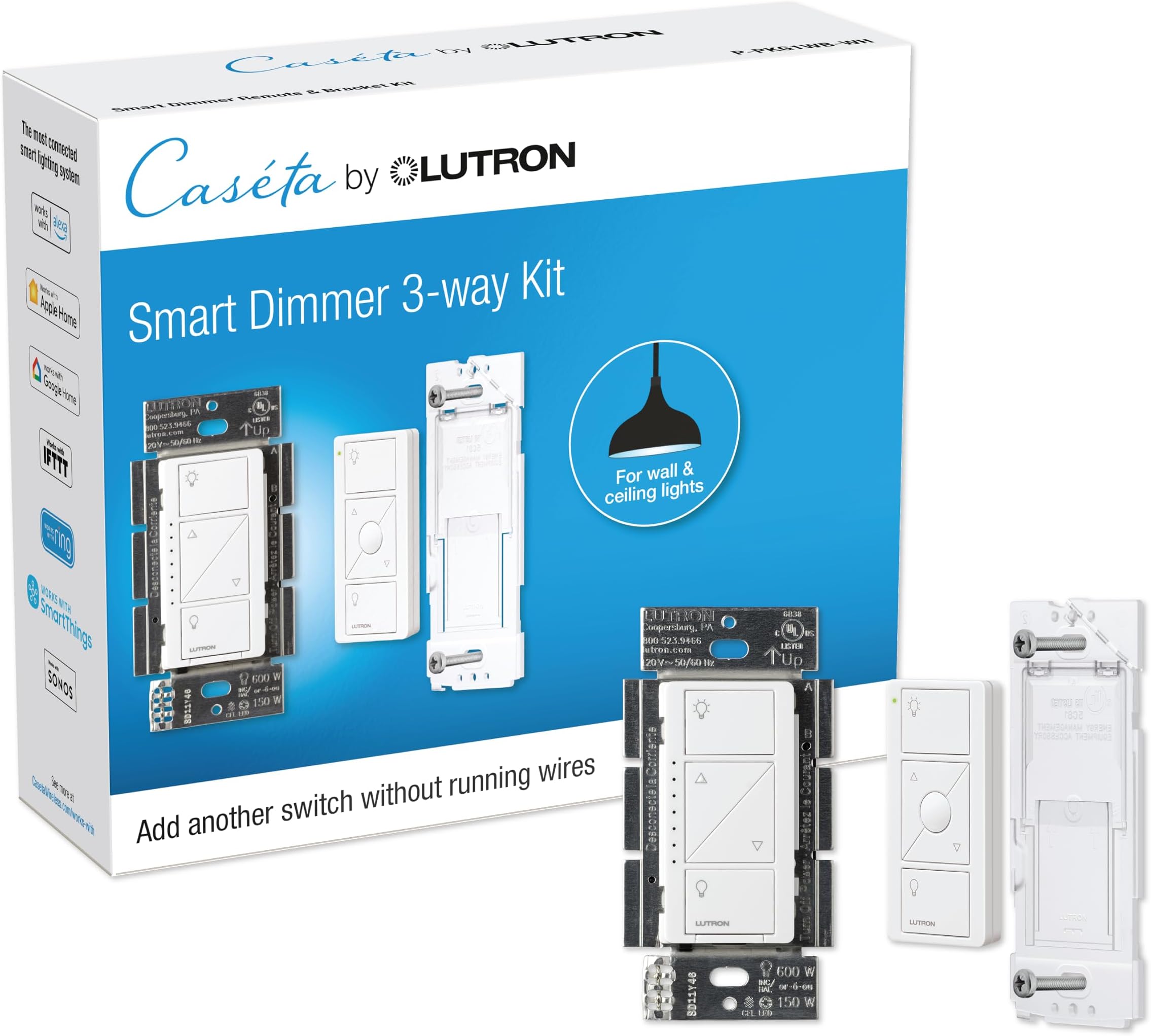
The Lutron Caseta 3 Way Smart Dimmer Kit includes a dimmer switch and Pico remote that enable wireless, voice, and app control of lighting without requiring a neutral wire. Compatible with major smart home platforms, it supports up to 150W dimmable LEDs or 600W incandescent bulbs, offers easy 15-minute installation, and features advanced dimming technology for flicker-free ambiance. Ideal for modern and older homes alike, it delivers flexible, energy-efficient lighting control with long-lasting remote battery life.


| ASIN | B07HM6L48C |
| Actuator Type | Push Button |
| Best Sellers Rank | #7,538 in Tools & Home Improvement ( See Top 100 in Tools & Home Improvement ) #41 in Electrical Light Switches |
| Brand | Lutron |
| Brand Name | Lutron |
| Circuit Type | Single-Pole/3Way |
| Color | White |
| Connectivity Protocol | N.A |
| Connector Type | Hard Wired |
| Contact Material | Brass |
| Contact Type | Normally Closed |
| Control Method | Voice |
| Controller Type | Amazon Alexa w/Lutron Smart Hub |
| Current Rating | 2 Amps |
| Customer Reviews | 4.7 out of 5 stars 3,026 Reviews |
| Global Trade Identification Number | 00784276258463 |
| Included Components | (1) Caseta Smart Dimmer Switch, (1) Pico remote, and (1) Wallplate Bracket |
| International Protection Rating | IP00 |
| Item Dimensions | 1.13 x 2.93 x 4.69 inches |
| Item Height | 4.69 inches |
| Item Type Name | Smart Dimmer Switch and Remote Kit |
| Lower Temperature Rating | 32 Degrees Fahrenheit |
| Manufacturer | Lutron Electronics Co., Inc. |
| Material Type | Metal, Plastic |
| Model | P-PKG1WB-WH |
| Mounting Type | Wall Mount |
| Number of Items | 1 |
| Number of Positions | 4 |
| Operating Voltage | 120 Volts |
| Operation Mode | ON-DIM-OFF |
| Specification Met | UL |
| Switch Type | Dimmer Switch |
| Terminal | Push Button |
| UPC | 784276258463 |
| Unit Count | 1.0 Count |
| Upper Temperature Rating | 104 Degrees Fahrenheit |
| Wattage | 150 watts |
T**C
Fantastic if you do not have a neutral available or want to add additional switches without wiring
The majority of my dimmers in my home are Lutron Caseta dimmers with their proprietary ClearConnect wireless communication protocol. Lutron dimmers and the Pico switches can be paired together without any further smart-home integration. However, they also can be incorporated into most smart-home systems. I have paired them with a Wink Hub 2 that gives me access to my dimmers via Amazon Alexa and Google Home (although I could have used Lutron's own Caseta Wireless Smart Bridge with Google Home or Amazon Alexa as well). If you are used to conventional switches, the look and feel of the Lutron Caseta dimmers will take some time to get used to, but the simplicity and functionality outweighs the awkwardness of switching. They also provide a memorable flare to guests who have conventional switches at their own homes. In other words, unlike other smart switches that try to hide as mechanical switches, these switches are all digital; they cannot hide. If you are wiring up a dimmer in a room where a neutral wire is available and you do not have plans to need more than a single switch, other smart dimmers like the Leviton DZ6HD-1BZ Decora Smart Z-Wave Dimmer are going to look more conventional and be far more configurable. Dimmers like the Leviton DZ6HD-1BZ are also less likely to cause problems with a wide variety of different types of lights, whereas the Luton Caseta dimmers can be poor choices for light loads that operate under very small amounts of current. Most Lutron dimmers (in the Caseta line as well as other "dumber" lines, such as Maestro) have been optimized for wiring simplicity, which comes with strengths and weaknesses. One major strength of the Lutron Castea dimmer is that it is designed to work without a neutral wire. Most new houses will have a neutral available in every junction box, but this will not be the case for "older" houses. The Lutron dimmer stays powered even when the light is off in the same way most "dumb" lighted switches/dimmers do it – it continues to pull a small amount of current through the circuit. The current is small enough that it will not turn on the device, but it is large enough to keep the dimmer operating, providing a subtle green nightlight glow while also responding to wireless commands. Lutron uses its smarts at running switches on very low power to create remote control devices, like the Pico remote (which include not only dimming controls but a "favorite setting" button), that can be powered by watch batteries for at least a decade if not longer. These can be mobile, mounted where a traditional 3-way switch would go (in which case it may be necessary to "wire nut" some of the switch's leads together to remove the conventional 3-way functionality), or just mounted to a wall using their mounting bracket. I recently replaced a 2-gang wall plate with a 3-gang wall plate that let me slide in a Lutron Pico remote into the third spot, and now it looks like there was a 3-gang box there the whole time. Furthermore, I was able to add a third switch to that room using a Pico-remote mounting bracket and a Lutron Claro 1-gang decorator wall plate (although a traditional wall plate would have also been fine) where there previously were no switches whatsoever. So that is the real strength of the Lutron Caseta line; it is so simple to add switches. Switches can also be paired to multiple dimmers simultaneously. So groups of lights that would otherwise be controlled separately can be joined together into a virtual circuit. The flexibility of Lutron Caseta comes with costs. Because it does not use a neutral, there is always current in the circuit, even when the light is off. This means that if you use an LED light that operates on very little current (such as a candelabra with a mini-screw connector, as is used in some ceiling fan light kits), the small amount of current necessary to keep the dimmer listening on the ClearConnect network will be enough to cause a small glow or flickering in the light. Fortunately, the dimmer can be adjusted to use as little current as possible, thereby allowing for some troublesome lights to be tamed. However, there are limits to this tuning. The other downside is that the Pico remote has a battery (although it does last very long; I have never had to replace a Pico battery yet after 5+ years). If you are replacing a traditional 3-way switch with a Pico remote, you will have to wire-nut some wires together behind the remote in the wall in order to "short out" the old 3-way switch configuration, and I am not sure that this wiring configuration is always going to follow building code. In general, I'm very happy with my Lutron dimmers. They have been easy to install and operate and extremely flexible. They look very different, and they use a proprietary mesh-network communication protocol (ClearConnect, which is distinct from Z-Wave, Zigbee, and others). But there is a Lutron bridge that can connect that network to popular smart-home systems (and Wink has support directly within its hub, and so no bridge is necessary if you use Wink). These switches are expensive, even relative to other smart-home switches, but that is the price of their flexibility as well as Lutron's brand-name strength in dimming technology. Some people also do not like that the Lutron Caseta dimmer has no screw terminals; wires are solidly fixed to the device, and so wire nuts must be used. Fortunately, the dimmer itself is not much deeper than a conventional switch (and possibly a little less deep than an old-fashioned rheostat dimmer).
S**N
Great value for the money
Love this light switch. I really like the remote that comes with it so I could add a switch to the other side of the room as well. The wiring was very easy to work with. Very compatible as I was able to use it on my ceiling can lights and they work with no issues. There is no delay like another switch I have, so the connectivity is smooth and easy to install. There is no doubt, it is worth the money, you cannot go wrong with Lutron. I have had these for a month now and I am sure the battery life will suffice. My friend has the same setup and his batteries lasted almost three years. So the battery life will be fine.
E**E
Reccomend for use with Apple HomeKit
I use the Lutron Castea system in conjunction with Apple HomeKit. They integrate seamlessly and easily while the combination allows a multitude of features. In addition, the Casseta Homebase network frees-up bandwidth on the 2.4Ghz band of my WiFi mesh network that would otherwise be taken-up by smart switches from any of the other vendors such as Kasa. Our four-story 3000sq.ft. townhouse functions nicely with a single Homebase connected via Ethernet to a Deco mesh node on the second floor. At first, I glossed over such features as adding remote switches and programming scenes via the Caseta app. Now I find they add tremendously to my home. For example, I have a Pico on the dining room table that adjusts all the lighting in and near the dining room for an evening meal with one touch. Same for the home theater; same for our primary bedroom at bedtime. I added a pico in the hallway using just a double gang faceplate on an existing single gang switch without any wiring at all. Now I can initiate the primary bedroom evening lighting scene - or turn on all the bedroom lights full strength - before I enter the room. There is even a pico with a built-in nightlight. If you have outdoor temporary lights, perhaps for the holidays, there are weatherproof outdoor switches you can program. All our permanent outdoor lighting is on the Caseta network for security and, of course, you can program switches for when a room is occupied via HomeKit. We also use the system for electrostatic air cleaners that help to keep our home dust and allergen free, turning them off when people are around and running them in vacant areas at night and when no one is home. As a bonus, energy bills have diminished a bit despite living in data center land. Take that AI.
S**2
New to Lutron (but have 24 years of automated light switches) - Learned Some Important Things..
Just recently switch to Lutron product line, and my fan switch install went flawless. I installed this switch on my outdoor lights and learned a lot along the way. Hopefully this will help someone else. - When I installed the switch, I have neutral wires in my gangboxes (house built in 2000), and was shocked that this switch didn't have a neutral connection. You don't need it for this switch, which is great for those that don't have the wire, but it was a first for me as my Zwave switches always needed it - Switch was installed correctly, but had no lights on the switch itself, and while I noticed my outdoor porch lights were showing a dimly lit bulb, hitting the on or off on the switch did nothing. I was convinced initially it was wiring, but lo and behold, the true issue was the bulbs that I installed. I had purchased some cheap no-name brand LED bulbs and they were not dimmable (I think). Upon changing the bulb, the switch showed operational lights, and everything worked fine. In my two fixtures, I initially only changed one, and that was all it took to get it working. I confirmed the same issue when I installed another switch for my 3 deck post lights. Changing a bulb to a dimmable bulb (while I wait for matching replacements) was all I needed to do to get it to work! - Pico remotes are amazing, and can be used for many different things. Love that I don't need hardwired Z-wave accessory switches anymore, and these make it so less crowded in a multi-gangbox! Highly recommend those looking to make the switch from Zwave, WiFi and other lower quality switches. I will say my Zwave installation was flawless in operation, but ultimately got sick of the low quality and frequent failures. Anyone considering a "WiFi" switch should not do so, but I'm not going to gain much in functionality over my Zwave switches, the reliability and Picos are the big pluses.
N**C
Best smart switches
We love these so much! Love that we can set our outdoor lights on timers and never have to worry about them, and that we can control our interior lights when home or away. These blend in well with any white wall switches, too
I**N
Exactly what I was looking for
This was very easy to install and it was exactly what I was looking for. I wanted a dimmer that was going to be future proof for when I install additional smart switches that work with Google Home. The function is great when you want to adjust the lighting, especially with the remote that comes with it. You are able to adjust the brightness on both the remote and the main switch, which is great. I do like the value for the morny, just keep in mind you would need to buy the home base to enable the smart features to control through Google Home.
R**N
Great product, once you figure out how to install it!
I love Lutron products and how well they integrate with Alexa. Now can turn on/off all of my lights in house via Alexa while sitting in my easy chair, or light up my house over the internet while I'm away. Great system. BUT, don't be fooled with their propaganda that light switches are "easy to install". Even if you're knowledgeably about "neutral wires", etc, the instructions will NOT really help you if you've got anything other than a plain vanilla install. The instructions for the wall switch are really for the Pico remote. And in my case, I had 5 wires coming into my old swtch, but the instructions only are relevant for 4 wires. And don't expect their YouTube videos to help much either. They are redundant and not relevant. But after spending 3 hours, I was able to install the new dimmer switch and add it and two Pico remotes to my existing Lutron Caseta system. And I love it!!!!
R**B
Get a second switch
Easy to install. Works perfectly. Had a bathroom with the switch outside the room. Now better with a switch inside the bathroom. Fortunately I already had dimmable bulbs in play.
Trustpilot
1 month ago
2 weeks ago