Buy anything from 5,000+ international stores. One checkout price. No surprise fees. Join 2M+ shoppers on Desertcart.
Desertcart purchases this item on your behalf and handles shipping, customs, and support to Uruguay.
🚀 Triple your screen, triple your impact!
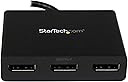
The StarTech.com 3-Port DisplayPort 1.2 Splitter is a Windows-only MST hub that enables connection of up to three DisplayPort monitors—two at 4K 30Hz and one at 1080p 60Hz—without requiring drivers. Designed for professionals seeking enhanced multitasking, it supports integrated and discrete GPUs, features secure latching connectors, and includes IT-friendly software to maintain window layouts, making it ideal for dynamic office or home setups.


| ASIN | B00JLRBB8I |
| Best Sellers Rank | #140 in DVI-HDMI Adapters |
| Brand | StarTech.com |
| Built-In Media | Video splitter - 3 ports |
| Color | Black |
| Compatible Devices | PC |
| Connector Type | DVI, HDMI, VGA |
| Current Rating | 1.2 Amps |
| Customer Reviews | 4.0 out of 5 stars 1,269 Reviews |
| External Testing Certification | RoHS, CE, FCC |
| Finish | Hdmi |
| Global Trade Identification Number | 00065030851886 |
| Item Dimensions | 15.2 x 3.1 x 0.8 inches |
| Item Type Name | Signal Splitter |
| Item Weight | 0.22 Pounds |
| Item dimensions L x W x H | 15.2 x 3.1 x 0.8 inches |
| Manufacturer | StarTech.com |
| Mfr Part Number | MSTDP123DP |
| Model Number | MSTDP123DP |
| Number of Items | 1 |
| Number of Ports | 3 |
| Package Quantity | 1 |
| Power Plug Type | No Plug |
| Smart Home Compatibility | Not Smart Home Compatible |
| Specific Uses For Product | personal |
| UPC | 065030851886 |
| Unit Count | 1.0 Count |
| Warranty Description | 3 Year |
| Warranty Type | Extended |
K**R
Works great - Only pitfall is how DP behaves in Windows
I bought this to be used with my Windows 7 setup - 3 monitors ran out of one DP port. While it does the job, and indeed powers all three monitors, Windows freaks out when any of the monitors is turned off or goes into power save mode. It acts as if the display was physically disconnected/no longer exists, and shifts all your desktop items and windows into another monitor. That is a problem for Windows when *all 3* monitors disappear at once - it basically freezes and you have to reboot. I gave up on Windows+DP and just went the DVI route. However! This device works great out of the box with Linux. I'm using it at work, Running Arch Linux x64, kernel 4.0.7-2-ARCH. xrandr sees all monitors connected to it, and although there is a slight (0.75-1.25s) delay when setting up the monitors with xrandr, it works just fine and I am able to have 3 spanned 27" monitors running at 1080p through this device. Overall, this product does what it is supposed to - the only issues I had with it were operating system issues that are not the fault of this product.
J**S
It works just fine if you give it it's own power supply
After a few months of use, I can say that this DP splitter works almost flawlessly with my Surface Pro dock and my pair of old 1920x1080 screens, with one caveat. In my experience, this model of display port splitter should not be powered by the Dock, PC, or screens, and should be powered with its own independent USB power supply. Any old cell phone charger will do, the one I'm using is 5v @ 750mA with a micro usb to usb adapter. I suspect the problems with this device comes from the fact that the screens or the dock will disconnect or limit the power to their USB ports when not in use, causing the splitter to forget its settings and behave erratically.
R**W
Works as I expected.
I was very apprehensive about buying this after reading some of the other reviews. I just bought 4 Dell monitors with Display Ports and a new Dell I7 PC. I set it all up about 3 weeks ago, and so far, everything works perfectly. It may be that some of the other reviewers are, let's just say, "technically challenged". I'm pretty technical, but it was child's play (er. mostly plug-and-play) to get the monitors plugged in and images showing up on my screens. A little bit of configuration within Windows and the Dell display adapter settings, but you'll need to do that with ANY new system. I didn't evaluate tech support - did not need it. NOTE: I chose this because although I wanted to try daisy-chaining the monitors off my PC. The video card will do it; but my monitors will not. You need daisy-chainable Display Port monitors with both in and out Display Ports - and those monitors are much more expensive. So, this adapter is the alternative route - it merely splits the video signals 4 ways. Same results as the daisy chain method, and I'm quite happy with how this works.
K**8
Horrible
Okay I deal with this because I don’t know what else to do. Spoke to Amazon customer service. Whatever they told me to do, worked for a day and it was back to doing the same thing as before. I wish I could rate it 0 stars. I would have written a review a long time ago but it wasn’t marked “delivered” for a very long time. Anyway, when I lock my computer and it goes to sleep, all hell breaks loose. My primary screen starts flashing and it will flash on and off all night long if I don’t cut it off. Either that or, all of the monitors will go into a deep sleep to where when I touch the mouse, the monitors won’t wake up at all and I have to keep pressing the reset button until it wakes them up. Most of the time that doesn’t work and so I have to start unplugging cords to get it to recognize them and turn them on. Either that or, it will act right and I touch the mouse and all of my monitors will come on. Great, now I can sign into my computer, however, everything that was on screen 2 and screen 3 is on screen 1, causing me to have to move EVERYTHING back to each screen it goes on. Waste of money.
J**.
Doesn't quite live up to the manufacture's claims. Usable with workarounds.
UPDATE: I finally found a solution to the issues I was having. This MST hub has a limited amount of bandwidth for all connected monitors. Their website says that 1920x1080@60Hz = 22% of the bandwidth. I think 22% is actually 1920x1080@60Hz at 24bit color. Windows 8 and above only support 32bit color depths. The increased color depth results in a 33% increase in bandwidth to the MST hub, which means with 3x 1080p@60hz monitors connected it uses approximately 90% of the bandwidth. This should work but doesn't. The solution I found was to use the NVidia Control Panel to set the output color to 6 bits per channel (aka 24bit color). The 'Desktop color depth' can't be changed from 32bit, but 'Output color depth' can set to 6bpc. At 6bpc the bandwidth to the hub is reduced to a level that it can actually handle. I attached a picture for reference. I'm not sure if this is exclusive to NVidia cards, so I suggest you check your video card settings prior to purchasing this item. I'm raising the rating of this item back to 3 stars because it does actually drive 3 monitors at 1080p@60Hz. -2 stars for the poor documentation and frustration. --------------------- UPDATE: I initially gave this product 3 stars, but after a month of using the device on a daily basis I'm downgrading it to 1 start. Over the past month I've run into the following issues. When I turn off my monitors at lunch or the end of the day, randomly I lose one monitor. Generally unplugging the MST Hub fixes it, but sometimes I have to power down everything for it to come back up. This is not a graphics card issue or monitor issue. I've tested with a cable connected directly to the laptop and have no issues. Today the same thing happened, but this time I couldn't get one of the monitors to come on. I pressed the scan button, power cycled, but nothing. I had to move the monitor to the unused port on the MST Hub. So in addition to all the other trouble, now I have a 3 port MST Hub with a dead port (yes I tried connecting other devices to the dead port and none of them get signal). This product is garbage. I highly suggest you look for another product, or plan to pull your hair out. --------------------- I bought this for a 3 monitor configuration. My docking station has 2 DP ports, but with MST hubs can support up to 6 monitors. The video card in the laptop is an nVidia Quadro K1100m. I bought the 3 port hub in hopes of cleaning up some of the cable clutter on my desk. So the plan was to place the hub behind the 3 monitors and run a DP extension between the hub and the docking station. This didn't work out. The hub only supports 3x 1080p monitors at 24hz. This configuration had way too much flicker. I was able to run 2 monitors a 1080p@60hz and 1 at 800x600@60hz, but this is less than idea. It seems that the hub doesn't have enough bandwidth to support 3x 1080p@60hz. In the end I ran 2 monitors (1080p@60hz) off of the hub, and ran the third by connecting it directly to my docking stations 2nd DP port. I also tested this using the integrated Intel graphics card but got the same results. I also verified that the laptop/docking station is DisplayPort v1.2 compliant. The laptop is a HP ZBook 17 Gen1. I'm giving it 3 start because the manufactures website clearly says that 1920x1080 @60hz = 22% bandwidth, so 3 should only consume 66% meaning it should support this configuration. But unfortunately this is not the case. Other than this specific issue I find this to be a good product. If I were to purchase again I would probably try the 2 port version and save a few dollars. Manufacture's product page: [...]
T**E
A little finicky, but it works
I have been using this adapter for a year and a half now. I have a solid state drive with two Acer and one MSI monitors. All equipment is at least 6 years old. This is my workstation, and is turned on everyday. The two Acer monitors are connected to the adapter. The MSI is directly connected to the solid state drive. The adapter works well on a daily basis. Often one or both monitors in the adapter will not activate. If this happens, I disconnect and reconnect the adapter (not the monitors), and they light up again. Over the 18 months or so, I have had to reset the adapter 3 times. If you adapter just seems to stop working, I recommend a reset. It's always worked for me. To reset the adapter: 1) Make sure your computer is on and the adapter is plugged in, as normal 2) Unplug the adapter 3) Unplug all attached devices to the adapter, including the power cord 4) Plug the adapter into your computer 5) Plug the power cord into your adapter 6) Plug in the monitors to the adapter At this point, the monitors might activate. Don't let this stop you from the final step. 7) There is a little SCAN button on the front of the adapter beside the power cable plugin. Click the SCAN button. All monitors will flash and might go dark for a moment, but they reactivate soon enough. Hope this helps. It's been a great little adapter for me. If it did not require me to unplug/replug it so often, I would give it 5 stars.
C**L
Our corporate standard for user and kiosk multi-monitor display solutions
StarTech's DisplayPort hub solution is the multiple monitor hub that we have standardized to use for all of our corporate desktop, notebook and tablet use. Initially we introduced the StarTech Mini DisplayPort to 3x DisplayPort hub for all of our Microsoft Surface Pro3 users with a Surface dock running either 2 or 3 displays. We've continued to use the StarTech solution for DisplayPort to multi-display for our currently deploying Dell Optiplex 9020Micro and Dell 9020 Small Form Factor desktop pc's and Dell/HP notebooks, ultrabooks and convertibles. Manufacturers have finally begun standardizing all new computers with MiniDisplayPort/Thunderbolt or Displayport displays, supplanting the vise grip of legacy VGA, DVI and retail HDMI connectivity. This is great because it allows the use of the newer displays that support DP connections, but it also provides us with a useful method of connecting the existing legacy monitor with new PC's with adapters. StarTech's DisplayPort Hub is aligned with its adapter modules, to provide a single manufacturer supported hub to many output displays (DP, MiniDP, VGA, DVI, HDMI) using the correct StarTech conversion adapter. From a corporate support aspect, this simplifies the # of inventoried hubs and adapters that are out in the wild for our users and provides a solid supported single manufacturer display connectivity solution that just works. This solution does not require a high end graphics card to achieve business multi-monitor support. Most of our business PC's are running Intel HD5000 graphics adapters and run 3x 24" 16:10 monitors fine (Dell U2415) or lesser resolution. Thankfully the solution is cost effective and can be used with Startech ST121SHD50 HDMI CAT6 transmitter/receivers to increase the distance of the PC from large HDMI presentation screens considerably. All of the Startech displayport video connectivity solutions mentioned in this review are in active use as a standard for my corporate customers and I use them at home as well. There was no product provided by the vendor for this glowing review - they just work that well.
Z**R
It's tough to make a product work on every single device. Sometimes you have to think it through to make things work.
At first it did not wanted to work with my Graphics Card. I was duplicating my third monitor even though it was set as extended. I updated the drives. Now it picks up my third monitor a bit better. Shows as PnP monitor. I couldn't change the resolution, it was set around 640x800 or less. I updated the monitor driver by manually selection the driver. Re-plugged in the monitor, and voila! My setup: 1 div to dvi, then using this device to split to 2 monitors (display port to dvi). Graphics Chipset: AMD Radeon HD 7400 Series
J**A
Useless
It didn't work. Followed their instructions, called their support, eventually all they could tell me was /maybe/ different cables would work. I ended up finding another way around the problem for much less money.
D**R
Waste of money
Trying to drive 2 Asus pg279q monitors Nothing but trouble and wouldn't go more than 30hz at 2k 1440p
な**め
良い
助かりました
J**.
Funciona con Win11
Funcionó a la primera y aunque en su caja solo hace referencia a Windows 10 y 8, a mí me funcionó perfectamente en Windows 11.
J**R
Super
Funktioniert problemlos
Trustpilot
1 month ago
4 days ago