


Desertcart purchases this item on your behalf and handles shipping, customs, and support to Uruguay.
🖱️ Elevate your workflow with silent precision and wireless freedom!
The TECKNET Wireless Bluetooth Mouse offers dual-mode Bluetooth connectivity with a 15-meter range, 6 adjustable DPI levels up to 4800 for precise control, and a durable design tested for 10 million clicks. Its energy-efficient system supports up to 24 months of battery life on 2 AA batteries, making it a reliable, versatile choice compatible with most operating systems and devices.
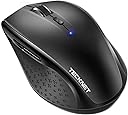


| Antenna Location | Office |
| Are Batteries Included | No |
| Are Batteries Required | Yes |
| Asin | B07H4GLL7K |
| Battery Average Life | 24 months |
| Best Sellers Rank | 1,784 in Computers & Accessories (See Top 100 in Computers & Accessories) 80 in Mice |
| Brand Name | TECKNET |
| Button Quantity | 6 |
| Colour | Black |
| Compatible Devices | Microsoft Windows 2000, XP, VISTA, 7, 8, 10,11 |
| Customer Reviews | 4.4 4.4 out of 5 stars (10,522) 4.4 out of 5 stars |
| Enclosure Material | Plastic |
| Hand Orientation | Ambidextrous |
| Hardware Platform | PC |
| Included Components | TeckNet BM308 Mouse+Manual |
| Item Dimensions L X W | 26.9L x 17.3W centimetres |
| Item Weight | 75 Grams |
| Manufacturer | TECKNET |
| Manufacturer Part Number | 600212 |
| Model Name | Alpha |
| Model Number | EWM01308 |
| Mouse Maximum Sensitivity | 4800 Dots per Inch |
| Movement Detection | Optical |
| Network Connectivity Technology | Bluetooth |
| Number Of Batteries | 2 AA batteries required. |
| Operating System | Windows |
| Power Source | Battery Powered |
| Product Features | 2 Additional keys, 24 months battery life, Bluetooth, TeckNet TrueWave Tracking |
| Product Finish Type | Smooth |
| Product Warranty | 1 |
| Range | 15 meters |
| Style Name | Mobile |
| Theme | computer accessories |
| Unit Count | 1.0 count |
User
Reliable and Comfortable Mouse for Work and Home Use
I’ve been using the TECKNET Bluetooth Mouse for both my work and home office setup, and it’s been excellent so far. The connection is stable, the mouse feels comfortable in hand even after hours of use, and the build quality is solid.The adjustable DPI is a nice touch for switching between tasks, and I appreciate the long battery life – I haven’t had to change the battery yet. Setup was quick and hassle-free, and I’ve had zero issues with it.If you're looking for a dependable and affordable wireless mouse for everyday productivity, this one is a great choice.
User
Quiet and Comfortable Mouse
Really happy with this wireless mouse. It connects easily via Bluetooth and the silent clicks are great for working without disturbing anyone. It feels comfortable to use and the size is perfect for travelling. Great value for money!
User
Comfortable in the hand, great connectivity.
Having tried a dozen or more Bluetooth mice as a professional CG artist, this has to rank as one of the most comfortable I have used. It is very light, sits in my palm perfectly and the buttons are largely intuitively positioned - although it took me a little while to get used to not accidentally touching the forward and backward buttons on the left. The mouse connects and reconnects very readily to all of my Macs, from the older desktops to my new MacBook Pro. The instructions only quote compatibility with various Windows operating systems but luckily for me it works perfectly with Apple computers. Connectivity is something which I have found to be an annoying problem with other brands, where constant re-pairing or waiting for your connection to ‘wake up’ can accumulate a lot of lost time during a working day, but this mouse seems particular good at reconnecting. I find the default DPI of 1200 plus the next step up to 1600 perfectly adequate for most usage, though I do like that it has the option of higher resolutions for more detailed work. 3D animation software often requires three button modifiers, and if I had one criticism it is that the scroll wheel when used simply as a middle-mouse-click is quite sensitive. However, this wouldn’t affect most every day use and it’s something I’m already getting used to so this is slightly picky of me. I can’t speak for the battery life as I haven’t had it too long but the instructions speak of intelligent power saving and, as the mouse sleeps and reawakens so consistently well, I feel pretty confident about economic battery usage. Altogether, a nice, reliable, ergonomic mouse, one of the best I’ve used.
User
Another great mouse from Tecknet
I bought this mouse (BM308) to use with my Dell Latitude 5290 and I must say it works a treat. I chose the grey colour and it matches perfectly with the laptop.The mouse is a decent full size unit designed for a right handed user so sorry to the lefties out there (see photos - and size compared with an iPhone 6 and a credit card). And I like the fact that it is Bluetooth enabled as it means I can free up a USB socket on my laptop which was previously used to house the receiver for a 2.4 GHz wireless mouse (which used to be a very good yet smaller Tecknet portable mouse).I like the fact that there are 5 different DPI settings available is an added bonus and I think most will use the 1200 or 1600 DPI settings unless working with a large screen estate and desk which allows for a bit more wider movements when using the mouse. And given that the button is high up and away from the scroll when fingers; you are unlikely going to be pressing that button accidentally. I also like the fact that there is a forward and back button on the left side of the mouse. Gosh, I haven’t used extra buttons on a mouse in a long time but I they are useful for sure.The on/off button is a bonus as sometimes I don’t use the mouse and just popping it into my bag can mean the mouse is accidentally left on and moving/clicking away. So a quick slide of the button and it’s all off which is just simple but highly effective. The sleep feature works quite well and it wakes easily with movement or a simple click. Battery life is great too and 2xAA batteries should last a good while (I am using rechargeable batteries). . And with a good Bluetooth range, it has saved my bacon a few times when I have forgotten to pack my presentation pointer when presenting to an audience.Overall a cheap and cheerful mice which will serve me well in the office like it has done already. And just as good, if not better than the Logitech/Microsoft equivalent.Grab yourself one of these mouse as you won’t be disappointed.
User
One little mouse with cheap price tag and hefty quality
Hello fellow tech lover, if you are about to purchase this item and are a bit dubious as to why it's so cheap, I hope I will put your doubts at rest. After all, I was in your shoes as well. After buying an expensive bluetooth Logitech for over £50 which caused me enormous amount of headaches and frustration with Logitech Support I threw it in a drawer and started looking again. After a few considerations between Microsoft and other makes I came across this product and I have to say I was very surprised by it's reviews. Considering the price tag I thought I'll give it a go and have not been disappointed. As soon as I got the product, it synced beautifully with both my Macbook Pro and my Surface 3 (Windows). Mind you, I could only sync it with one device at any given time, i.e. if I sync it with Macbook, I have to re-sync it with Surface 3 and vice versa. It doesn't remember more than one device - but that's not a problem. I use it mainly at work anyway. The feel of the mouse is amazing, it's not too small, it's not too big, perfect for carrying around and saving that one extra USB port as it's Bluetooth. I use it every day for 9 hours and the battery has lasted so far without changing - bought it beginning of August. Once I disabled in the Bluetooth settings that annoying feature where the laptop cuts of power for the bluetooth device to conserve power, the mouse works flawlessly.I'm well please with this little and cheap product, if only everything was as good and cheap.
User
Excellent mouse with no setup or dongle required!
Highly portable but not on the small side, which is exactly what I wanted!The main reason I bought it was because you don't have to plug anything in to the USB to make it work. It connects via bluetooth 3.0 or 5.0 and as long as your device has bluetooth 3 or 5 then it should be detected easily.I have tested and used this mouse on my Android phone, Fire Stick, Steam Deck, Laptop and my main PC with no issues whatsoever!You get 2 side buttons, which are a great addition for gaming or even just for extra handy hotkeys in photoshop or other programs. The buttons and mouse-wheel are solid and not flimsy/loose like a lot of cheap mice are. It also has a decent weight to it, which is due to the thickness and high quality of plastic used. I like that and hate to feel cheap thin flimsy rubbish which is what most bluetooth mice are made of.So I feel you get the best of all worlds with this mouse as it's more than good enough to be a permanent fixture either as a desktop mouse or just leave it on your armchair and use it to control your Smart TV/Fire Stick etc. The things you can use it for are limitless.The switch underneath turns it off and conserves the batteries while you store or transfer it. The batteries will last you an awful long time too, which I was quite surprised by as bluetooth devices usually drain quite a lot of power. But as long as it's in close range to your device, you'll get a lot of time from your batteries. In my experience if you're more than a couple of feet or so away then you may see them drain quicker. Which goes for all BT devices.I only have one slight criticism and that is that the side grip isn't rubber, it's just hard plastic with a matte texture. But for the price of it you can't really complain, and it feels comfortable enough for me for even long gaming sessions!As a PC gamer of nearly 30 years I've had loads of mice, but I think you could easily spend a lot more than this and get a lot less in return. So I'd say it's quite a bargain!I'm very happy with mine and even bought 2 more as gifts for family members.
User
Not as good as the (discontinued?) BM308
Update (6 November 2022)I purchased this mouse (model: EWM01308) to replace the Tecknet BM308 which developed a fault after 5 years trusty service - a single-click of the left button had started registering as a double-click. It looks like the BM308 has been discontinued? My early impression of its replacement is not favourable.POSITIVESSame full-size shape as the BM308.Works with Eneloop AA rechargeable batteries. (This mouse emits a red light from the sensor underneath, whereas the BM308's light was invisible. Too early to say if that will impact battery life).Paired quickly on a Windows 10 Lenovo ThinkPad laptop using Bluetooth 'Swift Pair'. The laptop sees it as a "BT5.0 mouse".NEGATIVES (in order of frustration)The cursor motion is noticeably jerky at slow speeds, e.g. when trying to accurately drag / position an element on-screen. (With the BM308, it was super-smooth). Changing DPI made no difference. Turning off "enhance pointer precision" in Windows mouse setting made it worse.Occasionally, a left click has failed to register. (Another reviewer mentioned this too).I haven't noticed the 4 stages of sleep mode but when the mouse eventually goes to 'deep sleep', (after ~30 minutes undisturbed?), you need to click a button, or move the scroll wheel, to wake it. Use of the scroll wheel is less 'dangerous' than clicking, if the mouse has gone to sleep while the pointer is over a close button for example, but the BM308 just needed a wiggle.The battery indicator / DPI light on the top is a faint blue colour, whereas it was a much more noticeable bright orange on the BM308. Certainly nowhere near as bright as the photos here on Amazon would appear to indicate!The button click is louder than that of the BM308 (although that doesn't really bother me, and might be because I'm comparing a new mouse with a well-worn one).Would I recommend it, or buy it again? Not without looking at alternatives first.My original review of the BM308 follows for reference:I've had this mouse since November 2017, (so over 4 and half years now), and it's worked flawlessly.Paired first time on Windows 8.1 and Windows 10.I use rechargeable Eneloop AA batteries and get at least 6 months lifetime using the mouse for work for 9 hours/day, 5 days/week minimum. (I tend to change / recharge the batteries after 6 months anyway). Tracking is smooth. I mainly use it on a red mouse mat but it's also worked on a black one as well as plain and wood-effect desks. I have it set to the highest DPI.I haven't noticed the 4-stage sleep but when I leave it undisturbed for, say, 30 minutes, it just takes a wiggle to wake it up (with a brief second or so lag - nothing to complain about). I've never had to click a button to wake it. I've occasionally had random disconnects, maybe once every week or two, but the problem has been the Bluetooth on my PC, not the mouse. When it happens, I just put the PC to sleep then wake it and connection is restored. No need to reboot the PC.The buttons click (i.e. it's not a "silent" mouse) but they're not loud, and I can rest my fingers on them without accidentally clicking (i.e. it's not over-sensitive / trigger-happy!). The scroll wheel notches and is completely silent.It's a full-sized mouse but very comfortable to use.All-in-all, it's the best mouse I've ever used. I'm thinking of buying another one just to have ready for the day this one dies.
User
Amazing product
Works amazing! Very good for work
User
Wanted to Turn my Note Pro (12.2") into a little more than a toy
The price is what sold me on it, but it was the size I was worried about. I don't have big hands, but I don't have small hands either (they're in that annoying in between stage of bigger than average, but smaller than large for an adult male). This mouse is great, though was a pain to pair with android, and I thought it was busted. I ended up testing it on my Windows 8 PC and it worked just fine, then I later figured out how to get it to work on my Android Tablet without any issue. I'll go into that a little later.Pros:-Not that small, just slightly smaller than my favorite M510 Logitech mouse. It's the large hump near it's rear that makes it decent fit for my hands without having to change my grip to something uncomfortable and unusable.-On windows, all the buttons work and did something, again I'll go into that later.Cons:-None really, the android connection issue is an Android issue that I solved. If I had to pick one, it would be that the printed manual says it has an 8 month battery life as to the 18 that this page claims, kind of a huge difference in time.Android Connection Fix:1st: Connect the device like you would any other. Go into Settings > Bluetooth > Turn it on > Scan. On initial turn on of the mouse it should go into search mode where it should then be discovered by your tablet/phone. If not press the connect button (top middle) on the underside of the device.2nd: Notice how janky the cursor is, that seems to happen every time you pair this mouse for the first time. Turn off your bluetooth, and then on again to kill the connection with the mouse.3rd: When bluetooth is back on, press "Bluetooth 3.0 Mouse" to initiate re-pairing, and on the bottom of the mouse press the connect button to re-establish a link to the tablet. You should notice now that the cursor is smooth and working as it should.Mouse Buttons Functions (Windows):-Orange side buttons = back and forth (top = forward, bottom = back)-Everything else works like it should, right click, scroll wheel/middle click, left click. Works just fine and is very responsive.Mouse Buttons (Android):-Orange (top): seems to not do anything for me-Orange (bottom) and Left Click: acts as an Android "back" button-Right Click: acts like a one finger touch-Scroll Wheel: scrolls between home screens and drawers in launcher, and then normally in apps like Photo Gallery, and Browser-Middle Button: acts like "home" takes you to your launcher, you can also activate the long press "home" feature (which on my Note Pro launches Google Now)Since I'm writing this on my Tablet using/testing a keyboard I don't know if I can upload pictures from Amazon's Android App. I'll do that when I reconnect with my PC and maybe correct any spelling mistakes I might have made but using an external keyboard doesn't pick up. With that said, I can't be more pleased with my purchase, after solving that Android Mouse issue. It's one of those purchases that luckily doesn't cost much and for me is worth the risk. The manual was in proper English and was rather informative.
User
overall works nicely
The back and forward button only work while browsing internet. These two buttons do not work in Microsoft apps such as word
User
My favorite mouse for computer
Very cute mouse for office . It was easy to set up. It very user friendly and comfortable on your hands . I like that it save battery by going into sleep mode when not in use. Love it !
User
Mouse senza fili bluetooth
Chiarisco subito che questo Mouse non ha il ricevitore bluetooth QUINDI è assolutamente necessario che il vostro computer abbia già di suo tale accessorio, oramai presente in tutti i portatili, iPad o smartphone.Personalmente ne ho acquistati ben due pezzi in tempi diversi. Il primo perchè era in offertissima a poco più di 6 euro ed ho voluto provarlo. Soddisfatto ma a distanza di tempo ne ho comprato un secondo perchè mi era necessario. Detto questo il mouse funziona egregiamente bene; si configura subito come accessorio BT, i tasti e la rotella sono precisi al tatto, l'ergonomia e la leggerezza lo fanno scorrere ottimamente e la regolazione di velocità/risoluzione del puntatore sono ineccepibili per semplicità e velocità di attuazione. L'ho usato sotto Linux e MacOSx e relative macchine senza problemi, anche sul Raspberry (che ha wifi e BT di serie) e con mio enorme stupore anche sul telefono, un Huawei P Smart Z ( lo preciso perchè non so se altri smartphone lo permettono; penso sia una caratteristica di Android 9). Basta che si accenda il BT e che i dispositivo venga rilevato e sullo schermo compare il puntatore come sul PC. Le funzioni touch vengono coadiuvate dal mouse ;). Le batterie dopo più di 6 mesi non le ho ancora sostituite. NB: può capitare che il computer perda la connessione perchè il mouse è fermo da qualche minuto; semplicemente entra in modalità standby per risparmiare energia; basta muoverlo perchè la riconnessione avvenga veloce e in automatico.
User
Great deal for the price!
Works like it should for a decent price! Have had no issues whatsoever 😊
Trustpilot
5 days ago
1 month ago