Buy anything from 5,000+ international stores. One checkout price. No surprise fees. Join 2M+ shoppers on Desertcart.
Desertcart purchases this item on your behalf and handles shipping, customs, and support to Uruguay.
🚀 Dominate your digital domain with ASUS ROG Rapture – where speed meets security in style!
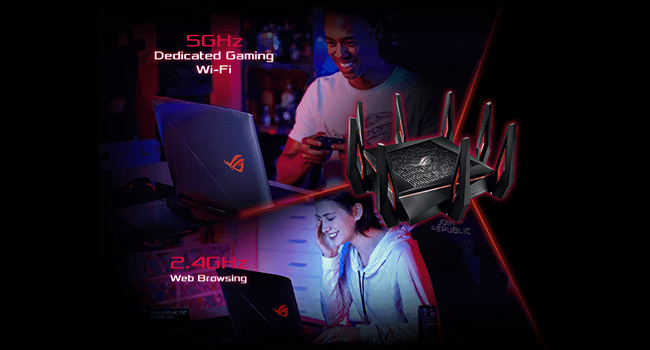
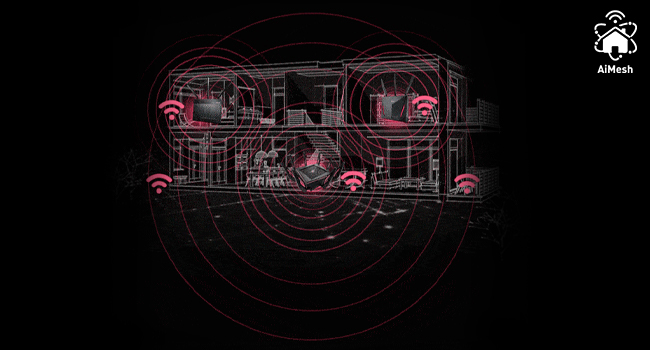
The ASUS ROG Rapture GT-AX11000 is a tri-band WiFi 6 gaming router featuring a powerful 1.8GHz quad-core CPU, 2.5G gaming port, and AiMesh compatibility for whole-home coverage. It delivers blazing-fast speeds up to 11,000 Mbps, advanced game traffic prioritization, and lifetime internet security, all wrapped in a sleek design with customizable Aura RGB lighting. Ideal for gamers and professionals demanding ultra-low latency, extensive device management, and robust network protection.


| ASIN | B07MRD1LDZ |
| Antenna Location | Game,Monitoring,Security |
| Antenna Type | Retractable |
| Best Sellers Rank | #5,682 in Computers & Accessories ( See Top 100 in Computers & Accessories ) #584 in Computer Routers |
| Brand | ASUS |
| Built-In Media | GT-AX11000, user manual |
| Color | Black |
| Compatible Devices | Gaming Console |
| Connectivity Protocol | bluetooth, ethernet, wi-fi |
| Connectivity Technology | USB, Wired, Wireless |
| Control Method | Voice |
| Controller Type | amazon_alexa, vera |
| Coverage | Very large homes |
| Customer Reviews | 4.5 out of 5 stars 3,501 Reviews |
| Data Transfer Rate | 11000 Megabits Per Second |
| Frequency | 5 GHz |
| Frequency Band Class | Tri-Band |
| Global Trade Identification Number | 00192876064740 |
| Is Modem Compatible | No |
| Item Dimensions L x W x H | 11.3"L x 4.74"W x 14.86"H |
| Item Type Name | ASUS ROG Rapture GT-AX11000 AX11000 Tri-Band 10 Gigabit WiFi 6 Gaming Router, 2. |
| Item Weight | 4.1 Pounds |
| LAN Port Bandwidth | 10 gigabits per second |
| Manufacturer | ASUS Computer International Direct |
| Maximum Upstream Data Transfer Rate | 10000 Megabits Per Second |
| Mfr Part Number | GT-AX11000 |
| Model Name | ROG Rapture GT-AX11000 |
| Model Number | GT-AX11000 |
| Number of Ports | 15 |
| Operating System | Linux |
| Other Special Features of the Product | Internet Security, WPS |
| Security Protocol | WPA2-PSK, WPA3, WPS |
| Smart Home Compatibility | Smart Home Compatible |
| Special Feature | Internet Security, WPS |
| UPC | 192876064740 |
| Unit Count | 1.0 Count |
| Voltage | 120240 Volts |
| Warranty Description | 2 Years |
| Wi-Fi Generation | WiFi 6 |
| Wireless Communication Standard | 802.11ax |
| Wireless Compability | 802.11ax |
A**.
Great upgrade
We upgraded from an ASUS AC66U. The previous router was also ASUS. The initial setup took about 30 minutes, and we were able to get things going pretty quickly after that. First thing I did was upgrade the firmware, and we haven't had any issues at all. The only restarts have been from me after configuring new items like the VPN. The one hangup I had was that I was using the ASUS DDNS and didn't see the info that I needed to contact them to release the old domain from the old router before connecting it to the new one. That info is on the bottom of the one of the FAQ pages, but I wish they would make it more prominent. So far this is my only interaction with customer support, but they were very helpful and got it taken care of right away. Hopefully there aren't any more difficult requests that I need to send their way. Previously we had the two routers providing connectivity for the house, and had issues when devices wouldn't disconnect from one, and go to the other. They were setup as a main router, with the secondary as a wired AP. This new router has been working great without need for a second router, although I did setup one of the old ones just in case, it has remained unplugged on the counter. All of our devices for a 4 adult household have been seeing much improved speed, as well as, signal strength. I can easily get signal a couple hundred feet away from our house and browse the internet. The house even has aluminum siding, so I'm sure most people will probably get better signal than I would. The previous router was unable to really handle the full throughput of our connection to Comcast. It would top out around 150Mbps, but the new one easily runs past it around 470Mbps (on a 400Mbps connection). Another thing I setup was the VPN. I decided on the router hosted one for IPSEC with PSK/Secret. That works great and is the one I'm more familiar with having worked with CISCO stuff in the past. It also doesn't require that the traffic go through a 3rd party before going through your router. This is great for if we're traveling and want to make sure that our traffic is transmitted securely even though the WiFi we're on might be open or shared. Additionally, you don't have to pay for a VPN service. In terms of total cost, it is pretty expensive, and fortunately I had a bit of cash that we weren't expecting to have that I used in order to bring down the total cost of the router to about $250. At that price it's basically a steal, but at the full $450 it was something we were contemplating, but would probably not have pulled the trigger on. Having said that, the number of features that are provided are very impressive. I especially appreciate the network security through TrendMicro. I'm sure it's not on the same level as a FireEye appliance, but for the home you probably couldn't do a whole lot better with an all in one solution. We don't have any kids yet, but when we do, I would like to try out the parental controls. I could try them out on the other three people, but I'm not sure how happy they would be. The AIMesh would be nice to try, but both of our older ASUS routers don't support this. There's not a lot that the system can do besides attempting to band steer clients from one AP to the other, so if you really want, you can setup your network to basically provide the same functionality as AIMesh, it just won't be able to do the band steering as well. You can do this by setting your dynamic IP address range like this: 192.168.1.100-254, then statically assign IPs to any APs in the .1.1-.1.99 range. This essentially works like daisy chaining switches together, but over WiFi. You can then adjust the settings for each router where it will either attempt to allow the client to continue to connect, or cede the connection to a "better" one. One more thing I hope for is that they will be able to add WPA3 support in the future, but even if they don't, I'm not super concerned. All in all, this appears to be a pretty good upgrade from our old router. I usually use equipment such as this for longer periods of time by buying the top of the range, then making sure that it will continue to meet our needs. This helps to stomach the cost a bit more too. The older routers will probably see reuse as time goes on, if someone I know is in need of a router, or if I am experimenting with things. I have often thought of setting up a stand alone server to serve this purpose and act as the router and firewall, then using APs for WiFi, but in terms of a total functionality, time spent, money spent (including power), and ease of use for the home environment, I have found myself coming back to these routers, and specifically ASUS for the broad feature set that is offered. Obviously there is brand familiarity too.
M**2
ASUS ROG Rapture GT-AX11000 - Fantastic So Far!
I have installed the ASUS ROG Rapture GT-AX11000 on July 28th, 2019, and so far, I can not praise this router enough. I am a computer system builder and have dealt with all sorts of home and small business networking scenarios over the last 10+ years and the Asus units are by far the easiest to set up and the best in features/performance with the right unit purchased. Installation: Installing the ASUS ROG Rapture GT-AX11000 was extremely easy. You do NOT need a computer with Ethernet connections to configure or set it up. It is an option, but if you own a tablet or smartphone, a simple app download will get you up in running in no time. I downloaded the Asus router app from the Google Play store. I powered down my ISP's modem, connected the router to it, and then booted the modem. I waited for it to establish a connection, then booted up the ASUS ROG Rapture GT-AX11000. I waited a few moments for the router to start communicating with the modem and then launched the Asus Router app on my Samsung S10 smartphone. The app found the router without issue, and after a couple of clicks and setting the signal properties and passwords, I was connected and online. It all took less than 5 minutes. Asus has really simplified the configuration and setup process. Shortly after connections where established, it found a firmware update, and I installed it. Once rebooted, I was back online and ready to go. Features: This router, as well as several other Asus higher-end models, has a FANTASTIC user interface with a slew of options to customize, control, and configure your network. This makes it super easy to monitor your internet/bandwidth usage. In my network, I have an online printer, 3 desktops, 4 smartphones, 2 tablets, and a smart TV all belonging to various family members. The Asus router app will show a complete list of all the devices that have been connected to it. If the device is online and connected to the router at that moment, you can see in real-time the amount of traffic that is being uploaded/downloaded to and from that device. If that device is turned off, it is added to the 'Offline' devices, but still available to be configured in the app. Once a device is connected, you will see it's standard ID name (example - Android 4.4, etc if it is an android phone). You can then rename that device so you can identify it easier. So for example, let's say one of your kids connects their phone to the wifi. You can rename it to 'Joey's Cellphone' and then not only monitor how much traffic is going to/from the phone, but you can limit the bandwidth it sends and receives, and even, with a simple tap of a button, you can turn off the signal entirely so the device no longer has access to the router/internet. You can also set up a schedule of when that device can receive a signal from the router. This is extremely handy if you want to limit a user's online time. If a family member has multiple devices, you can group those devices all together under a single user account, and turn access on/off for all that user's devices with a simple tap of the button. I do a lot of video and audio work, and one of my connected devices is a NAS (network-attached storage unit). One of the features of this router that I found useful was the 'IP Binding' feature. Wat this will do is, it will take a mac address of a certain device, and once that device is powered on/connected, it will assign a specific IP number to that device every single time that device connects to the router. It's somewhat like a static IP address, but without the hassle of all the extra configuration steps. This is helpful to me because, with my NAS, I have mapped network drives on my Windows 10 computer. If the network loses power in any of the devices, there is a chance when the NAS re-connects that it'll get a different IP number, which will force me to have to disconnect all mapped network drives from the NAS and re-map them with the new IP number. With IP Binding, the router will make sure that the NAS, as well as any other device I configure with it, will get the same IP number at all times. Signal Strength: This router has fantastic signal strength. I do not have my router places in the best of places. It's on the bottom shelf of my workstation on the second floor, with a few pieces of computer gear sitting next to it. I still receive 5 bars of 2.4Ghz signal all over the house, and I get a steady 3 or 4 bars of 5Ghz service. This is in a home with an outer wall and inner wall of solid concrete block from the foundation to the roof, with 6 inches of dead air space between them. So there is a lot that signal has to penetrate through in order to reach the devices. I have been online with this router for about 4 days now. In all my testing, I can not say I have run across any issues so far. Connected to my network at random times, I have 3 desktops, 1 laptop, 4 smartphones, 2 game consoles, a tablet, and a Kindle. With having Gigabit internet through my ISP, I have pushed this router pretty hard at times while testing it. My hardest test so far, I simultaneously had Netflix streaming on 2 devices, online gaming on another, doing large file transferring/downloading from the NAS AND internet on another. All devices combined were pulling from all 3 radio bands this router offers. I had no buffering or lag issues on any of the devices. So far, I have ZERO complaints about this router. I have been doing home and small business networking for over 10 years, and this is by far the best networking purchase I have ever made. I highly recommend this router at this point. If I hit any issues in the future, or it doesn't stand the test of time, I will come back to update this review!
J**L
ASUS ROG Rapture WiFi 6 Gaming Router - Fast Internet for Epic Gaming!
Hey there, fellow gamers! So, I recently got my hands on the ASUS ROG Rapture WiFi 6 Gaming Router, and man, it’s a game-changer for my online gaming sessions! First things first, this router is all about speed. With WiFi 6 technology, it’s like my internet got a turbo boost. I’m talking faster and more reliable connections, reduced lag, and smoother gameplay. It’s like the difference between riding a bicycle and zooming down the highway in a sports car. Seriously, no more frustrating lag spikes ruining my gaming experience! Setting up this bad boy was a breeze. The user-friendly interface and step-by-step instructions made it a piece of cake. I had it up and running in no time, and I didn’t need a degree in rocket science to figure it out. It’s perfect for tech-savvy gamers and even those who are a bit less tech-inclined. Now, let’s talk about range. The ASUS ROG Rapture WiFi 6 Gaming Router has some serious reach. I can game in my bedroom, the basement, heck, even out in the backyard, and still enjoy a stable and fast connection. No more dead zones or weak signals killing my gaming vibes. It’s like having my own personal gaming hotspot. One thing I love about this router is its gaming-focused features. It’s like it was tailor-made for us gamers. The Game Boost feature prioritizes gaming traffic, ensuring a smooth and lag-free experience. Plus, with the built-in WTFast game accelerator, I can connect to game servers lightning fast, giving me that competitive edge. It’s like having a secret weapon for dominating the virtual battlefield. In terms of design, the ASUS ROG Rapture WiFi 6 Gaming Router looks pretty sleek. It’s got that cool gamer aesthetic with RGB lighting and all. I mean, who doesn’t love a router that adds a touch of style to your gaming setup? It’s like having a mini light show while you’re busy fragging your opponents. Okay, let’s keep it real. This router isn’t the cheapest option out there, but you definitely get what you pay for. If you’re serious about your gaming and want top-notch performance, this bad boy is worth the investment. It’s like having a personal internet powerhouse in your gaming lair. In conclusion, the ASUS ROG Rapture WiFi 6 Gaming Router is a game-changer for us gamers. It delivers lightning-fast internet speeds, excellent range, and gaming-focused features that enhance the overall experience. Get ready for lag-free battles, seamless connections, and dominating the virtual world with this router by your side! Disclaimer: This review is based on my personal experience with the product, and I didn’t receive any compensation or incentives for writing it. So yeah, this is just me sharing my honest thoughts and excitement about the ASUS ROG Rapture WiFi 6 Gaming Router.
T**R
VERY effective WiFi coverage for large homes
I purchased the ASUS GT-AX11000 gaming router to improve WiFi coverage of my 3600 square foot, 2-level home in a densely packed beach cities neighborhood where spacing between homes is about 10 feet side-to side, and where there are a LOT of overlapping WiFi domains competing for capacity. Sifting through many, many reviews, the consistently strong points of this WiFi router seemed to be a very broad coverage area, unusually high capacity at a distance plus ability to handle a LOT of throughput and clients. And I found that these claims were quite true, in my application. In particular, I wanted seamless WiFi calling as cell coverage at this location is very poor. Friends who've installed mesh systems reported mixed WiFi calling results, with node handoffs often dropping calls. In this capacity, the GT-AX11000 installation was very successful. I now have seamless WiFi calling throughout my home and yard ... and a bit beyond. (Yay!) In addition, my family has been "sheltering in place" from COVID19, with three of us working remotely (2 VPNs, many video conferences) and my two sons are avid gamers and we all like to stream media (movies, TV, music) from the usual internet sources. This situation severely strained the old LAN infrastructure. Internet service bandwidth to this home is 200+ Mbps down/10+ Mbps up. Service distribution in the home is through a mix of wired gigabit Ethernet and WiFi networks. The previous wired/WiFi system was built around a Linksys WRT1900AC router, with a wired Netgear Access point to extend the network at one end of the home and another Netgear wireless repeater to fill the remaining WiFi voids at the other. WiFi service capacity varied from 90 Mbps in close proximity to the router, down to 20 Mbps at any significant distance, and WiFi calling was unreliable do to many "dead zones" and the different coverage areas provided by the access point and repeater. A key complication is that the home has numerous large mirrored, 2 and 3-panel closet doors and also has very large mirrors in each of its four bathrooms. These mirrors are break up "line of sight" RF transmissions and have been problematic with every WiFi system installed. Plus home construction is stucco over wire mesh - not very RF-friendly, either. Placed in the same exact location as the previous 4-antenna Linksys WRT1900AC WiFi router, the 6-antenna ASUS GT-AX11000 somehow manages to cover the entire property all by itself (no need for the auxiliary WAP and extender) with no dead spots on 2.4 GHz, and just ONE very tiny dead spot on 5 Ghz. The ASUS WiFi router appears to put out a 6-7 dB stronger signal than the old Linksys, but somehow the return channel from wireless clients, like cellphones, is also much cleaner. In most of the home, 2.4 GHz WiFi now supports 80-200+ Mbps, with 35-40+ Mbps out in the extreme front and back yards (lot is 50x150 feet). This is twice the speed and much better coverage than the old Linksys WRT1900AC. Oddly, 5 GHz service is almost uniformly 200+ Mbps (service provider limit) - I expected this band to drop off rapidly with distance but it seems to work at full speed throughout most of the home, except for one very small "dead" location. Remarkable. Of course, it helps that there is absolutely no other routers in range that supports the 2nd 5 GHz band. But our new laptops DO. (Yay!) Setup was easy. The GT-AX11000 was a nearly drop-in replacement for the old WRT1900AC and required only one or two minor tweaks to its basic settings to bring everything else up seamlessly. This includes supporting about 30 clients on a typical day. ASUS went out of their way to make router menus user-friendly and self-explanatory, and since this unit has been out for more than a year, the firmware seems pretty bug-free too, though there are a LOT of gaming tweaks I haven't tried. I did NOT buy this expensive piece of gear for gaming. The whole family seems happy with this new arrangement. Even the gamers. In conclusion, applied as a my home's central WiFi/wired router, the ASUS GT-AX11000 is a stellar performer in a large home in a densely populated area where many WiFi networks compete. The home's many large mirrors and stucco-over-chicken-wire construction, which hampered the performance of previous routers, does not seem to be a problem for this beast. And it IS a beast - looking like a giant alien spider sitting on top of a bookcase. Quite expensive, but delivers and works great (so far) - and that's what I REALLY care about!
J**Y
No to 5G for the USB ports
I bought this router on Nov. 4th, 2019, here on Amazon. I wanted to use it for a while before posting a review. This is a great router if you have DSL or pick up a Wi-Fi signal from somewhere. First, this has a very huge administration page if you like to make a lot of adjustments to your router. For me it was a little intimidating at first, but I grew to like it. Secondly, and the reason I took off one star. I access the internet by tethering my phone (Samsung S20 Ultra) to the USB port on the back of the router. Around a week ago Sprint moved me over to the 5G network. The router USB hub only works for 4G LTE/CDMA according to ASUS. Now it is having problems staying connected. I contacted ASUS about this and got and apology, but they have no future plans to upgrade the USB ports for 5G at this time. This is a very expensive router not to have foreseen the need for 5G. I did reset my phone to 4G, but I am not happy about this. I will probably try to resell this router or give it to a family member. Prior to the 5G rollout this was a great router, and I was very happy with it. I feel that ASUS needs to allow for future upgrades of this kind with this large of a price tag. This is just my opinion and yours may vary. Update: after extensive conversations with Sprint Advanced Technical Support, there are problems with the Samsung S20 series of phones and 5G. Supposedly Samsung is aware of this and are working on a software update. Also, although the USB ports on this router are hardware, there is software for them that can be updated for 5G. Hopefully ASUS will address this issue in the new future. Update -1/21/2022 -- Spoke with ASUS support yesterday, (what is now almost 2.5 years later since I purchased this router) and they still do not know if the USB 4G LTE ports will be updated to support 5G. Again, very disappointing for this price. Update - 11/06/2022 -- Unfortunately, around 6 months ago the router began to disconnect 2-3 times a day. I could unplug the cable or turn the router off/on, and it would correct itself. Then a couple of days ago the red light came on and stayed on (I call this "the red light of death). No ethernet internet, but the wi-fi works. I have T-Mobile Home Internet and no longer tether a cell phone for internet and the speeds are great per Speed Test. However, all my research indicates that once the red light comes on and stays on the router will have to be sent back to ASUS. Update - 11/08/2022 -- Hooray. I fixed the "red light/no internet" issue. I could not access the internet via an ethernet connection for 8 days. If anyone is having this issue and cannot connect to the internet, there is a fix. Go to the Microsoft Store on your phone and download the "ASUS Router app." I am guessing that I changed something in the settings for my router that my computer/router did not like. The ASUS GT-AX11000 has a very complex administrator setting system unless you are extremely savvy for these types of settings. I am still not sure exactly what happened, but I was able to apply new settings and update the firmware through my phone. Now the router works just like it did prior to the red light/no internet problem. Good Luck.
S**O
Reviews scared me but turned out great
I like Asus and their router management software. I was interested in this modem for the AX and VPN fusion options. I did a lot of reading of the reviews on amazon and was very wary of ordering this model to upgrade my Asus 1100. I then looked on the Best Buy page reviews and there the reviews were consistently more positive. I therefore decided to give it a shot. So far it has been 24 hours and this baby is great. The user interface and connections speeds are both very fast. The signal reach is a big improvement. The only drawback is that Asus provides a mind boggling number of options and that the colors on the setup screens makes the pages hard to read. I previously tried the Netgear Nighthawk 11000. Did not like the configuration software and did not get the speed. I suspect that some of the negative reviews come from setup problems or defective units. UPDATE: several weeks later. There are some holdbacks with the Asus AX11000. First, there are some bugs in the firmware. Even if you set a wired backhaul you cannot set the 5ghz2 ssid the same as the other channels. Once in a rare while a device will just disconnect (while sitting still in one location) and you have to reconnect. This happens to me maybe every couple of weeks but manually reconnect is fast. Second, tech support is not very helpful. After two weeks of e-mails and filling forms regarding the inability to set the same SSID despite a wired backhaul they send me an article on how when the backhaul is wireless the SSID cannot be the same. Really lack of care in dealing with a customer issue. Another tech person responded that they were aware of this and were working on a firmware fix but this did not keep the first tech from asking for more information and then sending me the inapplicable article on wireless backhaul. Overall, weeks later I still love the router, the incredibly snappy firmware interface and the speed. Hopefully they will get the couple of glitches fixed by the time that they become important to me..
P**T
Beware of "Amazon Renew" products
I had purchased this same router last year and it works fine. I purchased this item again to use as an AIMesh extension, but didn't realize that it was coming as an "Amazon Renewed" item. When it arrived, there was no documentation in the box. Fine, I can use the internet to download documentation. When I connected it, it went directly to account/password page instead of the setup page and the account/password defaults did not work. So... Amazon hadn't even done a factory reset on it after receiving it as a return from another customer. Very disturbing. I did do a factory reset. When going through the setup though, it became clear that the WAN port had failed on the device (probably why the last customer returned it!). So Amazon received a return and didn't even evaluate whether it was functioning before sending it out again. I had exactly the same router already operating - so I had direct comparisons of the operation and parameters on both systems., but still this was a half a day out of my time to go through every scenario to confirm that the hardware was defective. The ASUS product is fine, but I will never never buy an electrical component that has any risk of being an "Amazon Renewed" product - especially that can connect to my home network where I need to be concerned about cyber security. Though we have returned other products in the past with the UPS options, this time I returned the router at PetCO (which was stated to be Amazon's "fastest" option). At Petco, they asserted that they cannot provide a receipt to prove that they have received the item - Petco staff just say you will receive something in email. I am still waiting. I am hoping that PetCo's amazon return process is just very very slow compared to UPS. My suggestion if you have to return Amazon items is to not go through PetCo.
A**M
Why use pfSense? This is perfect for home security and gaming
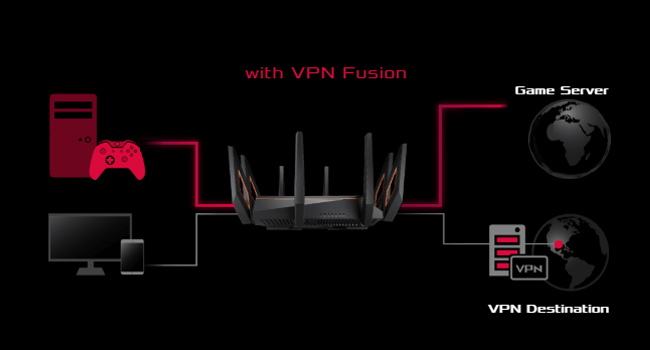
Update July 8,2021: 8 months of 24/7 connections to over 53 devices. Not a single problem. Took the router from the desk it was sitting on the basement and put it on top of a 6’ ladder, now Wi-Fi in the whole house, so I haven’t gotten the Asus node (don’t need it yet). For peace sakes I do have it to automatically reset twice/week around 4am, you set it up in admin settings. It was able to tell me the exact websites any device visits at any particular time, so I was able to catch kids wondering around the internet during school hours. Solid Router!!! Virtual school, teleworking and gaming worked as it should. My gaming ping is always under 40ns (anything under 60ns is good) I would buy again and definitely recommend. The lifetime “WTF” What The Fast subscription is embedded on the router, it really does work, for pc gaming it’s a most. Using a power house of a router running pfSense for my home network security. Unless you are an IT professional the upkeep for the true benefits of pfSense are not worth it in a home network. pfSense is an amazing free router software when paired with enterprise components is awesome, but my needs of Wi-Fi mesh for a happy wife instead of individual Wi-Fi access points made me pair my amazing router with the Orbi mesh solution. So far it has been amazing. Now 2 1/2 years later we are wanting Wi-Fi 6. Awesome Wi-Fi 6 mesh solutions are gonna cost you. 3 main things I wanted to accomplish inside a $700 budget for upgrade. 1-Home network Security 2-Powerful Wi-Fi 6 mesh 3-Play online gaming with true open NAT This router is fenomenal. It comes with free lifetime Trendmicro security with more than capable parent controls. I can assign individual ip to a devices and create profile. Now son has 3 devices under son. I can then assign to son OpenDNS home DNS service and keep him safe without me having to do anything else. I can use google DNS for game consoles and so on. My internet of things (IoT’s) are connected on the guest Wi-Fi with the 2.4ghz channel restriction so it won’t hog my other 2 bands. I can also put the guest network or in my case IoT’s network on a bandwidth restriction. Ok, now the awesome parts of security. I can put all IoT’s through a VPN and all personal computers and gaming console out. Split VPN works phenomenal on this router. Individual DNS per profile. Time schedule per profile. I can see all websites people go on my network. I can see traffic and bandwidth per ip and even apps. So far for home routing network this is pretty good. I know that having to trust Trendmicro with your information can be uncomfortable, but you can fix that by having your personal phones and computers use a VPN on the device itself. So I’m running router level VPN for all IoT’s and device lvl VPN while keeping game consoles and streaming devices of the VPN’s and this router doesn’t even blink. With Trendmicro All my IoT’s are protected like I had an IT guru working for me. Next is the Wi-Fi mesh. My hose is 2 floors plus the basement. Is around 3,900 sq ft counting the basement. I had an Orbi on basement and the other on the 2nd floor. This way it would cover my whole house. I tried many single access points but it would always sacrifice one floor the best was in the middle but even then the outermost parts of the house signal was very bad, or not good enough to FaceTime. So I got Wi-Fi extenders and it got boring havin to change from one SSID to another. That’s why we went to mesh. This router does what I want for my home security so far so good, how about MESH. It’s rated for 5000 sq ft so I thought my house is only 3,900 sq ft it should work, but if it doesn’t I can always get this router as primary router and then get another Asus router for my mesh needs. The second router would become a node. So you an get this and add on to it later as you need it. So with a $700 budget I’m down $400 so this gives me some space for another aimesh capable router form Asus. I put this router in the worst place in the hose. Not the middle but on one side of the far left wall in the basement. Only one device fails to connect on the 2nd floor far right wall, a lamp switch. If I use a laptop, no problem but a small $5 Alexa switch don’t have the power to reach that far away router. I have Wi-Fi in the whole house. Basement and 1st floor I see over 1,000 Mbps connections and on 2nd floor drops down to 300Mbps. If the connection is 1,000 in Wi-Fi my true speed is 500Mbps which is half, but my internet connection is only 300Mbps so internet is not a problem for more than 3/4 of my house. I can easily FaceTime anywhere in my house with any device with this single router. Router assigns best band per device so my laptop can change form 2.4ghz to 5ghz as needed but IoT’s are restricted. So no need to get another router for mesh, in my case. So I’m gonna get a 2.5Gb switch (Qnap for about $100) since this router comes with a 2.5Gb port now I can easily upgrade my internal home network to 2.5Gb with out changing lan cables. If you are a true online gamer you have heard of network bloating. Do a speed test turn on adaptive QOS and input 95% of your service bandwidth. I scored A+ A+ A+ in dslreports bloating test report. I tried to fix that problem with pfSence but running multiple VPNs always interfered with the boating part. All and all I think I got my money’s well worth. The router has very good hardware and the software is truly geared for home security and gaming. This is exactly what I was looking for and what I would have expected at this price point. This router does 3 guest networks so you can separate IoT’s even more or leave IoT’s one one and give your guest a totally new one with no restrictions on bands. It has features only found on Buisness class routers it’s just worded different for their intended costumers. Split VPN is called VPNfusion and multiple SSID’s is like virtual lans for Wi-Fi only found on enterprise access points and DDRT software. So far I’m loving this router, I’m just afraid that it will flip over and chase me up the stairs. Future proof, signal strength, security, and gaming capable, this router is well worth it. I was forced to put it in the basement because it looks horrendous. I did not buy for looks I bought it for it’s features which in my case far exceed the Asus XT8 which looks amazing but can’t do everything I can. In the future I can use this router as primary and add-on a single XT8 zen router by Asus as a node, those look good and also have a 2.5Gb port. If you want to future proof your network you have to start thinking 2.5Gb because Wi-Fi 6 has over 3Gb bandwidth so your Wi-Fi will be faster than anything connected through wires. At least with 2.5Gb it won’t be too far apart.
Trustpilot
1 month ago
1 month ago