
💿 Unlock timeless media with speed and style — because your digital library deserves the best!
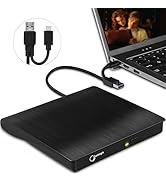
The Gotega External DVD Drive is a portable, USB 3.0 compatible optical drive offering up to 8x DVD and 24x CD write speeds. It supports a wide range of operating systems including Windows, Mac OS, and Linux, and features plug-and-play functionality with no software installation required. Its ultra-slim design and smart eject button make it a convenient and reliable solution for professionals needing to access or archive physical media on modern devices.



| ASIN | B07MJW5BXZ |
| Best Sellers Rank | #3 in External Disc Duplicators |
| Brand | Gotega |
| Color | Black |
| Customer Reviews | 4.2 4.2 out of 5 stars (72,005) |
| Date First Available | January 21, 2019 |
| Flash Memory Size | 1 GB |
| Hard Drive | External DVD CD Drive |
| Hard Drive Interface | USB 3.0 |
| Hard Drive Rotational Speed | 10 |
| Hardware Platform | Laptop, MacBook, Desktop, PC |
| Is Discontinued By Manufacturer | No |
| Item Dimensions LxWxH | 6.5 x 6.5 x 1 inches |
| Item Weight | 10.2 ounces |
| Item model number | External DVD Drive |
| Manufacturer | Gotega |
| Number of USB 2.0 Ports | 2 |
| Number of USB 3.0 Ports | 2 |
| Operating System | Windows XP/ 2003/ 2000/ Vista/ 7/ 8/ 10, All version Mac OS, Linux |
| Optical Drive Type | CD-ROM/CD-R/CD +/-RW/DVD-ROM/DVD-R |
| Product Dimensions | 6.5 x 6.5 x 1 inches |
| Series | External DVD Drive |
K**H
It works but not USB 3.0
I bought this to rip some DVDs and CDs that I want to throw out. I connected the drive to my dual boot Win11 / Ubuntu 24.04 machine. I am able to play and rip DVDs and CDs but the ripping aspect is quite slow. While investigating how to optimize the speed of the rip I discovered that the drive was actually USB 2.0, not 3.0. The merchant was kind enough to send me a replacement but the new drive is also 2.0. The drive functions adequately but it's not USB 3.0 as advertised. UPDATE: I'm upping my review to 5 stars because this is the only drive I have that I could get to work with MakeMKV.
G**Y
External DVD player for pc
If you have old tapes and y is u can make DCDs from them, this device will let you play this DVDs on your pc. It is very reasonably priced and it works as expected.
A**1
Works for now
We bought this with a lightning deal so it was a good price. It works with my computer. However, we had an issue with it after using it only a few times. It seemed the DVD tray was not straight so it wouldn't open or close. I had to turn it off (by unplugging it from my computer) and manipulate it some before connecting it again and it finally worked properly. After that, it seems to be better. I just hope it continues working with no issues because I wasn't planning on repurchasing within two months or even a year. There is no power button. It turns on when connected to your device. It connected quickly and easily so there's no need to set up a program to use either. It's small and compact so it doesn't take up much space either. I will say the cord is very short and I wish it were longer. It's almost too close and there's not much space to set it on the table or stand when it's connected to my device. So, in this regard, I don't care for this product. I'm not sure I'd buy this particular brand again when this one gives out. Hopefully, as mentioned, that won't happen for a while. We don't use it often, maybe two or three times a month.
D**D
Stop debating and buy this one.
I spent hours deliberating over all the choices Amazon had to offer. I'm not cheap, but I'm disabled and on a very limited budget, so I was leaning towards the low end of products to stay in my budget. I finally decided to try this product due to the 5 star reviews it got. Right out of the box, feels sturdy and well made. Virtually no setup, plug in the USB cable, and start doing whatever it is you want to do. The reason I needed a burner is most of my old copied music CD's were deteriorating, and I wanted to make new copies to keep in my truck. I was astonished at the speed this drive copied and burned my new CD's. I reproduced 9 albums in a little over 45 minutes. I am more than satisfied with those results. Also during the copy/burn process, I did not hesitate to abuse the drive a bit. Nothing violent, just average bumping, tapping, lifting and turning it, and not a glitch whatsoever, that is until I turned it upside down...It didn't like that...but picked up right where it left off, and had absolutely no effect on the quality of the burns. I also checked all of them and listened to 3 to their full length, and they all sound perfect. There are a couple of "Cons", but they are more than justified for the price and are easily accepted, or worked around. The first one is the "attached" USB cable, I would prefer it to be detachable, so it could be replaced if something happened to the original, but when I considered the fact that it is conveniently stored right on the unit for easy storage, transport, and protection, I decided to cross the "damage cable thing" bridge when I get to it, and move on. The second "Con" is that they don't include any software to actually use it other than Windows Media Player for playing music. So, I did my usual research and found "Express Burn" by NCH Software. It did a great job and very easy to use at an also unbeatable price...FREE! There may be others out there, and of course you could pay to get some premium features, but this program will copy files, create back-ups and copies of your music collection, as well as create bootable CD's to repair your Windows build if need be, without making an additional investment. To close this "novel" (which I almost never write reviews) I will just say I highly recommend this drive, and paired up with the free software you can't go wrong!
P**N
Did not function at all for me
Unfortunately it took a few years to recognize that this product was unstable and unusable. I bought it to watch dvd movies. When that didn't work I put it away in its box and bought a more expensive player. Then I brought this one out again so I could backup files and restore some old files saved on CD-R. It could not read any of the 5 CDs that I tried. The error was 'put in a CD'. Then when I tried to view the properties of a DVD I wanted to burn it spun & hung for many moments then said it could not read the disk, which was blank. Then it could not format the disk. This is with a Windows 11 laptop. I'm happy that it was not too expensive for me, but perhaps that was the issue. Too cheap and No value at all.
A**R
Works great.
Item works great with mu Ubuntu Linux laptop just received the item with the casing cracked as the top won't stay on but i'm using it that way since i don't drive i don't have a way to return it just don't look the best but hopefully will keep working looks like it was packaged messed up as the shipping box was ok just shipped without much padding just shipped in the small box so could have got dropped anywhere in shipping before i received it.
C**Y
Great product for burning dvd, fast and works great.
Best investment I made...since new computers do not have cd drive/burner. This works perfectly and fast. Love it.
C**H
Not Reliable Enough
The drive works, when it works. The issues I have had with it: 1) More often than not, it won't open when the eject button is pushed. It reliably opens if it is being recognized by a computer and the Eject option on the computer is used, but that frequently is not the case. 2) It will suddenly stop working and either has to be rebooted by disconnecting and reconnecting or if it starts up again, it then ejects the DVD. 3) It is quite slow and sometimes takes so long to open a file on a DVD that it seems to time out. It can do the job when it feels like it, but it is very inconsistent and unreliable. I'm done babying it.
O**K
I was initially a bit sceptical over the drive as it is so low cost while the big brand name equivalents are 3 to 4 times and more expensive. However, I only needed a CD/DVD disc drive to load my software on CDs/DVDs and to read my data files. Since my needs are pretty much basic, I didn't need a drive with all the bells and whistles and after a lot of shopping around on Amazon, finally settled for this drive for my Windows 11 laptop. I have two free software programs to run the drive as it didn't come supplied with any. This is not a deal breaker as one can download free programs like VLC and cyberlink. VLC does not burn discs but reads them very well while cyberlink software reads and writes. Both programs are not for Blu-Ray in their native form. If you need reading and burning software for Blu-ray discs, I'd suggest looking elsewhere or buying the upgrade professional version from cyberlink and a Blu-ray disc reader/burner - which this "gogeta" unit is not and suits only CDs and DVD discs.. In any case, the drive worked straight off with the need for either VLC (VideoLan) or cyberlink as Windows 11 recognized the drive immediately and popping in a CD/DVD disc with a movie or MP3 music will work pretty straight off. If there is any drawback to the "gotega" drive (Made in China), it is that the "User Instructions is printed in a tiny scrap of paper less than A4 in size and in font size that would require the use of a magnifying glass to read. I overcame this by scanning the instructions and then, printed them in an enlarged format on a full A4 sheet (two sheets required - one for the front and one for the back). The USB cable is a bit short but there are many other drives that are supplied with equally short cables. The "gotega" disc drive USB3 cable is only around 8 inches in length. Not a big deal again as I suppose a longer cable will make transportation harder as well as affect the electrical properties of the data carrying cable. The drive itself is very lightweight and feels almost flimsy and has to be handled with care. Alternatively, it is too heavy, it will attract criticisms too especially when it is used in a laptop and not a desktop. One final minor drawback is the fact that because the drive is so light (and very silent as well which a good thing), it tends to get pushed around a bit easily as there are no sticky rubber feet to help hold down the drive - especially when you are pushing the eject button (the eject function in software control is also available in Windows 11) and so, it's not a big deal as one can easily get some small stick-on soft rubber feet from the local hardware store (or Amazon). The eject function gets the drive to pop out about under an inch while you will have to pull the rest of the disc carrier manually but again, this is a low-cost unit that does the job without any problems so far. I hope that it will be durable in the long term for use in my ASUS laptop but for the time being, I have been pretty satisfied with this product.
S**.
Laptop registers the dvd but then the videos weeren't playing.
A**R
Great product. Plays DVDs to my laptop
M**F
I was a bit nervous, but when i plugged it into the usb drive, my pc recognized it and no issues recording or reading dvd. I do wish the usb cable was a bit longer. I can tell you that using a usb extender will not work. The drive will not be recognized if using that. Only the cable built in. It's easy to work with.
M**M
This CD/DVD drive is so easy to use - simply plug it in and it works immediately. I have lots of old photos stored on CD, which I wanted to transfer to my PC and was really impressed with the read-speed and transfer speed. It's very slim and lightweight so would easily slide into a laptop bag. It also plays our DVDs perfectly. Excellent drive.
Trustpilot
2 months ago
5 days ago



