
🎨 Elevate your digital canvas—precision, portability, and power in one sleek tablet!
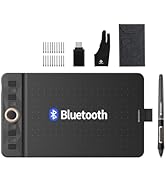
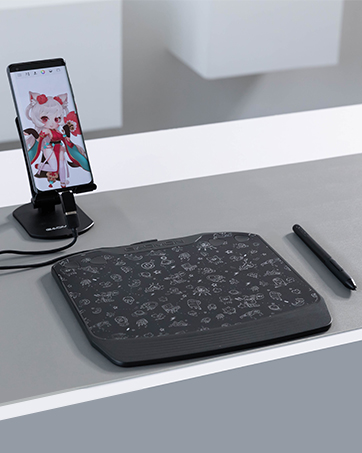
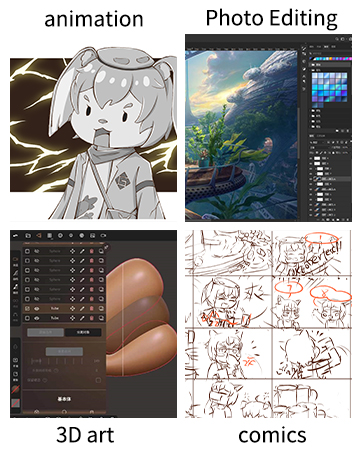
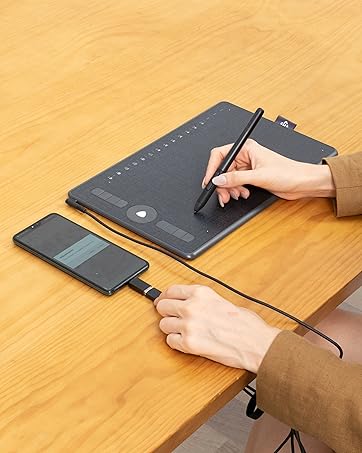
The GAOMON S620 is a compact, lightweight drawing tablet featuring an 8192-level pressure-sensitive passive pen and 4 customizable express keys. Its 6.5 x 4 inch active area balances portability with ample workspace, supporting Windows, Mac, and Android OS. Designed for digital artists, online educators, and gamers alike, it offers precise control, battery-free convenience, and multi-platform compatibility, making it an ideal entry-level tool for creative professionals and hobbyists on the go.










| ASIN | B07R77SNX9 |
| Batteries Included | No |
| Batteries Required | No |
| Best Sellers Rank | #5,148 in Electronics ( See Top 100 in Electronics ) #11 in Graphic Tablets |
| Brand | GAOMON |
| Compatible Devices | Desktop, Laptop |
| Connector Type | USB |
| Country of Origin | China |
| Customer Reviews | 4.1 4.1 out of 5 stars (8,272) |
| Date First Available | 7 June 2019 |
| Device interface - primary | Buttons |
| Display Type | LCD |
| Does it contain liquid? | No |
| Generic Name | Drawing tablet |
| Hardware Interface | USB 2.0 |
| Has Auto Focus | No |
| Importer | GAOMON |
| Includes Rechargeable Battery | No |
| Item Dimensions LxWxH | 10.2 x 16.5 x 0.1 Centimeters |
| Item Weight | 250 g |
| Item model number | GAOMON S620 |
| Manufacturer | GAOMON TECHNOLOGY CORPORATION |
| Material | rubber |
| Model | GAOMON S620 |
| Model Name | GAOMON S620 |
| Mounting Hardware | Digital Pen, GAOMON S620 Pen Tablet, Quick Start Guide, Replacement Nib, USB Cable |
| Net Quantity | 1 Pack |
| Operating System | Android 6.0 Marshmallow, ChromeOS 88, Windows 10, Windows 7, Windows 8, macOS 10.12 Sierra |
| Packer | GAOMON |
| Product Dimensions | 10.16 x 16.51 x 0.1 cm; 250 g |
| Programmable Buttons | No |
| Screen Resolution | 1920x1080 |
| Special Features | Portable |
| Standing screen display size | 5.8 |
J**J
Easy to use!
At last gaomon didn't disappoint! I had xp pen 960S model but it didn't last that long I bought it like a year ago! I wanted to find something within budget just for blender and clip studio paint! I'm a freelance manga artist and illustrator since I really wanted something within budget I gave it a try and it turns out to be decent! This graphic pad is really suitable for beginners and it's easy to use! Also the pen has 2 buttons which is a great thing! Because previously when I bought xp pen it only had a single button which I was using as a function of "undo" but now that I have two so I use them as "undo " and a link between eraser and gpen! Btw it also works on windows 11 so you don't really need to worry about anything! Overall it's a good graphics pad for the price it's given! You can definitely go for it other than xp pen! Bet it won't disappoint you!!
A**U
Plastic and pressure sensitive
As a beginner, I find the Gaomon S620 a good entry-level drawing tablet. It takes a bit of time to get used to, especially if you’re new to digital art like me, but once you start learning, it becomes easier to handle. The pen performance is impressive — it’s very precise and the pressure sensitivity works well, making drawing and shading feel natural. However, the tablet’s plastic body does feel a bit low quality, so the build doesn’t feel as premium. Overall, despite being a beginner and facing some initial difficulty, I believe this product is great for new digital artists. The pen quality and accuracy make it worth it, even though the body material could be better.
F**N
Perfection...
So this is my first ever drawing tablet. After going through so many options and reviewing different tablets. I came to conclusions that I should give it a try... And seriously this is really good in all aspects, this one has I guess the highest LPI at this price point. If you compare it with wacam one. The pen pressure, the sensitivity, the resolution everything is great. I work on a 2K display and it is calibrated so well. Pen works great, glide on surface is not slippery but give a good resistance same as working on paper. Can costomize all 6 buttons from the software (4 on tab and 2 on pen). Still getting use to it. Long stry short if you can draw on paper, you can use it effortlessly. Other than that, build quality is sturdy not heavy nor light weight.
A**O
Best
Very very best and comfortable product
F**N
Ok for beginners
Average performance, ok for beginners. Many times Tablet software gets disconnected and can't find the tablet, need to restart the driver manually. Presure detection often is not even, in slow draw/movement you can see blot like spots coming in the line, is a big issue, no issues in quick draw. Quality is Ok.
T**A
Value for Money
Reviewing after months of use. Very very good product. It's the first time I am using a writing tablet and it's realky good. Pros: Price Works smoothly Easy to use Can make notes easily Cons: The buttons are little bit tricky to use. The pen's button is also not so helpful Overall I can make nktes easily in one note and other websites. I am fully satisfied.
N**L
DONT BUY THIS AND SAVE YOUR MONEY👎👎
Not at all accuracy to draw or write! Worst product ever! Its a total waste of money! IT DOES NOT SUPPORT IOS AT ALL, WE HAVE ONLY APPLE PRODUCTS, and we do not have a single andriod product! And it only works in macbook, still it just function as a MOUSE TO A COMPUTER. We even tried in an andriod phone but this product also failed to work in andriod phone! ITS JUST ANOTHER TYPE OF MOUSE! Just a cursor and not at all accuracy to draw! Idk why people liked this product, and why have they given good reviews but for me ITS A BIG NO! Sorry gaomon but the truth is truth! Let me tell you honestly: 1)The first drawing picture is drawn on ipad by apple pencil and it works best, still we decided to buy this graphic tablet so we can do it more accurately but the reality is worst than expected! 2)The second drawing picture is drawn on macbook (as this tablet only supports andriod and only one apple product which is macbook) and see the accuracy, we tried to draw the same thing but the results show vast difference! Pls do not buy this and pls save ur money for some better technology than this!
K**N
Good and worth it to buy
It's a good product, worth it to purchase it at this price. work efficiently, doesn't lag at all. And I am happy to purchase it but there are some issues with stylus the buttons doesn't work that much efficiently in comparison to tablet but it doesn't make any difference .
T**K
its good and worth the purchase you might hate oni t at first but its actually really easy to use.
M**T
Bu fiyata alınabilecek en iyi grafik tablet buna şüphe yok bu fiyata göre gayet büyük bir alanı var rahat not tutturur çizim yaptırır hissiyatı güzel pişman olmazsınız ama en ıyı grafık tabletlerı kullandıysanız onların fıyatı bunun bı 10 13 katı aynı deneyım elde edılemez tabii ki ama bunun yerıne 2 katı para verıp bır urun de alsanız aynı deneyımı elde edeceksınız( basınç hassasiyeti maksımum sevıyede ki 2 bin bile yeter aslında tilt desteği yok kara kalemde maksımum performans alınamayabılır ama urun cok ucuz tılt desteği nasıl koysunlar) o yüzden harika eğer bilgisayara takacaksanız daha iyisi yok ancak bu urunu androıd ıcın tablettır telefondur bunun ıcın alıyorsanız, ben başka ürün bakmanızı önerıyorum ürünün değil yarısı 1 bölü 4 ünü kullanabılıyorsunuz tuşları özelleştıremıyorsunuz sadece kalemdekı 1 tuş u sılgı olarak kullanmanıza ımkan verıyor
J**N
Väldigt bra funkar exakt så jag ville!
G**N
When I first saw this tablet I was rather skeptical; even for a smaller tablet it was incredibly cheap, especially when compared to the prices set by other brands. I went ahead and ordered this tablet, after all there’s not much to lose; on top of the Gaomon warranty I was also offered a 3 year long protection plan for a little under $5. Already a better start than any other tablet I’ve purchased. The tablet arrived much quicker than expected and I was also pleased to see how nicely everything was packaged. I attached a little unboxing video here; I went ahead and removed the plastic from the products (tablet, tablet pen, and glove) before recording, but everything was re-placed as how it was when it came in. The contents include: Tablet features: 6.5” by 4” Work Area. 4 Shortcut keys Everything else: The S620 tablet itself Battery-free AP32 pen (8192 levels pen pressure, aka pretty standard pen pressure but impressive for such a small tablet) 1x USB Type-C Adapter & 1x Micro USB Adapter Drawing glove Spare pen nibs (enough for the tablet’s whole lifetime, more nibs are available on their website but they provided plenty to start with) Setting up this tablet took no more than 10 minutes, Gaomon’s site was really easy to navigate. If you have another tablet make sure you uninstall that driver before installing this one, the same goes for any tablet, only one can work at a time. Not that big of a deal, just a tip for beginner tablet users! After around an hour working with the tablet, I got an error message on my computer and the driver stopped working. I went back to Gaomon’s website and right there on the front page (it’s so big you can’t miss it) was a link to download their universal driver that would fix the issue right up. kudos to them. Driver issues are super common with all tablets, but I’ve never seen a company that openly acknowledges & tries to give you as much access as possible to fix them as Gaomon does. I didn’t have to dig for this fix AT ALL, and the tablet worked normally after taking the 2 seconds to download the new driver. Super rare for tablet companies, you usually have to dig. There was only 1 cord for this tablet, which I was really pleased about. There’s no clutter! It’s definitely portable and quick. The glove fit me as well, which I wasn’t expecting since tablet companies tend to either send huge gloves or extremely tiny ones, but this one fit me perfectly! There’s also USB connectors in case you want to use the tablet on your phone; like I said, it’s made for portability and ease of use. The pen nibs supplied are enough to last the tablet lifetime, it’s overall a great deal. As for the tablet performance itself, it works just as well as my $350 Wacom Intous (medium). Obviously, it’s a lot smaller than I’m used to, which took some adjusting, but that’s expected. I got the hang of it within the same hour and worked on it as I would any other tablet after that. It performed just as well drawing wise as my Wacom. The only con really was the pen. For the first hour or two I was really enjoying the pressure of it. After an hour or so I had to push a bit harder for it to connect & to get the pressure I wanted. Again, this took some adjusting too and wasn’t my favorite, I’m more used to pens that don’t have so much “buffer room” so that’s more of a personal preference. Once I was more used to it after another hour or two it wasn’t so bad. For such a small and well priced tablet though, it’s surprising that it works THIS well. You definitely get bang for your buck I’ve never been one to use shortcut keys before, but I decided “why not” and set some up to use for this tablet, and wow I’ve been missing a lot! I like how these keys click a lot more than my Wacom’s do. Their sensitivity is really nice and the shortcut menu is right on the driver menu so it’s super easy to navigate and set up. I highly recommend this tablet to beginner artists (I’m going to be giving this tablet to my younger sister, who’s just recently getting into digital art/animation), it’s cheap, easy to understand, and very portable. It does it’s job well, what more can I say? In a time like this with the lot of us doing everything online, I’d also recommend this tablet to teachers (my own struggles to write equations with his mouse), it would really help with signing things online as well! I’m actually astounded that I spent hundreds on a tablet I could have gotten for less than half the price for the same quality from Gaomon. Leading tablet companies aren’t always the way to go, Gaomon has much better protection plans as well! And I got a free tablet glove. Now, I wouldn’t suggest this particular tiny tablet for full time artists like myself, they have other sizes that I expect to hold up just as well for under $100. Hell, I could even get a screen tablet for cheaper than I got my Wacom desk tablet for. Had I known about Gaomon when I was first looking for a tablet, I surely would have saved a lot of time, money, and clutter buying from them.
G**.
Ho comprato la tavoletta grafica GAOMON S620 oltre un anno fa e devo dire che è stata una scelta azzeccata. È una tavoletta molto compatta, ideale per chi ha poco spazio sulla scrivania, ma allo stesso tempo offre un'area di lavoro sufficiente per disegnare comodamente. Il design è minimalista, con una superficie liscia che consente un ottimo scorrimento del pennino. Il pennino è preciso e reattivo, con un buon livello di sensibilità alla pressione, che rende l'esperienza di disegno molto naturale. Dopo un anno di utilizzo, posso dire che non ha perso nulla in termini di prestazioni. La reattività del pennino è sempre ottima e, anche durante lunghe sessioni, non ho mai avuto problemi di latenza o interruzioni. Una cosa che mi piace molto è che è compatibile con i principali software di grafica, come Photoshop, Illustrator e Clip Studio Paint, quindi posso usarla senza problemi sia per il disegno che per il fotoritocco. Anche il setup è stato semplice, basta collegarla al computer tramite USB e il gioco è fatto. Nel complesso, la GAOMON S620 è un'ottima tavoletta per chi inizia o per chi cerca una soluzione economica ma comunque di qualità. Dopo un anno, è ancora in perfette condizioni e mi sta dando grandi soddisfazioni. Se cerchi una tavoletta grafica compatta e conveniente, questa è sicuramente una scelta valida.
Trustpilot
1 week ago
1 month ago



