
DOWNLOAD THE APP


Customer Services
Copyright © 2025 Desertcart Holdings Limited
DOWNLOAD THE APP




🚀 Power your workstation like a pro — where performance meets precision.
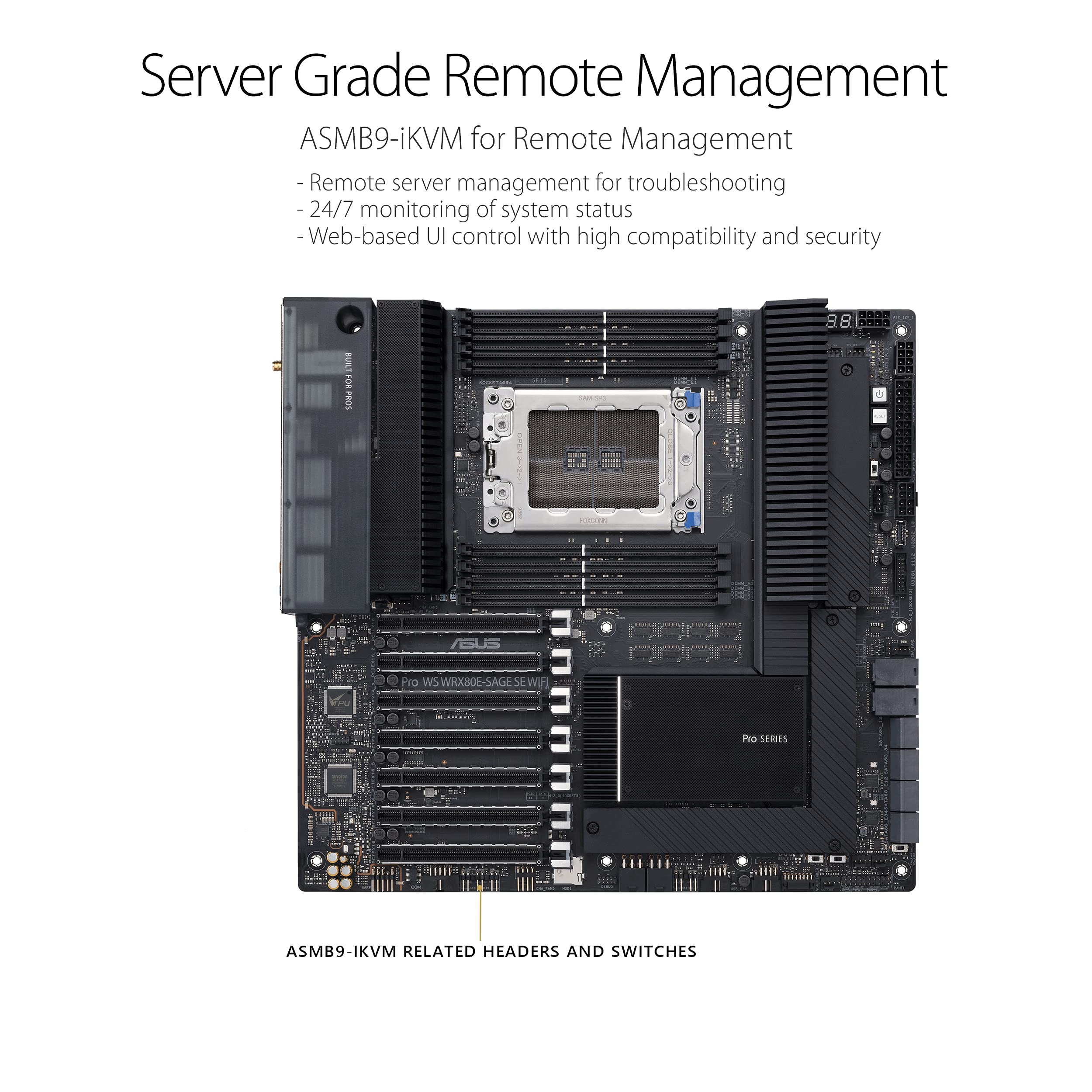
The ASUS Pro WS WRX80E-SAGE SE WIFI is a premium EATX workstation motherboard designed for AMD Ryzen Threadripper PRO processors. It features 7 PCIe 4.0 x16 slots, dual 10Gb LAN, WiFi 6, advanced cooling solutions, and server-grade remote management via ASMB9-iKVM. Engineered for demanding professional workloads like AI training, 3D rendering, and media production, it offers unparalleled expansion, connectivity, and 24/7 stability for the modern creative and IT manager.
| ASIN | B0927N4Y5T |
| Best Sellers Rank | #1,382 in Computer Motherboards |
| Brand | ASUS |
| Customer Reviews | 3.6 3.6 out of 5 stars (64) |
| Date First Available | April 7, 2021 |
| Item Dimensions LxWxH | 9.8 x 14 x 4 inches |
| Item Weight | 6.56 pounds |
| Item model number | 90MB1590-M0EAY0 |
| Manufacturer | ASUS |
| Memory Speed | 2133 MHz |
| Number of USB 2.0 Ports | 2 |
| Product Dimensions | 9.8 x 14 x 4 inches |
| RAM | DDR4 |
| Series | WRX80E-SAGE SE |
| Wireless Type | 802.11a/b/g/n/ac, 802.11ax |
J**E
Rock Solid Workstation Motherboard
So first I want to say that I'm very satisfied with this Asus WRX80E Wi-Fi motherboard. It's been a month since the PC has been operational and there have been zero problems. I'm 60years old and this is probably my last custom built computer build. Reason for building? My previous PC is a 10 year old all in in one PC has been a good PC but my Photography work is slowing it down way too much and the poor thing struggles to process one picture while it wizzes and blows hot air processing just one picture in 1 or 2 minutes. I'm quite proficient at building things and previously built a tower PC in 1996 that for the time was quite fast and advanced for its time. It was a Asus MB too. Fast forward to 2021> This PC build processes an image in seconds, about 8 sec max compared to my old pc of 1 - 2 minutes. 1996 PC build cost was $1600.00. 2021 PC Build cost $10388.00 so far. This is a server grade motherboard with server grade memory, HDD drives, server grade SSD drives and server grade cooling system built to last. No it doesn't have overclocked Processor or memory. It has a 16 core 32 thread processor and error correcting server grade memory thats built to work and keep on ticking error free 24/7. My multi tasking has been been taken up many levels with this PC. I can have multiple things going on all at once and this Motherboard just keeps on trucking without locking up. So here are the perks and the downs about this motherboard. Perks: :) (1) Super reliable multitasking motherboard that can handle heavy Workstation loads and even full fledged server workloads. (2) Easy to upgrade Bios with dedicated USB bios port. (3) Q code LED's for fault codes and diagnosing. (4) My bench marks scores were spread evenly with great scores for workstation, server and even full 3D gaming. The Downs: :( (1) If you're expecting this Motherboard to boot up in 20 seconds then you'll be disappointed. This motherboard was 1st designed as a server and workstation 2nd. There is a lot going on and when you turn on the power and the Motherboard and Bios goes through all of it's checks before it posts. Yeah the MB will game but if you're building a gaming PC then a gaming board is the best choice. (2) Fan control management works well all on its own but if you want to control fans in a custom setup you have to go through the motherboards BMC. ( another small computer processor within the MB that has its own video output that can only be accessed with another computer on a network.) :( If Asus in the future provides software to do this through the Windows operating system or any other method other than connecting another PC in a network then this motherboard will be your crown jewel. That's it! Some hints: If you're spending this much on a custom built PC and motherboard and cheap out on everything else you won't be satisfied. Build it for your needs and give this motherboard proper processor and video card and memory and you'll be rewarded with true reliability and performance.
M**O
chipset fan is problematic
Mounting booby-trap: Circular silkscreen, around all mounting holes, clearly indicates board-mounting screw's maximum head-diameter. But conical shaped bore, in uppermost left corner of board (near i/o shield top), is smaller than that maximum diameter. A screw that fits just inside circular silkscreen, elsewhere on board, is too large for uppermost-left mounting-screw position. A screw placed in that bore will get stuck, with certainty, inside the conical bore with no way to extricate it except by removing the entire board, disconnecting all cables, then drilling out the screw in peril of mechanical and electronic damage. This booby trap occurs because the conical bore jams the screw's head before its threads fully seat the chassis bolt. Turning the screw, in either direction, strips its head. ____________________________________________ Why is there an absolute upper limit of 30 minutes on ASMB9-iKVM IPMI BMC web service interface? Why can it not be changed to a longer duration? We need to monitor over 24 hours without automatic logout. Where did the arbitrary 30-minute-limit gaffe originate? Here's another gaffe: If the motherboard is powered-up continuously, then any attempt to log in to the iKVM by browser will indicate "session expired". This happens after some indeterminate amount of time is passed. A manual power cycle won't fix this. The only way to get around it is by cutting power to the board from the mains supply switch. ____________________________________________ Every engineering school in the US teaches that blinking light denotes error condition. Every industrial OEM manufacturer, in the US, blink LEDs only on error condition or data transmission. (The only groups of people who prefer blinking lights are police officers and gamers.) Why does the BMC_LED blink green in absence of error? Why does the MESSAGE_LED not blink when reporting an error? The motherboard is powered down and the BMC_LED still blinks. Why? ____________________________________________ ASUS ASMB9-iKVM interface, for IPMI BMC, interprets 0 RPM as "Disconnected". But 0 RPM is a valid state of a connected fan. Setting 0 thresholds could be a way to work around 0 RPM being falsely reported as failure. Why can't upper and lower RPM thresholds be set on disconnected or 0 RPM fans? ____________________________________________ There is a two-digit 7-segment LED display providing board status in hexadecimal code. These LEDs represent a throwback to 1983 when Z80 microprocessor demo-boards needed a display. Asus is very capable of providing an elegant postage-stamp size color LCD display right on the motherboard, as it does for gamers. As it is presently, we are forced memorize 256 hexadecimal codes or take an inordinate amount of time to look them up, presuming the motherboard's user manual is handy. Asus: please put an LCD display on this board to communicate board status. _________________________________________ Chipset fan is problematic. Nbartowski reported the exact same issue on level1techs.com in May 2021. BIOS would report a critical error: that Chipset fan was spinning down below critical level. Examining it through the IPMI BMC interface reveals its status as N/A. Error manifested as blinking LED notification on motherboard. This blinking error indicator would occur reliably when the power supply (PSU) line switch was turned on for a few minutes without subsequently turning on the computer (motherboard) itself. Error indication stopped when powering the motherboard immediately followed supply of line voltage to the PSU. When that was done, the motherboard Q-code 7-segment LEDs began a countdown from hexadecimal FF. Error indication hasn't been seen since, Chipset fan only spins during POST, but BIOS still reports N/A Chipset fan (but no blinking LED). ASUS customer support recommended returning the motherboard on an RMA, but this turned out to be a BMC firmware issue. BMC firmware installation has about 5 unnecessary steps. In the 17th step you are asked which of the 13 firmware modules, in particular, you want to flash. The problem here is that version numbers, associated with each submodule and currently installed module, are incorrect. So by selecting only a subset of modules to install, the Chipset Fan problem is introduced. The solution is to flash the entire BMC firmware suite and to overwrite what is already there. Provide line voltage to the Power Supply Unit, then don't wait to power up the motherboard. The 7-segment Q-code LEDs will then go into countdown and later the BMC_LED will blink green. Then the IPMI BMC interface will report Chipset Fan at 0 RPM, which is probably normal under small load. ________________________________________________________________________ I have little confidence in ASUS customer support because they couldn't answer simple questions about the board's operation, and I don't think they have actual access to ASUS products. Every time a question became a little beyond what they could find in the User manual, the problem got escalated. But I was never contacted by engineering, so it is impossible to get answers from someone at ASUS who actually knows what's going on. I can read manuals; I don't need ASUS' Placating Response Team to read the manual to me. ________________________________________________________________________ In the User Manual for this motherboard, only Windows 10 is listed as compatible Operating System. Yet we know, a priori, that any motherboard must be OS independent. Immediately after a fresh Windows install, there appears an Asus Armoury Crate icon in the System Tray (the right side of Taskbar). In the BIOS, there is a selection to disable Armoury Crate. This means that the BIOS has altered a clean installation of the Windows 10 Operating System; specifically, the Windows System32 folder holds executables named AsusDownLoadLicense and AsusUpdateCheck. This is the first instance we've ever seen of a BIOS injecting high-level executables into the OS. This practice is unprecedented. If not stopped now, then there will be no limit to the amount of adware, sludgeware, updateware, notifyware, and telemetric spyware stealthily injected into the OS by a Windows savvy BIOS. ASUS: The practice of OS alteration by any BIOS is unacceptable. Discontinue this practice. By that I mean, completely remove the option to inject Armoury Crate into the OS. Do not merely disable the default option; remove it altogether along with any stealth firmware that can inject executables into the OS.
S**4
Powerful Board
This is the second Asus Pro WS WRX80E board I used for a video editing build. Yes, it costs real money. Yes, it's big. Yes, it's have. That's what I wanted, especially all the PCIE slots, onboard M.2, and massive memory support. I loaded this particular unit with a 3090 video card, 256 of RAM, and a 16 core Threadripper Pro. It hums along, editing 4k video with zero issues. Also, the enclosed Hyper m.2 card gives room for 4 more ssd's. These provide fast storage options depending upon how you want to format it. I also used some PCI cards to hold old 2.5" ssd's that become scratch drives for sample edits. One advisory: Be sure to update the BIOS and understand how all that works for your particular needs. Take your time and plan out the build for best results.
T**1
The best of the best, this is EE-ATX Mobo
Pros: -Great Quality -Tons of PCI-E ports Cons: -Both Asus and Amazon DON'T say that this is an "EE-ATX" motherboard (Extra Extended ATX). Bought three different cases because all said "E-ATX" compatible. The ONLY case that with compatible mount fittings in the correct positions is the "Corsair 7000D Airflow"! -The bios DOESN'T allow you to change fan speeds nor pump speeds for AIO loops. You have log into their IPMI through an internet browser. The ipmi switch must also be physically turned "on" on the motherboard. Super tedious and pointless. Just make it available in the bios, Asus!!! -Backplate on motherboard makes it difficult to mount the motherboard. You have to bend the backplate inward in order to make contact with the mounting holes of the case. -Take off 1 star because of the IPMI and wonky backplate.
J**Z
Desafortunadamente el producto enviado por amazon no funcionaba.
Trustpilot
1 month ago
2 weeks ago